wayground logo

Free Printable Worksheets

Font size

S
M
L
XL
Worksheets

CXC IT Grade 10 End of Term Assessment Examination 2022

Total questions: 100

Worksheet time: 2hrs 40mins

Name
Class
Date
1.

A Microsoft Word file will have which file extension?

a)

.xlsx

b)

.docx

c)

.jpg

d)

,pptx

2.

A keyboard is:

a)

A storage device

b)

An output device

c)

An input device

3.
You cannot get a computer virus if you install antivirus software.
a)
True
b)
False
4.

What am I?

a)

Desktop PC

b)

Smart phone

c)

Laptop

d)

Mainframe computer/server

5.

what am I?

a)

Desktop PC

b)

Mainframe/server

c)

Laptop

d)

Smart Phone

6.
This computer is used by touching with your finger
a)
laptop
b)
tablet
c)
desktop
d)
mainframe
7.
Which one of these is the most expensive
a)
desktop
b)
laptop
c)
supercomputer
d)
mainframe
8.

Which type of computer is built to support an organization's information?

a)

Mini

b)

Mainframe

c)

Embedded

d)

Super

9.
RAM & ROM are known as what kind of memory?
a)
Secondary storage
b)
Main memory
c)
Registers
d)
Flash memory
10.
What does the acronym RAM stand for?
a)
Random Alignment Memory
b)
Read Access Memory
c)
Random Access Memory
d)
Read All Memory
11.
Where is ROM usually found inside a computer?
a)
Inside the CPU
b)
As part of the hard drive
c)
On the motherboard
d)
With the CD drive
12.
In terms of computer memory, what is meant by the term 'volatile'?
a)
It retains its content when power is cut
b)
It loses its contents when power is cut
c)
It is not stable and should not be used
d)
Memory chips can overheat
13.
Which statement best describes RAM?
a)
Fast, permanent storage
b)
Slow, volatile stoage
c)
Fast, volatile storage
d)
Slow, permanent storage
14.
What is the average size of RAM in a PC or laptop computer?
a)
512 MB
b)
1 - 2 GB
c)
8 - 16 GB
d)
32 - 64 GB
15.
Why is Virtual Memory needed or used by a computer?
a)
When RAM becomes full because of too many programs running at once
b)
When ROM is too small and struggles to store the Operating System
c)
When users wish to store data on an external server such as 'the cloud'
d)
When chosen by the user or computer administrator
16.

How Many GBs does a Terabyte have?

a)

1024

b)

8

c)

100

d)

1

17.

What is the smallest measurement used to measure a computer memory ?

a)

Megabyte

b)

Terabyte

c)

Yottabyte

d)

Bits

18.

What is the largest measurement used to measure a computer memory ?

a)

Zettabyte

b)

Bytes

c)

Bits

d)

Yottabyte

19.
A computer has 1024 megabytes of RAM. That is the same as ...
a)
1 Gb
b)
1000 Gb
c)
1 Kb
d)
1 Tb
20.
Where is data stored when it is Virtual Memory?
a)
It is stored on a area of a secondary storage device e.g. hard disk drive.
b)
It is stored in the RAM.
c)
It is stored in the ROM.
d)
It is stored in an optical drive e.g. CD.
21.
If you want to draw house plans, you could use this device
a)
Light pen
b)
graphic Tablet
c)
PDA
22.
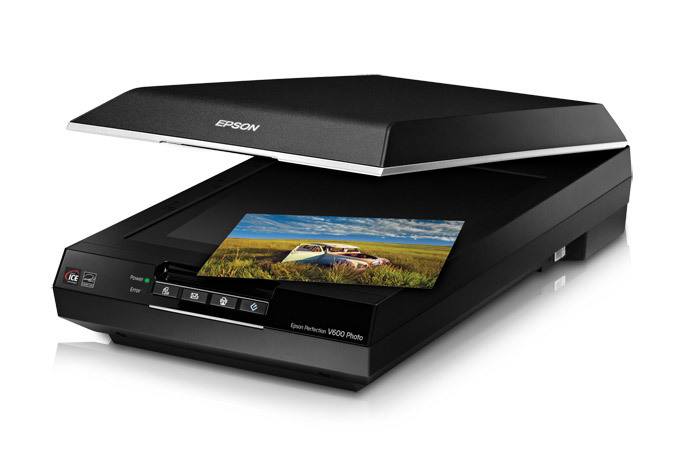
If you want to put some old paper pictures into your computer, you could use a
a)
SD Card
b)
flash drive
c)
scanner
23.
An input device that can transfer information into your TV.
a)
mouse
b)
flash drive
c)
Wii remote
24.
Scanner
a)
Input 
b)
Output
25.
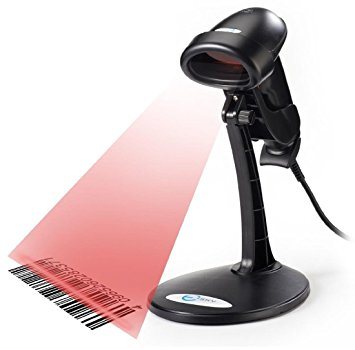
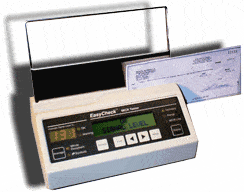
Barcode Reader
a)
Input 
b)
Output
26.

Any data/ information or instructions that entered into the memory of the computer for processing.

The definition above refers to the term...

a)

data

b)

program

c)

input

27.

What is the most accurate definition of a keyboard?

a)

The device contains keys and special button to launch media.

b)

The device contains keys and buttons and the user presses the keys and buttons to enter data.

c)

The device contains keys and buttons to control a pointer or cursor on screen.

28.

You have a limited desk space. Which device is suitable for a pointing device?

a)

trackball

b)

mouse

c)

touch sensitive pad

29.

A device shaped like a pencil eraser that is positioned between key on a keyboard.

a)

joy stick

b)

pointing stick

c)

pen input

30.

Which scanner can function as an input and output device?

a)

Flatbed Scanners

b)

Portable Scanners

c)

Multifunctional Scanner Printer Copier

31.

Select the person's identity used in the biometric input.

a)

fingerprint

b)

voice

c)

hair

d)

tongue

32.
Input devices allow us to send information to the CPU (Central Processing Unit) to tell the computer what to do.
a)
True
b)
False
33.
What does OMR stand for?
a)
Optical Mark Recognition
b)
Optical Meter Reader
c)
Operator Mark Recognition
d)
Online Meter Reader
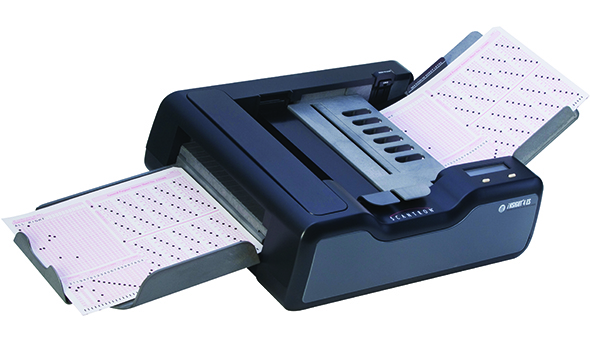
34.
Which of these is OMR sometimes used for?
a)
Marking Exam Papers
b)
Controlling Characters in Computer Games
c)
Projecting a Presentation onto a big screen.
d)
Playing  an Audio File
35.
What does MICR stand for?
a)
Magnetic Ink Character Recognition
b)
Magnetic Ink Computer Recognition
c)
Multimedia Internet Computer Recognition
d)
Memory Internet Character Reader
36.

Input device commonly found on laptops instead of a mouse in the form of a small panel containing different touch-sensitive areas.

a)

Touch pad

b)

Scanner

c)

Sensors

d)

Stylus

37.

Enters sound onto a computer

a)

Microphone

b)

Speakers

c)

Touch Screen

d)

Light pen

38.

What is an output device?

a)

It is something you don't connect to a computer that has information sent to it.

b)

It is something you connect to a computer that sends information into the computer.

c)

It is something you connect to a computer that has information sent to it.

d)

It is somebody you connect to a computer that sends information into the computer.

39.

Is it an input or output device?

a)

Input

b)

Output

c)

Input and output

d)

I don't know

40.

Is it an input or output device?

a)

Input

b)

Output

c)

Input and output

d)

I don't know

41.

A device that inputs moving images into a computer which is mainly used for video conferencing.

a)

Digital camera

b)

Video camera

c)

Web cam

d)

Film camera

42.
What word processing feature compares every word with an electronic dictionary?
a)
Spell Check
b)
Help
c)
Thesaurus
d)
Word Count
43.
What type of application would be best to use when typing a letter?
a)
Microsoft Access (Database)
b)
Microsoft Excel (Spreadsheet)
c)
Microsoft Word (Word Processing)
d)
Microsoft Outlook (Email)
44.
What is a shortcut to copy highlighted text?
a)
CTRL+Z
b)
CTRL+P
c)
CTRL+C
d)
CTRL+Y
45.
What is a shortcut to paste text?
a)
CTRL+V
b)
CTRL+P
c)
CTRL+X
d)
CTRL+S
46.
Which of the following would change the appearance of a character?
a)
Alignment
b)
File Name
c)
Font Style
d)
Margins
47.
What is the standard font size in word processing documents?
a)
12
b)
15
c)
14
d)
18
48.
Changing the existing document is known as what?
a)
Entering
b)
Editing
c)
Re-typing
d)
Selecting
49.

Identify which to/too/two you should use: The coffee was__ hot to drink.

a)

two

b)

to

c)

too

50.

What type of spacing should you use for a cover letter?

a)

Single spacing

b)

Double spacing

c)

Triple spacing

d)

Half spacing

51.
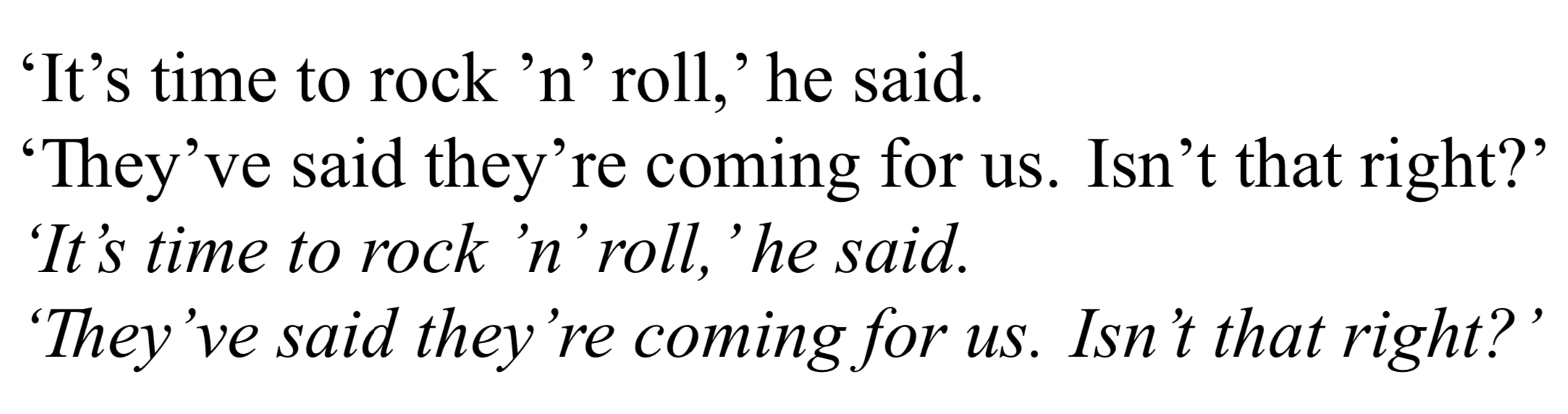
Select the correct version of this sentence:
a)
'Mary is trying hard in school this semester,' her father said.
b)
"Mary is trying hard in school this semester, her father said."
c)
"Mary is trying hard in school this semester," her father said.
d)
Mary is trying hard in school this semester, her father said.
52.

Allows you to type info below the bottom margin on each page.

a)

header

b)

footer

c)

margin

d)

Word

53.

What type of orientation is being used if a document is wider than it is tall?

a)

landscape

b)

portrait

c)

marginal

d)

indented

54.

Which style makes the text look slanted?

a)

bold

b)

italic

c)

underline

d)

strike through

55.
Which sentence below uses proper capitalization?
a)
"Smooth Criminal" is an excellent song by the artist Micheal Jackson.
b)
Smooth criminal is an excellent song by the Artist Micheal Jackson.
c)
Smooth Criminal is an excellent song by the artist Micheal jackson.
d)
"Smooth Criminal" is an excellent song by the Artist micheal jackson.
56.
Microsoft Word and Google Docs are examples of what?
a)
Word processors
b)
Spreadsheets
c)
Presentations
d)
Databases
57.

How would you best define the term "margin"?

a)

The boundaries within which we type

b)

The edges of a page

c)

The beginning of a paragraph

d)

The area where we do not type

58.

Which key is used to start a new line?

a)

Shift

b)

Caps Lock

c)

Enter

d)

Space bar

59.

Font means _____________________.

a)

size of letters

b)

type style of letters

c)

bold letters

d)

italic letters

60.

Which of the following is the alignment option?

a)

Center align

b)

Right align

c)

Left align

d)

All of the above

61.

Dialog box

a)

A box that appears when a command is selected and is used to supply the information to execute the command.

b)

Located at the top and left of the document

c)

A list of commands

d)

A horizontal bar that displays the name and type of document
62.

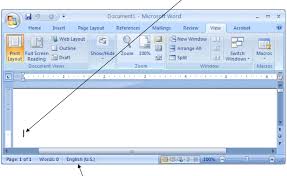
A blinking vertical line in a document that indicates where the next character typed will be placed.

a)

Insertion point

b)

Ribbon

c)

Scroll bar

d)

Document

63.

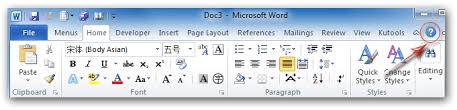
The Ribbon

a)

The process of creating a file of what currently is in the computer to use commands

b)

Designed to help you quickly find the commands that you need to complete a task. A horizontal bar below the title bar that contains the names of tabs and drop down menus.

c)

Determines if the next word will fit on the end of the current line or if it must go on the next line.

d)

located at the top of the Word document

64.

Rulers

a)

Located at the top and left side of the document window and contains markers used for formatting text.

b)

Symbols that do not appear on paper when printed.

c)

Used to scroll a document going up, down and side to side.

d)

Icons

65.

Status bar

a)

Displays information about a document

b)

Displays the documents title

c)

Displays tools to scroll from side to side and up or down

d)

Displays information to format text

66.
In most word-processing programs, what should you select in order to add a table to a document? *
a)
File | Print
b)
Insert | Table 
c)
Format | Lists
d)
View | Print Layout
67.
What is the quickest way to add a new row to a table?
a)
Tab Button
b)
CTRL + Z 
c)
 Right click | drop down | new row
d)
 Insert Tab | new row
68.
Which layout option will make the text flow around the image? 
a)
 Inline
b)
 Wrap Text
c)
 Break Text
d)
Position Text
69.
Changing the layout of a document page or the design of text is called:
a)
Editing
b)
 Painting
c)
 Reviewing
d)
 Formatting
70.
What is the fastest way to see the word count on a Word Document? 
a)
Count the words
b)
Check the status bar 
c)
 Click the spell check button 
d)
Count the words in the first paragraph
71.
Which toolbar option in a word processor enables you to change the amount of space between lines of text?
a)
Text Alignment
b)
Line Spacing
c)
 Font Size 
d)
Styles
72.
Which tab you should go for "Spelling Check" ?
a)
Home
b)
Insert
c)
Review
d)
Design
73.

Temporary storage of data in a computer is in the?

a)

Hard disc drive

b)

The USB drive

c)

RAM

d)

ROM

74.

A network of computers is?

a)

WAN

b)

WLAN

c)

Computers connected via network infrastructure

d)

LAN

75.

Examples of software which can be used to make quizzes are?

a)

Google forms, quizlet and kahoot

b)

Quizlet, kahoot and myQuiz

c)

Kahoot, YoutubeQuiz, Podomatic

d)

Kahoot, office 365, quizlet

76.

What is the best form of backup?

a)

regular backup to reliable medium

b)

cloud storage

c)

USB storage

d)

c:/backup

77.
What is Google Drive?
a)
A free service from Google that allows you to store files online and access them anywhere using the cloud. 
b)
The street that Google's main headquarters building is located on.
c)
A special program for controlling an automobile.
d)
A very expensive golf club.
78.
What is the Google tool you use to get your assignments and hand them in?
a)
Docs
b)
Classroom
c)
Gmail
d)
Drive
79.
Name this icon
a)
Drive
b)
Work
c)
Doc
d)
Word
80.

It is the main circuit board of your computer and is also known as the logic board.

a)

Video Card

b)

Microprocessor

c)

Motherboard

d)

RAM

81.

It is a portable, inexpensive storage medium that consists of a thin, circular, flexible plastic.

a)

Floppy Disk

b)

RAM

c)

USB FLashdrive

d)

Memory Card

82.

Information processing cycle is a series of activities performed by...

a)

computer

b)

human

c)

software

d)

hardware

83.

Which of these operations is not involved in Information Processing Cycle?

a)

output

b)

storage

c)

update

d)

input

84.

Entering data and instruction into a computer is ____________

a)

storage

b)

output

c)

process

d)

input

85.

Saving data, information and programs in the computer for future use is ________________

a)

input

b)

storage

c)

output

d)

process

86.

What is the nickname for the CPU?

a)

The BOSS

b)

The Processor

c)

The Backbone

d)

The Brain

87.

What does IPOS stand for?

a)

DPC

b)

Internet Process Out System

c)

Input Processing Output Storage

d)

Intranet Possible Opening System

88.

Which term is defined as accepting data into the computer via input devices?

a)

Data

b)

Information

c)

Input

d)

Output

e)

Processing

89.

Which term is defined as converting data into information?

a)

Data

b)

Input

c)

Output

d)

Processing

e)

Storage

90.

Which term is defined as raw facts and figures?

a)

Data

b)

Input

c)

Output

d)

Processing

e)

Storage

91.

Which of these is an advantage of cloud storage?

a)

The user has no control over their data

b)

Many programs can be run at the same time, regardless of the processing power of your device

c)

Accessible anywhere with an internet connection

d)

Portability

92.

What is cloud computing?

a)

Storing files on the Internet

b)

Running programs on a remote server

c)

Running an operating system

d)

All of the above

93.
Which of these is not a benefit to cloud computing?
a)
Saves storage space on your PC
b)
Gives you access to files from any computer
c)
Protects your files from being lost due to PC failure
d)
Completely protects your information from cloud hackers
94.

What is a disadvantage of cloud computing?

a)

It is vulnerable to hacking

b)

The storage can be easily expanded

c)

Portability

d)

All of the above

95.

Backups protect against data loss due to...

a)

file corruption

b)

hardware failure

c)

hardware failure and file corruption

d)

neither

96.

Which of the following backup options are considered removable media?

a)

USB flash drives

b)

NAS devices

c)

Cloud storage

d)

Local SATA drives

97.

•You don’t need a powerful computer with a huge hard drive – everything is stored and run on a remote computer. You can this advantage on?

a)

the Internet

b)

Local area networks

c)

optical devices

d)

cloud storage

98.

The instructions that tell the computer what to do:

a)

Hardware

b)

Input

c)

Software

d)

Ooutput

99.

System Software:

a)

Consists of the operating System.

b)

performs a useful function.

c)

Is the outside of the computer.

d)

Controls the computer.

100.
Microsoft Office and similar software is an example of:
a)
off the shelf
b)
bespoke
c)
open source