wayground logo

Free Printable Worksheets

Font size

S
M
L
XL
Worksheets

computers

Total questions: 59

Worksheet time: 51mins

Name
Class
Date
1.

What is a computer?

a)

An electronic device that receives input, processes it and provides an output in the desired format.

b)

An electronic device to do homework, play video games or surf on the internet.

c)

An electronic device that receives input, stores or processes the input and provides an output in the desired format.

2.

Typing an essay in Word is an example of input.

a)

Yes, because you're inserting data into the computer.

b)

No, because you're not introducing data into the computer.

c)

I don't know.

3.

Taking a picture with the cell phone is an example of output.

a)

Yes, because it's the result of processing data.

b)

No, because it's not the result of processing data.

c)

I don't know.

4.

Printing a document is an example of output.

a)

Yes, because it is the result of processing data.

b)

No, because it's not the result of processing data.

c)

I don't know.

5.

Listening to audio through the speakers is an example of input.

a)

Yes, because you're inserting data into the computer.

b)

No, because you're not inserting data into the computer.

c)

I don't know.

6.

Is this a valid example of the Input-Process-Output Model?

Input: Scanning picture.

Process: Editing the picture.

Output: Printed poster with picture.

a)

Yes.

b)

No.

c)

I don't know.

7.

Is this a valid example of the Input-Process-Output Model?

Input: Text and numbers typed on keyboard.

Process: Calculations performed in a spreadsheet.

Output: Bank record.

a)

Yes.

b)

No.

c)

I don't know.

8.

Check all the examples of Input Units.

a)

Keyboard

b)

Microphone

c)

Speakers

d)

Mouse

9.

Check all the examples of Output Units.

a)

Screen.

b)

Printer.

c)

Headphones.

d)

Keyboard.

10.

The control unit, arithmetic logic unit and memory are together called Central Processing Unit or CPU.

a)

Yes

b)

No.

c)

I don't know.

11.

Hardware cannot be touched, only software can be touched.

a)

Yes.

b)

No.

c)

I don't know.

12.

Software is the set of instructions or programs that make a computer function. It cannot be touched or seen.

a)

Yes.

b)

No.

c)

I don't know.

13.

Check all the characteristics of computers.

a)

Speed.

b)

Accuracy.

c)

Reliability.

d)

Versatility.

e)

Store capacity.

14.

Check all the advantages of using a computer.

a)

Computers can do the same task repetitively with the same accuracy.

b)

Computers allow you to play video games.

c)

Computers do not get tires or bored.

d)

Computers have access to the internet.

e)

Computers can take up routine tasks while releasing human resource for more intelligent functions.

15.

Check all the disadvantages of using a computer

a)

Computers only help you do homework.

b)

Computers can work many hours at a time.

c)

Computers have no intelligence. They follow instructions blindly without considering the outcome.

d)

Regular electric supply is necessary to make computers work.

16.
How do we call this?
a)
memory stick
b)
folder
c)
mouse
d)
router
17.
How do we call this?
a)
webcam
b)
screen
c)
 a link
d)
keyboard
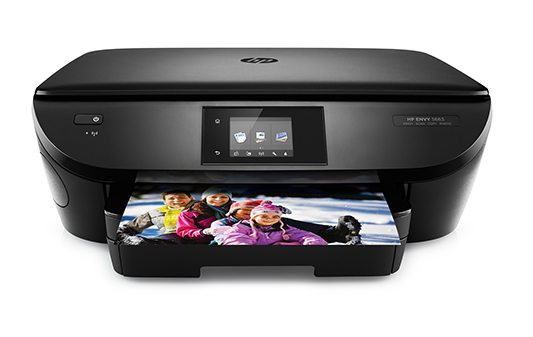
18.
How do we call this?
a)
scanner
b)
smartphone
c)
games console
d)
printer
19.
How do we call this?
a)
router
b)
mouse mat
c)
memory stick
d)
printer
20.
How do we call this?
a)
mouse
b)
speakers
c)
mouse mat
d)
webcam
21.
How do we call this?
a)
keyboard
b)
mouse
c)
games console
d)
a speaker
22.
How do we call this?
a)
mouse mat
b)
computer screen
c)
tablet
d)
webcam
23.
How do we call this?
a)
smartphone
b)
speakers
c)
mouse mat
d)
folder
24.
How do we call this?
a)
tablet
b)
router
c)
monitor
d)
screen
25.
How do we call this?
a)
tablet
b)
folder
c)
laptop
d)
smartphone
26.
How do we call this?
a)
folder
b)
memory stick
c)
tablet
d)
mouse mat
27.
How do we call this?
a)
smartphone
b)
tablet
c)
keyboard
d)
laptop
28.
How do we call this?
a)
laptop
b)
folder
c)
games console
d)
mouse
29.

What part of the computer lets you click?

a)
b)
c)
d)
30.

What button do you press to go on the internet?

a)
b)
c)
d)
31.

Which one of these lets you call friends?

a)
b)
c)
d)
32.

Which one of these helps you type?

a)
b)
c)
d)
33.

If your computer dies, what do you need?

a)
b)
c)
d)
34.

What can you use to play computer games?

a)
b)
c)
d)
35.
What does a mouse do?
a)
It controls the pointer on your screen
b)
It stores data
c)
It makes a copy of a sheet of paper on your computer
d)
It provides power to a device
36.
What does a scanner do?
a)
It enters information into your computer
b)
It provides internet access
c)
It makes a copy of a sheet of paper on your screen
d)
It protects the internal components of your computer.
37.
What is an advantage of using computers?
a)
People can become addited
b)
Computers and technology can replace human force
c)
People can work at a faster rate
d)
Many people can access your information
38.
I want to give internet access to my friends. What device do I need ?
a)
You need a charger
b)
You need a router
c)
You need a keyboard
d)
You need a mouse
39.
I like that video. Can we ____________ it?
a)
delete
b)
download
c)
forget
d)
reset
40.
What is a disadvantage of using computers?
a)
Computers can do a work faster.
b)
Computers helps us to communicate faster
c)
Computer do the job easier
d)
Computers replace human workforce and create unamployment
41.
What device do you use to protect the internal components of a computers?
a)
A computer case
b)
A hard drive
c)
A keyboard
d)
A mouse
42.
How do you use internet for?
a)
You can store data
b)
You can search for information faster.
c)
You can enter information 
d)
You can delete information
43.
What's your opinion about technology?
a)
It's terrible and harmful
b)
It is dangerous and useless
c)
It's out of date and slow
d)
It is useful , fast and reliable
44.
What does a monitor do?
a)
It stores and transfers data
b)
It shows information to the user
c)
It protects the computer from harmful programs
d)
It provides power to a device
45.

Which one of these is a robot?

a)
b)
c)
d)
46.

What part of the computer lets you click?

a)
b)
c)
d)
47.

What part of the computer takes your picture?

a)
b)
c)
d)
48.

The main processor: every instruction goes through it.
a)
Motherboard
b)
CPU
c)
Operating System
49.

Show what the software is doing.
a)
Input Devices
b)
Output Devices
50.

A special kind of electric switch with low and high settings that can be used to represent numbers, words, pictures, ect.
a)
Bits
b)
Software
c)
Transistors
51.

Master program that manages the interactions between hardware and software.
a)
Software
b)
Operation System
c)
Hardware
52.

Stores information for the operation of a computer; similar to short-term memory.
a)
ROM
b)
REM
c)
RAM
d)
MAR
53.

Interpret the instructions from the software.
a)
Processors
b)
Transistors
54.

Holds the main components of a computer in place.
a)
CPU
b)
Operation System
c)
Motherboard
55.

Basic unit of binary information.
a)
Hertz
b)
Bits
56.

The physical components of a computer.
a)
Software
b)
Operating System
c)
Hardware
57.

A unit of frequency equal to 1 cycle per second.

a)
Bits
b)
Hertz
58.
Which term best describes a digital scanner?
a)
Input hardware
b)
Output hardware
c)
Input Software
d)
Output Software
59.
Which of the following is considered software?
a)
Central Processing Unit
b)
Operating System
c)
Random Access Memory
d)
Graphics Chip