
 Worksheets
ICT GRADE 1 - BEDIR SCHOOL
Total questions: 100
Worksheet time: 1hrs 13mins
Draw a laptop and colour it.

Draw a projector
Write your name bellow:
Which of the following parts of computer are input?


What is a computer
(a)




The main processor: every instruction goes through it.
Show what the software is doing.
A special kind of electric switch with low and high settings that can be used to represent numbers, words, pictures, ect.
Master program that manages the interactions between hardware and software.
Stores information for the operation of a computer; similar to short-term memory.
Interpret the instructions from the software.
Basic unit of binary information.
The physical components of a computer.
A unit of frequency equal to 1 cycle per second.

Name of this input device?
Printer.
Keyboard.
Mouse.
Pen.

What is the name of this output device?
Printer.
Monitor.
Hard drive.
Mouse.
Which of these are programming languages?
C.
Portuguese.
Visual Basic.
XPTO.

What does this image represent?
Fatherboard.
Anyboard.
Motherboard.
Chip.
What is the meaning of the acronym www?
Have no special meaning.
World Wide Web.
World Weather Web.
World Warm Web.

What is the name of this component?
Water Cooler.
Central Processing Unit.
Memory.
Solid State Drive.

What is the meaning of the acronym USB?
Universal Serial Business.
Universal Security Bus.
Universal Serial Bus.
Universal Serial Background.

Which of these are high-level programming languages?
C++.
Java.
Assembly.
Basic.

What is the Internet?
A local network.
Mobile phone network.
Is the global system of interconnected computer networks that use the TCP/IP protocol to link devices worldwide.
A local computer network providing a variety of information and communication facilities.

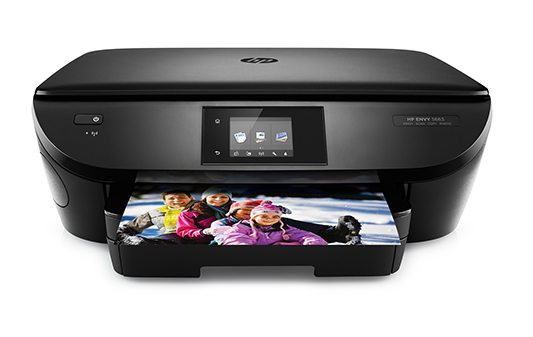
What is the name of this device?
Laser printer.
3-D printer.
Scanner.
Inkjet printer.
You use it to see people while talking to them on the Internet.
webcam
mouse
You wear them on your head to hear sounds.
headphones
speakers
We use it to move around the screen.
mouse
modem
We use it to type information into a computer.
tower
keyboard
We use it to copy documents or pictures onto a computer.
screen
scanner
It is connected to a computer and can make copies of documents onto paper.
printer
DVD drive
It is a tall box which contains the main parts of a computer such as the hard disk and the drives.
controller
tower

I love to listen to music while I work, so I (a) all my favourite songs on my computer.

You must always (a) your work before you close the file.

I’ll (a) a copy of the document for you.

David, can you please help me (a) this program from the Internet?

You can keep the files you need and (a) the rest.

If you want to (a) to the Internet, click here.

I can help you (a) the photos from your digital camera to your computer, if you like.

To send the email, just (a) the ‘send’ button.
For sale - Limium Camera
14 megapixels - digital zoom
Bought 2 months ago but never used
Phone Miriam: 989034521
The advert says that the camera:
is a new model
hasn't been turned on
was used for 2 months
Dear Aunt Megan,
Thanks so much for the tennis rackets! They are a great present and I use them at practise. Hope you had a great weekend! Please send me some pictures!
Thomas
Why was Thomas written the letter?
To wish his aunt a nice weekend
To thank his aunt for a gift
To send his aunt some pictures
SMS MESSAGE - RECEIVED 09:13
Hi Mum! Can we give Maggie a lift to the concert tonight? We need to pick her up from her house, so we should leave home earlier than usual. We are also bringing her back home. Jenny
Jenny...
says she's going to the concert with Maggie's mum.
asks her mum to take her and Maggie to the concert.
tells her mum she will be home earlier than usual.
WANTED: PART-TIME WORKER
The café needs someone to work in the afternoons three days a week. The pay is 10£ per hour. Perfect for students. No experience is needed.
What is true about the job?
You don't need to have experience.
It's not appropriate to students.
You must work every day.
AFTER SCHOOL ACTIVITY - CHESS
We've decided to offer chess lessons again this year. If you're interested, please fill in the form and give it to Mr Gibbs. We aldo need written permission from your parents.
The notice informs that...
parents should talk to Mr Gibbs.
parents must agree to their children taking the lessons.
this is the first time the school offered chess lessons.
Name of this input device?
Printer.
Keyboard.
Mouse.
Pen.
If your computer dies, what do you need?


What button do you press to go on the internet?


Which one of these helps you type?


We press (a) key to go on a next line.

It is a .................................... .
Mobile phone
Smart watch
tablet
Who is sitting correctly in front of a computer screen?


What am I?
Mainframe Computer
Desktop Computer
Laptop Computer
Tablet Computer
We can eat and drink sitting in front of the computer.


(a) is the longest key on the keyboard.
Mouse is used to
add gap in between the words.
listen to the music
enter the numbers
Drag and drop the files.
To erase the letters to the left of cursor, we use _____
Backspace key
Delete Key
Enter Key
Caps Lock
Which key is used to type capital letters?
Enter Key
Function keys
alphabet key
Caps Lock
Which keys are used to scroll the page up-down?
Number Keys
Alphabet Keys
Function Keys
Arrow Keys
What is the blinking bar called?
Arrow
Mouse
Cursor
letter
Which one of these is a robot?


What am I?
Desktop PC
Smart phone
Laptop
Mainframe computer/server
Software is ...
Hardware for your computer
any set of instructions that tells the hardware what to do and how to do it
all hardware components
any set of instructions for you to read
Hardware is ...
any part of your computer
any part of your computer that has a hard structure
any part of your computer that has a software structure
any part of your computer that has a physical structure

