
 Worksheets
G8-Comp. Sci. Review Semester 2
Total questions: 40
Worksheet time: 1hrs 20mins
Write down your steps, take notes about error messages, always check the cables, restart the computer
Try lots of things and shutdown the computer
Ask a parent for help, ask teacher for help, ask God for help
Unplug your computer and plug it back in just to check the power source
A user has not updated an application for over two years and has just updated to the newest release on the workstation. The user notices, however, that the software with the newest release is operating very slowly. The other applications on the workstation are operating normally. What is a possible cause?
The BIOS needs to be updated.
The computer needs to be replaced.
The computer does not have enough RAM.
The workstation does not have a compatible driver installed.

Look at the following code, what will it generate
1,2,3,4,5,6,7,8,9,10,11,12
0,1,2,3,4,5,6,7,8,9,10,11,12
1,2,3,4,5,6,7,8,9,10,11,12,13
0,1,2,3,4,5,6,7,8,9,10,11,12,13
WHILE loops are
loops which run an unknown number of times
loops which run for a specific number of times
the same as if statements
not part of programming

Look at the code below and identify which statement below is true:
Starts at 10, goes up to 100, increases by 10
Starts at 10, goes upto 101, increases by 10
Starts at 1, goes up to 100, increases by 1
Starts at 10, goes up to 10, increases by 10
The "break" command:
will quit the whole program
will stop the loop and continue with any instructions after the loop
will skip any remaining code in the loop, but go back to the top and restart the loop
will cause an error
The "continue" command:
will quit the whole program
will stop the loop and continue with any instructions after the loop
will skip any remaining code in the loop, but go back to the top and restart the loop
will cause an error
In programming, what is iteration/looping?
The repetition of steps within a program
The order in which instructions are carried out
A decision point in a program
What part of an if statement should be indented?
All of it
The statements within it
the first line
the lines within the brackets

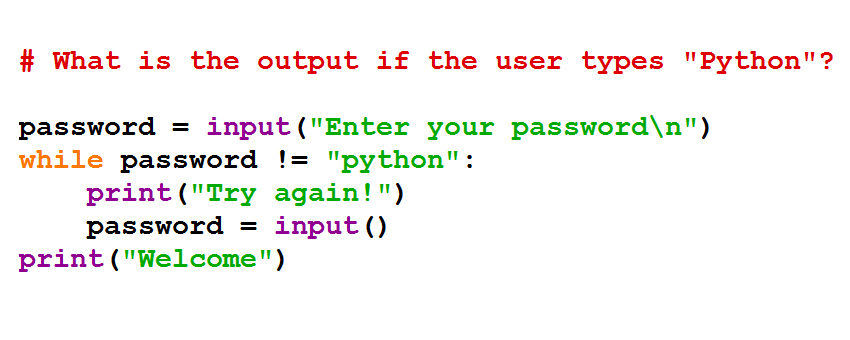
What is the output?
more than 7
more than 23
spam
7

What is the output?
True
False
condition1
condition2

What is the output?
250.0
200.0
300.0
350.0

What is the output?
next
stop
next
stop
syntax error - program doesn't work
The % symbol in Python is used to.
Get the reminder of a division problem.
Divide the number
Calculate the percentage
Print the output

4
3
2
1
3
2
1
0

Which is correct?
A
B

Are there any syntax errors?
No
Quotations are not needed on line 1
Elif does not exist
There should be a colon on line 7
color=( (a) ("What is your favourite colour?")
Which of the following is not effective in preventing malware infections?
Opening email attachments
Turning on Windows Automatic Updates
Installing anti-virus software
Setting Internet Explorer's security setting to medium-high
What is a Trojan horse?
It scans downloads and email attachmentsI
It replicates and makes copies of itself
Is destructive software disguised as something good.
An animal

Where is the computer's virus load in computer ?
Web Browser
Audio Device
Monitor
Memory
Mention a virus name which can stole and gather private information without knowledge !
Spyware
Trojan
Worms
Hackintosh
They encode or encrypt themselves in a different way every time they infect your computer. They use different encryption and algorithm.
Worm
Trojans
Browser Hijacker
Polymorphic Virus
A software that scans your computer for malware and monitors your system for activity associated with viruses.
Spybot
AdAware
Built-in diagnostic tools
Anti-virus
Infect certain types of data files. Mostly it infect Microsoft Office files such as Word Documents, Excel Spreadsheets, PowerPoint Presentations and Access Databases.
File Infector Viruses
Macro Viruses
Resident Viruses
Worms
Malware is programmed to attack a computer and gather information secretly. What is the long form of Malware?
(a)
Which of the following may result in a malware infection?
Opening an email attachment
Downloading a file from a website
Clicking on an infected link
All of the above
Once the scanning is complete with your antivirus, you get a detailed list of viruses in your system and the infected files (if you have). What is the option used when you are not sure of the virus present on the file. In this way, you can separate the infected file from the non-infected files.
Repair
Delete
Quarantine
None of the above
Which options below that cannot be infected by computer virus?
A word file with macro on it
Memory which currently running on computer system
A compressed file
CD-ROM
Choose any symptoms below you think indicate the presence of a computer virus.
Some files on Reena's laptop have double extensions or secondary names.
Reena is getting error messages on her screen.
Strange music plays from Reena's computer speaker
Reena's computer is running very slow than usual
The brightness of Reena's monitor is too low.

In a Python program, what would be the starting value in the FOR LOOP code?
100
10
5
20

