
 Worksheets
5/23 - IT Bridge Final Review
Total questions: 84
Worksheet time: 1hrs 9mins

Bear
mouse
Tiger
Lion

T.V
Bed
Pillow
Monitor
The _____ includes all of the components that store and process data, which makes it the most important part of the computer.
computer monitor
computer mouse
computer tower
computer keyboard
A ______ looks like a television, and is used to display visual output from the computer tower.
computer monitor
computer mouse
computer tower
computer keyboard
A ________ plays audio output from the computer.
monitor
tower
speaker
mouse
The ________ is covered with buttons, called keys, which you can use to type text and send commands to the computer.
computer
monitor
mouse
keyboard
The ________ moves the onscreen cursor and interacts with elements on the screen.
computer
monitor
mouse
keyboard
Identify the different parts of a desktop computer.
in sleep mode the computer is completely turned off.
TRUE
FALSE

What is this symbol called?
cursor
mouse
sign in
minimize
Label the following keyboard. Please note some options will NOT be used.
Which key puts a space between words or letters?
Select the key that moves the cursor to the next line.
Select the key that removes a letter to the right of the cursor.
Select the key that puts five spaces at the beginning of a paragraph.
Match the following:

Tablet

Laptop

Desktop Computer

Smart Watch

Smart phone
Choose the word that matches the definition:
A picture representing an object, such as a document, program, folder is called an (a) .
Select ALL of the INPUT devices.
(Note: You can select more than one item.)
Select all the OUTPUT devices.
(Note: You can select more than one item.)
Which of the following is NOT an input device?
Barcode Reader
Scanner
Touchpad
Microphone
Speaker
Is a touch screen an input or output device?
input device
output device
both an input and output device
What are all keys can be found on a keyboard?
Alphabet keys
Numerical keys
Command keys
Start button
All of these choices
Fill in the appropriate vocabulary word for the following definitions.
The (a) at the bottom of the PC screen that contains the start button, a notification area, open programs, and other applications that are used often.
The (b) is the first screen you see when you turn on your computer.
In MacOS the (c) is used to launch apps, switch between running apps, access the Trash, and access specific folders.
Which word describes all the physical parts of a computer?
Input
Hardware
Software
Output
A program that enables a computer to perform a specific task, as opposed to the physical components of the system.
Software
Hardware
Input
Output
Identify the appropriate word to complete the sentences below.
The (a) is the physical components of a computer. An example would be a (b) .
The (c) enables a computer to perform a specific task, as opposed to the physical components of the system. An example would be (d) .

COMPUTER BASICS QUESTION:
What part is this?
Power Supply
Cooling Fan
Central Processing Unit
Motherboard
Hard Disk Drive

COMPUTER BASICS QUESTION:
What part is this?
Motherboard
RAM Chip
Central Processing Unit
Network Interface Card
Hard Disk Drive
bit (a)
8 bits (b)
a way of representing information using only two options (c)
Demonstrate your knowledge of web browsers and search engines by dragging and dropping the correct examples to its best description.
These are examples of web browsers (a)
How you find pages. (b)
These are examples of search engines. (c)
What you use to view pages on the Internet. (d)
Extra Credit Question:
Covert the binary number 1101 to a decimal number.
(a)
What are the three main parts of an email address?
username
the @ symbol
domain
all of these choices
Match the email parts with their names
BCC
Allows you to email multiple people without others on the email list seeing who is emailed.
CC
Allows you to send to the primary recipient but also secondary parties who may need the information
Subject line
Briefly states your reason for writing.
Signature
Your name, important contact information, or pertinent information. Should be updated regularly.
You should always (a) your emails before sending. Once they are sent you cannot get them back.
Before hitting ___________on an email, make sure the content of the reply is appropriate for everyone who will see it.
Reply
Delete
reply all
undo delete
What is the domain of the following email address?
boris27@earthlink. net
boris27
earthlink.net
@
.net
John wants to also include Samantha in an email, but he does not want the recipient to know the message was also sent to Samatha. What field should John put Samatha's email address?
To
BCC
CC
Subject
Dolly wants to also include Farah in an email, and she wants the recipient to know the message was also sent to Farah. What field should Dolly put Farah's email address?
To
Bcc
Cc
Subject
Which of the following are types of browsers? (Select all that apply.)
Firefox
Bing
Chrome
xfinity
EMAIL QUESTION:
It is always important to have a subject line in an email.
True
False
EMAIL QUESTIONS:
You can use this to send mass emails so as not to reveal everyone’s contact information.
Reply All
Forward
CC
BCC

What parts of this email are MISSING?
Subject
Greeting
Body
Closing
Signature
Typing emails in ALL CAPS is the same as ____________________.
Whispering
Shouting
Making a point
Browsing
Which of these is NOT a rule to follow when sending a professional email?
Include a subject line
Use a greeting
Using emojis
Sign your full name
Which of the following would be appropriate as a topic/purpose for writing a formal email?
bank loan
complaint about a store purchase
an incorrect grade in PowerSchool
question about a friend's party
letting your parent know about a school activity

What rule of etiquette did Kate forget to follow in this email?
She did not include a greeting or salutation.
She did not keep to the point.
She communicated in an unprofessional way (like slang, "texting language," or ALL CAPS).
She did not include a brief and specific subject line.

What rule of etiquette did Kate forget to follow in this email?
She rambled on too long and did not get to the point.
She did not include a greeting or salutation.
She did not sign and proofread the email.
She did not include a subject line.

What rule of etiquette did Kate forget to follow in this email?
She did not get to the point quickly enough.
She did not include a subject line.
She did not sign or proofread her email for mistakes.
She communicated in an unprofessional way (like slang, "texting language," or ALL CAPS).
a) In Gmail, unread messages are (a) .
b) The (b) folder contains messages you have created but not yet sent.
c) The (c) folder contains messages that you have deleted.

What does "Compose" mean?
Create a new email
Delete an email
Save an email
Change an email
a) Gmail uses (a) instead of folders to organize emails.
b) If you want to share a message you received, you can (b) it.
c) Another term for junk email is (c)
SOFTWARE QUESTION:
What is software?
The insides of the computer that saves information
The heart of the computer
The brain of the computer
The programs or instructions that tell the computer what to do
SOFTWARE QUESTION:
What is applications software?
Software used to do everyday tasks on the computer
Software that helps run and maintain the computer
Software that programs the computer
SOFTWARE QUESTION:
Which of the following are types of operating systems?
(Select all that apply.)
Android
Robotics
Linux
Windows 10
Google Drive
SOFTWARE QUESTION:
Hardware and Software do not have to work together.
True
False
SOFTWARE QUESTION:
Which are examples of apps?
Word processing software
Angry Birds
Google Chrome
All of these choices.
SOFTWARE QUESTION:
A set of programs containing instructions that work together to coordinate all the activities among computer hardware resources.
System Software
Utility Software
Operating System
Translator
A folder within a folder is known as which of the following?
root folder
main folder
file path
subfolders
File extensions are three- or four-letter abbreviations.
True
False
image file
.jpeg
moving graphic file
.gif
portable document format file
presentation file
.pptx
standard text file
.txt
You can put different types of files in one folder.
True
False
SOFTWARE QUESTION:
What is software?
The insides of the computer that saves information
The heart of the computer
The brain of the computer
The programs or instructions that tell the computer what to do
SOFTWARE QUESTION:
Which of the following are types of operating systems?
(Select all that apply.)
Android
Robotics
Linux
Windows 10
Google Drive
Software Question
Match the following
image file
.jpeg
moving graphic file
.gif
portable document format file
presentation file
.pptx
standard text file
.txt
Google Workspace Question
True or False
As a word processing application, Google Docs has functionality similar to Microsoft Excel.
TRUE
FALSE

Google Workspace Question
Referring to the Google Docs, what does the cloud with a check mark mean?
Your changes have been saved to your Google Drive.
You can begin writing.
You have no spelling errors.
It is cloudy outside.
Google Docs Question
True or False
If you’ve misspelled a word in your document and click on it, Google Docs automatically provides suggestions.
True
False
Google Docs Question
Which of the following is not an option for inserting an image in Google Docs?
Upload from computer
By URL
Upload from Instagram
Camera
Google Docs Question
True or False
If you want to insert an image into your document, Google Docs allows you to search the web for your desired image.
True
False
Google Docs Question
Which Google Docs tool allows you to review and restore a previous version of your document?
Version History
Undo
Add-Ons
Redo
Google Docs Question
True or False
When you share a document with restricted access, anyone with the link to your document can access it.
True
False
Google Workspace Question
In Google Docs, you can be given commenter permissions. Select the boxes of permissions an commenter has.
Google Workspace Question
In Google Docs, you can be given editor permissions. Select the boxes of permissions an editor has.
Google Workspace Question
In Google Docs, you can be given viewer permissions. Select the boxes of permissions an viewer has.
Google Sheets Question
In google sheets how can you tell what is a column and what is a row?
Rows run (a) .
Columns run (b) .
Google Sheets Question
In a spreadsheet a (a) is the rectangular box where a row and column.
Google Workspace Question
Which of the following are considered spreadsheets? (Select all that apply.)
Google Docs
Microsoft Excel
Microsoft Word
Google Sheets
In spreadsheets Rows are labeled by (a) , while Columns are labeled by (b) .
GOOGLE SHEETS QUESTION:
All formulas in Google sheets begin with the following symbol:
+
-
=
%

GOOGLE SHEETS QUESTION:
What is the name of this cell?
B10
5B
B5
you cannot know the name from this picture

GOOGLE SHEETS QUESTION:
What number should be in E1 (based on the formula)?
1
2
5
9
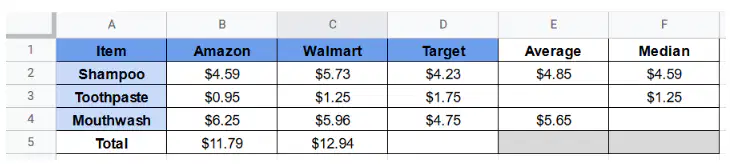
Google Sheets Question
Which formula(s) would work to find the value for cell D5? (Select all that apply)
=sum(D2:D4)
=median(D2:D4)
=D2*D3*D4
=average(D2:D4)
=D2+D3+D4

