
Font size
 Worksheets
Topic 1 Revision
Total questions: 35
Worksheet time: 18mins
What is the design, and use of robots that perform functions normally carried out by humans?
Robotics
3D Printer
AI
Expert Systems
When a computer performs tasks that are normally carried out by humans, this is known as?
Robotics
3D Printer
AI
Expert Systems
What are computer programmes designed to provide a solution to complex problems known as?
Robotics
3D Printer
AI
Expert Systems
What word means something is easy to use and understand and use, especially for people with a disaibility?
Accessibility
Bionics
Virtual Reality
Emerging Tech
What is the application of biology to the study of robots known as?
Accessibility
Bionics
Virtual Reality
Emerging Tech
RAM stands for:
What do device drivers do?
Allows the OS to communicate with hardware
Drives around the motherboard
Increases the amount of storage
Which of these is not a function of an OS:
Provide a user interface
Communicate with hardware
Allow the computer to multi-task
Improves CPU performance
_____________is a type of system software that allows a user to perform maintenance-type tasks
Operating system
System Software
Application software
Utility program
Which is not a type of System software?
Device drivers
Utility programs
Applications
Operating systems

Which one of these is best describes application software?
Software used to carry out
tasks e.g. web browser.
Software to help keep your
computer healthy e.g. anti-virus.
Software that allows you to use your computer and install other software.

Which of the following statements about cloud storage are true... (choose as many as are appropriate)
Data will be secure if there is a fire or other problem at the site
Data protection rules do not apply if you opt to use cloud storage
It prevents your data being hacked/targeted by hackers
It prevents the need to buy expensive hardware for data storage
Which of the following shows the capacity of OPTICAL STORAGE MEDIA in the correct order (smallest to largest)?
DVD > BLU RAY > CD
CD > DVD > BLU RAY
BLU RAY > DVD > CD
DVD > CD > BLU RAY
Rank the units of data storage in order from smallest to largest..
MB > KB > Byte > TB >GB
KB > Byte > MB > TB > GB
Byte > KB > MB > GB > TB
TB > GB > MB > KB > Byte
Which of the following storage devices is most suitable for use in mobile devices?
Cloud
Magnetic
Solid State
Optical
Which term is used to describe the fact that software should be able to be used by ALL types of users?
Accessibility
Useability
Optimisation
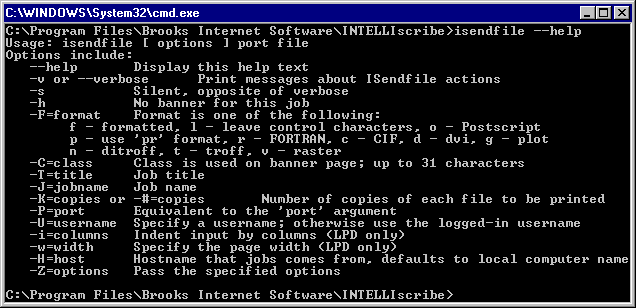


Which type of user interface is shown in the following image?
Command Line Interface
Graphical User Interface
Menu Interface
Speech and Sound Interface
Which service allows user to access programs over the internet?
Webcam Services
Cloud Computing
Head Cameras
Facial Recognition Software
Which storage device typically stores the most data?
Magnetic Tape
Magnetic Hard Disk Drive
CD-ROM
Solid State Drive
A DVD can store how much data?
25GB
4.7MB
650MB
4.7GB
Which of these are optical storage?
SD CARD
HDD
CD ROM
SSD
Which of these types of storage is usually the most expensive?
CD ROM
Solid State Drive
Magnetic Hard Disk Drive
Magnetic Tape
What does RAM do?
Save data for later use
Backing Up whole computer systems
Storing Films, Games
To store data and programs in current use by the computer
What is Blu-Ray used for?
Save data for later use
Backing up whole computer systems
Storing Films, Games
To store data and programs in current use by the computer
Which of the following usually stores the most data?
SSD
Magnetic Hard Disk Drive
Blu-Ray
Memory Stick
Which of the following is the fastest for data transfer?
Solid State Drive
Magnetic Hard Disk Drive
Blu-Ray
Magnetic Tape

