
Font size
 Worksheets
Formative GD 3
Total questions: 36
Worksheet time: 25mins
Shortcut key to start help ------
F1
F2
F3
F4
F5
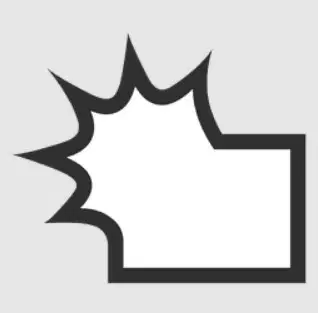
In AI, what is the name of this tool?
Symbol crystalize tool
Symbol sizer tool
Symbol spinner tool
Symbol scruncher tool

In AI, what is the name of this tool?
Dodge tool
Zoom tool
Puppet warp tool
Smudge tool

In AI, what is the name of this tool?
Dodge tool
Zoom tool
Puppet warp tool
Smudge tool
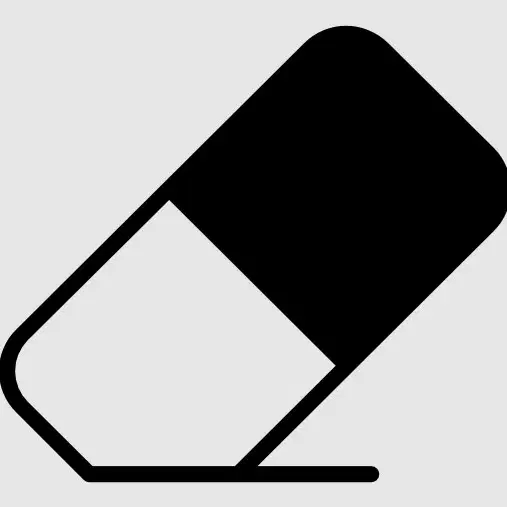
In AI, what is the name of this tool?
Dodge tool
Eraser tool
Smooth tool
Sharpen tool

In AI, what is the name of this tool?
Custom shape tool
Elliptical tool
Flare tool
Shape Builder Tool
Shortcut key to copy a selection -
F6
F5
F3
F4
ctrl + c
Shortcut key to paste a cut/copied content -
F6
F5
F3
F4
F5
Shortcut key to show/hide layers panel -
F6
F5
F7
F4
F5
Shortcut key to activate an inverse selection -
Shift + F5
Shift + F6
Shift + F7
Shift + F8
Shift + Ctrl + I
in Ai & PS, Shortcut key to activate the magic wand tool -
W
L
M
C
Y
Shortcut key to activate the Path Selection tool & magic erase tool.......
A
B
C
D
E
Shortcut key to activate the Artboard tool -
U
V
W
X
A
Shortcut key to select the next brush -
,
.
'
;
"
Shortcut key to toggle between Standard and Quick Mask mode -
S
Q
M
T
Shift + T
Shortcut key to cancel completely -
Delete
Backspace
Esc
Tab
F4
Select and mask workspaces are opened by pressing ____.
Ctrl + R
Alt + R
Ctrl + Alt + R
Tab
Ctrl + R
Shortcut key to reapply filters used previously -
Ctrl + F
Alt + F
Ctrl + Alt
Ctrl + Alt + F
Shortcut key to change the cancel to reset -
Ctrl
Alt
Shift
None
Shortcut key to activate crop tool & Slice tool
P
C
R
T
S
Shortcut key to open the curve dialog box -
Ctrl + O
Ctrl + C
Ctrl + M
None
Which of the following is/are the component(s) of the layer panel?
Thumbnail
Adjustment layer
Smart Object
Transform
Appearance
Non-destructive editing relies on the ____.
Type layer
Layer style
Layer mask
None
quick Mask
Which of the masks can be created in Photoshop?
Layer
Vector
transparent
opacity
appearance
Non-destructive editing is provided by all of these masks, so we do not lose the original ____ data of the image when editing the mask.
Size
Pixel
Data
path
point
Creating an object as a smart object will allow us to perform operations on it without affecting its ____.
Dataset
Image quality
Video quality
File size
Pixel quality
The ____ effect will be applied to the modified content when the layer's content is edited or moved.
Same
Different
Similar
Multiple
Overlay
Which of the following layer style options is present in Photoshop?
Altitude
Blend Mode
Contour
pixel
line
Which of the following shape tools is supported by Photoshop?
Rectangle
Polygon
Line
triangle
circle
Create an object centered at the selected point by pressing which of the following keys?
Spacebar
Shift key
Alt key
Shape tool
Ctrl Key
Which tool on Photoshop helps remove the background from the image?
Magic Wand Tool
Magic Eraser Tool
path erase tool
Erase tool
Knife tool
Which of the following blending mode(s) is/are available on Photoshop?
Normal
Dissolve
Behind
overlap
overload
A ____ mode mixes the RGB values of an original color with the green, blue, and red channel values.
Subtract
Exclusion
Hard Mix
Difference
A ____ mode mixes the RGB values of an original color with the green, blue, and red channel values.
Subtract
Exclusion
Hard Mix
Difference
screen
Using the ___ tool, you can draw complex shapes and paths.
Draw
Eraser
Shape
Pen
line
Which of the following pen tool(s) is/are available on Photoshop?
Freeform Pen
Add Anchor Point Tool
Convert Point Tool
Convert pen Tool
Freeform carve

