
 Worksheets
MSS Form 1 EOT 1 Exam 23-24
Total questions: 61
Worksheet time: 1hrs 9mins
What is a computer?
A computer is case that manipulates information or data.
A computer is an electronic device that manipulates information or data.
A computer is powered box that manipulates information or data.
A computer has the ability to:
It has the ability to store, retrieve, and process data.
It has the ability to store, retrieve, and pastas data.
It has the ability to stage, retrieve, and process data.
You can use a computer to (check all that apply)
Type Documents
Send Email
Play Games
Browse the web
Hardware is ...
any part of your computer
any part of your computer that has a hard structure
any part of your computer that has a software structure
any part of your computer that has a physical structure
Hardware is (check all that apply)
Software
Keyboard
Mouse
computer's internal parts
Software is ...
Hardware for your computer
any set of instructions that tells the hardware what to do and how to do it
all hardware components
any set of instructions for you to read
Desktop computers are designed:
For mobility
To be placed on a desk
To be wired to other computers
Desktop Computers have (CHECK ALL THAT APPLY)
Mouse
Computer Case
Monitor
Keyboard
The laptop computer is commonly called a
mobility device
a persons preferred computer
laptop
Tablet computers
Are worse than computers
Are more portable than laptops
Use a keyboard
Use a mouse
Which of the following are specialized computers. (click all that apply)
house phone
smartphone
wearables (fitness trackers, smartwatches)
game consoles

This computer is smaller than a laptop and great for playing games or watching movies. It has a touch screen.
Ipad
Laptop
Desktop
Smartphone

This computer is smaller than a desktop computer but larger than a ipad.
ipad
Laptop
Smartphone
Desktop

If you do not want to disturb other people, you should wear this.
Printer
Headset
Microphone
Webcam

This device lets you see people over the Internet.
Keyboard
Printer
CPU
Webcam

This computer part lets everyone listen to sounds.
Speakers
CPU
Microphone
Mouse

You often see this plugged into a computer.
Monitor
Printer
Mouse
CPU

This computer part is just like a television. What is it called?
Mouse
Monitor
Keyboard
Printer

What do we call this computer part?
Keyboard
Monitor
Mouse
Speakers

What is the name of this computer part?
Monitor
Keyboard
CPU
Printer
Which of the following might be associated with computer science?
The study of data, data processing and information management
The use of computer hardware, software and telecommunications devices to store, manipulate, convert, protect, send and receive data
The study of both computer hardware and software design
None of the above
Which is not an example of a peripheral device?
Keyboard
Registers
Mouse
Speakers
The ALU processes data and stores it in:
Flash drive
Main memory
modem
Sound card
The speed at which a CPU processes data to convert it, is measured in:
Megabytes
Gigabytes
Gigahertz
Megahertz





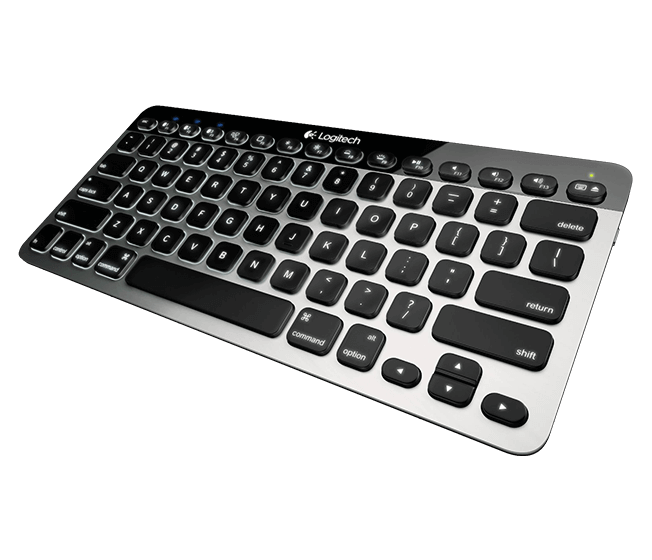
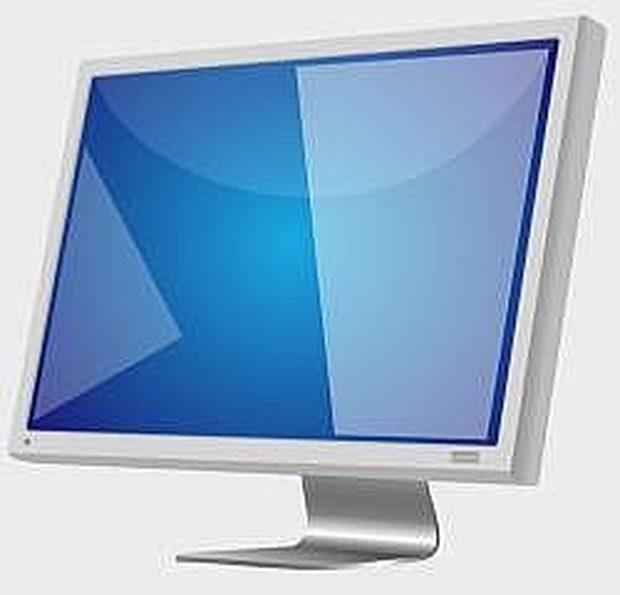
Which of the following answers would LEAST likely to reduce the risk of eye strain?
Taking a 5 minute break every hour
Non reflective desks
Blinds at the window
An ergonomic keyboard

This is a picture of the ___ button
Change Case
Decrease Font Size
Increase Font Size
Text Effects and Topography

change the size
change the font
bold your text
change the color

change the font
change the color of your text
change the size
underline

change the size
change the font
bold your text
change the position on your text to the left

Save Icon


Which would you select to center a selection?
A
B
C
D
What is the insertion point in Word?
The part of your document where you insert pictures or clipart
The blinking vertical line, sometimes called the cursor, showing where text or numbers will appear next when typed
The part of your document where you need to insert a table
The arrow that moves around the screen when you move your mouse

This is the -----------------
Home Menu
Start Menu
Apple Menu
If you make a mistake, what do you do?
Restart writing the document
Delete everything
Undo
I don't know
What does cut mean?
Permanently removing text from a document.
Storing the document in a file.
Removing text or graphic from the document and placing on clipboard.
Moving information from one place on the document to another.
Explain the difference between the terms ‘computer’ and ‘computer system’.
What does document mean?
A place where papers are stored.
A written or printed paper that contains information.
A box for text.
An image on a page.
What does font mean?
The spacing of the words on a page.
The appearance of a character distinguished by typeface and size.
The style of writing in a paragraph.
The title of the document.
What are margins?
The distance between the paragraphs of a document.
The distance between the lines in a paragraph.
The distance between the title and body of a document
The distance between the edge of the text in the document and top, bottom, or side edges or the page.
What is portrait orientation?
A way of getting to know a document.
Occurs when the document is longer than wide.
Occurs when the document is wider than long.
When a document is stored.
Explain the difference between ‘data’ and ‘information’.
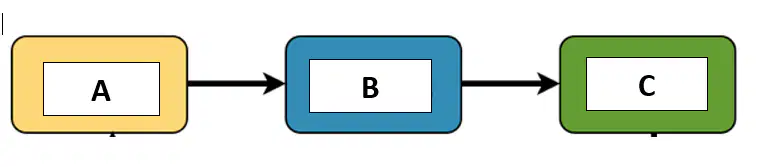
In the stages of processing, what stage should be placed in A, B and C
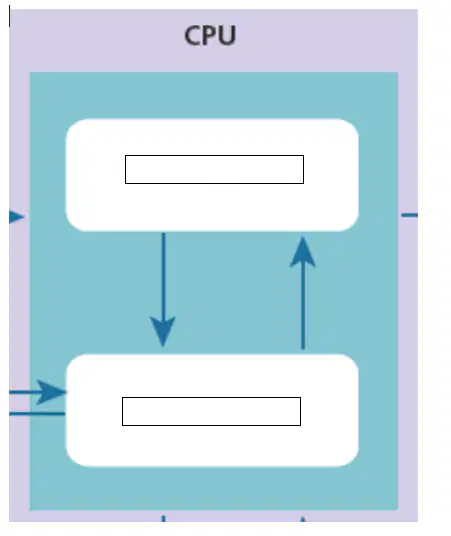
What are the TWO main units of the CPU? In addition, State the function of each
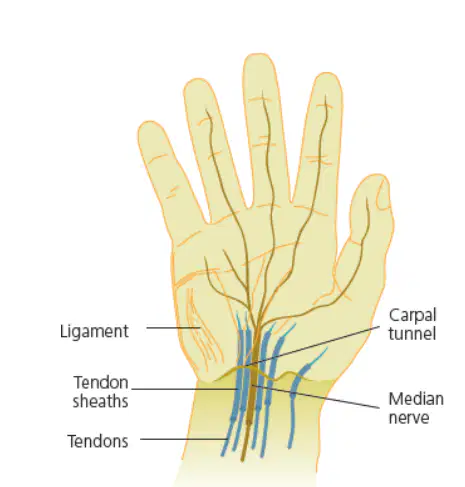
Give 3 ways we can prevent RSI
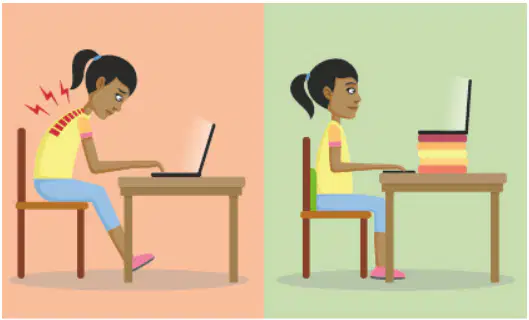
State TWO things that the young lady did to prevent Neck Strain
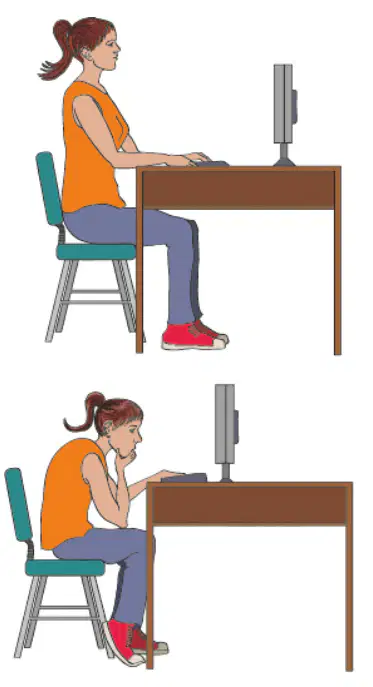
Give 1 exercise which can be done to prevent lower back pain

List the steps that can be taken to open Microsoft Word

Use the numbers to reorder the steps to saving a document in Microsoft Word for the first time. Write your order in the space provided.
For example, 1, 3, 4, 2

