
Font size
 Worksheets
Sec 1 Document Processing 1 and 2 Revision Questions
Total questions: 20
Worksheet time: 12mins
To create documents, we can use a
Microsoft Word
Word Processor
Spreadsheet Program
Food Processor

The type of fonts used determines the appearance of the text.
What is another name for font?
(a)
Fonts that contain small, decorative lines found at the end of a stroke are (a) fonts.
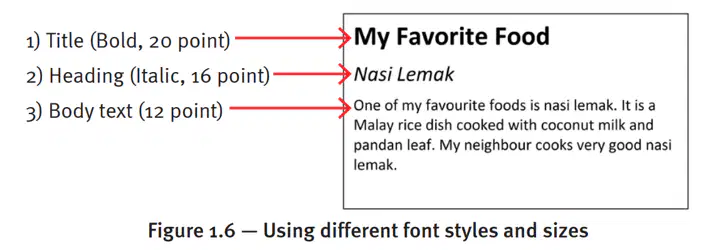
Different font sizes can be used to differentiate the title, heading and body text. The title of a document should be (a) than the heading and body text.
When we are editing a document, we can use the ___________ feature to search for a word or phrase, and replace the text with another word or phrase. This feature allows us to replace repeated occurrences of the same words or phrases quickly in a long document.
search and rescue
copy and paste
find and replace
cut and paste
Which term refers to the blank areas surrounding a document page?
(a)
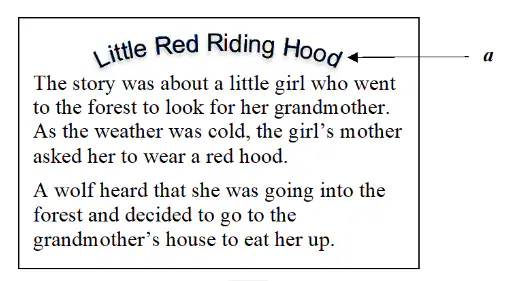
What is a known as?
Drop Cap
Word Art
Text to Path
Text Alignment
Which of the following cannot be inserted into a document?
Table
Graphic
Sound
Border
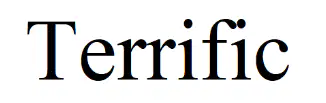
What is the font type of the word shown here?
italic font
sans-serif font
bold font
serif font
Which type of document is mostly set to landscape orientation?
Brochures
Notes
Letter
Magazines
Which statement is true about formatting text?
Birthday card or invitation note should use fonts that are formal.
Body text should be bigger than title text.
One effective way to grab readers’ attention is to use drop caps.
Using a mix of serif and sans serif font makes a document more readable.
Which of the following is a type of page orientation?
Landscape
Layout
Margin
Table
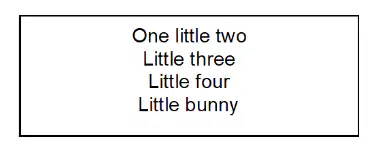
What type of text alignment has been applied to the paragraph below?
Center aligned
Fully justified
Left aligned
Right aligned
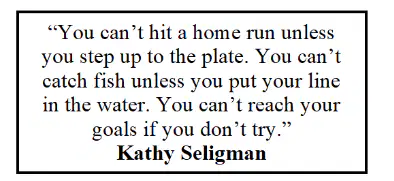
To create the text shown here, what alignment is used on the paragraph?


All of these will help improve the readability of a document except ___________________.
aligning the title to be at the centre of the document
decreasing the line spacing of the paragraphs
having more white space
increasing the font size of the title so that it is larger than the body text
In word processing, we often use portrait and landscape. What do portrait and landscape refer to?
Document layout
Dropped cap
Page margins
Page orientation
Which of the following situations will require the use of a word processing software?
i. calculate the cost of an overseas trip
ii. design a healthy menu for a school event
iii. draw the school logo
iv. write an article for the school magazine
i and iv
ii and iii
ii and iv
iii and iv
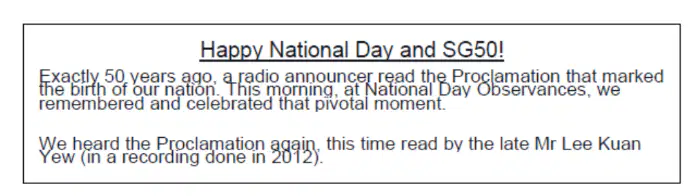
The diagram shows part of a word processing document.
The way to improve the document is to
change the alignment of the text.
change the font colour of the text.
increase the font size.
increase the line spacing between text.
In a document, the word ‘see’ is typed as ‘sea’. What will the spelling checker do when it is run?
Add the word to the error library.
Alert the typist to rectify the mistake.
Correct the mistake.
Ignore the mistake.
The space at the top, bottom, left and right sides of a documenting processing page is known as
footer
header
margin
page number

