

wayground logo

Free Printable Worksheets

Font size

S
M
L
XL
Worksheets

CL 5-EXCEL REV 2

Total questions: 31

Worksheet time: 19mins
Name
Class
Date
1.
Student Name?
4 lines
2.
5. Which is a predefined calculation in the spreadsheet application?
a)
Function
b)
Formula
c)
Data
d)
None
3.
6. What is the text Concatenation operator?
a)
+
b)
=
c)
&
d)
@
4.
11. All formulas in Ms Excel begin with the following symbol:
a)
+
b)
-
c)
=
d)
%
5.
12. Ms Excel is used to?
a)
Add numbers.
b)
Make charts (graphs).
c)
Information in columns and rows.
d)
Collect Data
e)
All of the above
6.
13. _______ option allows to join multiple cells into single cell.
a)
Merge Cells
b)
Split Cells
7.
14.The intersection of a row and a column in a worksheet is called as a ______________.
a)
Tabs
b)
Sheet
c)
Table
d)
Cell
8.
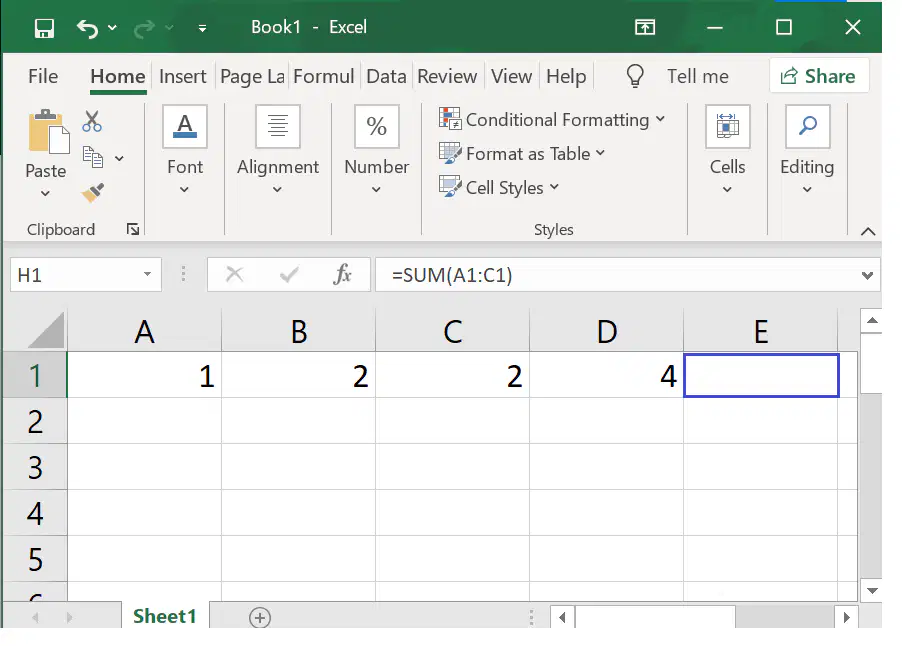
15. What number should be in cell E1 (based on the function)?
a)
1
b)
2
c)
5
d)
9
9.
17. The cell range can be denoted as __________if the cell addresses of first cell and last cell are F8 and F15 respectively
a)
F8*F15
b)
F8+F15
c)
F8:F15
d)
F8/F15
10.
21.The file extension of a file in MS-Excel is
a)
.xls
b)
.doc
11.
22. Columns are labeled by ______________.
a)
numbers
b)
alphabets
c)
symbols
d)
colours
12.
23. ___________ displays the content in the active cell.
a)
Name Box
b)
Formula bar
13.
24. Mr. Ram is looking over his quiz data again in his spreadsheet. He wanted to know how many students received an 80% on his latest quiz. In his spreadsheet he would use the ___________________ function.
a)
Sum
b)
Average
c)
Count
d)
Max
e)
Min
14.

In MS Excel, what function is used to find the highest value in a range of cells?

a)

MAX

b)

MIN

c)

AVERAGE

d)

SUM

15.

1) Which cell is selected in this picture?

a)

B2

b)

B3

c)

C3

d)

m3

16.

Define Cell?

a)

The dark bordered box in excel.

b)

A box in Excel that has formulas.

c)

The intersection of a column or row in a worksheet or table.

d)

Fx Bar where you input data

17.
The area within the red box is called
a)
Active Cell
b)
Fill Handle
c)
Cell
d)
Row
18.
Numbers in Excel is automatically aligned  ____.
a)
Right
b)
Left
c)
Center
d)
Justify
19.

1. What is the "Active Cell" in Excel?

a)

The Bottom cell in a worksheet. It is indicated by a dark border onscreen

b)

The current cell in a worksheet. It is indicated by a dark border onscreen.

c)

The top cell in a worksheet. It is indicated by a dark border onscreen

d)

The past cell in a worksheet. It is indicated by a dark border onscreen

20.

_____ is used to specify the type of data that can be entered in a celll

a)

input message

b)

data validation

21.

The ____ command is used to view only the required data while the rest of the data is temporarily hidden,

a)

Filter

b)

Data validation

22.

The _____ command is used to change or customize the order of the spreadsheet data

a)

filter

b)

sort

23.

This alerts users by displaying an error message if invalid data is typed in a cell

a)

Error Alert

b)

Filter

24.

Vertical axis of a chart is _______

a)

X axis

b)

Y axis

c)

X axis

d)

B axis

25.

__________ is a area that holds all the elements of a chart.

a)

Plot Area

b)

Chart Title

c)

Chart Area

d)

Legends

26.

What is the formula sign for multiply?

a)

/

b)

*

c)

=

d)

-

27.

The Sort & Filter option is present under which tab of Microsoft Excel?

a)

View Tab

b)

Insert Tab

c)

Data Tab

d)

Tools Tab

28.

To display only those records where temperature is below 0 degree you will

a)

Manually extract the data

b)

Sort the data

c)

Filter the data

d)

Use Goto option

29.

To arrange data in ascending order of age we will

a)

Filter it

b)

Sort it

c)

Apply Conditional Formatting

d)

Rearrange data manually

30.
Which feature would allow you to change the formatting of any cells that are less than $100.00?
a)
Cell Formatting
b)
Easy Formatting
c)
Auto Formatting
d)
Conditional Formatting
31.

This icon allows you to apply borders.

a)
b)
c)
d)
