
 Worksheets
Using the Mail and Calendar
Total questions: 6
Worksheet time: 3hrs 35mins
What change did Microsoft make to the productivity apps in Windows 8 compared to the previous versions?
Microsoft combined Mail, Calendar, and People into one app.
Microsoft created three separate apps: Mail, Calendar, and People.
Microsoft removed the Calendar and People apps.
Microsoft introduced Windows Live Mail as the new productivity app.
Which app in Windows Office covered all the bases for mail and calendar before Windows 8?
Windows Live Mail
Outlook
People
As of Windows 11, how many apps now exist for Mail and Calendar, and how do they operate?
One app with two separate modes
Two separate apps with independent modes
Three interconnected apps with independent modes
One app with a single mode for both Mail and Calendar
Which of the following is NOT a commonly used protocol for email services?
POP3
IMAP
SMTP
FTP
What is the primary function of email clients?
To store emails on the server permanently
To send emails directly to the recipient's computer
To retrieve and manage emails from a server
To encrypt email messages for security
Which type of email system allows you to work on email while away from an internet connection?
Online email
Hybrid systems
Email programs
Mobile email apps
Which company offers email variants on Android, iPhone, and iPad, and requires organizations to sign up for a paid service for full features?
Microsoft
Yahoo! Mail
Outlook
Which protocols allow both Outlook and Gmail to work with almost any email account?
SMTP and FTP
HTTP and HTTPS
POP3 and IMAP
TCP and IP
What is the main difference between the Windows 11 Mail app in wide and narrow screens?
The app is only available in wide screens.
The left column might be expanded in wide screens.
The preview pane does not exist in narrow screens.
There are no differences; it looks the same in both.
Since its debut, how has the Windows 11 Mail app been described in terms of development?
It has received more development attention than Outlook.
It has been discontinued in favor of Microsoft 365.
It sees a steady trickle of improvements.
It has not changed at all since its debut.
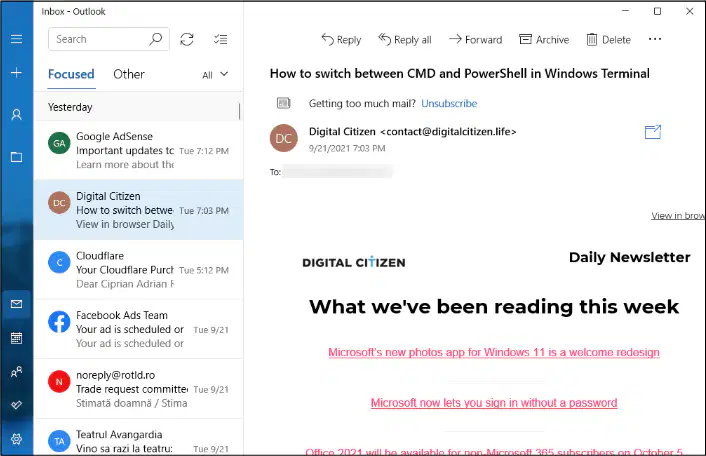
Which feature is shown as focused in the preview of the Windows 11 Mail app?
The search bar
The inbox section
The settings menu
The calendar function
Which of the following statements is true about the Mail app in Windows 11 according to the text?
The Mail app is the only option for email on Windows 11.
The Mail app cannot work with Gmail or Outlook accounts.
You can switch between using the Mail app and web-based interfaces for email without losing messages.
The Mail app permanently deletes messages once they are read.
What is the primary function of the Mail app in Windows 11 as described in the text?
To store emails permanently on your local computer.
To act as a gathering point, pulling in mail from various email services.
To send emails exclusively through Outlook.com.
To function as a web browser for checking email online.
According to the text, what can you do with Outlook.com and Gmail accounts in relation to the Mail app?
You can only access them online, not through the Mail app.
You can set them up to work with the Mail app or use their web-based interfaces.
You must choose between using the Mail app or the web-based interfaces, but not both.
You can only use them with the Mail app when you are at the office.
Which email services can the Mail app in Windows 11 pull mail from according to the text?
Only Outlook.com and Gmail
Outlook.com, Gmail, Exchange Server, Yahoo! Mail, and iCloud
Exchange Server and Microsoft 365 business plans only
Only IMAP and POP3 email services
According to the text, what can you do if you're thinking about moving to Windows 11 Mail?
You can only add your Outlook.com account to Gmail
You can add your Gmail account to Outlook.com and vice versa
You must use the Mail app exclusively and cannot link other accounts
You can only use the Mail app when connected to the internet
What does the text suggest you can still do with the Windows 11 Mail app when you can't get to the internet?
You can download new messages
You can send new messages
You can look at your most recent messages
You can't do anything with the Mail app without internet
According to the text, which of the following is considered superior to the Mail app in certain respects?
Microsoft Outlook
Gmail and Outlook.com
Internet Service Provider (ISP) email
Free, open-source alternatives
What is the main reason the author prefers Outlook.com's and Gmail's interfaces over the Mail app?
They are bundled with Office software
They display more information on the screen
They are free and open-source
They are provided by Internet Service Providers
What is Outlook.com formerly known as?
Outlook Mail
Outlook Web App
Exchange Server
Microsoft Email
What is the author's opinion on ISP-provided free email services?
They are the best available option
They are superior to Gmail and Outlook.com
They generally don't compare favorably to other services
They are the most user-friendly option
Which calendar app is highly regarded for being powerful and easy to use, and is well integrated with other Google apps?
Outlook.com Calendar
Outlook (the app from Microsoft 365)
Google Calendar
Apple Calendar
Where does Outlook.com Calendar live?
Inside Google.com
Inside Outlook.com
Inside Microsoft365.com
Inside Apple.com
If you need to schedule a conference room in an office with many people using Outlook, which calendar is suggested?
Google Calendar
Outlook.com Calendar
Outlook (the app from Microsoft 365)
Any of the calendar apps
Which feature in Google Calendar allows you to keep track of different types of events separately?
Create button
My calendars section with different calendar options
Search bar
Today button

What is the purpose of the color-coding in the Outlook.com Calendar as shown in the image?
To indicate different days of the week
To represent different times of the day
To differentiate between various types of appointments and events
To show the current date
Based on the image, which application allows you to search for people within the calendar?
Google Calendar
Outlook.com Calendar
Both Google Calendar and Outlook.com Calendar
Neither Google Calendar nor Outlook.com Calendar
What common feature is visible in both Google Calendar and Outlook.com Calendar interfaces?
A search bar
A "Meet Now" button
A "New event" button
A "Print" option
For a similar experience to the Mail and Calendar apps from Windows 11 on mobile platforms, which app is recommended?
Gmail app
Yahoo Mail app
Microsoft Outlook app
Apple Mail app
What happens the first time you click or tap the Mail shortcut from the Start menu in Windows 11?
You are taken to the Mail screen immediately
You are given the chance to add an account
The Mail app downloads the latest updates
You are prompted to set up security settings
Which type of email account should you choose if your email address ends with @outlook.com, @live.com, or @hotmail.com?
Yahoo!
Outlook.com
iCloud
If you have an email account with Google, what is the most common format for your email address?
something@icloud.com
something@yahoo.com
something@outlook.com
something@gmail.com
Which email account type should you select if you are using your company's Exchange mail server or Microsoft 365 for handling your mail?
Office 365
iCloud
Other
Advanced setup
For which type of email account is it rare to have and requires choosing the 'Advanced setup' option?
Exchange ActiveSync account
iCloud account
Google Workspace account
POP or IMAP server account
What happens if you sign into Windows 11 with a local account and add a Microsoft account to the Mail app?
You will not be able to use the Mail app.
You will be asked if you want to change that local account into a Microsoft account everywhere.
Your local account will be deleted.
The Mail app will stop receiving messages.
What should you do if you do not want to change your local account into a Microsoft account on Windows 11 when prompted?
Click or tap Next.
Shut down the computer.
Click or tap Microsoft Apps Only.
Ignore the message.
What does the Mail app display after you click or tap Microsoft Apps Only?
It displays a year's worth of messages.
It displays a week's worth of messages.
It displays about a month's worth of messages.
It displays all messages since the account creation.
What does the hamburger (three lines) icon do in the Mail app's standard layout?
It starts a new message.
It switches between accounts.
It lets you look at all the options when the left column is minimized.
It opens the Settings pane.
What is the function of the person icon in the Mail app's standard layout?
It opens the Calendar app.
It lets you switch between your inbox, outbox, archive, and so on.
It lets you switch among accounts, if you have multiple email accounts.
It takes you to Microsoft's To Do app.
What happens when you click or tap the folder icon in the Mail app's standard layout?
It opens the People app.
It lets you switch between your inbox, outbox, archive, and so on.
It starts a new message.
It brings up a Settings pane.
Which icon in the Mail app's standard layout does not do anything when viewing your email?
The envelope icon
The calendar icon
The check mark icon
The gear icon
What does the check mark icon do in the Mail app's standard layout?
It opens the People app.
It launches the Calendar app.
It takes you to Microsoft's To Do app or to Microsoft Store so you can install the app.
It brings up a Settings pane.
What does the right column display in the Mail app's standard layout?
The Settings pane
The selected message
A list of all messages in the selected folder
The inbox when a specific folder is not selected
What action in the Mail app will expand the left column according to Figure 1-10?
Clicking the search bar
Clicking the 'New Message' button
Clicking or tapping the hamburger icon
Clicking the 'Reply' button
Which of the following options is not shown in the compose window of the Mail app in Figure 1-11?
Discard
Send
Format
Save Draft
What is the default font type and size for new text in the email message as mentioned in the document?
Times New Roman 12-point
Arial 10-point
Comic Sans 11-point
Calibri 11-point
How can you apply paragraph formatting such as bulleting or numbering in the Mail app?
Click on the Send icon
Click or tap the paragraph formatting icon
Click or tap the Discard icon
Click or tap Insert > Files
What should you do to add an attachment to an email in the Mail app?
Click or tap the Send icon
Click or tap the Options tab
Click or tap Insert > Files
Click or tap the Discard icon
Where do you set the message priority indicator in the Mail app?
In the paragraph formatting menu
In the Insert > Files dialog box
At the top, in the Options tab
In the Send icon menu
What happens if you decide not to send a message and click or tap the Discard icon in the Mail app?
The message is sent immediately
The message is saved as a draft
The message is deleted and cannot be recovered
Windows 11 Mail automatically saves everything
Which of the following is considered a significant shortcoming of the Mail app according to the text?
The ability to send messages
The editing capabilities
The lack of customized folders
The inclusion of inline pictures
What should you do first if you have multiple email accounts and want to search for an email in the Mail app?
Type your search term and press Enter
Use Cortana to find the email
Navigate to the account you want to search before performing the search
Click on the settings gear icon
Where do you click or tap to start a search in the Mail app?
On the settings gear icon
On the folder icon on the left
Above the second column
On the magnifying glass icon
What happens if the Mail app window isn't wide enough when you click or tap the gear icon for settings?
The Mail app will close
Settings will appear on the left side
Settings will appear on the right side
The search function will be activated
Which of the following email services can you connect to the Mail app?
Only Outlook.com and Gmail
Only Yahoo! and iCloud
Any Outlook.com, Gmail, Exchange Server, Yahoo!, iCloud, or IMAP or POP account
Only Exchange Server and Office 365
Where do you click to add a new email account in the Mail app?
Click on the 'New Email' button
Click or tap the gear icon at the bottom left
Click on the 'Inbox' tab
Click on the 'Send/Receive' button
After clicking the gear icon to add a new account in the Mail app, what is the next step?
Click or tap 'New Email'
Click or tap 'Focused Inbox'
Click or tap 'Manage Accounts' > 'Add Account'
Click or tap 'Reading pane'
What must you enter after choosing to add an account in the Mail app?
Your user preferences
Your email ID and password
Your contact list
Your calendar events
If Mail presents you with an option to use the account everywhere on your device, what are the two options you can choose from?
Use default settings or customize settings
Use Microsoft Apps Only or Use on this device only
Tap Microsoft Apps Only or tap Next
Tap Microsoft Apps Only or tap Microsft Account Everywhere
What can you change in the Mail app's settings to personalize your experience?
The color of the email text
The picture that appears in the far-right pane when no mail has been selected
The size of the Mail app window
The font style of the email list
What feature in the Mail app allows you to have an automatic response sent to any received message?
Email Forwarding
Automatic Replies
Quick Responses
Auto-Organize
Where do you find the extra options for setting in the Mail app?
In the Home tab
At the top of the email list
At the bottom of the app
In the File menu
What is the default setting for new mail and responses in the Mail for Windows app regarding signatures?
No signature is added by default.
A custom signature is required for each email.
A default signature is added to all new mail and responses.
The user must manually add a signature each time.
What can you do with the default font settings in the Mail for Windows app?
Change the default font size only.
Change the default font style only.
Change the default font, size, and formatting for one or all email accounts.
You cannot change the default font settings.
What type of notifications can you enable in the Mail for Windows app?
Display notifications only for high priority emails.
Display notifications or play a sound when new mail arrives.
Display notifications for emails marked as spam.
No notifications can be enabled.
Imagine Isla, Henry, and William are planning a group project. What is the main advantage of them using a digital calendar for managing their schedule?
It requires internet access to view
It can only be accessed from one device
It can be easily shared and synchronized across devices
It is less secure than a paper calendar
Avery, Arjun, and Daniel are discussing the benefits of using a digital note-taking app for their group project. What is the main benefit they mention?
It can only be used on one device
It decreases the need for organization
It allows for easy organization and access to notes across devices
It requires physical storage
MS WORD IS SOFTWARE OF?
APPLE
ANDROID
MICROSOFT
Imagine Maya is finalizing a research paper for her environmental science class that will be printed and bound. She wants to ensure that the title, her name, and the page number appear at the bottom of every page for easy reference. Which feature should Maya use?
Page Break
Footer
Header
Table
Anika is finalizing her thesis on environmental science and needs to adjust the margins, orientation, and size of the document for submission. Which tab should she use?
Home Tab
View Tab
Layout Tab
Design Tab

