
 Worksheets
Computing year 11
Total questions: 90
Worksheet time: 54mins
Why aren't natural (human) languages suitable for instructing a computer?
Computers cannot understand all natural languages in the same way
General ambiguity present in natural languages
Errors in translation make natural languages unreliable
This is not true, natural languages can be used and suitable for computers
What are programming languages and what are they used for?
A specific set of instructions put together in order to create a makeshift language. The instructions can only be understood by one CPU and vary across different companies
Languages written for direct translation into a language the computer can understand used to write programs/software
Languages spoken by programmers to avoid confusion when communicating program documentation in technical terms
Languages which are only understood by computers and written by them (A.I.). This is also called a computerisation process.
What are the differences between programming languages and natural languages?
Programming languages can only have one meaning and follow strict syntax. Natural languages may have more than one meaning depending on context and grammar
Programming languages are made for programmers, while natural languages are made for other people
Natural languages are strict in grammar and do not allow room for error while programming languages are easy to read and understand
Programming languages always use a binary system (1/0) while natural languages always use an alphabet
A ____ _____ (programming) ________ is a programming language which is object oriented, that enables a programmer to write instructions which are independent from the computer architecture. This kind of programming language uses English-like statements.
(a)
A ___ _____ (programming) ________ is a programming language which is closely related to the architecture of a computer. This kind of programming language is harder to understand than its counterpart which uses English-like statements.
(a)
Some Examples of High Level Languages include:
Python
Arthron
C#
Assembly
Java
Some Examples of Low Level Languages include:
C
Machine Code
COBOL
Java
Assembly
High Level Languages do not need to be translated, and can be understood directly by a computer.
True
False
Low Level Languages do not need to be translated and can be understood by the computer directly.
True
False
A program written in a High Level Language is written in a code that requires translation. This raw code is called:
Disassembled Code
Executable Code
Source Code
Raw Code
A language translator translates source code into ________ ____.
(a)
What are the 3 translators?
BlueJ
Compiler
Machine Decoder
Assembler
Interpreter
Which of these is a Low Level Language Translator?
Interpreter
Machine Encoder
Assembly
Compiler
Assembler
Which of these are not High Level Language translators?
Assembly-to-High-Level-Language (AtHLL)
Compiler
Assembler
Interpreter
Java
A Compiler:
is worse than an interpreter
Translates code once, into executable code and never has to translate again. Errors are not highlighted and specified.
Translates Code each time it's run. This includes loops, running it for every count of the loop. Errors are displayed and explained.
Translates only Assembly Code into Machine Code once. Errors are corrected on the compiler's behalf.
is better than an interpreter
An Interpreter:
is worse than an compiler
Translates code once, into executable code and never has to translate again. Errors are not highlighted and specified.
Translates Code each time it's run. This includes loops, running it for every count of the loop. Errors are displayed and explained.
Translates only Assembly Code into Machine Code once. Errors are corrected on the interpreter's behalf.
is better than an compiler
The first generation of programming languages is:
Used with the help of punch cards
Mostly Assembly Code
Mostly Machine Code and Binary
Made up of High Level Languages
The Second Generation of Programming Languages is:
Made up of Declarative statements
Mostly made up of Assembly Code
Mostly Made up of Machine Code and Binary
Made up of Imperative Statements
The Third Generation of Programming Languages is:
Declarative, meaning that the programmer can automate certain tasks.
Imperative, meaning that the programmer must control everything happening.
Mostly Made up of Assembly Code
only made up of complex programming structures.
The Fourth Generation of Programming Languages is:
Declarative, meaning that the programmer can automate certain tasks.
Imperative, meaning that the programmer must control everything happening.
Mostly Made up of Assembly Code
only made up of complex programming structures.
What is the Opcode of an Assembly instruction?
The Comment of an Assembly Instruction
The data which is meant to have an instruction processed on it.
The instruction itself, instructing which process is to be carried out.
The process where an instruction is fetched and executed.
What is the Operand of an Assembly instruction?
The Comment of an Assembly Instruction
The data which is meant to have an instruction processed on it.
The instruction itself, instructing which process is to be carried out.
The process where an instruction is fetched and executed.
Immediate Addressing in an Operand means that:
The address which immediately sends you to the location.
The Operand has been fetched from memory or storage and is being used from its location
the Operand has just been created by the program, and is not contained in any memory. This is usually used with a '#' before.
A symbol meant to represent the data to be processed.
Direct Addressing in an Operand means that:
The address which directly sends you to the location.
The Operand has been fetched from memory or storage and is being used from its location
the Operand has just been created by the program, and is not contained in any memory. This is usually used with a '#' before.
A symbol meant to represent the data to be processed.
Symbolic Addressing in an Operand means that:
The address which directly sends you to the location.
The Operand has been fetched from memory or storage and is being used from its location
the Operand has just been created by the program, and is not contained in any memory. This is usually used with a '#' before.
A symbol meant to represent the data to be processed.
What is a dry run and how can it be done?
Running a High Level Language in a Lower one, but not machine code, in order to get a better idea of how the code works. This is done with High to Low Level Translators
When the programmer writes down how each variable changes throughout the program in order to understand how the computer processes each instruction. This is usually done with a trace table.
When the programmer allows the program to run over a long period of time in order to find out whether the outcome changes. This can be done with any IDE.
When a program is erased of all memory locations which are replaced with new contents to find whether the old contents were the issue. Usually done with RAM altering software.
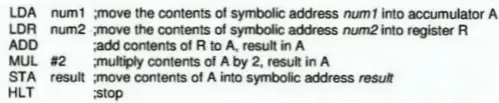
What is the function of this assembly code?
(You are permitted and encouraged to use a trace table)
Adds 2 to the result of num1 and num2.
Adds num1 to num2 and stores the answer in A (Accumulator)
Adds num1 to num2 and doubles the answer.
Adds num1 to num2 and halves the answer
What types of Error can be present when entering data?
Error of Integrity
Error of Omission
Error of Transposition
Error of Substitution
Error of Principle
What is the difference between Data Verification and Validation?
Verification is more reliable than validation since it has a higher chance of finding an error.
Verification is done while the data is being entered while validation is done while data is being processed.
Verification is done by the user inputting the data and has very few methods for checking, while validation is done by a computer and has a multitude of methods for checking the data.
Verification is done by the computer outputting data and having it be checked before being printed. Validation is done by the user while the data is being input.
Select the validation checks:
Double Entry Check
Range Check
Check Digit
Format Check
Type Check
Select the Validation Checks:
Spellcheck
Presence Check
Length Check
Compiler Check
Time Check
Select the Verification Checks:
Proofreading done by another person
Spellcheck
Entering data Twice
Range Check
What is a Network?
It is another version of the Internet, except localised.
A set of computers able to view each other's resources, and nothing else.
A set of computers communicating with each other and sharing data, hardware, power etc.
A search engine where information from various sources can be found.
What can be shared withing a Network?
Battery, Processing Power, CPU cores, Clock Speed and Operating Systems
Monitors, Printers, Mice, Keyboards, Speakers and other Input/Output devices.
Hardware, Processing Power, Entire Systems, Files, and other resources.
Nothing can be shared across a network, since a third party specialised modem is necessary.
Which of these are advantages to networks?
Roaming Access
Sharing of resources on a network.
Communication with other computers on the network.
Centralised databases, servers, updates and maintenance.
Better security since networks are more private.
Which of these are disadvantages to a network?
Requires more Management
Not Cost Efficient
Less secure and more prone to hacking
Easier to spread malware
Data is harder to access since more encryption is used.
Select which of these are types of networks
WAN
MAN
LAN
WLAN
WIRELESS NETWORK
A (a) Area Network is used in small buildings and separate floors
A (a) Area Network is used in cities and large towns
A (a) Area Network is used on multi-national and sometimes international scales
Advantages to a Wireless Network include:
Transfer Rate is increase and allows for communication to be done quickly and on a large scale.
Connection Speeds are faster
Allowing the users to move freely without disrupting the connection
Allowing users to join and leave a network as they please
Disadvantages to a Wireless Network include:
Networks cannot share any resources over a wireless connection
Connection becomes weaker with each new node
Radio Waves are prone to electromagnetic interference.
Easier to intercept radio waves
Which of these are mediums for network communication?
Internet Wires
Coaxial Cables
Telephone Line
Ethernet Cables
Infrared Radiation
Which of these are mediums more network communication?
Microwaves
Satellites
Fibre Optic Cables
Conditional Links
Blockchain
What is bandwidth?
The maximum amount of data that can be transferred over a period of time.
The rate of transferal of data over networks.
The width of a wire measured in cm, used to calculated how many lines transfer a number of bits over time.
What is baud rate?
The maximum amount of data that can be transferred over a period of time.
The rate of transferal of data over networks.
A group of bauds which all travel along one baud rate.
Protocol is:
The code that should be run on a network when a certain group of conditions is passed
A set of rules that control and govern communications
The Hyper-Text Transfer Protocol, used on the Internet
Not important to the network, as long as there is a safety key.
A Router is:
A type of GPS which is more location specific and has more general uses, such as messages and video viewers.
A hardware device which connects a node to the network, exchanging a set of packets.
A device which is similar to a MODEM, in how it converts signals from analogue to digital, and sometimes does the opposite.
A path finding software which allows the user to view servers within an area in a network
What is Data Security?
The Security of Documents and Data which are kept in physical locations and need to be secure.
The Process of Backing Up data to a cloud or separate drive in order to prevent the loss of data.
The protection of data from unwanted viewers and possibly hazardous individuals.
Locking Data with a digital key in order to keep it secure. No one can access this data.
What is Data Integrity?
The Correctness, Validity, and Accuracy of Data
The Process of Backing Up data to a cloud or separate drive in order to prevent the loss of data.
The protection of data from unwanted viewers and possibly hazardous individuals.
The confidence levels of how correct and accurate data may be. If Data Integrity is low, it may mean that data is old and requires updating.
How can errors occur during data transmission?
Lack of Internet
A big wall
Interference
Corruption
(a) is the illegal copying of software by bypassing paywalls and legal documents.
What is Copyright?
The illegality of copying software. This is accompanied by the Piracy Act, indicating that copying anything from other sources is illegal
The legal protection of authors and creators have over their software.
The right to copying any data, code, software, and program.
The Law which enacts a right to suing anyone who copies work placed under the law.
A EULA is:
The agreement software creators have with their software which is to be sold.
An End-User Agreement to use of the software. This indicates that agreeing to a EULA is illegal.
An agreement to the (partial) ownership of a license to use a specific software.
The Terms and Conditions of buying software
What is the difference between a single-user and a multi-user license?
Single-User license is to be used by one account on one computer and can be refunded. Multi-User License is used by multiple accounts that must all pay and must all agree to a refund if it ever comes to it.
A single-user license can only be used on one computer. A multi-user license can be used on multiple, but this number of users is usually limited.
Single-User License must use a Standalone Computer and Single-User OS and Multi-User License must be used by a computer which can connect to a network and uses a Multi-User OS.
What is a Site-License?
A License to software which can be used by a select group, organisation, or building.
License to enter a specific website which one would otherwise not have the authority to enter.
The License to enter a physical site. This can be purchased online.
Freeware is Software that doesn't need to be paid for. With this in mind, what is Shareware?
Software which can be shared between two or more computers.
Free software, but only for a limited time, after which it needs to be paid for.
Also free software which doesn't need to be paid for
Software which cannot be shared, and if it is, it will become free, but this is an illegal agreement
Which of these can be used to protect software from unauthorised viewers?
Serial Key
Activation Key
Dongle (Physical Key)
Using a lock and key on the server room
Back-ups

What type of backup system is displayed in this image?
Transaction Process Backup
Compiling Backup
Grandfather, Father, Son Backup
Master Backup
A method of checking data integrity is by using bit ______. In this method, an extra bit is used within a collection of bits, and it can be used in odd or even strings. In this collection, whether a string of bits is odd or even is displayed by the ______ bit, and this shows whether information has been corrupted or edited in any way. (Both blanks are the same word)
(a)
All personal data taken from someone must adhere to the ____ __________ Act (circa 2001).
(a)
The Data Subject is the:
The Person who is subjected to viewing and verifying data
Primary company which takes the data one may consider personal.
Person from whom information is being taken.
Subject of the Use of Data. (Why data is being taken)
The _____ _____ is the group or organisation which uses the personal data one may enter. (Lines are not equal to number of characters.)
Data Controller
Data User
Data Subject
Data Commissioner
The Data Controller is:
The person who controls how much data is to be taken as per the Data Protection Act.
The person who decides whether data should be taken from one individual user or not
The person who controls what data the organisation requires from its users.
The person who controls what data is to be taken from them and what data they would like to keep to themselves.
The Data ___________ checks that the data being taken and used adheres to the Data Protection Act. Organisations need permission from the Data ___________ in order to begin taking data from users. (Hint: It starts with C, O, M, M)
(a)
Certain types of sensitive data, such as race, ethnicity, religion, medical history and financial status require permission from the data commissioner to be sold.
True
False
Which of these are part of the Data Protection Act?
Data cannot be stolen from users unless the organisation is paid to do so
Data cannot be collected from users, even with an agreement.
Data cannot be kept for longer than is necessary
Collected Data must be collected for a reasonable reason which the organisation requires.
Collected data must be accurate and kept up to date.
Which of these are functions of an Operating System?
User Management
Input/Output Management
CPU Management
Memory Management
File Management
Device ______ control connections to peripherals.
Management
Drivers
Spoolers
Bufferers
Buffering is:
The temporary storage of input/output data that needs to be input/output
The halting of data transmission to allow for all data to be completely transferred
The loading of information during an output being paused due to an error
The pausing of a video due to slow network speeds and data corruption. The correct data needs to be retrieved from the central server
Spooling is:
The temporary storage of input/output data that needs to be input/output
The halting of data transmission to allow for all data to be completely transferred
The loading of information during an output being paused due to an error
The pausing of a video due to slow network speeds and data corruption. The correct data needs to be retrieved from the central server
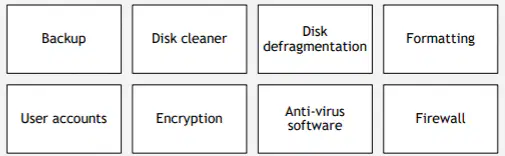
What is the software in the image an example of?
Data Security, Protection and Integrity Maintenance Software
Optimisation Software
Utility Software
Application Software
Single-User Operating Systems account for only one user at a time.
True
False
Multi-User Operating Systems account for multiple users but not all at once.
True
False
Single-Programming Operating Systems have one program which can be edited but not run.
True
False
Multi-Programming Operating Systems have more than one program which can be run but not at the same time.
True
False
_____ Processing allows for all related and grouped data to be entered at once and then processed in one, efficient function. (The lines do not indicate the number of characters.)
Networked
Time-Sharing
Batch
Real-Time
Time-Sharing Operating Systems share time slices between users and check whether users are ready to enter characters. With this in mind, what is a Real Time OS?
An OS which has an extremely fast system clock capable of complex calculations, although these may take some time.
An OS which uses the most accurate clock it can.
An OS which gives immediate responses with incredible speed an accuracy. These OS's usually contain extra hardware for hardware redundancy.
Exactly the same as a Time-Sharing OS, but faster in its time shares.
A _____ OS can connect to other computers on a specific network. This OS is specialised for dealing with data traffic and resource sharing. (The Lines do not indicate the number of characters)
Real-Time
Time-Sharing
Networked
Batch
A General System is:
A system designed to do the bare minimum a user requires from it.
A system made to do as many complex tasks as possible while using the least amount of processing power.
A System designed to do multiple different tasks which users may typically do.
A system designed to cater to a general audience in context to whichever organisation is publishing the system.
Dedicated Systems are:
Systems which are dedicated to complex calculations and problems
Systems which are created for a specific purpose.
Systems which use all of their processing power to process any instruction, be it simple or complex.
Systems which are created for one organisation, buyer or individual.
Embedded Systems are:
Systems which do less complex tasks than the larger systems they come from
Systems which are spread out across multiple devices. Ex: Internet of Things (IoT)
Systems within other systems.
Specific systems made to help other systems.
Which of these is responsible for defining problems in any given system and designing solutions for them?
Computer Technician
Programmer
System Analyst
Data Entry Clerk
Which of these is responsible for coding, updating and debugging software?
Computer Technician
Programmer
Computer Engineer
I.T. Trainer
Which of these is responsible for teaching new employees how to use certain software?
Web Master
Data Entry Clerk
Computer Engineer
I.T. Trainer
Which of these is responsible for entering and updating data onto the system database?
Web Master
Data Entry Clerk
Computer Engineer
Computer Technician
Which of these is responsible for designing and creating websites?
Web Master
I.T. Trainer
Programmer
Computer Technician
Which of these is responsible for installing and maintaining hardware and software?
System Analyst
Computer Engineer
Programmer
Computer Technician
Which of these is responsible for manufacturing, designing and testing computer hardware?
System Analyst
Computer Engineer
Programmer
Computer Technician
Computers have both had great advantages and disadvantages. Are all of the following statements true or false?
Advantages: More Automation, More Efficiency, Less Labour, Faster Processing, Easier to Design and Manufacture
Disadvantages: Health Risks, Higher Chance of Digital Crime, Less Privacy, Easier to Store Large Quantities of Information
True
False

