wayground logo

Free Printable Worksheets

Font size

S
M
L
XL
Worksheets

Year 7 Computing Revision Quiz

Total questions: 101

Worksheet time: 1hrs 21mins

Name
Class
Date
1.

Ergonomics is related to human....

a)

comfort

b)

safety

c)

both comfort and safety

d)

none of the answers

2.

Improper lighting, glare, noise and other conditions can contribute to ergonomic problems.

a)

true

b)

false

3.

Ergonomic issues often occur in the office environment.

a)

true

b)

false

4.

Eye and vision issues can be reduced when working with computers by doing the following:

a)

taking breaks to rest eyes

b)

increasing reflections on the screen

c)

using brighter lights that increase glare on the screen

d)

sitting 4 feet from the computer screen

5.

Which of the following is a risk factor associated with ergonomics?

a)

awkward posture

b)

sufficient recovery time between computer tasks

c)

changing tasks often so that the employee doesn't perform the same motion every few seconds or on a continuous basis

6.

How do you define ergonomics?

a)

Lower back pain.

b)

The way you complete technology assignments.

c)

Pain caused by typing.

d)

A science that deals with designing and arranging things so that people can use them easily and safely.

7.

What does posture mean?

a)

the way you sit or stand

b)

the way your computer sits

c)

the technology created for this class

d)

the way you log on to the computer and submit information

8.

When sitting at a desk your feet should be...

a)

flat on the floor

b)

crossed

c)

propped up

d)

in the chair

9.

Which illness affect the eyes if you stare at the computer for a long time?

a)

Carpal Tunnel Syndrome

b)

Computer Vision Syndrome

c)

Lower back pain

10.

You can be affected by lower back pain if you do not___________

a)

stand up

b)

walk all over

c)

sit upright on the chair

11.

Which of the following is one way to prevent Carpal Tunnel Syndrome?

a)

turn on the light

b)

take breaks from the keyboard

c)

always look closely at the monitor

12.

Identify all the symptoms of Computer Vision Syndrome from the options below

a)

Bellyache

b)

Blurred vision

c)

Double vision

d)

Dry/red eyes

e)

Eye irritation

13.

Workplace safety is the responsibility of __________________.

a)

Employees

b)

Employers

c)

Everyone

d)

Supervisors

14.

When making capital letters, which key should be used?

a)

Caps Lock

b)

Tab

c)

Shift

d)

Control

15.
The “j k l ;” home row keys are struck by the:
a)
Left Hand
b)
Right Hand
c)
Either Hand
16.
The ASDF keys are struck with the __________.
a)
Left hand
b)
Right Hand
c)
Either Hand
17.

Where should your eyes be while keyboarding?

a)

Looking at the copy

b)

Looking at your hands

c)

Watching your neighbor

18.
What finger do I use to strike the space bar?
a)
Index finger
b)
Middle finger
c)
Pinky
d)
Thumb
19.
Your fingers should rest on the ____________________ of the keyboard. 
a)
top row
b)
home row
c)
bottom row
d)
sides
20.
What is wrong with the posture in the picture?
a)
The computer screen is too close to the person's eyes. 
b)
His arms are not close to his body.
c)
His back is not straight.
d)
His body is not directly in front of the computer. 
21.
What home row key do you use the left pinky for?
a)
F
b)
A
c)
S
d)
D
22.
What home row key do you use the right pinky for?
a)
semicolon- ;
b)
J
c)
K
d)
L
23.
What home row key do you use the left index (pointer) finger for?
a)
A
b)
D
c)
F
d)
S
24.
What key do you use the right thumb for?
a)
Return Key
b)
Space Bar
c)
Backspace/Delete
d)
Tab
25.
What home row key do you use the left middle finger for?
a)
A
b)
S
c)
D
d)
; semicolon
26.
The left pinky and left middle fingers are used to type which of the following words?
a)
lad
b)
add
c)
dad
d)
ask
27.
What home row keys do you  use the right ring finger for?
a)
L
b)
K
c)
J
d)
semicolon - ;
28.
Which of the following IS  NOT a Keyboarding technique?
a)
Get comfortable!
b)
Sit Up Straight
c)
feet flat on the floor
d)
hands on the home row keys
29.
Which are the following ARE home row keys?
a)
a s d f g h j k l ;
b)
a s d f j k l ;
c)
a s d f g j k l ; :
d)
a s d f j k l :
30.
Ctrl + S
a)
Copy
b)
Paste
c)
Save
d)
New
31.
Ctrl + V
a)
Cut
b)
Paste
c)
Copy
d)
Save
32.
Ctrl + X
a)
Cut
b)
Copy
c)
Paste
d)
Bold
33.

How do you SELECT ALL?

a)

Ctrl + A

b)

Ctrl + W

c)

Alt + Backspace

d)

Ctrl + 0

34.

What is the shortcut key to SAVE your document?

a)

CRTL+S

b)

CRTL+A

c)

CRTL+V

d)

CRTL+E

35.

What is the shortcut key to PASTE any text or object that you copied?

a)

CRTL+S

b)

CRTL+A

c)

CRTL+V

d)

CRTL+E

36.

Cut selected text

a)

CTRL+V

b)

CTRL+C

c)

CTRL+X

d)

CTRL+A

37.

These keys will UNDO any action

a)

Ctrl + Z

b)

Ctrl + Y

c)

Ctrl +R

d)

Ctrl + P

38.
What are the short-cut keys used to copy text and/or an image?
a)
Control X
b)
Control @
c)
Control C
d)
Control Copy
39.
Individual boxes in a table are referred to as:
a)
Cells
b)
Boxes
c)
Rows
d)
Columns
40.
A group of boxes in a table that go up and down (vertical) are called:
a)
Grids
b)
Boxes
c)
Rows
d)
Columns
41.
A group of boxes in a table that go side to side (horizontal) are called:
a)
Grids
b)
Boxes
c)
Rows
d)
Columns
42.
The lines that outline and divide boxes in a table are referred to as:
a)
Shading
b)
Borders
c)
Style
d)
Cells
43.
Combining two or more cells to make one is called:
a)
Combining
b)
Joining
c)
Merging
d)
Creating
44.
The main purpose of using tables in documents is to:
a)
Create extra work
b)
Organize information
c)
Add decoration to a document
d)
None of the above
45.
To add a table to the document, you should click the __ tab in Word.
a)
Home
b)
Edit
c)
Insert
d)
Layout
46.
What is a grid of rows and columns used to display and organize information
a)
Chart
b)
Report
c)
Table
d)
Letter
47.
Where are the commands for inserting a new column or row located?
a)
Layout Tab, Rows and Columns Group, Insert Above and Insert Below
b)
Insert Tab, Rows and Columns Group, New Column and New Row
c)
Design Tab, Table Styles, Rows and Columns Adding
d)
Draw a New Table 
48.
Columns and/or rows can not be added to a table once it is created?
a)
True
b)
False
49.
Given the highlighted area in the image, how many rows and columns would be in the resulting table?
a)
3x3
b)
3x6
c)
6x3
d)
6x6
50.
Which part of the table is highlighted in the image?
a)
Row
b)
Column
c)
Cell
51.

This command represents:

a)

Italics

b)

Superscript

c)

Bold

d)

Underline

52.

WHICH IS NOT A FONT

a)

SHADOW

b)

COMIC SANS MS

c)

TIMES NEW ROMAN

53.
Microsoft excel is an example of _________________ Software.
a)
Spreadsheet
b)
Word Processing
c)
Presentation
d)
Reference
54.
Microsoft PowerPoint is an example of _____________ software
a)
Presentation
b)
Word Processing
c)
Spreadsheet
d)
Reference
55.
Windows Media Player is an example of ________________ software.
a)
Spreadsheet
b)
Reference
c)
Presentation
d)
Multimedia
56.

Which of these is an example of an operating system?

a)

Windows

b)

Word

c)

Excel

d)

PS4

57.
Three functions of the operating system 
a)
User Interface, multitasking, communicates with hardware via device drivers
b)
User Interface, multitasking, saving
c)
fetch, decode and execute instructions
d)
memory management, fetching instructions, user interface
58.

What is software?

a)

The parts we can see and touch

b)

The instructions that tell the computer what to do

c)

The mouse and keyboard

d)

The Monitor

59.

Which is system software?

a)
b)
c)
d)
60.

Which is NOT an application software?

a)
b)
c)
d)
61.

Pick the Operating System software.

a)
b)
c)
d)
62.

Which is NOT system software?

a)
b)
c)
d)
63.

What can an operating system do?

a)

Allow the hardware and software to communicate?

b)

Make a computer run faster

c)

Make tea

d)

carry out hospital operations

64.

What can an operating system do?

a)

Allow the hardware and software to communicate?

b)

Make a computer run faster

c)

Make tea

d)

carry out hospital operations

65.

Hardware is different from software because....

a)

you can see hardware

b)

it costs more

c)

hardware needs a person to make it work

d)

a computer doesn't need software to work

66.

Used for typing and editing text

a)

Paint

b)

Microsoft Word

c)

Microsoft Excel

67.

Used for creating spreadsheets and graphs

a)

Microsoft Word

b)

Microsoft Excel

c)

Windows Media Player

68.

Used for creating presentations

a)

Microsoft Excel

b)

Paint

c)

Microsoft PowerPoint

69.

The icon for Microsoft Word

a)
b)
c)
70.

The icon for Microsoft Excel

a)
b)
c)
71.

Which of the following is not an application software?

a)

Spreadsheet

b)

word processor

c)

Database system

d)

Windows Vista

72.

What is an Application Software?

a)

programs that operate the computer

b)

programs developed to perform  specific task or to solve a particular problem.

c)

Programs that maintain and protect the computer

73.
Your friends are busy playing Minecraft. What type of software is Minecraft?
a)
Communication
b)
Entertainment
c)
Word Processing
d)
Spreadsheet
74.
Your sister is living in Italy. What type of Software would you need to keep in touch with her?
a)
Reference
b)
Multimedia
c)
Spreadsheet
d)
Communication
75.

Which of the following is not a type of application software?

a)

Microsoft Office

b)

Encyclopedia

c)

Games

d)

Windows 98

76.

Which type of application software is used to view web pages and other online content?

a)

Word Processor

b)

Spreadsheet

c)

Presentation

d)

Internet Browser

77.

Which type of application software is Gmail?

a)

Internet Browser

b)

Presentation

c)

Email

d)

Word Processor

78.

Which type of application software would you use to write an essay for college or university?

a)

Spreadsheet

b)

Email

c)

Internet Browser

d)

Word Processor

79.

Is this device INPUT or OUTPUT

a)

Input

b)

Output

80.
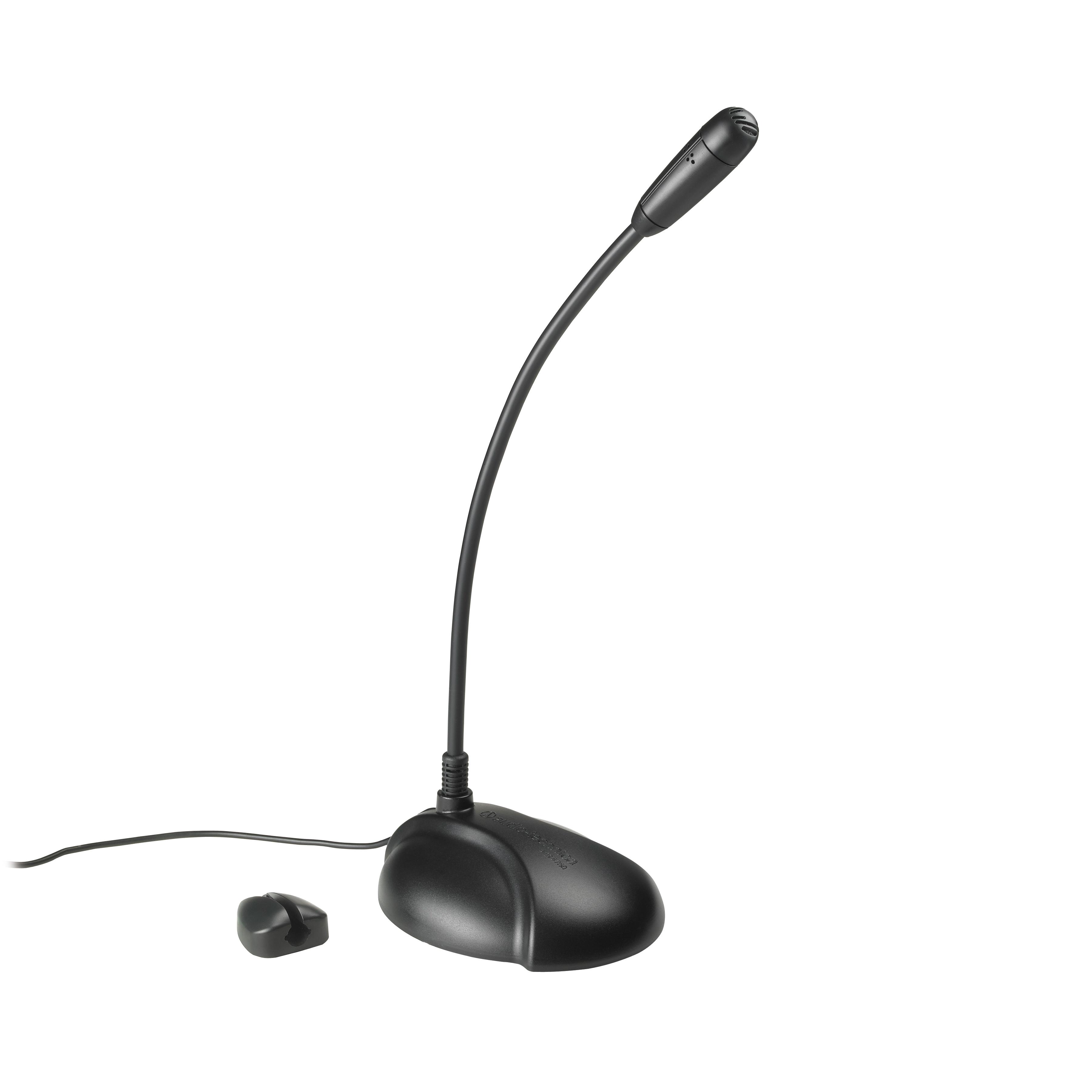
What type of device is this? Microphone
a)
Input
b)
Output
c)
Storage
81.
A USB memory stick is an input device because you plug it IN to a computer system
a)
True
b)
False
82.
What type of device is this?
a)
Input
b)
Output
c)
Storage
83.

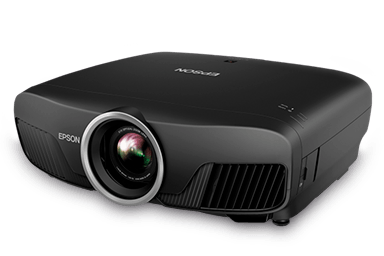
What type of device is this? (Projector)

a)

Output Device

b)

Input Device

c)

Input and Output Device

d)

Storage Device

84.
Which of these is not an input device?
a)
Scanner
b)
Screen
c)
Microphone
d)
Keyboard
85.
What type of device is this? Interactive whiteboard
a)
Input
b)
Output
c)
Input and Output
86.
What type of device is this? Keyboard
a)
Input
b)
Output
c)
Storage
87.
What type of device is this? Monitor
a)
Input
b)
Output
c)
Storage
88.
Is this device Input or Output?
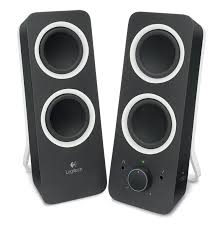
Speaker
a)
Input
b)
Output
89.

Which of these are magnetic storage devices?

a)
b)
c)
d)
e)
90.
Is this device Input or Output?
Printer
a)
Input
b)
Output
91.
What type of device is this? Smartphone screen
a)
Input
b)
Output
c)
Input and Output
92.

A Barcode Reader scans barcodes and puts the information into the computer.

a)

Output Device

b)

Input Device

c)

Storage Device

93.
What type of device is this? CD / DVD / Blu-Ray
a)
Input
b)
Output
c)
Storage
94.

What type of device is this?

a)

Output Device

b)

Input Device

c)

Input and Output Device

d)

Storage Device

95.
A CD, DVD or Blu-Ray is an input device because you put it  IN to a computer system
a)
True
b)
False
96.

Which one of the following segments of code would be the most precise block to use to draw a blue square in Scratch?

a)
b)
c)
d)
97.

What would the output of “say weather” be at the end of this program?

a)

rain

b)

cloudy

c)

rain, sun, rain, cloudy

d)

weather

98.

What value would be held by the ‘name1’ variable and the ‘name2’ variable at the end of this program?

a)

name1 = Jordan

name2 = Riley

b)

name1 = Riley

name2 = Jordan

c)

name1 = Jordan

name2 = Jordan

d)

name1 = Riley

name2 = Riley

99.

What will be the output of this program when it is executed? (What will the sprite say)?

a)

Good afternoon

b)

How are you?

c)

Good afternoon

How are you?

d)

Nothing will be outputted/said

100.

What will be the output of this program when it is executed? (What will the sprite say)?

a)

Good afternoon

How are you?

b)

How are you?

c)

Good morning

Good afternoon

How are you?

d)

Good morning

How are you?

101.

Which of these sets of instructions is not a subroutine

a)
b)
c)
d)