
 Worksheets
Python Programming
Total questions: 48
Worksheet time: 20mins
ข้อใดกล่าวไม่ถูกต้อง
ไพธอน ไม่สามารถรันได้ใน Linux
ไพธอน สามารถรันได้ทุกแพลตฟอร์ม
ไพธอน ไม่มีคำสั่ง Do while
ไพธอน ใช้การแปลภาษาแบบอินเตอร์พรีเตอร์
ข้อใดกล่าวไม่ถูกต้องเกี่ยวกับการแปลภาษาแบบ Compiler และ Interpreter
Compiler เมื่อแปลภาษาแล้วจะได้ .exe (Execute File)
Compiler ทำงานได้เร็วกว่า Interpreter หลายเท่าตัว เมื่อโปรแกรมมีขนาดใหญ่
Interpreter จะแปลภาษาทีละบรรทัด
Python เป็นภาษาแบบมี Compiler
ข้อใดไฟล์นามสกุลของภาษาไพธอน
.c
.py
.python
idle
ข้อใดประกาศตัวแปรได้ถูกต้อง
_def = 1
@score = 10.20
elif = ‘’
@try = [‘try’, ‘it’,’your’,’self’]
ข้อใดประกาศตัวแปรได้ไม่ถูกต้อง
x = [0,1,2]
a=b=c=0
a,b = [10,20,50]
a=[‘true’,{1,2,3,4}]
ถ้าต้องการเขียนนิพจน์เพื่อคำนวณพื้นที่ สามเหลี่ยมหน้าจั่ว ซึ่งมีสูตรดังนี้
4a(4b2−a2) กำหนดให้ a คือ ฐาน และ b คือ ด้านของ สามเหลี่ยม
a/4*((4*(b**2)-(a**2))**(1/2)
a%4*((4*(b**2)-(a**2))**(1/2)
a/4*(sqrt(4*(b**2)-(a**2)),(1/2)
a/4*((4*(pow(2))-(a**2))**(1/2
x = 10
x++
print(x)
11
10
12
Error
ผลลัพธ์ของ
>>> 2*5**2*3
คือ ข้อใด
300
150
600
106
>>> x,y = 4,2
>>> x or y
2
3
4
6
จงเติมชุดคำสั่งเพื่อให้โปรแกรมคิดพื้นที่สามเหลี่ยมทำงานได้อย่างสมบูรณ์
width = float(input("Width : "))
height = float(input("Height : "))
//เติมชุดคำสั่ง
print('='*20)
print("Area of Triangle : ",area)
area = width*height
area = (width*height)**0.5
area = 3.14*width*height
area = 0.5*width*height
ถ้าต้องการแสดงผลด้วย f String จากชุดคำสั่งนี้ต้องเขียนอย่างไร
number = float(input("Number : "))
print("Number is {number}")
print(f"Number is {number}")
print(f"Number is (number)")
print(f"Number is [number]")
จากชุดคำสั่งถ้ากรอก 2,3 จะได้ผลลัพธ์ว่าอย่างไร
x,y = float(input("x : "),input("y : "))
print(f'x and y : {x}{y}')
Error
x and y : 2 3
x and y : 2.0 3.0
Undefind
จากชุดคำสั่งจงเลือกชุดคำสั่งที่เหมาะสมในการรับค่า input
//เติมชุดคำสั่ง
//เติมชุดคำสั่ง
area = 0.5*width*height
print('='*20)
print("Area of Triangle : ",area)
width = float(input("Width : "))
height = float(input("Height : "))
width , height = float(input("Width : ")), float(input("Height : "))
ถูกทั้ง 1 และ 2
ไม่มีข้อใดถูก
การสร้างตัวแปรเพื่อรับค่าแบบนี้ถูกต้องหรือไม่ เพราะเหตุใด
x,y = float(input("x : "),input("y : "))
ไม่ถูกเพราะต้องแปลง float ทีละค่า
ถูกสามารถทำได้
ไม่ถูกเพราะต้องรับ x และ y คนละบรรทัด
ผิดทุกข้อ
ข้อใดคือ Comments ในภาษา Python
//comment
‘comment
#comment
/* comment */
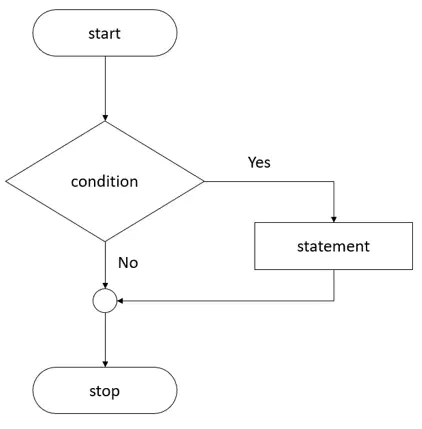
พิจารณาจาก Flowchart คือ การเขียน loop ในรูปแบบใด
if
while
do while
for loop
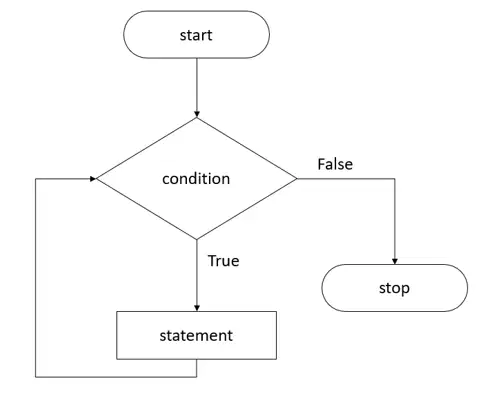
พิจารณาจาก Flowchart คือ การเขียน loop ในรูปแบบใด
if
while
do while
for loop

พิจารณาจาก Flowchart คือ การเขียน loop ในรูปแบบใด
if
while
do while
for loop
เขียนชุดคำสั่งเพิ่มเติมเพื่อให้ได้ผลลัพธ์ดังต่อไปนี้
10 9 8 7 6 5 4 3 2 1
a = [10,9,8,7,6,5,4,3,2,1]
for x in a :
#เติมชุดคำสั่ง
print(x,end=" ")
print(x,end=",")
print(x)
print(end)
ข้อใดประกาศตัวแปรไม่ถูกต้องตามหลักการ
#myhome
_myhome
my-home
ข้อ 1 และ 3 ผิด
Editor ใดที่เป็น Tool ในการเขียนไพธอน
IDLE
Pycharm
Anaconda
ถูกทุกข้อ
ข้อใดเป็นการประกาศตัวแปรด้วยภาษาไพธอน
Dim x as integer = 10
public x integer = 10
x= 10
x = 10++
ข้อใดเป็นการประกาศ function ในภาษาไพธอน
public static void main()
public function myFunction() as String
def Myfunction()
sub main()
ข้อใดเป็นการแสดงผลหน้าจอด้วยภาษาไพธอน
echo “Hello World”
print(“Hello World”)
printf(“Hello World”)
console.writeln(“Hello World”)
การติดตั้ง Package เพิ่มเติมในภาษา Python ใช้คำสั่งอะไร
pip
pup
pap
pop
ข้อใดกล่าวไม่ถูกต้องเกี่ยวกับ Python
Python สามารถนำไปใช้คำนวณทางคณิตศาสตร์ได้
Python สามารถนำไปสร้าง Web ได้
Python สามารถทำงานบนระบบปฎิบัติการ Rasberrypy
Python ไม่สามารถเขียนแบบ OOP ได้
จากชุดคำสั่งจะแสดงผลลัพธ์ว่าอย่างไร
x = 10
def addX():
global x
x = 20
addX()
print(x)
10
20
30
40
จากชุดคำสั่งจะแสดงผลลัพธ์ว่าอย่างไร
def ShowMessage(msg = "Hello Welcome"):
print("Hello " , msg)
ShowMessage("John")
ShowMessage()
John
Hello John
Hello Welcome
Hello John
Hello John
Hello Hello Welcome
จงเติมชุดคำสั่งให้สามารถรับค่า function ได้
def LineOfCircle(r):
line = 2 3.14 r
return line
def CalAreaCircle(r):
area = 3.14*(r**2)
return area
def InfoSum(r):
line = LineOfCircle(r)
area = CalAreaCircle(r)
return line,area
print("===Cal Info radius===")
r = float(input("Enter your radius : "))
//เติมชุดคำสั่ง
print("Line of Circle : ", line)
print("Area of Circle : ", area)
area = InfoSum(r)
line = InfoSum(r)
InfoSum(line,area)
line,area = InfoSum(r)
จากชุดคำสั่งจะแสดงผลลัพธ์ว่าอย่างไร
cars = {
"brand":"Toyata",
"color": ['gray','red','white']
}
cars["color"][0] = 'Yellow'
for x,y in cars.keys(),cars.items():
print(x,y)
Error
brand color
('brand', 'Toyata') ('color', ['Yellow', 'red', 'white'])
brand color
('brand', 'Toyata') ('color', ['gray', 'red', 'white'])
brand color
('brand', 'Toyata') ('color', [ 'red', 'white'])
จากชุดคำสั่งจะแสดงผลลัพธ์ว่าอย่างไร
data = {
"air":67,
"air":68,
"air":69
}
print(data)
{'air': 69}
{'air': 67}
{'air': 68}
Error เพราะ key ซ้ำกัน

จากตารางเปรียบเทียบทั้ง 3 ดังกล่าวจงเลือกให้สอดคล้องกับข้อมูลของ Set
changeable, duplicate members
unchangeable, No duplicate members
None, None
unchangeable, duplicate members
จากชุดคำสั่งจะแสดงผลลัพธ์ว่าอย่างไร
list(range(1,20,3))
[1, 4, 7, 10, 13, 16, 19]
[1, 6, 11, 16]
[2,4,6,8,10]
[1,3,5,7,9]
จากชุดคำสั่ง
data = [1,[2,[3]]]
print('Access Data')
print('-'*10)
ถ้าต้องการเข้าถึงให้ได้ผลลัพธ์ต้องเขียนชุดคำสั่งว่าอย่างไร
Access Data
----------
3
print(data[2])
print(data[1][2])
print(data[1][1][0])
print(data[1][1][1])
จากชุดคำสั่งผลลัพธ์คืออะไร
point = [10,20,30,40,50,100,150]
y = [x for x in point if x > 30 in point]
print(y)
[10,20,30,40]
[30,100,150]
[20,40,100]
[40, 50, 100, 150]
จากชุดคำสั่งจะแสดงผลลัพธ์ว่าอย่างไร
seta = set("a","b","c")
print(seta)
Error
(“a”,”b”,”c”)
[“a”,”b”,”c”]
{“a”,”b”,”c”}
จากชุดคำสั่งผลลัพธ์คืออะไร
seta = {"a","b","c"}
lst = [1,2,3,4,5,6,7,8]
seta.update(lst)
print(seta)
Error เพราะ list update กับ Set ไม่ได้
{1, 2, 3, 4, 5, 6, 7, 8, 'c', 'b', 'a'}
[1, 2, 3, 4, 5, 6, 7, 8, 'c', 'b', 'a']
(1, 2, 3, 4, 5, 6, 7, 8, 'c', 'b', 'a')
จากชุดคำสั่งจะแสดงผลลัพธ์ว่าอย่างไร
seta = {"cat","dog","bird","rat"}
a = seta.pop()
print(a)
print(seta)
dog
{'rat', bird, 'cat'}
cat
{'rat', 'dog', 'bird'}
bird
{'rat', 'dog'}
bird
{'rat', 'dog', 'cat'}
จากชุดคำสั่งจะแสดงผลลัพธ์ว่าอย่างไร
a = ("apple",)
print(type(a))
Error เนื่องจาก ,
<class 'tuple'>
<class 'list'>
<class 'Array'>
จากชุดคำสั่งจะแสดงผลลัพธ์ว่าอย่างไร
a = tuple(("apple","cherry","banana"))
print(type(a))
Error เนื่องจากใส่วงเล็บเกิน
<class 'tuple'>
<class 'list'>
<class 'Array'>
จากชุดคำสั่งจะแสดงผลลัพธ์ว่าอย่างไร
a = ("a","b","c")
x = list(a)
x[0] = "1"
a = tuple(x)
print(a)
('1', 'b', 'c')
['1', 'b', 'c']
{'1', 'b', 'c'}
['1'], ['b'],[ 'c']
จากไฟล์ importFor.py ที่ชุดคำสั่งดังนี้
def SayHello():
print("Hello"*3)
def SayGoodBye():
print("Say Good bye !!!")
เมื่อสร้างไฟล์ใหม่แล้วเขียนชุดคำสั่งดังนี้ จะได้ผลลัพธ์ว่าอย่างไร
from importFor import SayHello
print(SayHello())
HelloHelloHello
None
HelloHelloHello
None
Hello
จากชุดคำสั่งจะได้ผลลัพธ์อย่างไร
def main():
print("This is main!!!")
if name =="__main__":
main()
This is main!!!
Error
โปรแกรมหยุดทำงาน
โปรแกรมว่างเปล่าไม่ได้มีอะไรแสดงผล
จากชุดคำสั่งถ้าต้องการเติมชุดคำสั่งเพื่อตรวจเชคว่ารับค่าเป็นตัวเลขหรือไม่ จะเขียนชุดคำสั่งว่าอย่างไร
try:
//เติมชุดคำสั่ง
except ValueError:
print("Wrong Number")
x = int(input("Please Enter Your Integer : "))
x = input("Please Enter Your Integer : ")
x = float(input("Please Enter Your Integer : "))
x = map(input("Please Enter Your Integer : "))
จากชุดคำสั่งเมื่อกรอกข้อมูลเป็นเลข 2 จะได้ผลลัพธ์อย่างไร
try:
x = input("Enter your float : ")
if type(x) == float:
print("Ok float")
elif type(x) == int:
print("OK integer")
elif type(x)==str:
print("Ok String")
except ValueError:
print("Wrong Input")
finally:
print("Done...")
Error
Enter your float : 2
Ok Integer
Done...
Wrong Input
Done...
Enter your float : 2
Ok String
Done...
จากไฟล์ doc.txt ซึ่งมีเนื้อหาภายในดังนี้
Air Times 3 !!!!!
Air Times 2 !!!!!
Air Times 1 !!!!!
Boom!!!!
ผลลัพธ์จากชุดคำสั่งจะเป็นอย่างไร
f = open('doc.txt')
cnt = 0
for x in f:
cnt = cnt +1
if(cnt==3):
print(x)
f.close()
Air Times 3 !!!!!
Air Times 2 !!!!!
Air Times 1 !!!!!
Boom!!!!
จากไฟล์ doc.txt
Air Times 3 !!!!!
Air Times 2 !!!!!
Air Times 1 !!!!!
Boom!!!!
ผลลัพธ์จากชุดคำสั่งจะเป็นอย่างไร
f = open('doc.txt','r')
print(f.read())
Air Times 3 !!!!! Air Times 2 !!!!! Air Times 1 !!!!! Boom!!!!
Air Times 3 !!!!!
Air Times 2 !!!!!
Air Times 1 !!!!!
Boom!!!!
Air Times 1 !!!!!
Air Times 2 !!!!!
Air Times 3 !!!!!
undefind
จากไฟล์ doc.txt
Air Times 3 !!!!!
Air Times 2 !!!!!
Air Times 1 !!!!!
Boom!!!!
ผลลัพธ์จากชุดคำสั่งจะเป็นอย่างไร
f = open('doc.txt','r')
c = f.readlines()
print(c[0:2])
Air Times 1 !!!!!
Boom!!!
('Air Times 3 !!!!!\n', 'Air Times 2 !!!!!\n')
['Air Times 3 !!!!!\n', 'Air Times 2 !!!!!\n']

