
 Worksheets
Y7_Introduction_Computers_EOY
Total questions: 74
Worksheet time: 40mins
Which of these is a Hard Disk Drive (HDD)?


Solid state storage has no moving parts?
True
False
Which of the following storage devices is most suitable for use in mobile devices?
Cloud
Magnetic
Solid State
Optical

What is a storage device?
A device use for calculating data
A device used to store data temporarily
A device used to supply power to the computer
A device used to store data permanently
External storage device, fairly fragile, easy to snap or scratch.
Flash memory
Magnetic Tape
CD
Hard disk


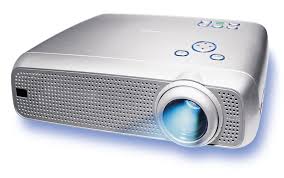
Projector
An input device used to enter characters and functions into the computer system pressing buttons, called?
Remote control
Keyboard
Mouse
Touch screen
A USB memory stick is a _______ device
input
output
storage
both input and output
Headphones are a _______ device
input
output
storage
both input and output

A microphone is an example of an ______________ device.
input
output
both input and output
storage device (not considered input or output)


Is this a hardware or software?
Hardware
Software

Hardware or Software?
Hardware
Software

Which type of memory is non-volatile?
RAM
ROM
Which type of memory is used to store the OS, programs and data in use by the CPU?
RAM
ROM
Which type of memory is read-only?
RAM
ROM
Which type of memory does not keep data stored when it is powered off?
RAM
ROM
Which type of memory would you upgrade to improve the performance of your computer?
RAM
ROM
Data entered into a computer through a keyboard is called (a) . (Hint: It goes in first)
The manipulation of data according to instructions is the (a) .
Information displayed on a monitor after processing is the (a) .
Fast-access memory that holds data currently in use is called (a) . (Hint: Think speed)
Long-term storage devices like hard drives are (a) (Hint: two words)
Storing data online and accessing it from anywhere is (a) .
A set of instructions that tells the computer what to do is (a) . (Hint: Not the physical parts)
The software that manages the computer's resources is the (a) . (Hint: Think control center)
The physical components of a computer system are (a) . (Hint: You can touch them)
The brain of the computer responsible for processing is the (a) .
Temporary memory that is cleared when you turn off the computer is (a) .
Permanent memory that stores essential startup instructions is (a) .


What do you do?

Do you share it?

Who should you ask before you do it?

What is E-Safety?
Knowing how to be safe online
Knowing how to be safe in a public place
Knowing how to cross a road
Knowing how to be safe in school

If you receive an abusive e-mail from an anonymous sender, what should you do?
reply politely
send an abusive message back
confront the person you think it probably came from
none of the above


Online safety is the same as internet safety and cyber safety.
True
False
All resources you find online are free to use.
True
False
Online safety represents the state of being protected from any security risks to your private information when using internet.
True
False
All images you find online are free to use.
True
False
Anything found online is under copyright unless the author/creator has explicitly indicated that their work is free to use.
True
False
Which of the following is information that is not dangerous to share on the Internet?
your country
personal information
your passwords
famili information
What should you never use when making a password?
Personal data
Numbers
Letters
What is a digital trace?
Everything we leave on the Internet.
Only uploaded images on the Internet
Just what we write on the Internet
What should we do if someone requests our personal information on the Internet?
Write all the data because there is no danger on the Internet.
Write all data except phone number.
Ask an adult for advice.
On the Internet it is desirable to:
Share all your data.
Talk to strangers.
Publish whatever we want.
To adhere to the rules of conduct, not to talk to strangers, not to write inappropriate things.
Someone has told you three reasons why you shouldn't let your mobile phone post your location on social networking sites. Which one is true?
Your parents will be able to track where you've been and guess what you've been up to.
The local shopping centre will notice you're there so often that they will offer you a job.
Someone might go to your house while you're out and burgle it.
What term describes the act of winding someone up online?
Trolling
Posting
Phishing
What should you do if you want to meet someone you only know online?
Meet somewhere quiet, so you can get to know each other.
Take an adult with you and meet in a public space.
Don't tell anyone because that would be embarrassing.
What software can you use to avoid getting viruses?
Disk Cleanup software
Firewall software
Anti-virus software
Which of these statements is true?
It is illegal to download from file-sharing sites.
It is free and legal to download anything you find online.
It is legal to use file sharing sites, but not if you're downloading the latest blockbuster or best-selling album.
What can you do to get less spam?
Always tick the 'don't pass on my details' box when filling forms in.
Change your email address every six months.
Never give your email address to anyone.
What might someone do if they steal your identity?
Earn lots of money and leave it in your bank account.
Try to give you all the credit for their hard work.
Try to access your bank account or set up a loan in your name.

