
Font size
S
M
L
XL
 Worksheets
PH Ew#ll#t Pr#d#ct H#ng##t
Total questions: 10
Worksheet time: 50mins
Name
Class
Date
1.
What would you do if you receive an inquiry to refund a Maya Credits & QRPay Maya transaction?
a)
Direct merchant to contact their AM/CPS for refund request
b)
Refund the transaction from AD
c)
Recommend merchant to create refund from API
d)
Escalate to L2
2.
If partner raise transaction checking inquiry and you found:
- the payment was recorded as FAILED in Admin Dashboard
- the payment is FOUND in settlement report
What would you do in the first place?
a)
inform partner the transaction was received in xendit side, but unsuccessful on merchant's end.
transaction is valid for chargeback
b)
Escalate to product team
c)
Escalate to L2
d)
Escalate back to partner
3.
Why partner usually raising transaction checking inquiry to us?
a)
Difficult to find transaction on dashboard
b)
Lack of understanding about failure reason
c)
curious about xendit payment flow
d)
Partner receive chargeback request
4.
In what condition you'll put the ticket as task::other::lack of understanding refund request?
a)
when merchant asking about transaction status
b)
merchant is requesting manual refund
c)
transaction status is updated to REFUNDED after it's triggered on dashboard
d)
when end customer ask for refund status
5.
Who's our PH eWallet partner?
a)
GrabPay, PayMaya, GCash
b)
GrabPay, PayMaya, GCash, ShopeePay
c)
GrabPay, PayMaya, GCash, ShopeePay, Zalopay
d)
Zalopay, PayMaya, GCash, ShopeePay
6.
What should you do if after you proceed a manual refund from admin dashboard but you see the status is not updated?
a)
Escalate to L2
b)
Switch to merchant dashboard to see whether the manual refund has been successfully triggered
c)
Get back to merchant the refund is failed
d)
Escalate to product team
7.
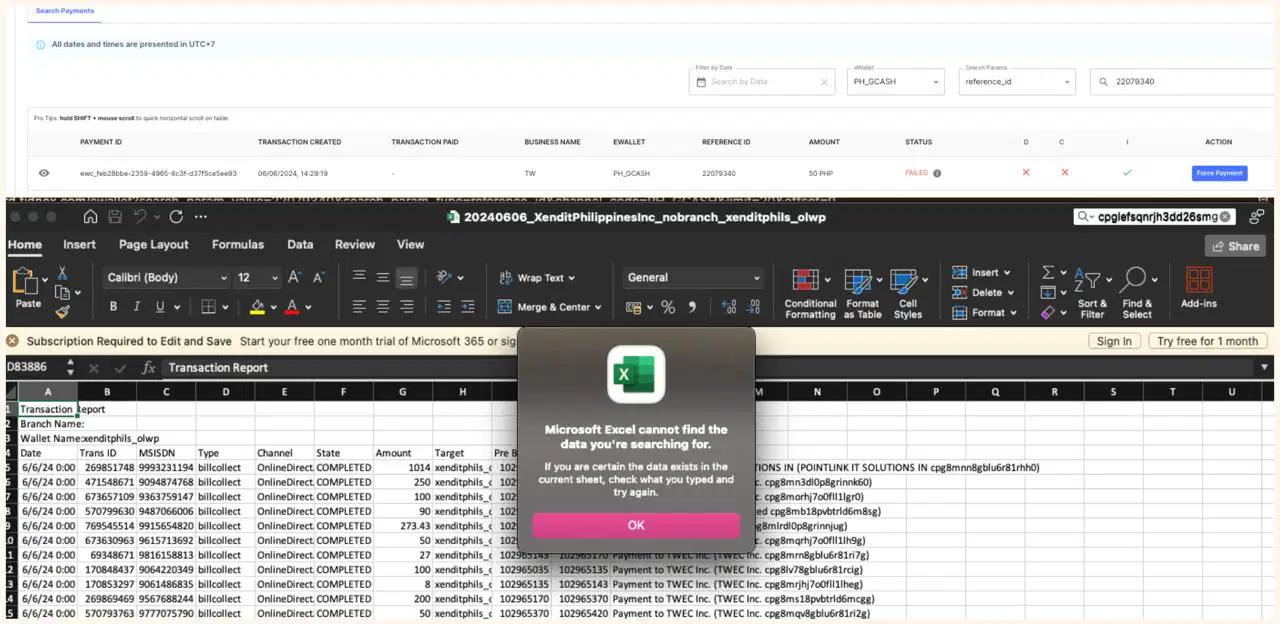
what is the correct PRC for this inquiry?
- Transaction is recorded as FAILED in Admin Dashboard
- Transaction is not found in settlement report
a)
Ticket Category: Issue
Ticket Type: Paid transaction not reflected on dashboard
Reason Code: Partner Issue
Partner: Paymaya
Action Taken by CS: L2
b)
Ticket Category: Issue
Ticket Type: Paid transaction not reflected on dashboard
Reason Code: Partner Issue
Partner: Gcash
Action Taken by CS: Settlement report checking
c)
Ticket Category: Issue
Ticket Type: Refund Failure
Reason Code: Partner Issue
Partner: Paymaya
Action Taken by CS: Settlement report checking
d)
Ticket Category: Issue
Ticket Type: Paid transaction not reflected on dashboard
Reason Code: Partner Issue
Partner: Gcash
Action Taken by CS: L2
8.
If partner is raising transaction checking inquiry with condition:
- the payment recorded as FAILED in Admin Dashboard
- the payment is not found in Settlement Report
What would you do?
a)
Escalate to L2
b)
Inform partner to REJECT the chargeback request
c)
Inform partner to ACCEPT the chargeback request
d)
Recommend partner to contact merchant
9.
Before refunding eWallet transaction for merchant, what should you check?
a)
Merchant have sufficient balance to do refund
b)
refund amount is not bigger than paid amount
c)
validity period of refund
10.
How long is the refund validity period for GCASH?
a)
180 Days
b)
185 Days
c)
365 Days
d)
30 Days
e)
Unlimited
Reset

