Wayground logo

Free Printable Worksheets

Font size

S
M
L
XL
Worksheets

ADOBE PP

Total questions: 60

Worksheet time: 30mins

Name
Class
Date
1.
Name the selected tool.
a)
Mark In
b)
Mark Out
c)
Add Marker
d)
Export Frame
2.
Name the selected tool.
a)
Mark In
b)
Mark Out
c)
Go To In Point
d)
Go To Out point
3.
Name the selected tool.
a)
Mark In
b)
Mark Out
c)
Go To In Point
d)
Go To Out point
4.
Name the selected tool.
a)
Mark In
b)
Mark Out
c)
Add Marker
d)
Export Frame
5.
Name the selected tool.
a)
Mark In
b)
Mark Out
c)
Add Marker
d)
Export Frame
6.
Name the selected tool.
a)
Mark In
b)
Mark Out
c)
Add Marker
d)
Export Frame
7.
Name the selected tool.
a)
Lift
b)
Extract
c)
Insert
d)
Overwrite
8.
Name the selected tool.
a)
Lift
b)
Extract
c)
Insert
d)
Overwrite
9.
Name the selected tool.
a)
Lift
b)
Extract
c)
Insert
d)
Overwrite
10.
Name the selected tool.
a)
Lift
b)
Extract
c)
Insert
d)
Overwrite
11.
Name the selected tool.
a)
Lift
b)
Step Forward 1 Frame Right
c)
Step Back 1 Frame Left
d)
Play-Stop Toggle
12.
Name the selected tool.
a)
Lift
b)
Step Forward 1 Frame Right
c)
Step Back 1 Frame Left
d)
Play-Stop Toggle
13.
Name the selected tool.
a)
Lift
b)
Step Forward 1 Frame Right
c)
Step Back 1 Frame Left
d)
Play-Stop Toggle
14.
Name the selected tool.
a)
Hand
b)
Pen
c)
Rate Stretch
d)
Razor
15.
Name the selected tool.
a)
Hand
b)
Pen
c)
Rate Stretch
d)
Razor
16.
Name the selected tool.
a)
Hand
b)
Pen
c)
Rate Stretch
d)
Razor
17.
Name the selected tool.
a)
Hand
b)
Pen
c)
Rate Stretch
d)
Razor
18.
Name the selected tool.
a)
Ripple Edit
b)
Rolling Edit
c)
Select (Trim)
d)
Zoom
19.
Name the selected tool.
a)
Ripple Edit
b)
Rolling Edit
c)
Select (Trim)
d)
Zoom
20.
Name the selected tool.
a)
Ripple Edit
b)
Rolling Edit
c)
Select (Trim)
d)
Zoom
21.
Name the selected tool.
a)
Ripple Edit
b)
Rolling Edit
c)
Select (Trim)
d)
Zoom
22.
Name the selected tool.
a)
Slide
b)
Slip
c)
Track Select Backward
d)
Track Select Forward
23.
Name the selected tool.
a)
Slide
b)
Slip
c)
Track Select Backward
d)
Track Select Forward
24.
Name the selected tool.
a)
Slide
b)
Slip
c)
Track Select Backward
d)
Track Select Forward
25.
Name the selected tool.
a)
Slide
b)
Slip
c)
Track Select Backward
d)
Track Select Forward
26.

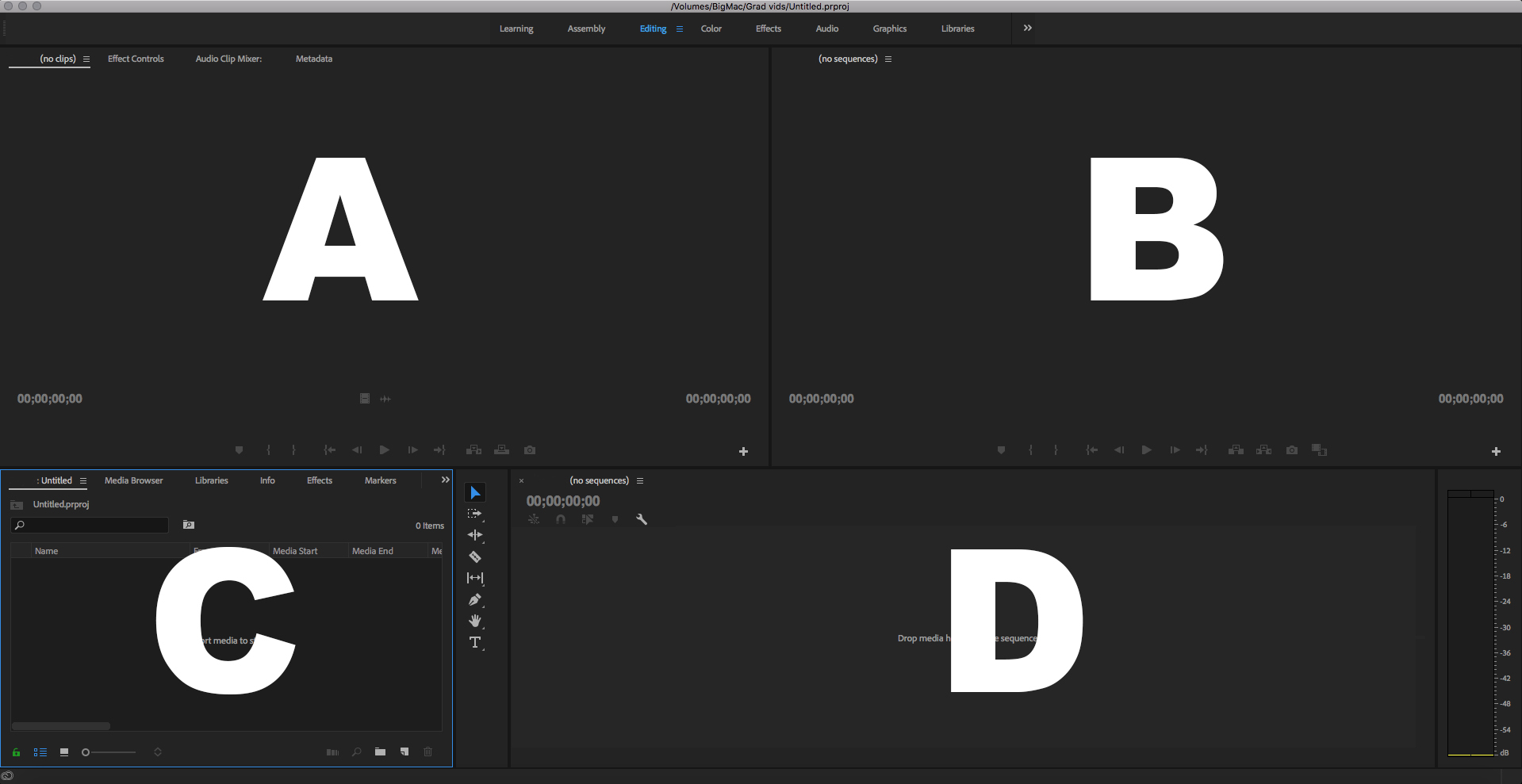
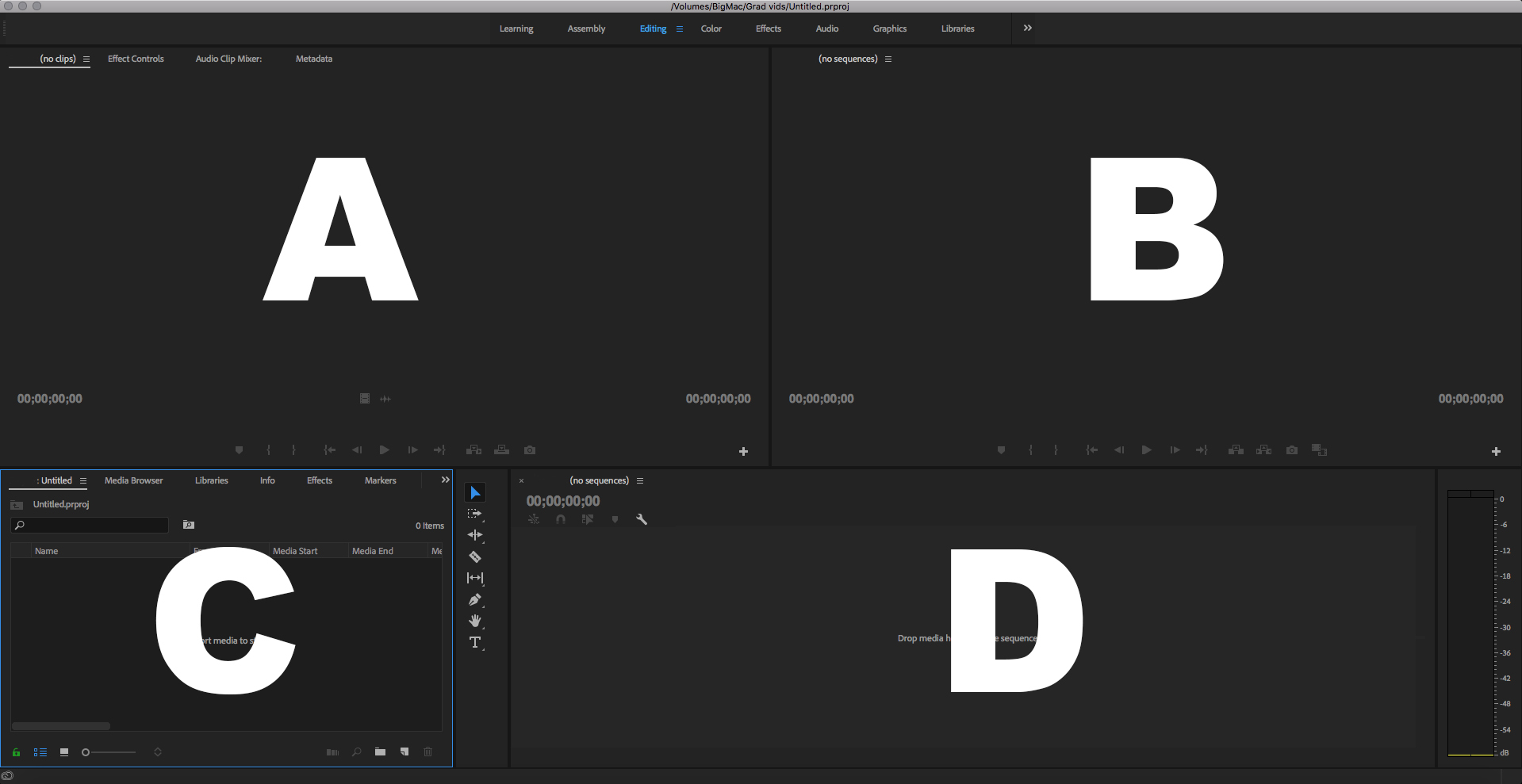
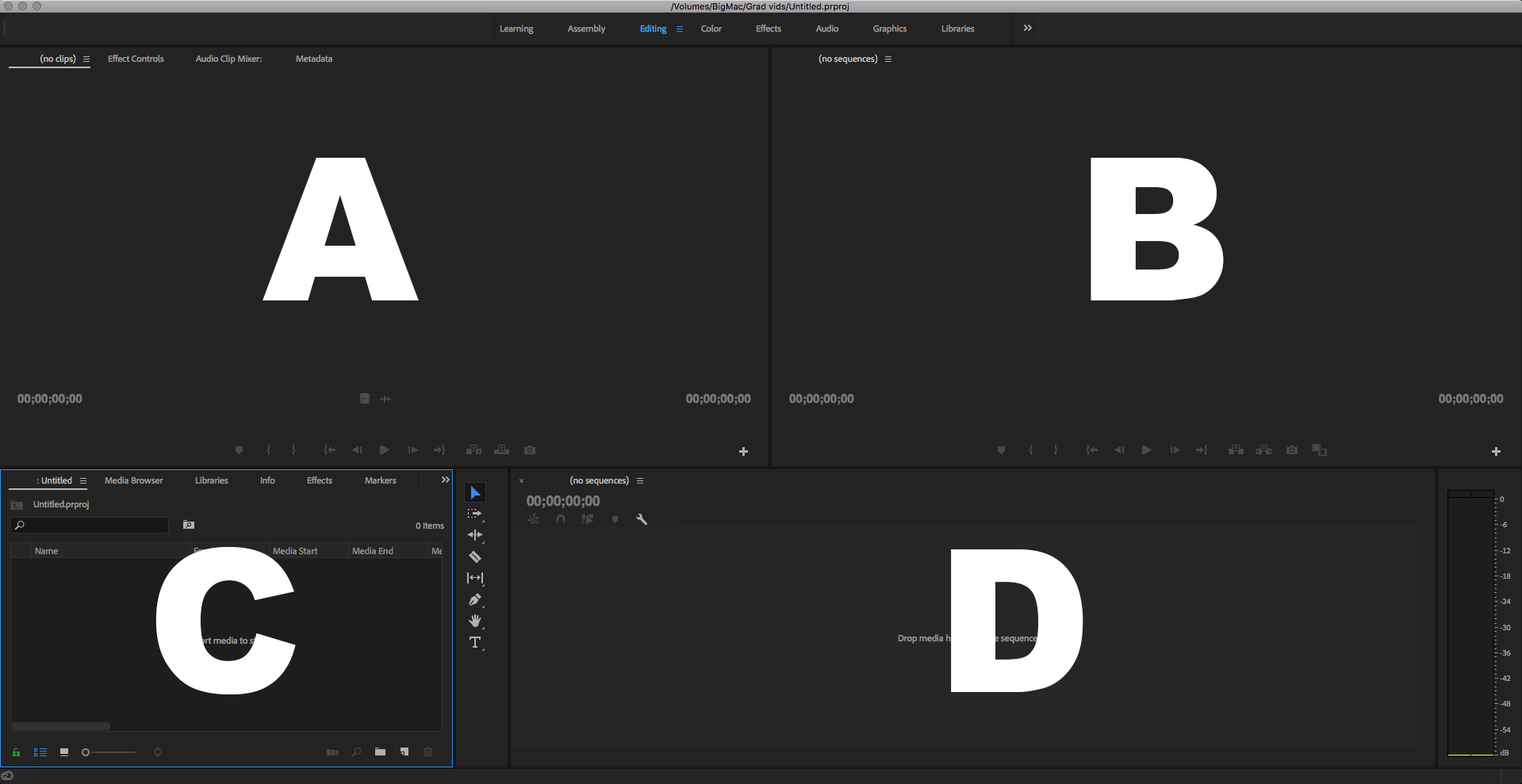
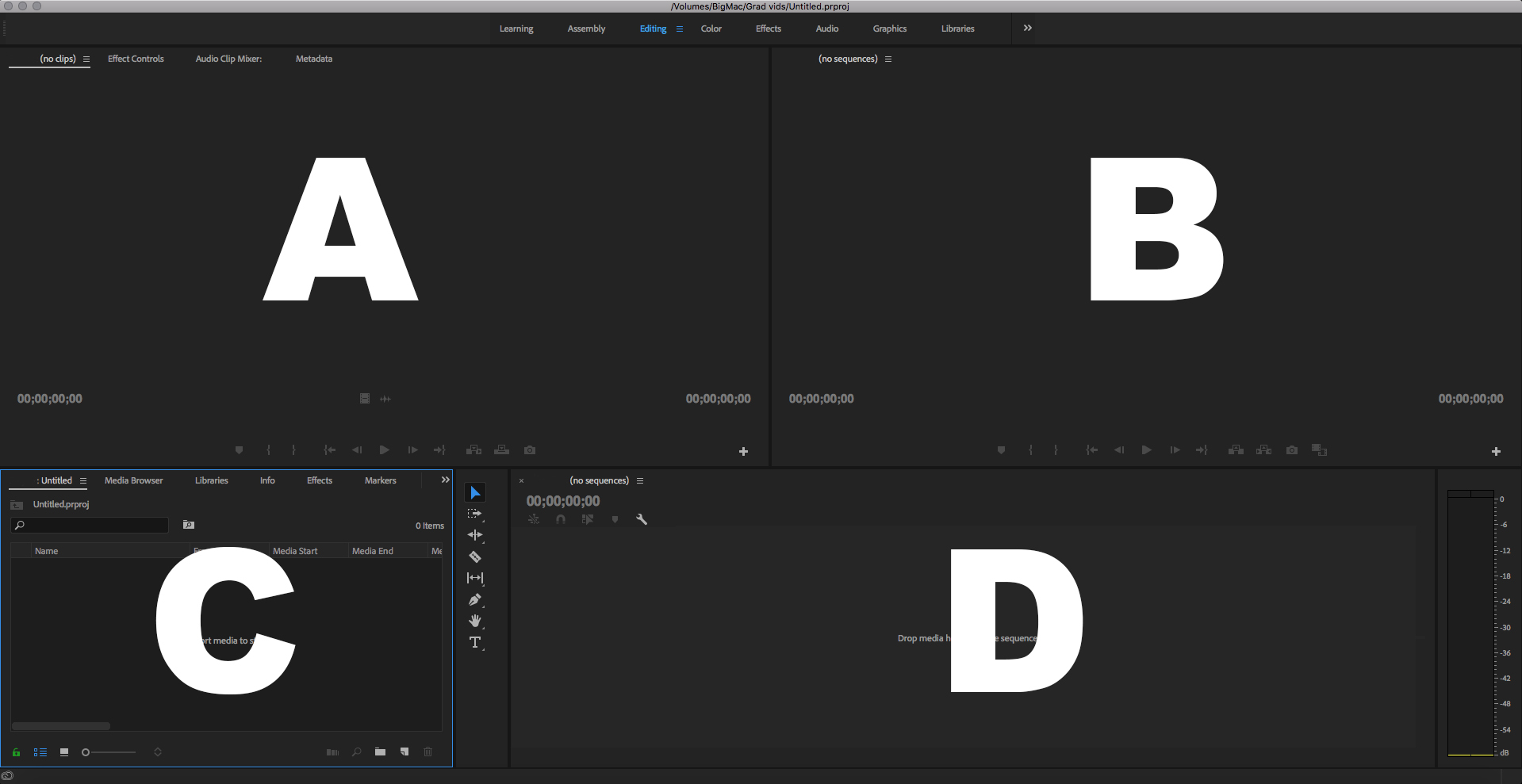
Which is the Program Panel?

a)

A

b)

B

c)

C

d)

D

27.

Which is the Source Panel?

a)

A

b)

B

c)

C

d)

D

28.

Which is the Timeline Panel?

a)

A

b)

B

c)

C

d)

D

29.

Which is the Project Panel?

a)

A

b)

B

c)

C

d)

D

30.

Inside the Project panel, what does this Icon stand for?

a)

A Clip

b)

An Audio Clip

c)

An Image

d)

A Sequence

31.

Inside the Project panel, what does this Icon stand for?

a)

A Clip with Audio

b)

An Audio Clip

c)

A Sequence

d)

A Subclip

32.

Inside the Project panel, what does this Icon stand for?

a)

A Sequence

b)

A Subclip

c)

An Audio File

d)

A Clip with Audio

33.

Inside the Project panel, what does this Icon stand for?

a)

A Subclip

b)

A Sequence

c)

A Clip with Audio

d)

An Image

34.

Inside the Project panel, what does this Icon stand for?

a)

A Clip with Audio

b)

A Subclip

c)

A Bin

d)

An Audio Clip

35.

Inside the Project panel, what does this Icon stand for?

a)

A Subclip

b)

A Folder

c)

A Bin

d)

A Sequence

36.

In the Source Monitor, what does this Icon do?

a)

Insert

b)

Extract

c)

Lift

d)

Overwrite

37.

In the Source Monitor, what does this Icon do?

a)

Lift

b)

Mark In

c)

Export Still Frame

d)

Overwrite

38.

In the Source Monitor, what does this Icon do?

a)

Play

b)

Fast Forward

c)

Go to Mark In

d)

Move forward by 1 frame

39.

In the Program Monitor, what does this Icon do?

a)

Lift

b)

Extract

c)

Insert

d)

Overwrite

40.

In the Source Monitor, what does this Icon do?

a)

Go to Mark Out

b)

Extract

c)

Mark In

d)

Mark Out

41.

In the Program Monitor, what does this Icon do?

a)

Extract

b)

Export Frame

c)

Lift

d)

Screenshot

42.

What Workspace is this?

a)

Editing

b)

Color

c)

Effects

d)

Assembly

43.

What Workspace is this?

a)

Assembly

b)

Color

c)

Effects

d)

Editing

44.

In the Source Monitor, what does this Icon do?

a)

Move 1 frame forward

b)

Play

c)

Export Frame

d)

Insert

45.

In the Source Monitor, what does this Icon do?

a)

Out Point

b)

Play

c)

Go to out point

d)

Export Frame

46.
How do you "undo" an edit in adobe premiere pro?
a)
Use the short cut "cmnd+z"
b)
Use the short cut "cmnd+d"
c)
Use the short cut "cmnd+u"
d)
Use the short cut "cmnd+q"
47.
How do you add a video transition across two movie clips in the timeline?
a)
Using the effects window, and click and drag transition onto the movie clips
b)
Using the effects window and clicking on the transition
c)
Using the colour window and clicking on the effect
d)
Using the audio window and moving the faders
48.
What is the difference between audio clips and movie clips
a)
Movie clips are visual files
b)
Movie clips are audio files
c)
Audio clips are photoshop files
d)
Audio clips are visual files
49.
What is the program window used for?
a)
It is used for viewing the final program material
b)
It is used for exporting the final program
c)
It is used for importing the footage
d)
It is used for recording the footage
50.
What is the source window used for?
a)
Setting in-points and out-points, then dragging the clips into the timeline
b)
Importing movie clips into the media browser
c)
Exporting movie clips out of the project
d)
Exporting the movie footage out of the project
51.
What is the timeline used for?
a)
Editing a sequence of movie clips and audio clips
b)
Recording movie and audio clips 
c)
Importing movie clips
d)
Viewing movie clips
52.
How do you import movie clips into the project?
a)
Right click and 'import media'
b)
Left click and 'export media'
c)
Right click and 'export media'
d)
Left click and 'import media'
53.
How do you create a project in Adobe Premiere Pro?
a)
By using the new project dialogue
b)
By using the timeline
c)
By using the fade out screen
d)
By using the close project dialogue
54.
How do you save your project in Adobe Premiere Pro? 
a)
Go to the file menu and select 'save-as'
b)
Go to the edit menu and select 'copy'
c)
Go to the clip menu and select 'rename'
d)
Go to the sequence menu and select 'render'
55.

Which is the Slip Tool (Shortcut Y )

a)
b)
c)
d)
56.

What tool is this?

a)

The Ripple Edit Tool

b)

The Rolling Edit Tool

c)

The Rate Stretch Tool

d)

The Slip Tool

57.

What tool is this?

a)

The Slip Tool

b)

The Razor Tool

c)

The Rate Stretch Tool

d)

The Slide Tool

58.

What tool is this?

a)

None of these choices

b)

The Cut Tool

c)

The Selection Tool

d)

The Razor Tool

59.

What tool is this?

a)

The Frame Rate Tool

b)

The Track Select Backwards Tool

c)

The Undo Tool

d)

The Backwards Type Tool

60.

What happen if the speed/duration percentage number increase?

a)

The speed will move in slow motion

b)

The speed will move naturally

c)

The speed will move inconsistent

d)

The speed will move fast