
 Worksheets
Photoshop Certification | Miscellaneous Review
Total questions: 35
Worksheet time: 18mins
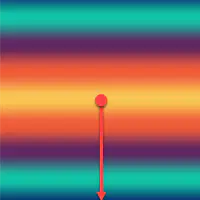
What type of gradient is pictured?
Linear
Radial
Reflected
Angle
Diamond
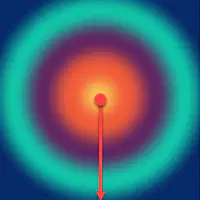
What type of gradient is pictured?
Linear
Radial
Reflected
Angle
Diamond
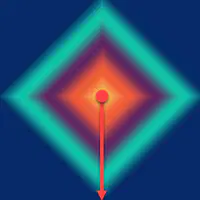
What type of gradient is pictured?
Linear
Radial
Reflected
Angle
Diamond
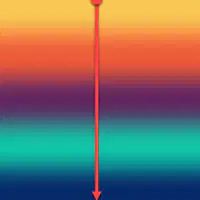
What type of gradient is pictured?
Linear
Radial
Reflected
Angle
Diamond
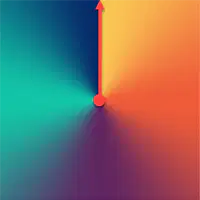
What type of gradient is pictured?
Linear
Radial
Reflected
Angle
Diamond
This color mode is best for images that your client will professionally print - such as advertisement flyers.
CMYK
RGB
This color mode is best for images that your client will view on a screen - such as webpage graphics.
CMYK
RGB
Liam, Grace, and Maya are working on a project for their graphic design class. They want to create a poster that will be printed in high-end quality. Which color mode should they use to obtain the truest color?
Grayscale
CMYK
RGB
Bitmap
Libby and Stacey created a new shirt design for their digital media class. It will be shared in their Google Classroom for their classmates to view. Which color mode is ideal for creating images that will be used in digital presentations?
CMYK
RGB
What is the keyboard shortcut for pasting?
Ctrl C
Ctrl Z
Ctrl V
Ctrl S
What is the keyboard shortcut for copying?
Ctrl C
Ctrl Z
Ctrl V
Ctrl S
What is the keyboard shortcut for undoing an action?
Ctrl C
Ctrl Z
Ctrl V
Ctrl S
What is the keyboard shortcut for saving your project file?
Ctrl C
Ctrl Z
Ctrl V
Ctrl S
Kara needs to turn on her rulers. Which menu will this be found under?
File >
Edit >
Select >
View >
Window >
Amanda's layers panel has disappeared. Which menu will help her get it back?
File >
Edit >
Select >
View >
Window >
April wants to create a new guide at the horizontal 3 inch point on her canvas. Which menu will this be found under?
File >
Edit >
Select >
View >
Window >
Bill lost his contextual taskbar, which gave him quick access to tools. Which menu will help him get it back?
File >
Edit >
Select >
View >
Window >
Jacob wants to add an author name to the metadata of his file. Which menu will this be found under?
File >
File Info >
Edit >
Preferences >
Select >
Modify >
Image >
Color Mode >
Edit >
Transform >
Alice wants to change the copyright information on her file. Which menu will this be found under?
File >
File Info >
Edit >
Preferences >
Select >
Modify >
Right-Click >
Blending Options >
Edit >
Transform >
Reese wants to turn on the grid to help him line up his text. Which menu will this be found under?
View >
Show >
Edit >
Preferences >
Select >
Modify >
Right-Click >
Blending Options >
Edit >
Transform >
Anna wants to skew a logo on her canvas. Which menu will this be found under?
File >
File Info >
Edit >
Preferences >
Select >
Modify >
Right-Click >
Blending Options >
Edit >
Transform >
Ben wants to expand his selection by 10 px. Which menu will this be found under?
File >
File Info >
Edit >
Preferences >
Select >
Modify >
Right-Click >
Blending Options >
Edit >
Transform >
Rick wants to add a drop shadow to his text. Which menu will this be found under?
Window >
Shapes
Edit >
Preferences >
Select >
Modify >
Right-Click >
Blending Options
Edit >
Transform >
Tim needs to add a tiger silhouette to his canvas. Which menu will this be found under?
Window >
Shapes
Edit >
Preferences >
Select >
Modify >
Right-Click >
Blending Options
Edit >
Transform >
Emily needs to add the sea style to three ellipse on her canvas. Which menu will this be found under?
Window >
Shapes
Edit >
Preferences >
Select >
Modify >
Right-Click >
Blending Options >
Edit >
Transform >
Courtney needs to make a hue adjustment layer. Which icon shows adjustment layers?



Alex needs to group his text layers together. Which icon make a new group?
Margo doesn't know if the layer is a smart object. Which icon shows smart objects?
Beth needs to remove the background from a layer. Which icon will help her do this?
Kim needs to increase space between her lines of text. Which setting will help her do this?

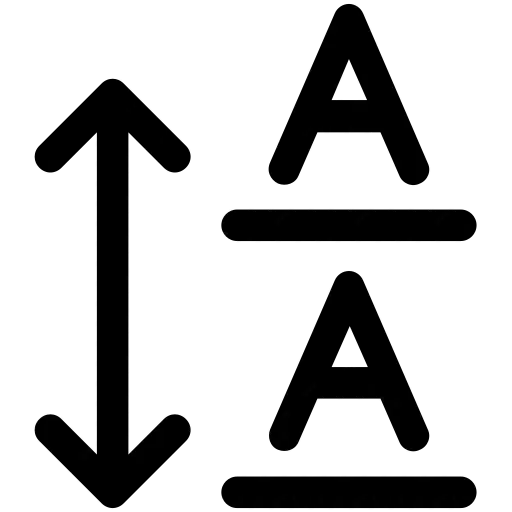

Andrew needs to decrease space between two characters (letters). Which setting will help him do this?
Which icon is kerning?
Which icon is leading?
Kelly needs to change the spacing between all of her selected characters (letters). Which setting will help her do this?
Which icon is tracking?

