
 Worksheets
untitled
Total questions: 100
Worksheet time: 45mins
Shortcut to open a document is ______
Ctrl + N
Ctrl + S
Ctrl + O
Shortcut to undo an action is _______
Ctrl + A
Ctrl + Z
Ctrl + esc
Ctrl + Y
What is the correct combination of keys to find text on a document?
Alt + F
Ctrl + T
Ctrl + F
Ctrl + H
Which of the following shortcut key is used to check to spell?
F3
F11
F5
F7
Shortcut to quit Microsoft Word, Powerpoint, Access, Excel etc is ______?
Ctrl + W
Ctrl + W
Alt + F4
Alt + Q
What is the shortcut to replace text in a document?
Ctrl + R
Alt + R
Ctrl + H
All of the above
What are the accurate combination of keys to save a document?
Ctrl + S
Ctrl + F
Alt + F + A
Alt + S
The keystrokes Ctrl + I is used to
Increase font size
Applies italic format to selected text
Indicate the text should be bold
Inserts a line break
What is the function of Ctrl + B in Ms-Word?
To converts selected text into the next larger size of the same font
It applies Italic formatting to the selected text
It makes the selected text bold
It adds a line break to the document
Shortcut for redo an action is _____
Ctrl + R
Ctrl + U
Ctrl + Y
Ctrl + Z
What is the shortcut key you can press to create a copyright symbol?
Ctrl + Shift + C
Ctrl + C
Alt + C
Alt + Ctrl + C
What is the shortcut to change the font?
Ctrl + F
Alt + Ctrl + F
Shift + Alt + F
Ctrl + Shift + F
What is the correct combination of keys to decrease the font size of selected text?
Ctrl + Down Arrow
Ctrl +
Ctrl + Shift +
Ctrl + Shift + Down Arrow
The key F12 opens a
Save As dialog box
Open dialog box
Close dialog box
Save dialog
What does Ctrl + = key effect?
All Caps
Shadow
Superscript
Subscript
Shortcut to create new document is ______ .
Ctrl + F
Ctrl + N
Ctrl + O
Ctrl + M
How can you make the selected character superscripted?
Ctrl + Shift + =
Ctrl + =
Alt + Ctrl + Shift + =
None of the above
Shortcut to close a document is ______
Alt + F4
Ctrl + C
Ctrl + W
Ctrl + Q
Which combination of keys used as a shortcut to go to a page?
Alt + G
Ctrl + G
Ctrl + L
All of the above
How can you increase the font size of selected text by one point every time?
By pressing Ctrl + }
By pressing Ctrl + {
By pressing Ctrl + [
By pressing Ctrl + ]
What is the shortcut key to copy text in MS Word?
Shift + V
Alt + C
Ctrl + X
Ctrl + C
How can you quickly undo the last action in MS Word?
Alt + Z
Shift + Z
Ctrl + Z
Ctrl + X
Which shortcut key is used to paste text in MS Word?
Ctrl + C
Ctrl + P
Ctrl + X
Ctrl + V
What is the shortcut key to save a document in MS Word?
Ctrl + A
Alt + S
Shift + S
Ctrl + S
How can you quickly select all text in a document using a shortcut in MS Word?
Ctrl + Z
Ctrl + A
Ctrl + X
Ctrl + C
Which shortcut key is used to open the find and replace dialog box in MS Word?
Ctrl + H
Ctrl + P
Ctrl + F
Ctrl + R
What is the shortcut key to bold text in MS Word?
Ctrl + B
Ctrl + A
Ctrl + C
Ctrl + D
How can you quickly italicize text in MS Word using a shortcut?
Ctrl + A
Ctrl + U
Ctrl + B
Ctrl + I
Which shortcut key is used to underline text in MS Word?
Ctrl + B
Ctrl + I
Ctrl + U
Ctrl + S
What is the shortcut key to insert a new page in MS Word?
Ctrl + Enter
Shift + Enter
Ctrl + N
Alt + Enter
What is the keyboard shortcut for opening a file?
Ctrl + C
Ctrl + 0
Ctrl + N
Ctrl + V
Write the shortcut key to make text BOLD.
(a)
What is the keyboard shortcut to Underline text
Ctrl + 0
Ctrl + U
Ctrl + Z
Ctrl + A
What is the keyboard shortcut to Undo
Ctrl + 0
Ctrl + U
Ctrl + U + 0
Ctrl + Z
Write the keyboard shortcut for paste
(a)
What is the keyboard shortcut to Left Align
Ctrl + L
Ctrl + L+ A
Ctrl + LA
Ctrl + Z
Write the keyboard shortcut to Justify text
(a)
What is the keyboard shortcut for centering text
Ctrl + Ctrl + J
Ctrl + J
Ctrl + C
Ctrl + E
What is the keyboard shortcut for Cut?
Ctrl + J
Ctrl + C
Ctrl + Z
None of the above
Write out the keyboard shortcut to Italicize text
(a)
The first screen you see when you open Word 2016 is called the:
Word screen
Recent screen
Start screen
Screen saver
Which of the following contains the commands you use most often, such as Save, Undo, and Repeat?
Quick Access Screen
Quick toolbar
Quick Access Toolbar
Quick command
The headings that appear on the Ribbon, such as File, Home, and Insert, are called:
groups
tabs
shortcuts
menus
Which command would you use to save a document for the first time?
Save
Save As
Save for the first time
Save or Save As
Which of the following options would you use when saving a document with a new filename?
Save
Save As
Ctrl+S
Save or Save As
When you start Word 2016, a new blank document appears.
True
False
Clicking the Print button on the Backstage Print screen sends the document straight to the currently selected printer with the default settings.
True
False
The File tab can be used to save and print files.
True
False
You can hide the Ribbon by double-clicking the active tab.
True
False
MS-Office is an application software.
True
False
What is the full name of MS WORD
MICROSOFT WORLD
MICROSOFT WORD
MICROSOFT WOD
MICROSFT WORD
Which is a Word file?


What is the keyboard shortcut for Copy?
CTRL+C
CTRL+A
CTRL+V
CTRL+P

To apply bold style to font what icon should we click?
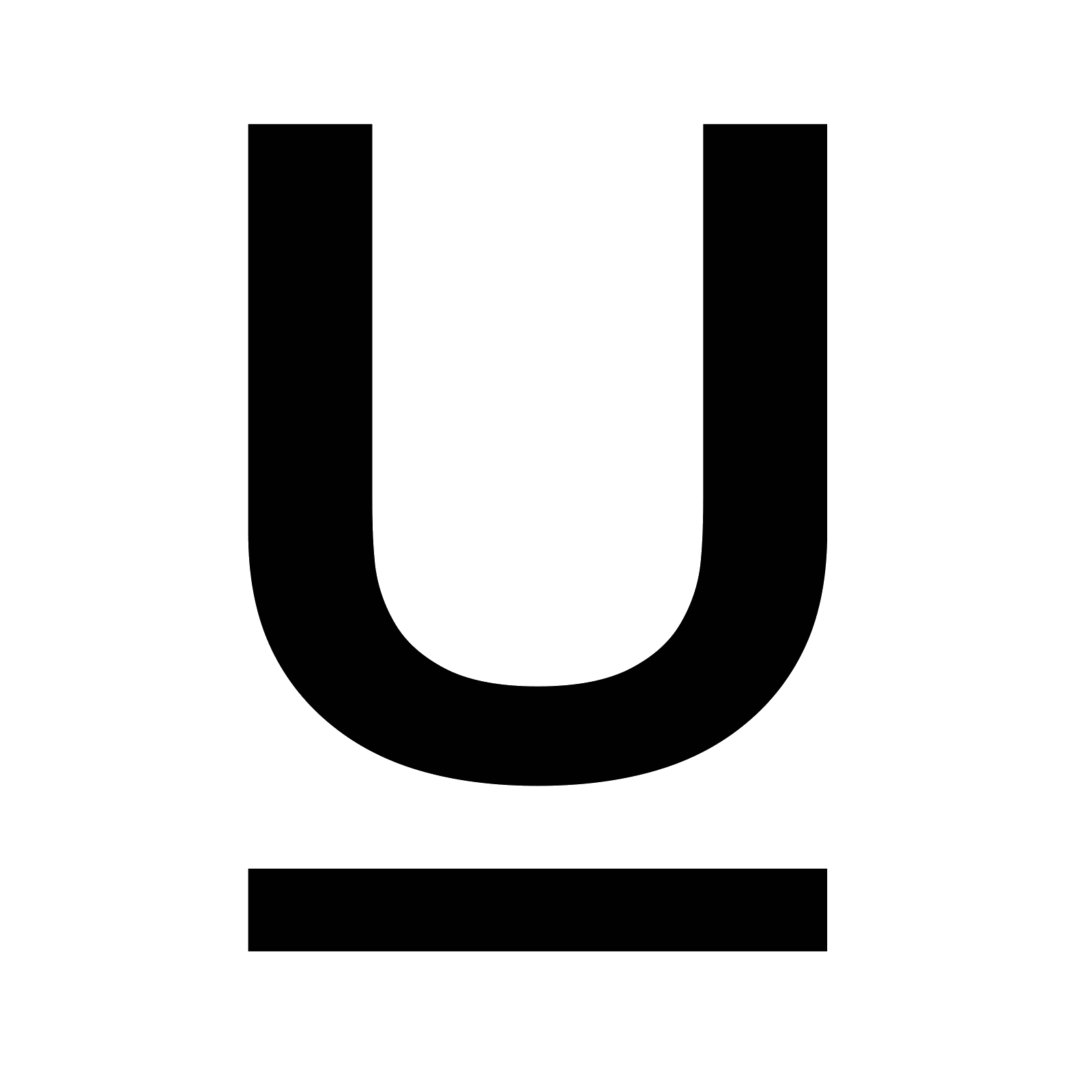
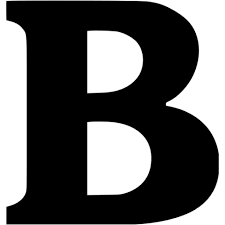
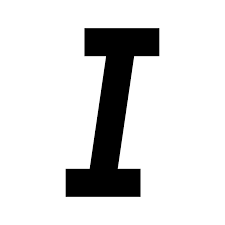

The above picture is an icon for
Change font type
Change font colour
Change font shape
Change font size

This has option like font color, font style, font size, etc.
Insert Tab
Home Tab
Layout Tab
File Tab
Tables, shapes, images, charts, graphs, header, etc. They are included in the ____ category.
Home
Design
Insert
View


WHAT PART OF MS WORD IS SHOWN?
VIEW SHORTCUTS
ZOOM CONTROL
MINIMIZE, MAXIMIZE & CLOSE BUTTON
STATUS BAR

What is a good definition of software?
parts of a computer that are soft
Parts of a computer that you can't see
A set of rules that tell a computer what to do
games

What is the use of this icon?
saving text
putting image
sending a text to the left
giving a highlight on the text

Identify the command
copy
cut
paste
crop

Identify the command
cut
copy
paste
color

Identify the button
minimize button
close button
restore button

WHAT PART OF MS WORD IS SHOWN?
QUICK ACCESS TOOLBAR
TITLE BAR
MENU BAR
RIBBON

WHAT PART OF MS WORD IS SHOWN?
QUICK ACCESS TOOLBAR
TITLE BAR
MENU BAR
RIBBON

WHAT PART OF MS WORD IS SHOWN?
QUICK ACCESS TOOLBAR
TITLE BAR
MENU BAR
RIBBON

WHAT PART OF MS WORD IS SHOWN?
QUICK ACCESS TOOLBAR
TITLE BAR
MENU BAR
RIBBON

WHAT PART OF MS WORD IS SHOWN?
FILE TAB
HORIZONTAL/VERTICAL SCROLL BAR
RULER
VIEW SHORTCUT

WHAT PART OF MS WORD IS SHOWN?
FILE TAB
HORIZONTAL/VERTICAL SCROLL BAR
RULER
VIEW SHORTCUT

WHAT PART OF MS WORD IS SHOWN?
FILE TAB
HORIZONTAL/VERTICAL SCROLL BAR
RULER
VIEW SHORTCUT

WHAT PART OF MS WORD IS SHOWN?
FILE TAB
HORIZONTAL/VERTICAL SCROLL BAR
RULER
STATUS BAR

WHAT PART OF MS WORD IS SHOWN?
VIEW SHORTCUTS
ZOOM CONTROL
RULER
STATUS BAR

WHAT PART OF MS WORD IS SHOWN?
VIEW SHORTCUTS
ZOOM CONTROL
RULER
STATUS BAR
WHAT PART OF MS WORD IS SHOWN?
VIEW SHORTCUTS
ZOOM CONTROL
MINIMIZE, MAXIMIZE & CLOSE BUTTON
STATUS BAR
What is a good definition of software?
parts of a computer that are soft
Parts of a computer that you can't see
A set of rules that tell a computer what to do
games
It contains all of the commands you will need to perform task in Word. It has multiple tabs, each with several groups of commands.
The Ribbon
Quick Access Toolbar
Tell Me
The Ruler

Which of the following are group names on the Ribbon?
*Choose all that apply.*
Clipboard
Voice
Paragraph
Insert
Choose all answers that are Tabs on the Ribbon
File
Home
Paragraph
Font
What does QAT stand for?
quiet access toolbar
Queen alt text
Quick Access Toolbar
You can customize the Quick Access Toolbar
True
False

What is the name of the picture?
The ribbon
The quick access toolbar
the status bar
the groups on the ribbon

What is the correct name of the picture?
Quick Access Toolbar
Status Bar
Ribbon
Groups
Bold and Underline are in what group on the Ribbon?
Font
Paragrap
Styles
Editing
It is located at the top and to the left of your document. It makes it easier to make alignment and spacing adjustments.
The Ribbon
Quick Access Toolbar
Tell Me
The Ruler
Shows three ways to view a document.
Scroll bar
Document Views
Document pane
Page and Word Count
File extension of word document is
.xls
.docx
.jpg
.bmp
Part of MS Word that will tell you the name of the file or document and the application you are currently using.
Window
Title Bar
Ribbon
Quick Access Toolbar
Button of Microsoft Word that will place it at the bottom of your screen on the Task Bar
Close
Minimize
Maximize
Save
Allows you to increase/decrease the amount of the document you see on the screen.
Zoom Slide
Ruler
Status Bar
Scroll Bar
WHAT PART OF MS WORD IS SHOWN?
QUICK ACCESS TOOLBAR
TITLE BAR
MENU BAR
RIBBON
WHAT PART OF MS WORD IS SHOWN?
VIEW SHORTCUTS
ZOOM CONTROL
RULER
STATUS BAR
WHAT PART OF MS WORD IS SHOWN?
VIEW SHORTCUTS
ZOOM CONTROL
RULER
STATUS BAR
WHAT PART OF MS WORD IS SHOWN?
VIEW SHORTCUTS
ZOOM CONTROL
MINIMIZE, MAXIMIZE & CLOSE BUTTON
STATUS BAR

