
 Worksheets
Vex Block Programming
Total questions: 18
Worksheet time: 19mins

Identify the device shown in the image.
Radio
Motor
Brain
Battery

Identify the device shown in the image.
Smart Motor
Radio
Engine
Brain

Which device secures the motor to the angle structure through the bearing?
Pop rivets
Screws
Spacers
Collars
Which block must be at the beginning of every program in VEXcode?


Which of the following describes why a Repeat block is used in a project?
To repeat certain blocks forever.
To run a sequence of commands a specific number of times.
To only run a stack of blocks one time.
To run an attached stack of blocks when the project starts.

What will the VR Robot do if the condition of the Left Bumper Sensor being pressed is TRUE?
The VR Robot will continue to drive forward.
The VR Robot will drive in reverse for 50 millimeters (mm) and then turn left for 90 degrees.
The VR Robot will stop moving.
The VR Robot will drive forward for 50 millimeters (mm) and then turn right for 90 degrees.

Which of the following best explains why a [Repeat until] block was used in this project instead of a [Wait until] block?
A [Wait until] block would block the project flow.
The robot would be waiting to detect red before doing anything else.
Using a [Repeat until] block allows the robot to drive forward for 300 millimeters (mm) and then turn right for 90 degrees, forever.
Using a [Wait until] block checks for red after every robot move, which is not needed.
Using a [Repeat until] block allows the [If then else] block to be skipped. This allows the project to execute faster.

How can the following example be simplified using a [Repeat] block?
By placing the drive forward and turn blocks in a [Repeat] block that repeats four times.
By placing the drive forward block in a [Repeat] block that repeats four times.
By placing the turn block in a [Repeat] block that repeats four times.
By changing all of the parameters of the drive forward blocks to 400mm instead of 200 mm.

Which of the following best describes what the VR Robot will do based on this project?
The VR Robot will drive forward 1000 millimeters (mm) at maximum velocity, turn right 180 degrees, set the velocity back to the default, and drive forward 1000 millimeters (mm).
The VR Robot will drive forward 1000 millimeters (mm) at maximum velocity, turn right 180 degrees, and drive forward 1000 millimeters (mm).
The VR Robot will drive forward 1000 millimeters (mm) at maximum velocity, turn right 90 degrees, set the velocity back to the default, and drive forward 1000 millimeters (mm).
The VR Robot will drive forward 1000 millimeters (mm) at maximum velocity, turn left 180 degrees, set the velocity back to the default, and drive forward 1000 millimeters (mm).

How long will the Left_Motor spin?
It will not spin
2 seconds
4 seconds
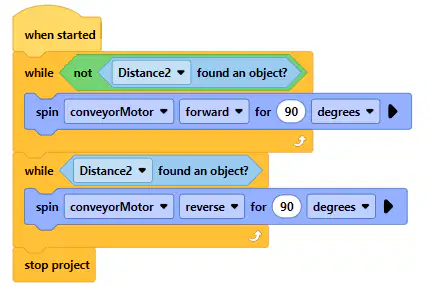
Which block would perform the following tasks:
Drive a conveyor belt forward in 90 degree increments until an object is detected by a sensor, then return the belt to its start position.




What do the grey blocks do in the V5 Coding System?
They tell the robot what the next set of commands will do in case there is an error.
They are comment blocks that make the code easier to read but do not affect the function of the robot.
They are comment lines that are only used when the teacher will check our code.
They are event blocks, which cause the next set of blocks to execute when a specific event happens.

What is the primary function of a [Forever] block in a coding project?
To execute a set of commands once.
To repeat a set of commands indefinitely until the project is stopped.
To execute commands only when a specific condition is met.
To pause the execution of commands for a specified time.

Why would an [If then] block be used in a project?
To execute a set of commands only if a certain condition is true.
To repeat a set of commands a specific number of times.
To ask the user a question.
To execute commands in a random order.

What happens when a [Stop Project] block is used in a project?
All motors stop spinning, but the project continues to run.
The project pauses for a specified duration.
All ongoing actions and the project itself stop immediately.
The project saves its current state and continues running.
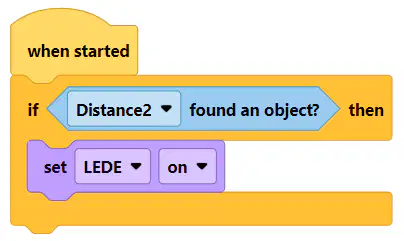
Noah and Cole are frustrated because the LED does not turn on when they run their program and wave their hand in front of the distance sensor. What is the issue?
They need to first set the brightness level on the distance sensor so that it can detect objects.
They should use a [when handwave] block instead of an [if] block.
The code only checks the distance sensor once and ends right away.
It should be in a loop.
They failed to turn the LED off before starting the program, so they cannot see if the LED turns on.

What will happen if the Front Eye Sensor detects green in this project?
The VR Robot will turn right for 90 degrees.
The VR Robot will turn left for 90 degrees.
The VR Robot will drive forward.
The VR Robot will stop driving.

The robot hits all five buildings in this program. Which building does it hit last?
top-left building
top-right building
bottom-left building
bottom-right building

