
 Worksheets
GRAF229-Midterm
Total questions: 29
Worksheet time: 14mins
In InDesign, a frame that has an X in it is called a/an______
sharpen image
What is the resolution range for an optimized image print?
72-96
150-200
266-400
600-800
What does it mean to optimize files?
Make changes based on client feedback
Ensure the file is saved in the native file format
Adjust size, color mode, and file formats
Adding adjustment layer for efficiency
Your new cookbook is ready to be reviewed by the client. It contains hyperlinks, videos, animations, and buttons. What type of InDesign document includes these elements?
Consistency
If you were creating a 300-page book and want to ensure the headings are all in the same format, you could save (then apply) a ____.
paragraph styles
What are main DESIGN considerations for AODA Compliance
Use a legible font style and size
Avoid white text on dark backgrounds
Use high-contrast colors for fonts and visuals
All of the above

Adjusting the spacing between pairs of letters is known as


How to avoid distorting images when Placed in InDesign
Hold the shift key while dragging
Hold the shift, command/control keys when adjusting a fixed box
Simply drag when autofit is applied in an object style
All of the above
Is it okay to horizontally or vertically distort a typeface letter form?
Yes
No

What are the biggest problems with files when printers receive them?
Bleed issues
Wrong colour models
Image resolution too low
All of the above
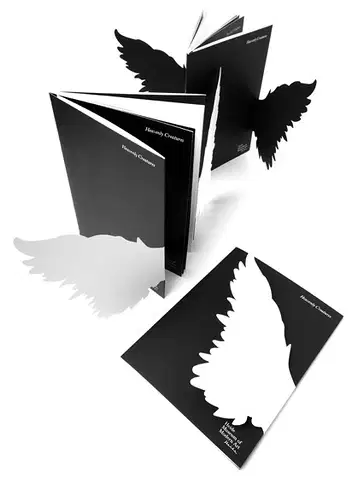
What is this printing technique called?
Diecut
Emboss
Deboss
UV Spot
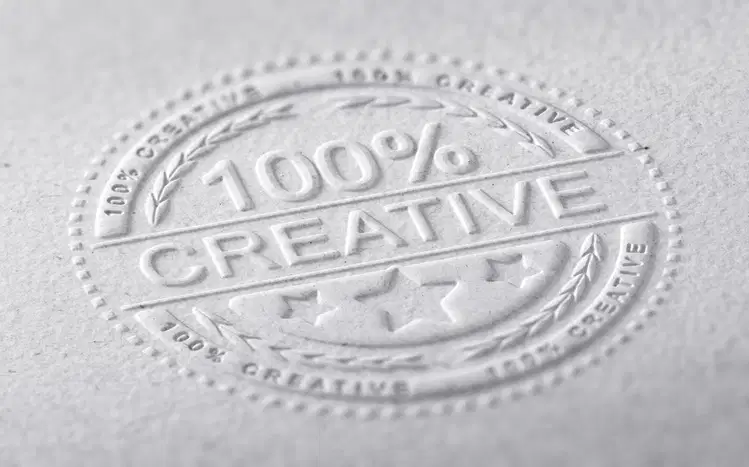
What is this printing technique called?
Diecut
Blind Emboss
Blind Deboss
UV Spot

What is Registration Black?
C100, M100, Y100, B100
C40, M40, Y40, B40
C0, M0, Y0, B0
None of the above.
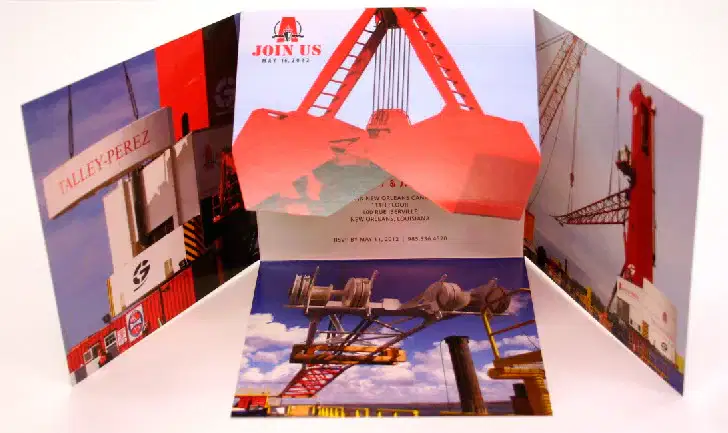
What is this fold?
Roll
Exotic
Iron Cross
Gate

What does a printer require to identify a printing technique in your file?
A spot colour renamed with the printing technique.
Both the object identified on a separate layer + spot colour renamed.
Just the printing technique identified on a separate layer.
Nothing, the printer will figure it out.

What is this fold?
Roll
Gate
Accordion
Iron Cross

How do you include a bleed when creating a PDF?
Create a 1/8" bleed margin in your file
Extend the image beyond the edge to the bleed margin.
Select all printer marks (exclude bleed marks), include doc bleed settings for PDF
All of the above

