wayground logo

Free Printable Worksheets

Font size

S
M
L
XL
Worksheets

Computer Hardware Review

Total questions: 68

Worksheet time: 50mins
Name
Class
Date
1.

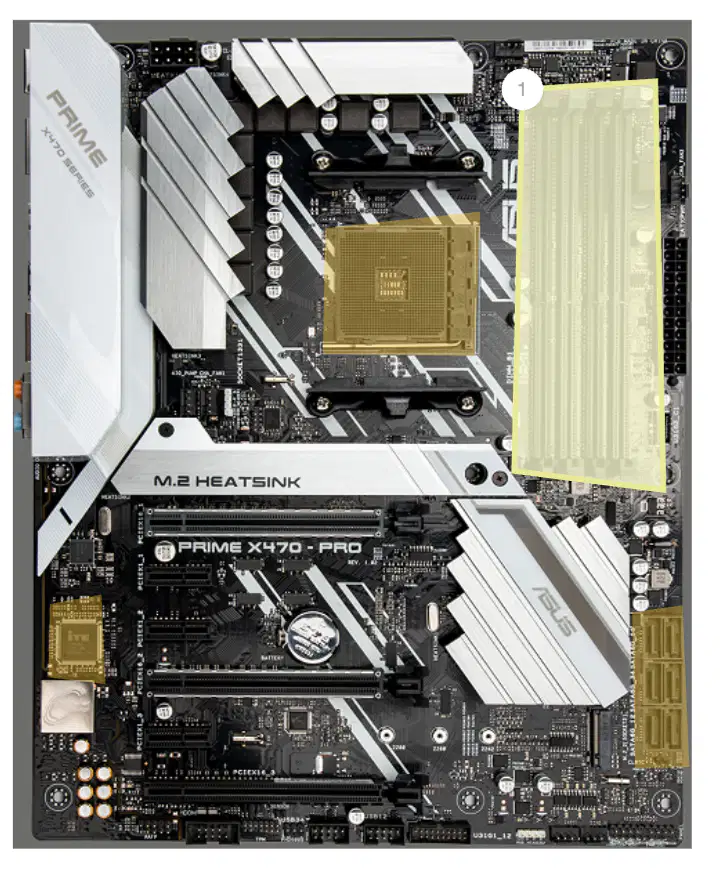
What is the function of a RAM memory slot on a motherboard?

a)

To store the operating system

b)

To connect the CPU

c)

To install memory modules

d)

To power the motherboard

2.

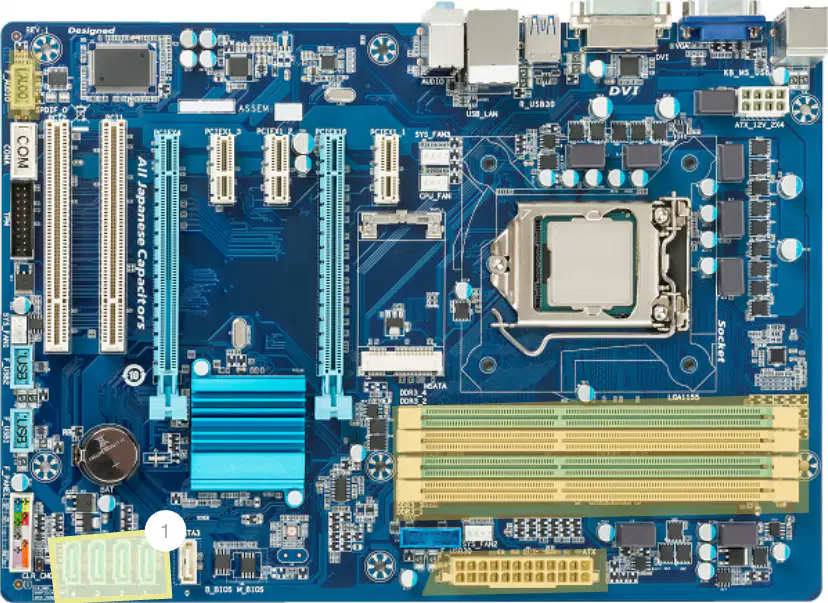
What is a SATA data connector used for?

a)

Connecting a monitor

b)

Connecting a hard drive or optical drive

c)

Connecting a keyboard

d)

Connecting a printer

3.

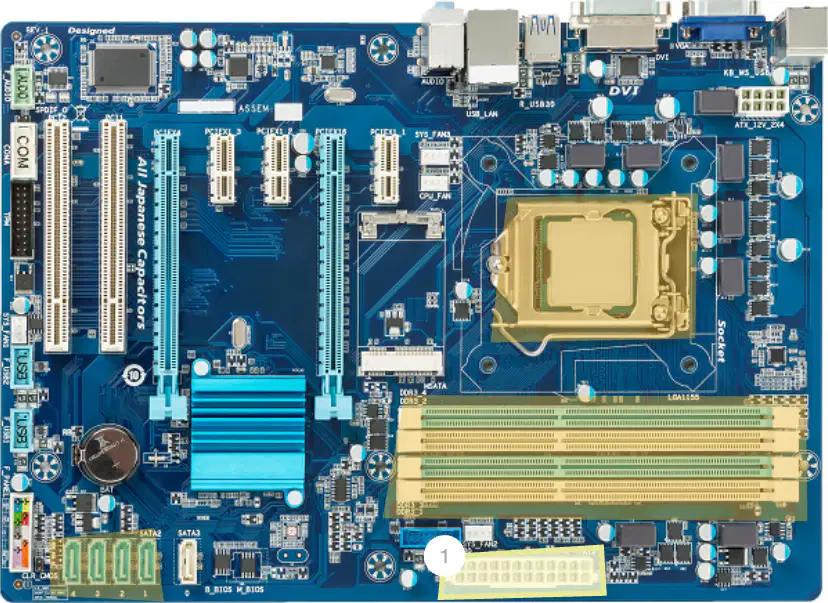
What is the main function of a motherboard's power connector?

a)

To connect the CPU to the motherboard

b)

To supply power to the motherboard

c)

To connect the RAM to the motherboard

d)

To connect external devices to the motherboard
4.

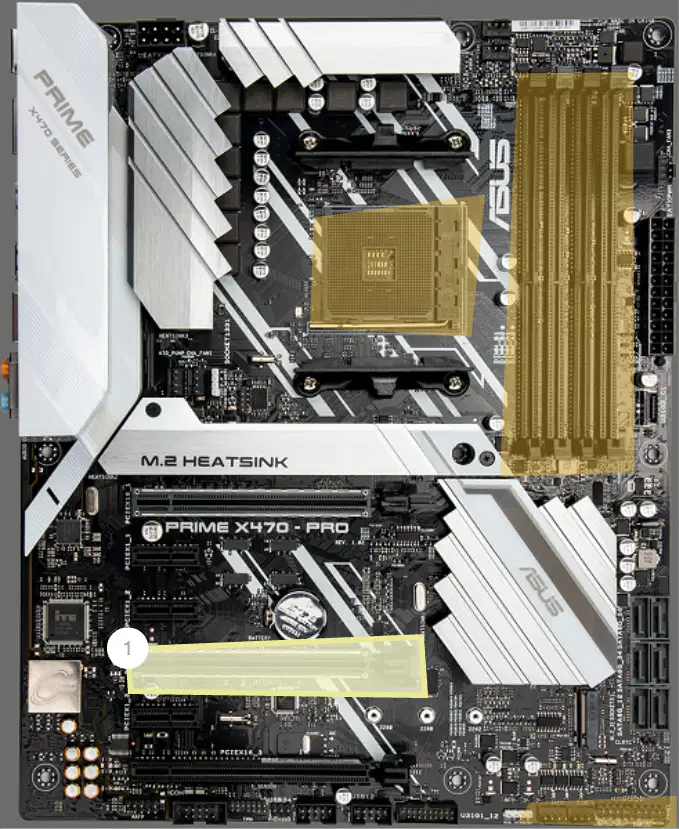
These slots on the motherboard allow you to add extra cards such as graphic cards.

a)

PCIe x16 slot

b)

RAM slots

c)

CPU socket

d)

M.2 heatsink

5.

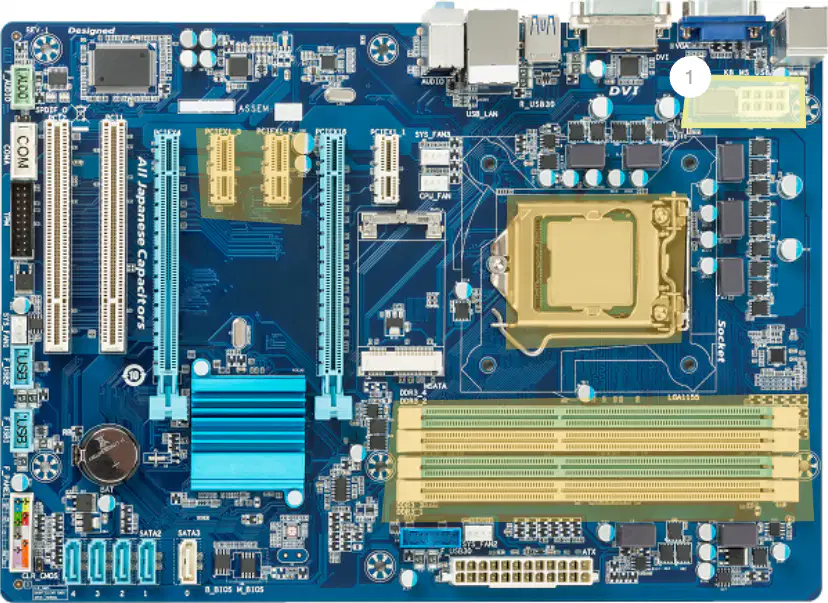
Modern CPUs require more power to operate. What is the purpose of the CPU's power connector?

a)

To connect the CPU to the internet

b)

To provide power to the CPU

c)

To connect the CPU to the monitor

d)

To cool the CPU

6.

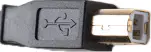
Which connector typically plugs into the back of an inkjet printer?

a)

Micro

b)

USB-B

c)

USB-C

d)

USB-A

7.

Select the option below with ALL peripheral devices.

a)

Printer, Monitor, Lamp

b)

Printer, Monitor, Calendar

c)

Printer, Monitor, Keyboard

d)

Printer, Lamp, Calendar

8.

Select all of the peripheral devices that would use Bluetooth to connect to the computer.

a)

Keyboard

b)

Mouse

c)

Headphones

d)

Monitor

9.

Which printer could be used to create a prosthetic limb?

a)

3D Printer

b)

Large Format Printer

c)

Inkjet Printer

d)

Laser Printer

10.

What are PCI slots used for on a motherboard?

a)

To house the CPU

b)

To add memory cards

c)

To expand the capabilities of a computer

d)

To install expansion cards

11.

Which two manufacturers are the major producers of processors used in modern PCs?

a)

Intel and AMD

b)

Intel and NVIDIA

c)

AMD and NVIDIA

d)

AMD and Qualcomm

12.

What slot is this?

a)

CPU

b)

RAM

c)

PCI

d)

CMOS

13.

Modern computers only have like 2 of these. You can attach things like another ethernet port or more USB ports.

a)

PCI

b)

PCI-Express

c)

RAM

d)

CPU

14.

This slot is used to put into specialized chips that hold information while the computer if running.

a)

RAM

b)

CPU

c)

PCI

d)

SATA

15.

These ports replaced the IDE connector.

a)

SATA

b)

EIDE

c)

RAM

d)

PCI

16.

The tan middle port is called?

a)

PCI-E x1

b)

PCI-E x4

c)

PCI-E x16

d)

None of these

17.

The longer tan port to the right, normally where video cards get inserted is called ________________

a)

PCI-E x16

b)

PCI-E x32

c)

PCI-E x4

d)

PCI-E x1

18.
Also known by its acronym RAM, this is a type of ephemeral storage that processes working data and machine code when it is energized. The data is volatile, meaning it goes away when the machine is turned off.
a)
Random Access Memory
b)
Operating System
c)
CPU (Central Processing Unit)
d)
Graphics Card
19.
A peripheral device that stores a copy of everything on the computer’s internal hard drive or solid state drive. These are considered essential, redundant protection against data loss due to hard drive failure.
a)
External Backup Drive
b)
Hardware
c)
RAM (Random Access Memory)
d)
CPU (Central Processing Unit)
20.
The part of the computer that one types on to input text, numbers, and other information.
a)
Keyboard
b)
Stylus
c)
SSD (Solid State Drive)
d)
Case
21.
Also known by it’s acronym USB, this is an industry standard interface cable that allows a computer to energize and communicate with peripherals such as printers.
a)
Universal Serial Bus
b)
Solid State Drive
c)
HDD (Hard Disk Drive)
d)
BIOS (Basic Input/Output System)
22.
Also known by it’s acronym SSD, this is a modern memory storage unit that uses flash memory to retain data. Since it does not have a spinning disk, it is a much faster way to store and retrieve data.
a)
Solid State Drive
b)
Software
c)
Power Supply Unit (PSU)
d)
Northbridge
23.
Also known by it’s acronym PSU, this is a device that converts alternating current (AC) electricity to low voltage direct current (DC) power that is used to run a computer and its peripheral components.
a)
Power Supply Unit
b)
Sound Card
c)
Northbridge
d)
Ethernet
24.
Also known by it’s acronym CPU, this chip executes the instructions that make up a software program, including arithmetic, logic, control, and input/output. This is considered the brain of a computer.
a)
Central Processing Unit
b)
Monitor
c)
Southbridge
d)
NIC (Network Interface Card)
25.
Also known as an audio card, this is an internal card that provides input and output of audio signals to and from a computer.
a)
Sound Card
b)
External Backup Drive
c)
Ethernet
d)
RAM (Random Access Memory)
26.
Also known as the main circuit board, this is a printed circuit board that holds and allows all communication between the important components of a computer.
a)
Motherboard
b)
Cooling Fan
c)
NIC (Network Interface Card)
d)
Heat Sink
27.
A device inside a computer that helps transfer heat and keep the computer from overheating.
a)
Cooling Fan
b)
Modem
c)
BIOS Flashing
d)
CMOS Battery
28.
This component is also known by the acronym HDD or as a fixed drive. It is an electro-mechanical storage devices that stores and retrieves digital information using a platter and magnetic storage.
a)
Hard Disk Drive
b)
Basic Input Output System
c)
CMOS Battery
d)
Overclocking
29.
A peripheral machine that usually outputs pictures and/or text onto paper. We say “usually,” because there are also devices that create three-dimensional models of items.
a)
Printer
b)
Hard Disk Drive
c)
Overclocking
d)
Form Factor
30.
A hand-held device that one uses to point an arrow or cursor on their display screen.
a)
Mouse
b)
Skunk
c)
Thermal Paste
d)
Expansion Slot
31.
A peripheral device that amplifies output signals from a computer and makes them audible at various volumes. These can be built into the computer, but the external ones usually sound better.
a)
Speakers
b)
Read Only Memory
c)
Expansion Slot
d)
GPU (Graphics Processing Unit)
32.
A term to describe any external components that are connected to a computer. Examples include scanners, printers, keyboards, mice, and joysticks.
a)
Peripherals
b)
Printer
c)
Optical Drive
d)
BIOS Flashing
33.
Another word for the screen or the display. It is an output device that shows information as pictures and/or text.
a)
Monitor
b)
Peripherals
c)
Bus Stop
d)
Bus Speed
34.

Device that scans documents or photos

a)

scanner

b)

mouse

c)

speakers

d)

printer

e)

keyboard

35.

the part of the computer in which information is stored temporarily when a program is being used

a)

RAM

b)

ROM

c)

CPU

d)

hard drive

36.

the part of a computer system that performs the computer’s main functions and controls the other parts of the system

a)

RAM

b)

ROM

c)

CPU

d)

hard drive

37.

sometimes also called the heat sink, pulls hot air out of the computer

a)

fan

b)

optical drive

c)

disk drive

d)

hard drive

38.

a device that is used for storing computer data and that contains one or more hard disks.

a)

fan

b)

optical drive

c)

disk drive

d)

hard drive

39.

Select all of the OUTPUT devices

a)

mouse

b)

keyboard

c)

printer

d)

microphone

e)

speakers

40.

Select all of the INPUT devices

a)

mouse

b)

keyboard

c)

printer

d)

microphone

e)

speakers

41.

Which port do computers have the most of?

a)

USB ports

b)

ethernet ports

c)

power supply port

d)

monitor port

42.

A power supply provides ______ to all the components of a computer.

a)

power

b)

supply

c)

light

d)

storage

43.

_______ is connected to the motherboard, either directly or through cables.

a)

everything

b)

nothing

44.

Video card is responsible for everything you _______ on the monitor

a)

hear

b)

see

c)

want

d)

need

45.

Short -term memory

a)

RAM - random access memory

b)

ROM - read only memory

c)

Hard drive

d)

flash drive

46.

Long-term memory

a)

RAM - random access memory

b)

ROM - read only memory

c)

Hard drive

d)

flash drive

47.

Which image below is an example of an INPUT device?

a)

b)

c)

d)

48.

Select the image below that shows a SSD or Solid-State Drive.

a)

b)

49.

Which hardware below provides power to the computer?

a)

b)

c)

d)

50.

A device that helps cool the computer, keeping the components at a safe and workable temperature

a)

Case Fan

b)

Heating Fan

c)

Hard Disk Fan

d)

DVD Fan

51.

a circuit board that can be inserted in a computer to give extra functionality. examples (video card, audio card, wifi card, etc.)

a)

MotherBoard

b)

RAM

c)

BIOS

d)

Expansion Card

52.

Connect microphones, headphones, and speakers to your computer with these cables.

a)

Audio cable

b)

Ethernet Cable

c)

HDMI Cable

d)

IEEE1394 or Firewire

53.

High-Definition Multimedia Interface" cable that transmits audio and video data

a)

Ethernet Cable

b)

HDMI Cable

c)

VGA cable

d)

Audio Cable

54.

A cable that connects portable media (usually) or other hardware like keyboards, mice and printers directly to computer.

a)

IEEE1394 or Firewire

b)

USB Cable

c)

Ethernet Cable

d)

HDMI Cable

55.
Is an expansion card which generates a feed of output images to a display. Frequently, these are advertised as discrete or dedicated graphics cards, emphasizing the distinction between these and integrated graphics.
a)
Graphic Card
b)
Sound Card
c)
TV Card
d)
Network Card
56.
Is an internal expansion card that provides input and output of audio signals to and from a computer under control of computer programs.
a)
Graphic Card
b)
Sound Card
c)
TV Card
d)
Network Card
57.
Is an electronic device that connects a computer to a computer Network, usually a LAN.
a)
Graphic Card
b)
Sound Card
c)
TV Card
d)
Network Card
58.
A machine allowing the creation of a physical object from a three-dimensional digital model, typically by laying down many thin layers of a material in succession.
a)
Inkjet Printer
b)
Laser Printer
c)
Dot Matrix Printer
d)
3D Printer
59.
What are the 4 necessary components for a computer?
a)
input output programs hardware
b)
processing storage monitor keyboard
c)
input processing output storage
d)
flash drive, input, CPU, RAM
60.
Which is measured in GHz?
a)
Processor
b)
Hard Disk
c)
RAM
d)
Power Supply
61.
Which loses its contents when the power is turned off?
a)
ROM
b)
RAM
c)
Hard Disk
d)
Power Supply
62.

What is this called?

a)

A pizza box

b)

A triangle

c)

A computer

d)

A monitor

63.

What are the red, green, and blue ports?

a)

Speaker, Microphone, Line in

b)

Speaker, HDMI, Line in

c)

Microphone,RJ-11, Line in

d)

Line in, Storage, Speaker

64.

What do we connect in the green audio jack?

(a)  

65.
A connector used to allow a computer to network with other types of hardware such as printers, keyboards, and speakers is called a... 
a)
USB Port
b)
Printer
c)
USB Cable
d)
Hardware
66.

What type of connector is shown?

a)

USB C

b)

Mini USB

c)

Micro USB

d)

USB Type A

67.

What connector type is pictured?

a)

USB C

b)

USB A

c)

Micro USB

d)

MINI USB

68.

What is this wire connection used for?

a)

speakers

b)

power

c)

headphones

d)

keyboard