
 Worksheets
Revision 2 BUS02004: Create and use basic spreadsheets
Total questions: 20
Worksheet time: 10mins
A ..................is a built-in formula in Excel.
function
Ribbon
Column
Raw
In Excel, a ................. is used to display data in a graphical format.
Chart
Cell
Table
Formula
............................ allows for the horizontal and vertical alignment of text, wrap text, shrink text, merge cells and the direction of the text.
Border tab
Alignment tab
Font tab
Number tab
By choosing ...................................tab you can combine the cells and centers the contents in the new larger cell
Merge & Center
Merge Cells
Unmerge Cells
Merge Across:
The .......................... feature in Excel allows you to automatically fill cells with data based on a pattern.
Data Validation
Flash Fill
Conditional Formatting
AutoFill
Excel offers many types of ......................including Column, Line, Pie, Bar, Area, Scatter and more
Shapes
Tables
Charts
Drawing
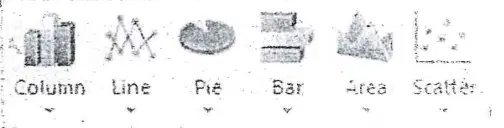
By Pressing one of the buttons in Excel we can create
Form
Picture
Chart
Border
The .......................... function in Excel is used to find the highest value in a range of cells.
MAX
AVERAGE
SUM
MIN
To set the page margins Click the Margins button on the ........................tab
Data
Home
Formulas
Page Layout
you can create a header or footer by clicking the Header Footer button on the ........................tab
Data
Home
Insert
Page layout
To align cell contents, click the cell or cells you want to align and click on the options within the Alignment group on the .............tab.
Review
Home
Insert
Data
You can hide a row or column by right click on it and choose Hide or Unhide.
True
False
The ribbon is the panel at the top portion of the document, it has five tabs
True
False
You can start using Microsoft Excel 2010 by click on Start Programs Microsoft
True
False
Once you have created a chart you can't modify it
True
False
You can change the name of a worksheet or change the color of the tabs even if you saved it.
True
False
If you want the same data copied into the other cells, you only need to complete one cell
True
False
The first step to insert cells, rows, and columns in Excel is to place the cursor in the row below where you want the new row
True
False
Common functions in Excel are (Sum-Average-Minimum-Maximum)
True
False
The page orientation in Excel can be portrait Only.
True
False

