
 Worksheets
ICT-ONLINE_SAFETY_SECURITY
Total questions: 65
Worksheet time: 38mins
What is phishing?
A cybersecurity measure
A fraudulent attempt to steal sensitive information
An antivirus program
A type of computer virus
Which software protects your system from malware?
Antivirus software
Graphic editing software
Spreadsheet tools
Word processors
What is the purpose of a firewall?
To speed up your internet connection
To block unauthorized access to a network
To store passwords
To back up data
What should you do if you suspect malware on your device?
Ignore the issue
Run an antivirus scan immediately
Uninstall unrelated applications
Restart the device repeatedly
How can you ensure secure browsing?
By clicking on all ads
By using updated browsers and avoiding suspicious links
By disabling security settings
By sharing your IP address publicly
What is a trade secret?
A public process used by businesses
Valuable private information not known publicly
A publicized copyright
An outdated patent
What does a copyright protect?
Original work of authorship
Public domain materials
Generic terms
Free software
What is the validity period of a utility patent?
10 years
15 years
20 years
50 years
Which is not a type of intellectual property?
Patents
Trademarks
Public domain
Copyrights
What is the first rule of netiquette?
Remember the human
Be forgiving of others people mistake
Respect other people privacy
Who authored the book "Netiquette"?
Virginia Shea
Virginia Shey
Tim Berners-Lee
Onel De Guzman
What does the term "netiquette" stand for?
Network sequence
Internet etiquette
Social media etiquette
Software protocol
How can you protect your online accounts?
By sharing passwords with friends
Using strong, unique passwords
Avoiding software updates
Storing passwords in plain text files
What is one common sign of a malware infection?
Faster system performance
Increased pop-up ads and crashes
Extended battery life
Clearer graphics
What differentiates a virus from other malware?
Viruses are always harmless
Viruses require user activation and are self-replicating
Viruses operate only on mobile devices
Viruses do not affect data
What is malware?
A software to enhance system performance
Malicious software intended to harm or exploit devices
A gaming application
A type of antivirus
What type of personal information should you avoid sharing online?
Favorite hobbies
Contact and financial details
Movie preferences
Book recommendations
When was the World Wide Web created?
1980
1990
1995
2000
What is a hypertext link?
A software for writing documents
A connection between parts of a document or different documents
A virus that links to files
A programming language
When was ARPANET, the early form of the Internet, developed?
1971
1969
1989
1994
What is the Internet?
A social media platform
A network connecting millions of computers worldwide
A search engine
A software application
What does "Remember the human" mean in netiquette?
Treat online conversations as informal as possible
Speak rudely since you are anonymous
Remember you are interacting with real people with feelings
Ignore the emotions of others online
How can you make yourself look good online?
Use proper grammar and spelling in posts
Ignore discussions and just post your opinions
Be overly critical of others' mistakes
Only participate in private groups
What does “help keep flame wars under control” mean?
Encourage heated debates for engagement
Avoid escalating arguments and de-escalate conflicts
Join in on intense arguments to prove a point
Ignore inappropriate discussions
How can you respect other people's privacy online?
By sharing personal messages publicly
By avoiding reading emails or posts not meant for you
By hacking into others' accounts
By collecting their private information without consent
What should you do if you see someone make an online mistake?
Publicly humiliate them
Correct them politely if necessary or let it go
Criticize them in a group chat
Ignore it completely
What is ransomware?
A virus that slows down your computer
Malware that encrypts your files and demands payment
An antivirus program
A browser extension for security
How can you identify a phishing email?
It has a personalized subject line
It asks for sensitive information or contains suspicious links
It uses your official company logo
It comes from a trusted friend
Which is the most secure way to use public Wi-Fi?
Accessing personal banking information
Avoiding a virtual private network (VPN)
Using a VPN to encrypt your connection
Sharing your passwords while connected
Why is it important to keep your software updated?
To add unnecessary features
To ensure compatibility with new devices
To protect against vulnerabilities and cyber threats
To reduce system performance
What is two-factor authentication (2FA)?
Using two devices to access your account
An extra layer of security requiring a second verification step
A replacement for passwords
A feature that disables your account temporarily
Why should you avoid oversharing online?
It reduces the fun of social media
It can put your personal safety and privacy at risk
It makes others dislike you
It leads to increased popularity
What is an effective way to stay updated on internet safety?
Avoid reading updates about online security
Only rely on friends for advice
Regularly read articles and attend seminars on cybersecurity
Use outdated software for browsing
Why is it important to limit your personal information online?
To avoid identity theft and data misuse
To make it easier for advertisers to target you
To ensure everyone knows your preferences
To increase your popularity on social media
A Filipino who developed the computer worm known as the I LOVE YOU Virus
Odel de Guzman
Onel de Guzman
Ronel de Guzman
Oriel de Guzman
Type of malware that is hard to detect, and collects information on your surfing habits, browsing history or personal information.
Spyware
Adware
Trojan Horse
Computer Worm
Type of Intellectual property that offers legal protection for logo,design,symbol of a goods or services
Patent
Trade Secret
Copyright
Trademark
It includes the unauthorized or unlicensed copying of a work
Copyright Infringement
Plagiarism
Using someone else's work or ideas without giving proper credits
Copyright Infringement
Plagiarism
What should you do if your device is infected with malware?
Disconnect it from the internet immediately
Continue using it without concern
Delete all files without checking
Restart your computer repeatedly
An intellectual property can be used without consent as long as used in the category of Fair Use except:
Parody
Criticism
Teaching
Meme
It was the earliest form of the Internet
ARPNT
ARPANET
ARRPANET
ARPAANET
All malware are viruses but not all type of viruses are malware
TRUE
FALSE
A computer worm virus is any malware that misleads users to its true intent.
TRUE
FALSE
Fair use means that an intellectual property may be used without consent as long as it is used in Fair Uses
TRUE
FALSE

Image shown applies what principle of graphics and layout?
(a)

Image shown applies what principle of graphics and layout?
(a)
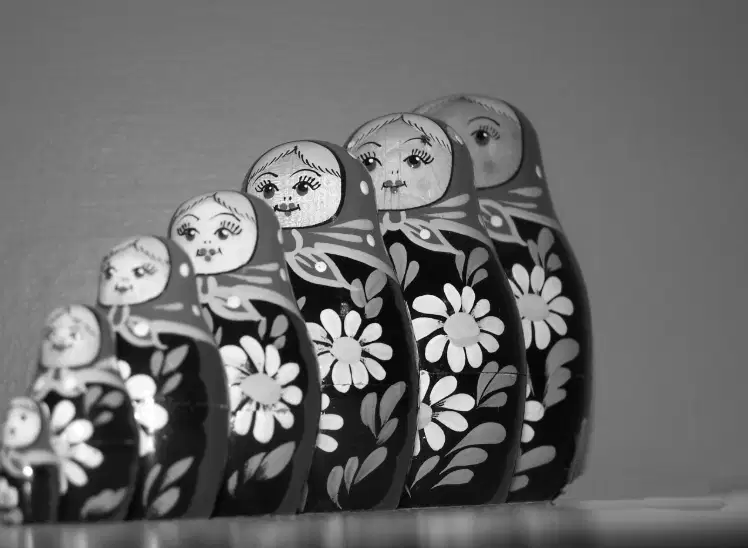
Image shown applies what principle of graphics and layout?
(a)

Image shown applies what principle of design and layout?
(a)

Image shown applies what principle of design and layout?
(a)
It is part of graphic designthat deals in the arrangement of visual elements on a page.
Layout
Infographics
Graphics
It is a picture or visual representation of a thing. As a result, computer graphics are essentially images shown on a computer screen.
Graphics
Infograhics
Layout
Online Image File Format that does not support transparency and animation
.jpeg
.gif
.png
Online Image File Format that supports transparency and animation
.gif
.png
.jpeg
Write the comple web address of Wikipedia website
(a)
Cutting parts away to remove distracting or irrelevant elements. Enhance focus and composition.
Cropping
Blurring
Filter
It is used to represent information, statistical data, or knowledge in a graphical manner
Infographics
Layout
Images
Write the complete web address of Comelec website
(a)
Write the complete web address of Fatima website
(a)
DNS stands for:
(a)

Identify the given application/site logo:
(a)

What mobile phone brand uses Symbian OS?
Nokia
Iphone
Samsung

Classify the given device
Input
Output

Classify the given device
Output
Input

What ICT Current trends categorized the given application/site?
Collaborative Platform
Assistive Media
Convergent Technology

