
 Worksheets
AutoCAD Certified User Practice Quiz 3
Total questions: 35
Worksheet time: 18mins
What are two methods of utilizing Object Snaps?
Identification of selected Osnaps after objects are drawn
Creating freehand drawings using the sketch method
Single selection of object snap operations between objects
Multiple selections of object snap operations between objects
Continuous identification of selected Osnaps as objects are drawn
What does the Nearest command do?
Finds a similar object and joins it to the current one
Locates a point offset from a reference point in a command
Finds a line and tracks off of its endpoint
Finds the closest object to lock onto
You can only have one object snap running at the same time?
True
False
What is Dynamic Input?
A method of drawing that uses copy and paste
A method of drawing that has users select a location on the screen with their mouse
A method of drawing that has users enter coordinates in the Command Line
A method of drawing that shows input boxes near the cursor when one starts to draw
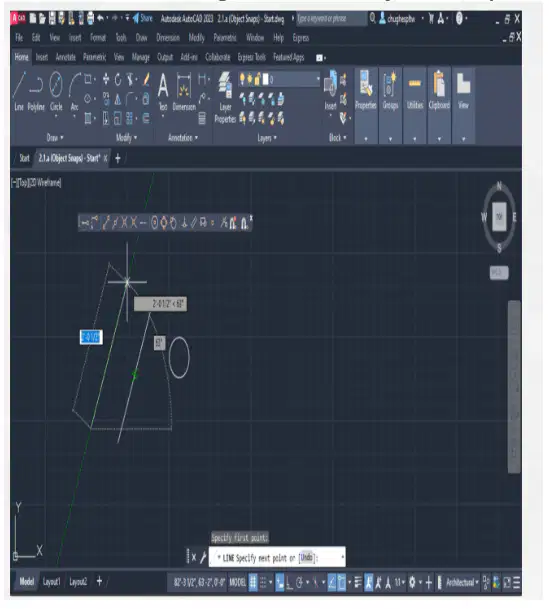
Refer to the image. Which object snap is being used here?
Extension
Insertion
Nearest
Parallel
What are the three coordinate input methods used by Draw commands in AutoCAD?
Polar tracking
Command line input
Dynamic input
Mouse input
Where are all commands for creating shapes in a drawing located?
In the Draw panel
In the Modify panel
In the Annotation panel
In the Layers panel
What tool can be used to duplicate polylines at equal intervals?
Multiline copy
Rectangular Array
Fillet
Offset
What template should be used if metric units are needed for a design?
acadiso.dwt
acad3d.dwt
acadiso3d.dwt
acad.dwt
Which of these is not a purpose of palettes?
To provide control over various properties and settings
To change the materials used in the drawing
To provide a list of available commands to use in the command line
To provide a close-up view of the graphics
What are two ways in which users can perform a crossing selection?
By typing crossing in the command line
By selecting and holding the Ctrl key on the keyboard
By selecting a point and dragging the cursor from right to left
By selecting a point and dragging the cursor from left to right
By typing ALL in the command line
What are two ways in which users can clear selections?
By selecting and holding the Delete key on the keyboard
By selecting and holding the Shift key on the keyboard
By dragging the cursor down
By typing Remove in the Select objects prompt
By typing Delete in the Select objects prompt
Which Layer Properties Manager setting improves AutoCAD‘s performance?
Lock
Transparency
On
Freeze
How can users display objects on selected layers? Choose two answers.
By using the LAYERs command
By using the LAYWALK command
By using the QuickCalc tool
By using the Isolate tool
By using the Quick Select tool
What is the purpose of enabling the Repeat Placement setting?
To allow users to insert multiple types of blocks in a drawing
To allow users to insert multiple blocks at the same insertion point
To allow users to have multiple instances of the same block in a drawing
To allow users to insert a block multiple times quickly
How far does the Trim command trim an object back?
To a specified length
To the nearest intersection with another object
To a selected point
By one inch
What is the benefit of the Array command?
It matches the properties of one object to another object
It copies or moves an object to a new location within the graphics area
It allows for a pattern of objects to be created quickly
It sets the length of an object to a specified distance
Which tool will create a rounded corner?
Fillet
Chamfer
Extend
Offset
Which color indicates that a grip is active?
Blue
Black
Red
Green
Which command will set a line to a specified length?
Trim
Lengthen
Extend
Offset
What should users type into the command line to place multiple dimensions?
The letter "A"
The letter "B"
The letter "C"
The letter "D"
Which command controls the leader line and text as one style?
LEADER
QLEADER
MLEADER
TLEADER
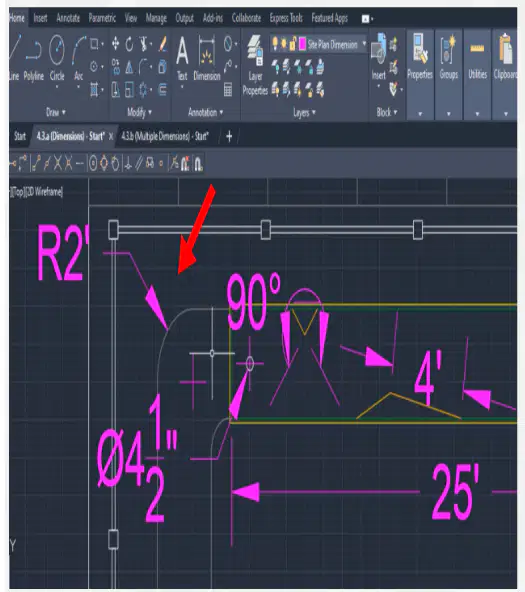
Refer to the image. What type of dimension is indicated?
Linear
Diameter
Angular
Radius

Refer to the image. What type of dimension is indicated?
Linear
Diameter
Angular
Radius
What should users type into the command line to place more than one baseline dimension?
The letter "A"
The letter "B"
The letter "C"
The letter "D"
Which three ways can a drawing be published in AutoCAD?
Generated as a Word document to be shared electronically
Physically printed on a printer
Published as a webpage
Plotted using a plotter
Generated as a PDF file to be shared electronically
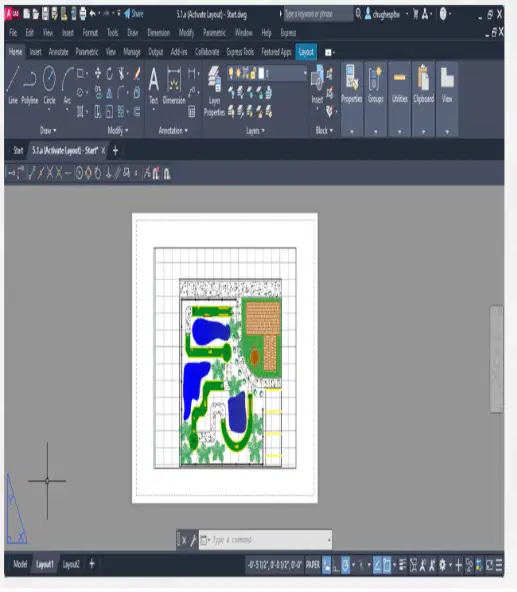
Refer to the image. What indicates this is Paper space?
The Layout1 tab on the lower left
The toolbar on the right side
The command line field at the bottom
The blue triangle in the lower-left corner
What option is used to fit objects along a line with specified start and end points?
Align
Fit
Scale
Rotate
What is the default direction for rotation in AutoCAD?
Clockwise
Counter-clockwise
Upwards
Downwards
What is the command used to check the distance between two points in AutoCAD?
SCALE
DIST
SIZE
LENGTH
What should be the scale factor to increase the size of an object by 20%?
1.2
0.8
2.0
0.2
What is the command alias for the Explode tool?
J
E
X
P
What is the purpose of the Cutting Edge option in the Trim command?
To cut objects in half
To select a boundary for trimming
To extend lines to a new edge
To create new objects
What happens when you set the offset gap type to 1?
The original object is erased
The offset distance becomes dynamic
Filleted corners are created at sharp edges
The tool mirrors the object
What is the first step when using the Fillet tool in AutoCAD?
Select the first object
Choose the trim mode
Enter the command alias
Specify the radius

