
Font size
 Worksheets
Year 5 ICT Lent Assessment
Total questions: 26
Worksheet time: 46mins
What is a variable in Scratch?
A fixed number in a game
A storage container that holds a changing value
A block that moves a sprite
A type of loop
What kind of data can variables store in Scratch?
Only numbers
Only text
Both numbers and text
Only boolean values
What is the difference between global and local variables?
Global variables can only be accessed by one sprite, while local variables can be accessed by all
Local variables are accessible by all sprites, while global variables are restricted to one sprite
Global variables can be accessed by all sprites, while local variables belong to a specific sprite
There is no difference between them
Which block is used to set a variable to a specific value?
Change [variable] by [value]
Set [variable] to [value]
Show variable [variable]
Ask [variable] and wait
How do you create a variable in Scratch?
By clicking 'Make a Variable' in the Variables category
By writing a variable in the Scripts section
By clicking 'Make a Block'
By typing a variable name in the sprite properties
Which of the following is an example of using a variable in Scratch?
Moving a sprite forward
Keeping track of a score in a game
Changing a sprite’s costume
Playing a sound
If you want to increase a variable’s value by 1, which block should you use?
Set [variable] to [1]
Change [variable] by [1]
Ask [variable] and wait
Show variable [variable]
What will happen if a variable storing a countdown timer reaches zero?
The game will reset automatically
Nothing will happen unless a script is created to check for zero
The variable will automatically reset to its original value
Scratch will stop the game automatically
How can you use a variable to track a player’s health in a game?
Set a variable to 100 at the start and decrease it when the player is hit
Create a new sprite for health points
Use a loop to constantly increase the health
Use a 'forever' block to reset health every second
What happens if you hide a variable using the 'Hide variable' block?
The variable’s value is deleted
The variable is removed from the project
The variable is still active but no longer visible on the stage
The variable stops working entirely
A local variable in Scratch can be accessed by all sprites.
True.
False.
The 'Set [variable] to [value]' block is used to change a variable's value.
True.
False.
You can store a player's name in a variable and use it later in the game.
True.
False
Scratch variables can only store numbers, not text.
True.
False.
If a variable is hidden, it no longer works in the project.
True.
False.
A variable is a (a) that stores a value and can change during a program's execution.
To create a variable in Scratch, click on the (a) category in the block palette.
The (a) block is used to increase or decrease the value of a variable.
A (a) variable can be accessed and modified by all sprites in a project.
In a game, a countdown timer is an example of a variable that keeps track of (a) .
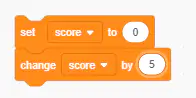
What does the following code do?
Resets the score to 5 at the start of the game
Increases the score by 5 without setting an initial value
Sets the score to 0 first, then increases it by 5.
Decreases the score by 5.
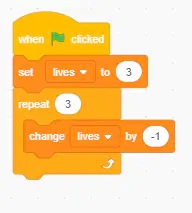
What happens when this script runs?
The lives variable stays at 3
The lives variable decreases from 3 to 0
The lives variable increases by 3
The lives variable is removed
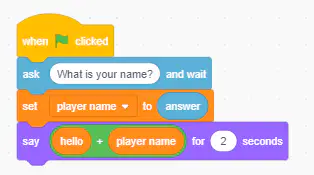
What is the purpose of this code?
It stores the user’s name and greets them.
It asks a question but does not use the answer.
It always says "Hello!" without using variables.
It sets the variable but does not display it.
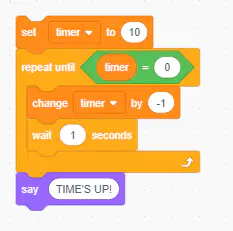
What happens when this script is run?
The timer decreases from 10 to 0 ( in seconds), then says "Time’s up!" .
The timer increases from 0 to 10.
The timer never stops decreasing.
The script does nothing.
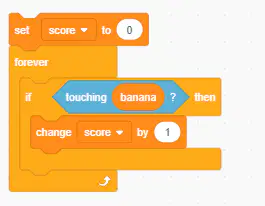
What does this script do?
The score increases by 1 when touching the banana.
The score remains at 0.
The sprite moves to the banana.
The game restarts every time.
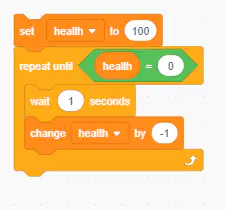
What happens when this code runs?
Health decreases from 100 to 0 over time.
Health remains at 100.
Health increases from 0 to 100 over time.
The script never stops.

