
NEW
Font size
 Worksheets
Net+ 10.4 Switch Security
Total questions: 62
Worksheet time: 31mins
What is the primary purpose of Network Access Control (NAC)?
To increase network speed
To authenticate endpoints before they connect to the network
To enhance data storage capacity
To improve user interface design
Which of the following is a method to prevent unauthorized devices from connecting to a network switch port?
Increasing bandwidth
Using a sinkhole VLAN
Installing additional routers
Upgrading firmware
What is a basic type of NAC implemented by configuring?
Firewall settings
Port security mechanisms
Wireless access points
VPN connections
What is the purpose of MAC filtering on a switch?
To allow any device to connect to the network
To define which MAC addresses are permitted to connect to a particular port
To increase the speed of the network
To disable all network ports
What happens when a host attempts to connect with a MAC address that violates policy?
The port allows the connection without any restrictions
The port automatically reboots
The switch port enters a violation state
The network speed increases
Which mode disables the port and sends alerts when a MAC address violation occurs?
Protect mode
Restrict mode
Shutdown mode
Open mode
What is the default mode when a MAC address violation occurs on a switch port?
Protect mode
Restrict mode
Shutdown mode
Open mode
What is the maximum number of MAC addresses allowed in the port security configuration shown?
1
2
3
4
What is the violation mode set in the port security configuration?
Shutdown
Protect
Restrict
Monitor
What is the port status according to the port security interface output?
Secure-down
Secure-up
Inactive
Active
How many security violations have been reported in the configuration?
3
4
5
6
What is the default IP address used to access the Cisco Small Business Switch in the demonstration?
192.168.1.1
192.168.254.8
192.168.0.1
192.168.100.1
What is the default username and password for the Cisco Small Business Switch mentioned in the document?
admin/admin
user/user
cisco/cisco
root/root
What is the first recommended action when setting up a new network device according to the document?
Update the firmware
Change the default username and password
Configure the IP address
Set up a firewall
Which link is used to change the device password on the Cisco Small Business Switch?
Security Settings
Network Configuration
Quick Access
User Management
What is the first step to secure access to a network switch according to the document?
Change the IP address
Add a new admin account with a complex password
Disable the default user account
Enable guest access
What user level should be set for the default user to enhance security?
Read/Write Management Access
Full Access
Read-Only CLI Access
Guest Access
Why is it important to save changes to the startup configuration files?
To increase network speed
To ensure changes are retained after a reboot
To allow multiple users to access the switch
To reset the switch to factory settings
What is one method of hardening a network switch mentioned in the text?
Enabling all switch ports
Disabling unused switch ports
Increasing network speed
Reducing network traffic
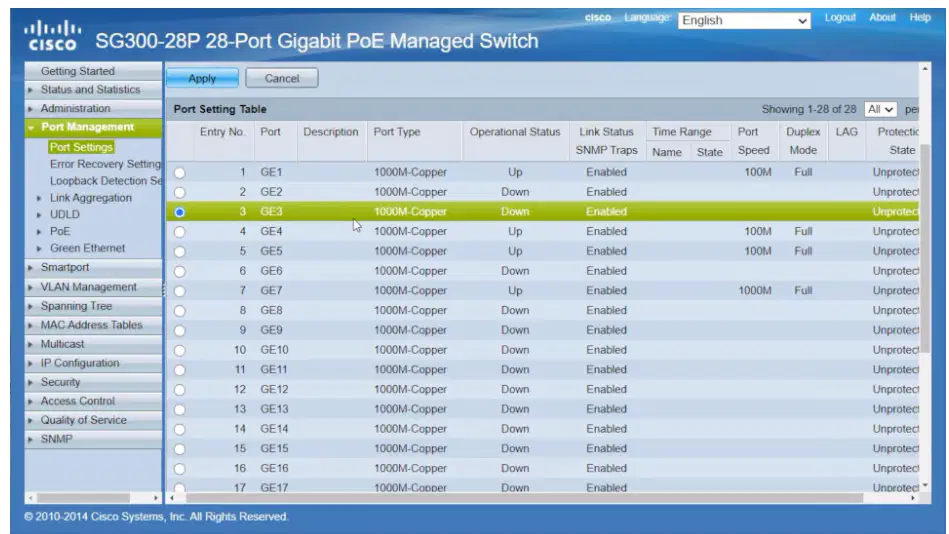
Which port is initially set to 'Down' in the process described?
Port 22
Port 23
Port 21
Port 27
What should be done after selecting the ports to apply the copied settings?
Click 'Close'
Click 'Edit'
Click 'Apply'
Click 'Save'
What does the Extensible Authentication Protocol (EAP) provide?
A framework for deploying multiple types of authentication protocols
A method for encrypting data
A system for managing network traffic
A protocol for wireless communication
In which scenario is pre-authentication required according to EAP?
When accessing a wireless network
When using a personal computer
When browsing the internet
When using a local printer
What is the role of a RADIUS server in the IEEE 802.1X Port-Based Network Access Control (NAC) standard?
To store and validate authentication credentials
To manage network traffic
To encrypt data
To provide internet access
What does the IEEE 802.1X standard use for authentication?
Authentication, Authorization, and Accounting (AAA)
Simple Mail Transfer Protocol (SMTP)
Hypertext Transfer Protocol (HTTP)
File Transfer Protocol (FTP)
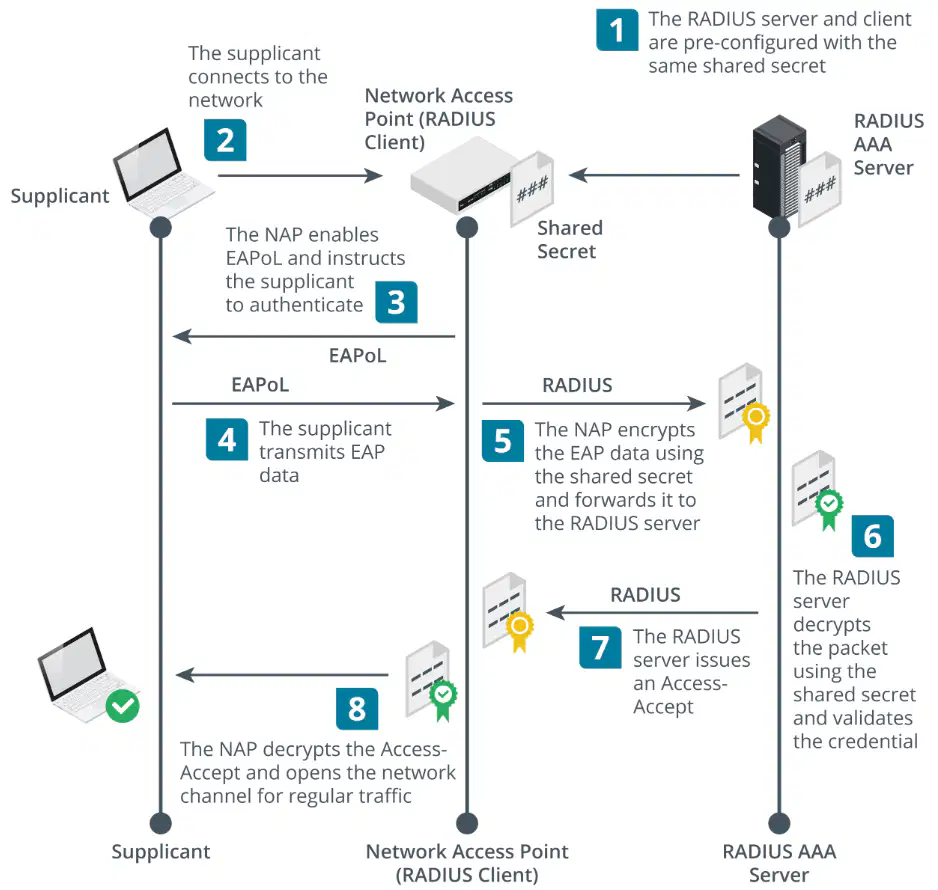
What is the first step in the RADIUS authentication process?
The supplicant connects to the network.
The NAP enables EAPoL and instructs the supplicant to authenticate.
The RADIUS server and client are pre-configured with the same shared secret.
The supplicant transmits EAP data.
What does the NAP do after the supplicant transmits EAP data?
It connects to the network.
It decrypts the Access-Accept and opens the network channel for regular traffic.
It encrypts the EAP data using the shared secret and forwards it to the RADIUS server.
It issues an Access-Accept.
What is the role of the RADIUS server after receiving the encrypted EAP data?
It connects to the network.
It decrypts the packet using the shared secret and validates the credential.
It instructs the supplicant to authenticate.
It transmits EAP data.

What does the NAP do after receiving an Access-Accept from the RADIUS server?
Encrypts the data again
Opens the network channel for regular traffic
Sends a health policy report
Validates the credential
What is required for a client to prove compliance with a health policy in sophisticated NAC solutions?
A shared secret
An attestation report
A machine certificate
A user password
What is the first step in configuring network access control on a Cisco Switch?
Entering interface configuration mode
Logging into the switch and entering global configuration mode
Running the command switchport mode access
Configuring the MAC address list
Which command is used to set the maximum number of devices allowed to connect through a port on a Cisco Switch?
switchport mode access
port-security mac-address sticky
switchport port-security
dot1x pae authenticator
What is the purpose of the command 'dot1x pae authenticator' on a Cisco Switch?
To enable port security on the interface
To configure a MAC address list
To set the maximum number of devices
To enter global configuration mode
How can you ensure that only specific MAC addresses are allowed to communicate through a port?
By using the command switchport mode access
By configuring a MAC address list and applying it to the interface
By entering global configuration mode
By running the command dot1x pae authenticator
What is the purpose of configuring a RADIUS client in a network?
To encrypt all network traffic
To manage user accounts
To authenticate and authorize network access
To increase network speed
When is it unnecessary to configure Routing and Remote Access as a RADIUS client?
When RADIUS is installed on a different server
When RADIUS is installed on the same server as Remote Access
When using a wireless router
When using a wired switch
What changes when you install the Network Policy and Access server role?
The server's IP address
The list of available network protocols
The properties and security settings of the server
The server's operating system
What is a shared secret used for in a RADIUS configuration?
To define the server's IP address
To encrypt the connection between the RADIUS client and server
To increase network bandwidth
To manage user permissions
What is the purpose of using certificates for NPS authentication?
To enhance network speed
To provide a secure authentication method
To reduce network traffic
To increase data storage
Which of the following is a method to prevent ARP cache poisoning?
DHCP snooping
ARP inspection
VLAN hopping
Spanning tree attacks
What is the function of DHCP snooping in network security?
To increase network bandwidth
To prevent rogue DHCP servers
To allow VLAN hopping
To disable IP address allocation
Why should the default VLAN use a different ID than any other user-accessible VLAN?
To increase network speed
To mitigate double tagging attacks
To allow more users
To reduce power consumption
What is the role of Router Advertisement (RA) Guard in network security?
To enhance data encryption
To perform similar functions to DAI and DHCP snooping for IPv6
To increase network bandwidth
To disable IPv6 functionality
What is the purpose of setting up a Bridge Protocol Data Units Guard (BPDU Guard)?
To allow an interface to put itself into a blocking state when it receives a BPDU packet.
To enable faster data transmission across the network.
To increase the bandwidth of the network.
To allow multiple root bridges in a network.
What happens if a port receives a BPDU frame when root guard is enabled?
The port is blocked and an error is logged.
The port increases its data transmission speed.
The port becomes the root bridge.
The port is disabled permanently.
What is the purpose of hardening a managed switch?
To increase the speed of the network
To enhance the security of the switch
To reduce the power consumption
To expand the network range
Which tool is used to access the management interface of the Cisco Small Business Managed Switch in the demonstration?
Google Chrome
Mozilla Firefox
Internet Explorer
Safari
What is the first step mentioned for hardening a switch?
Increase bandwidth
Shut down unused ports
Update firmware
Change the switch location
What does it mean when a port is administratively down?
The port is physically damaged
The port is turned off and cannot be used
The port is active and in use
The port is in standby mode
What is the purpose of setting ports to "Administratively Down"?
To allow all traffic through the ports
To ensure ports are active at startup
To disable unused ports
To increase network speed
Which port is used to copy settings to other ports in the document?
Port One
Port Two
Port Three
Port Four
What does a Classic Lock do in port security settings?
Allows all devices to connect
Locks the first device that connects
Allows unlimited devices to connect
Disables the port completely
What is the default action when a device not supposed to be on a port tries to connect?
Allow the device
Log the attempt
Discard the packet
Notify the administrator
What is one of the most secure actions you can take if you don't want unknown devices connecting to your network?
Enable MAC address filtering
Shut down the port
Use a VPN
Change the network password
What should you do if a device is not locked in and you want to prevent it from accessing the network?
Enable DHCP
Trap the MAC addresses
Use a firewall
Change the SSID
What is the purpose of creating a Management Profile in network settings?
To allow all devices to connect
To manage user passwords
To control management access
To increase network speed
In the Management Profile, what is the first rule that should be applied?
Allow all management
Deny all management
Enable guest access
Increase bandwidth
What IP address is specified to allow HTTP access from a specific workstation?
192.168.1.100
192.168.1.200
192.168.1.1
192.168.0.1
What is the purpose of setting an Active Profile in Access Profiles?
To allow all types of management interfaces
To deny all types of management interfaces except HTTP access from one workstation
To enable all traffic through the network
To disable HTTP access from all workstations
What should you do after loading the firmware to ensure the switch has the latest software and patches?
Click Apply immediately
Reboot the switch
Disconnect the switch
Delete the old firmware
Which type of ACL can be used to prevent game consoles from connecting to the switch?
IPv4 based ACL
IPv6 based ACL
MAC based ACL
DNS based ACL
What is the first step in setting up access control using ACLs on the switch?
Create an access control list
Reboot the switch
Load the firmware
Apply the Active Profile

