
 Worksheets
CMPE 311 MICROPROCESSORS PRE-FINAL EXAMINATION
Total questions: 100
Worksheet time: 34mins
What is the correct function to set a pin as an output in Arduino?
digitalWrite(13, HIGH)
pinMode(13, INPUT)
analogWrite(13, HIGH)
pinMode(13, OUTPUT
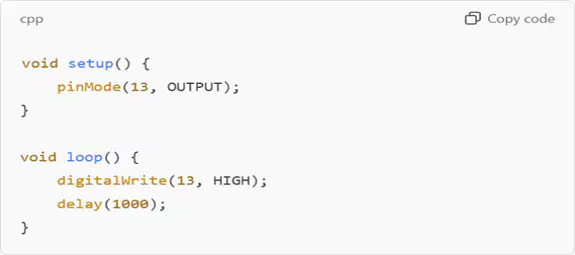
Why won’t the following "blink" code work?
The function digitalWrite should be analogWrite.
The pin should be set to INPUT.
The LED will not blink because there is no LOW state.
delay(1000); is too short.
What common mistake might prevent the built-in LED on pin 13 from blinking?
Forgetting to declare pinMode(13, OUTPUT); in setup().
Using delay(0); instead of delay(1000);
Writing digitalRead(13, HIGH); instead of digitalWrite(13, HIGH);
Using analogWrite(13, 255); instead of digitalWrite(13, HIGH);
If your LED stays on instead of blinking, what could be the problem?
pinMode(13, OUTPUT); is not needed.
The LED might be broken
The code is missing digitalWrite(13, LOW); and a delay.
The delay time is too long.
What will happen if you write delay(-1000);?
The code will not compile.
The delay function will be ignored.
The Arduino will blink the LED faster.
The Arduino will enter an infinite loop.
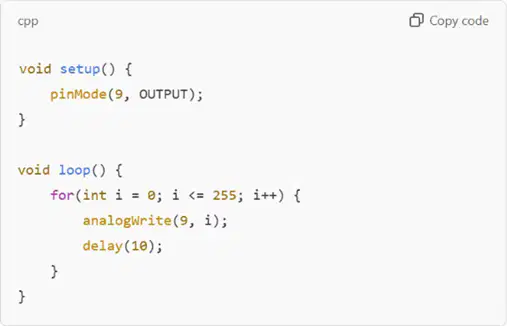
Why won’t the following code fade an LED property?
The delay is too long.
The loop should count down after reaching 255.
pinMode(9, OUTPUT); should be INPUT.
The pin should be 13, not 9.
What type of pins support analogWrite() for fading LEDs?
Only pin 13
Any pin set to OUTPUT
Digital pins
PWM pins marked with ~
What is the range of values accepted by analogWrite()?
0 to 255
0 to 50
0 to 1023
0 to 100
What common error occurs if you try to fade an LED on pin 2?
The LED will still fade but slower.
The LED will turn on and off instantly.
The code won’t compile
Nothing will happen because pin 2 doesn’t support PWM.
What happens if you use digitalWrite(9, HIGH); instead of analogWrite(9, 255);?
The LED will fade smoothly.
The LED will not light up.
The LED will turn on at full brightness
The LED will blink instead of fade.
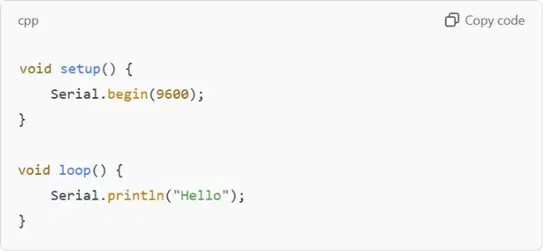
What is missing in the following code to display text in the Serial Monitor?
Serial.print() should be used instead of Serial.println().
Serial.begin(9600); should be in loop().
The baud rate should be 115200.
A delay() in loop() to slow output.
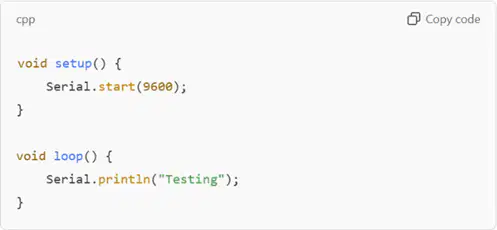
Why won’t this code compile?
Serial.println("Testing"); should be Serial.print("Testing");
Serial.start(9600); should be Serial.begin(9600);
The baud rate must be 57600.
There is no delay in loop()
If the Serial Monitor shows garbage characters, what is likely the issue?
The baud rate in the code and Serial Monitor don't match.
The print statement is incorrect
The Arduino board is defective.
The USB cable is unplugged
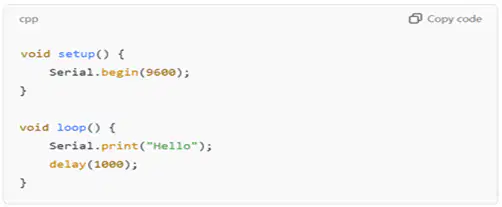
What will be printed in the Serial Monitor with this code?
HelloHelloHello (without spaces, repeating)*
No output because Serial.println is not used.
Hello
Hello (with a newline after each word)
What is a common mistake when using Serial.read( )?
Using Serial.readString ( ) instead
Forgetting to check if data is available with Serial.available( )
Not setting Serial.begin( )
Using Serial.println( ) instead of Serial.print( )
What happens if you remove the delay(1000); from a "blink" sketch?
The LED will blink faster.
The LED will stay on.
The code won’t compile.
The LED will stay off.
Why won’t this loop execute as expected?
There is an unnecessary semicolon after the for loop.
The loop should count down instead of up.
The loop needs a delay( ).
Serial.println(i); should be inside the loop.
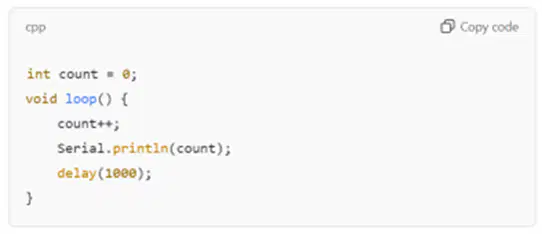
What will be the output of the following code?
It will print numbers starting from 0, increasing infinitely.
The code won’t compile.
It will print numbers 0 to 10, then reset.
It will only print "1" repeatedly.
If a delay of 5000 is used in loop(), what happens?
The delay function will be ignored.
The Arduino will restart.
The LED will blink 5 times per second.
The program will pause for 5 seconds before executing again.
How can you make an LED blink without using delay( )?
Use Serial.print( ) to slow down execution.
Use digitalRead( ) on the LED pin.
Use millis( ) to track elapsed time.
Use millis() to track elapsed time.*
What is the data type for storing whole numbers?
char
float
int
Boolean
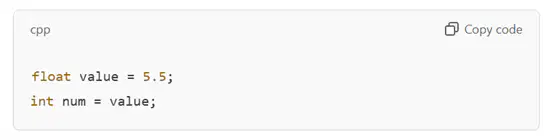
What is wrong with the following declaration?
count is declared inside setup( ) and not accessible in loop( ).
Serial.println(count); should be inside setup ( ).
loop( ) must be inside setup( ).
count++ is not a valid operation.
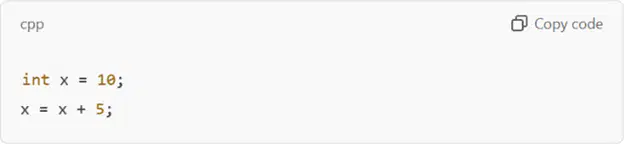
What is the value of x after this code runs?
10
10
5
15
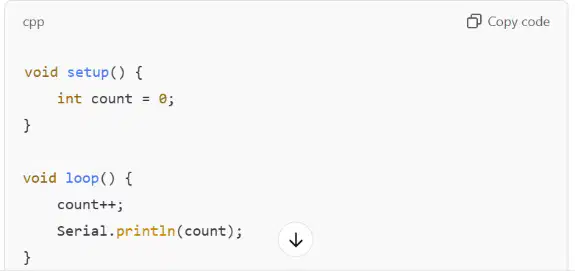
Why won’t the following code compile?
count is declared inside setup( ) and not accessible in loop( ).
Serial.println(count); should be inside setup().
loop() must be inside setup().
count++ is not a valid operation.
What does the bool data type store?
Decimal values
Strings
Whole numbers
True or false values
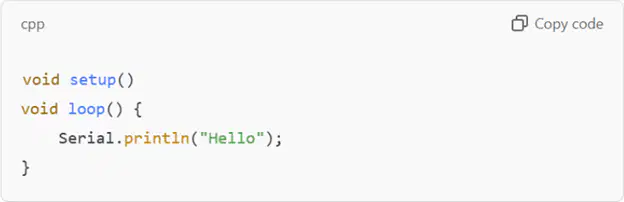
Why does this code fail to compile?
loop() is inside setup().
setup() is missing curly braces {}.
Serial.begin(9600); is missing.
Serial.println() should be Serial.print().
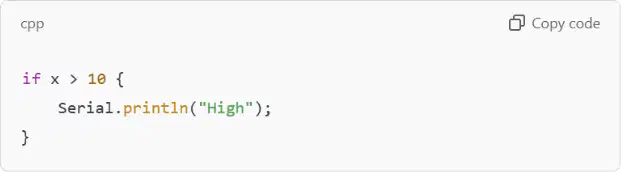
What is wrong with this conditional statement?
Serial.println should be Serial.print.
Parentheses () are missing around x > 10.
if should be written as IF.
The if statement must be inside loop( )
What will Serial.println(10 / 4); print?
2
2.5
10
10.5
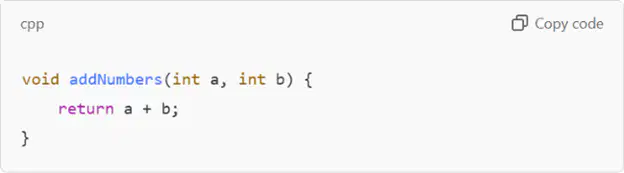
What is wrong with the following function?
Functions cannot have parameters in Arduino.
The return statement should be inside setup().
The parameters must be floats.
void functions cannot return a value.
What does // mean in Arduino code?
It is a syntax error.
It divides numbers.
It is used for comments.
It represents a special character.
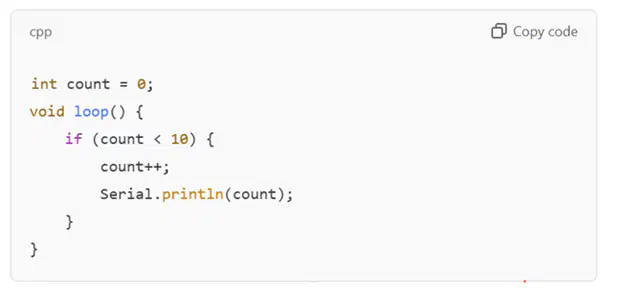
Why won’t this program stop at 10?
count never resets, so loop() repeats forever.
count should be float.
The if condition should be count > 10.
Serial.println() should be Serial.print().
What will happen if you forget a semicolon (;) at the end of a statement?
The code will not compile.
The statement will be ignored.
The Arduino will automatically fix it.
The Arduino will crash.
What is missing in this function? void greet() { Serial.println("Hello") }
A return statement
A semicolon after "Hello".
Serial.begin(9600);
The function should be inside loop()
What does millis() do?
Delays execution like delay().
Resets the Arduino.
Returns the number of milliseconds since the Arduino started.
Stops the Arduino for a set time.
What is the purpose of #define LED 13?
It creates a constant named LED representing pin 13.
It sets pin 13 to HIGH.
It turns on the LED connected to pin 13.
It initializes pin 13 as an output.
What is HIGH in Arduino?
A defined constant meaning 1.
A function.
A loop.
A variable.
What is missing from Serial.begin();?
A delay().
A loop statement.
A variable declaration.
A baud rate value.
What does analogRead(A0); do?
Outputs a PWM signal.
Reads a value from an analog sensor on pin A0.
Writes an analog value to pin A0.
Reads a digital signal
What is the purpose of pinMode(LED, OUTPUT);?
It writes a value to the pin.
It sets LED as an output pin.
It turns on the LED.
It reads input from the LED.
What happens if Serial.print() is used without Serial.begin(9600);?
The program won’t compile.
The Serial Monitor will crash
The Arduino will reset.
No output will be displayed.
int LED1= 4;
What statement is this?
Declaration
void Setup
C language
void loop
int LED1=4;
What is 'int= integer' used for?
Capital and small letters
Combination of Numbers and Alphabets
Alphabets
Numbers
int LED2=8;
What is number eight is referring in the coding above?
Analog Pin
Ground
5V
Digital Pin
digitalWrite (LED1,HIGH);
What does it mean by HIGH?
Switch OFF
Blinking
Switch ON
Sequence
delay (1000);
1000 in delay is equivalent to how many seconds?
2 seconds
10 seconds
1 second
20 seconds
digitalWrite (LED1, HIGH);
delay (1000);
digitalWrite (LED1, LOW);
What does the program do?
LED Switch ON at the beginning, wait for 10s and then Switch OFF.
LED Switch ON at the beginning, wait for 1s and then switch OFF.
LED Switch ON at the beginning, wait for 1s and then switch ON.
LED Switch Off at the beginning, wait for 60s and then switch ON.
How long is the LED on?
digitalWrite (13, HIGH);
delay(1000);
digitalWrite(13, LOW);
delay(1000);
100 seconds
200 seconds
1 second
100 milliseconds
Which symbol ends a statement?
Parenthesis)
Curly Brace }
comma,
semicolon;
Which pin is the jumper wire connected to?
digitalWrite (13, HIGH);
delay(1000);
digitalWrite(13, LOW);
delay(1000);
digital pin
100
12
13
A function is a series of programming statements that can be called by name. Which command is called repetitively over and over again as long as the Arduino has power.
(input)
loop()
(output)
setup()
A function is a series of programming statements that can be called by name. Which command is called once when the program starts:
(output)
setup()
loop()
(input)

What does pressing the check-mark do when working with your code?
Checks to see if the Arduino is connected to the computer.
Downloads your code onto the Arduino board.
Saves your work.
Checks your code for mistakes.
What is the definition of function?
Has inputs and outputs
Every input has only ONE output
x-values and y-values
Inputs have different outputs every time
What symbol is used to indicate a comment in Arduino programming?
##
/*
!!
//
How do you declare a variable in Arduino programming?
declare variable_name as data_type;
variable_name data_type;
int variable_name;
data_type variable_name;
How do you write a digital output to a specific pin in Arduino programming?
digitalWrite(pin, value)
setPinOutput(pin, value)
outputDigital(pin, value)
writeDigital(pin, value)
What is the function of the loop() in Arduino programming?
To pause the program for a specified amount of time
To end the program
To execute the program repeatedly after setup() has been called
To execute the program once
What is the function of the delayMicroseconds() function in Arduino programming?
To pause the program for a specified amount of time in microseconds.
To speed up the program execution
To skip a section of the code
To restart the program
LED is setup-up to blink. LEDs is an
Output
Input
pinMode
digitalWrite
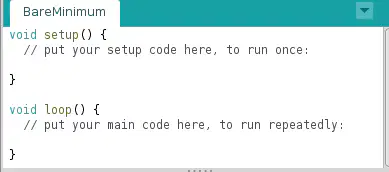
What is function of setup () ?
Allowing your program to change and respond.
To initialize variables, pin modes, start using libraries.
It indicates that the function is expected to return no information to the function from which it was called.
None of the above
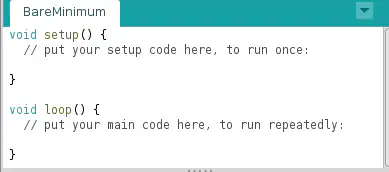
What is function of void () ?
Allowing the program to change, respond, and control the Arduino board.
To initialize variables, pin modes, start using libraries
It indicates that the function is expected to return no information to the function from which it was called.
None of the above
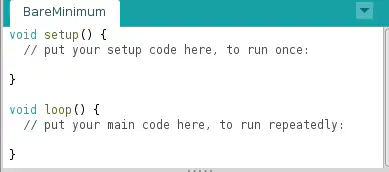
What is function of loop () ?
Allowing the program to change, respond, and control the Arduino board
It indicates that the function is expected to return no information to the function from which it was called
To initialize variables, pin modes, start using libraries
None of the above
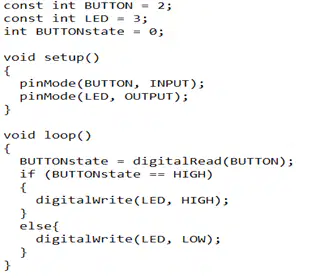
Which one of the following Arduino designs below refer to the code as shown in the figure?
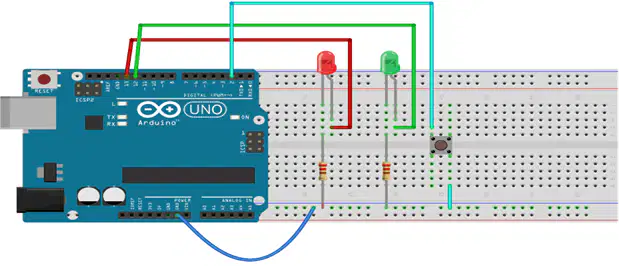
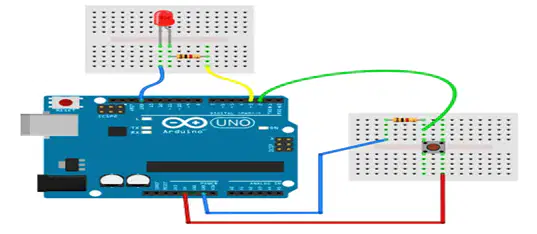
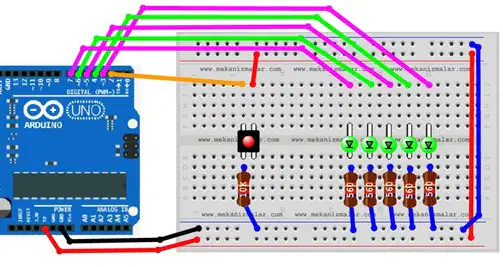
None of the above

Which one of the following Arduino code are TRUE ?
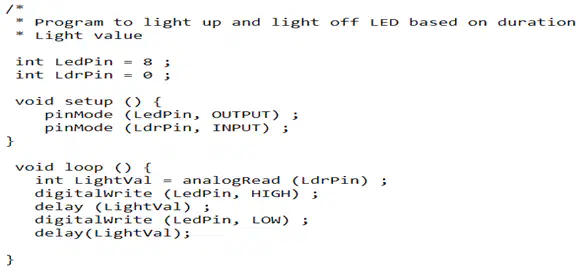
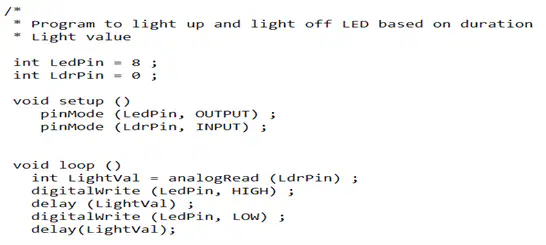
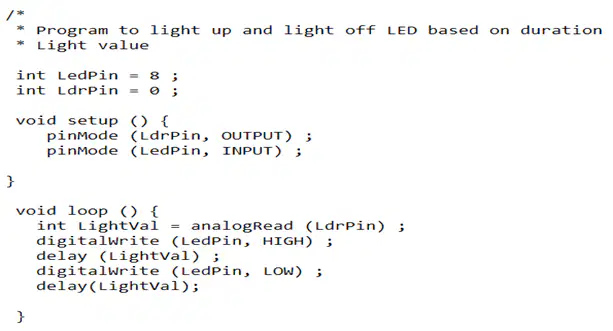
None of the above
Before your program “code” can be sent to the board, it needs to be converted into instructions that the board understands. This process is called...
Compile
Create Sketch
Serial Monitor
Stop
I use temperature sensor to read the room temperature. How do I write Temperature Sensor Set-up.
void setup(){
_______________________;
}
pinMode (Tsensor, INPUT);
PinMode (Tsensor, Output);
PinMode (Tsensor, Input);
pinMode (Tsensor, OUTPUT);
What does IDE stand for?
IDE
Internal Deep Escape
Integrated Development Environment
Integrated Developer's Environment
A program written with the IDE for Arduino is called __.
Source code
TextCode
Sketch
Raw code

What does this sketch do?
This sets up the pin that our LED is connected to as an INPUT pin
This sets up and LED to turn off
This sets up the pin that our LED is connected to as an OUTPUT pin.
Turns the LED off by writing LOW out on the pin.7
What is a Variable?
It is when you want to add two number together
It is a place where you can store some data
It is a name given to a special sub-routine that changes how the program works
It is a place in your code that changes
A function is a series of programming statements that can be called by name. Which command delays the LED by a number of milliseconds is.
delay()
stop()
setup()
loop()
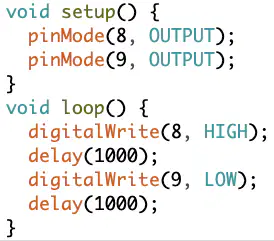
Which LED is ON ?
None
All!
8
9
Where is the position of this command?
pinMode (8, OUTPUT);
void loop()
void setup()
void stop()
None of the above
Where is the position of this command?
digitalWrite(8, HIGH);
void setup()
void stop()
void loop()
None of the above
How header file is to be defined to code for servo motors?
Servo myservo;
#include<Servo.h>
# define Servo
# include Servo
If servo object is myServo and then servo control signal to make 150 degree angle, is coded as
myServo.write(852.5);
myServo.Write(852.5);
analogWrite(852.5);
myServo.write(150);
Servo signal pin must be connected to
any one of the PWM pins
5V pin
any digital pin of Arduino
analog input pins A0 to A5
What type of actuator would be best suited to operating a robot arm?
DC Motor
Servo
Stepper motor
AC motor
Ultrasonic waves are a form of _______ waves
radio
ocean
sound
seismic
How many volts do the ultrasonic sensors need to operate?
12v
5V
10V
3V
An ultrasonic sensor is a device that can measure the ________ to an object by sending out _________ waves.
density / echo
path / seismic
distance / sound
elevation / sonic

What type of sensor would be used in this kettle?
Infra-red sensor
Temperature Sensor
Pressure Sensor
Light Sensor
What is the minimum Voltage to power up an Arduino uno module?
0. 5 V
0. 24 V
12V
0. 4V
What is the code used to input a library on your sketch?
#include
#define
#input
#determine
What is the function of the setup() in Arduino programming?
It is used to play music on the Arduino board
It is used to initialize the Arduino board and prepare it for the main loop
It is used to control the speed of the Arduino board
It is used to turn off the Arduino board
What is the function of the loop() in Arduino programming?
Runs the code only once
Stops the code from running
Resets the Arduino board
Executes the code continuously
What is the syntax for declaring a variable in Arduino programming?
data_type variable_name;
variable_name = data_type;
variable_name data_type;
variable_name = new data_type;
What is the difference between digitalRead() and digitalWrite() functions in Arduino programming?
They are used for controlling servo motors
They are used for measuring temperature
They are used for reading and writing digital signals on Arduino pins.
They are used for playing sound
Explain the use of the analogRead() function in Arduino programming.
It is used to measure the frequency of an analog signal.
It is used to read the analog voltage value from a specified analog pin.
It is used to write digital values to an analog pin.
It is used to control the speed of a servo motor.
What is the primary purpose of the Fritzing software?
To manage databases
To create prototypes and schematics
To design 3D models
To program Arduino boards
What is the function of the TX and RX LEDs?
To show power status.
To indicate the board is connected.
To indicate serial communication
To display error messages.
What is the correct execution process of an Arduino code?
Editor->Preprocessor->Compiler
Preprocessor->Editor->Compiler
Compiler->Preprocessor->Editor
ditor->Compiler->Preprocessor
What is the function of the IOREF pin on the Arduino UNO?
To take input voltage and set it as a reference for all GPIO operations
To provide a constant 12V DC supply
To provide ground
To provide the voltage corresponding to the standard GPIO working voltage of the board
What will be the output of the following Arduino code?
#define X 10; void setup(){ X=0; Serial.begin(9600); Serial.print(X); } void loop(){ //Do nothing… }
0xAB
0xa
0
Error
What is the purpose of the following Arduino code?
void setup() {
Serial.begin(9600);
}
void setup() {
Serial.write(40);
}
Send a signal to pin 40 on the Arduino board
Send a octal number of 40 through the Serial pins
Send a byte with value 40 through the Serial pins
Send a hexadecimal number of 40 through the Serial pins
What is the use of the Interrupt Service Routine in an Arduino?
To boot up the Arduino
To exit any code that is running
To automate functions
To make more memory
What is the full form of UART?
Universal Asynchronous Receiver/Transmitter
Universal Anti-Rectifying Transmitter
Universal Asynchronous Radio Transmitter
Universal Asynchronous Rectifier Transistor
What is the purpose of the tone() function?
To generate a sine wave
To generate a cosine wave
To generate a stable voltage level
To generate a square wave
Which of the following control structures is an exit-controlled loop?
For loop
While loop
Const and Goto
Do-While loop
What is the name of the control structure used to stop any loop prematurely and only exit out of the loop, not affecting the running of the rest of the program?
The continue statement
The break statement
The exit statement
The purge statement

