
 Worksheets
Revision Chapter 1
Total questions: 39
Worksheet time: 39mins
This is an example of an input device
(a)
This is an example of output device
(a)
This is an example of an input device
(a)
This is an example of output device
(a)
This is an example of input device
(a)
This is an example of output device
(a)
This is an example of both input and output device
(a)
This is an example of internal hardware
(a)
This is an example of internal hardware
(a)
This internal hardware consists of Arithmetic Logic Unit (ALU) and control unit (CU)
(a)
This hardware allows any computer to be connected to a network
(a)
What is SSD stands for?
(a)
What is HDD stands for?
(a)
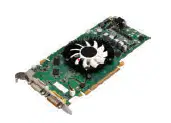
What is this device?
(a)
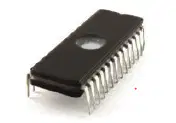
What is this device?
(a)
Software has how many types?
(a)

These are examples of what type of software?
(a)

These are examples of what type of software?
(a)
Analogue to Digital converter (ADC) converts what type of data?
Digital data to Analogue data
Analogue data to Digital data
Analogue data to Analogue data
Digital data to Digital data
Which of these are volatile?
RAM or ROM?
(a)
Which of these are permanent?
RAM or ROM?
(a)
What is BIOS stands for?
(a)
Which one of these can be upgraded and increase in size?
RAM or ROM?
(a)
Give two examples of backing storage.
(a)
What is CLI stands for?
(a)
What is GUI stands for?
(a)
Which type of interface is using command?
(a)
What type of interface that is using icons and menus?
(a)
This user interface (UI) is using human voice to give command.
(a)
This type of user interface (UI) is using human interactions like moving hands, head or feet.
(a)
In a home, very useful for people with disabilities, because many
tasks can be carried out by the spoken word only.
This is the benefits of what type of user interface?
(a)
This is the disadvantage of this type of user interface. It only works fairly near to the
camera or sensor (maximum of 1.5 metres)
(a)
I am a general-purpose computer that is
made up of separate monitor, keyboard, mouse and processor unit.
What type of computer i am?
(a)
I am less expensive, to upgrade or expand. what type of computer I am?
(a)
My monitor, keyboard, pointing device and
processor are all together in one single unit and I am extremely portable.
What type of computer I am?
(a)
I have front- and back-facing cameras, I also have longer battery life.
I have my own OS and few sensors to work.
What type of computer I am?
(a)
I am very fast to switch on and fully portable.
My camera is not great, the resolution is not high.
What type of computer I am?
(a)
I can translate multiple language, I can recognise people faces, i can operate cars or planes,
I also can analyse data efficiently. What am I?
(a)
I can do multiple work for you, I will obey your instructions. What am I?
(a)

