
 Worksheets
Year-6, Unit-3 MS Word Basics
Total questions: 26
Worksheet time: 23mins
How do you insert a shape in MS Word?
Go to 'File' > 'New' and create a shape.
Go to 'Insert' > 'Shapes' and select a shape.
Right-click on the document and select 'Add Shape'.
Use the 'Home' tab to draw a shape directly.
What steps do you follow to insert a picture in MS Word?
Right-click and select 'Add Image' from the menu.
Drag and drop the image directly onto the document.
Use the 'File' tab and choose 'Open' to insert an image.
Use the 'Insert' tab and select 'Pictures' to add an image.
What options are available for text alignment in MS Word?
Top, Bottom
Single, Double
Bold, Italic
Left, Center, Right, Justified
What is the difference between bold and italic font styles?
Bold text is slanted and italic text is thicker.
Bold text is used for emphasis, while italic text is for decoration.
Bold text is thicker and darker, while italic text is slanted.
Bold and italic styles are the same and used interchangeably.
What is the shortcut key for bolding text in MS Word?
Alt + B
Ctrl + I
Ctrl + U
Ctrl + B
How can you add a header to a document in MS Word?
Type directly at the top of the document.
Use the 'Layout' tab to add a header.
Right-click on the top margin and select 'Add Header'.
Click on 'Insert' and select 'Header'.
What is the function of the 'Home' tab in MS Word?
To format text, paragraphs, and styles.
To manage document permissions.
To check spelling and grammar.
To insert images and tables.
What is the purpose of the 'Insert' tab in MS Word?
To format text and paragraphs.
To insert various elements like images, tables, and charts.
To manage document permissions.
To check spelling and grammar.
Which tab would you use to change the font style in MS Word?
Review
Home
View
Insert
What is the shortcut key to save a document in MS Word?
Alt + S
Ctrl + P
Shift + S
Ctrl + S


What icon is Right Alignment?


Formatting means
changing the shape
changing text
changing appearance of text
none
The extension of MS WORD is ___________________
.pptx
.png
.docx
.sla


Which key do you press in the keyboard to start a NEW LINE ?


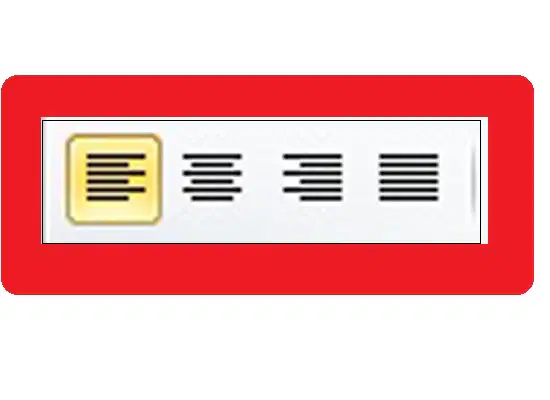
This tool let you change ____
Font style
Size
Bold
Text Alignment
There are two ways of Page orientation - Landscape & Portrait
True
False

WHAT PART OF MS WORD IS SHOWN?
QUICK ACCESS TOOLBAR
TITLE BAR
MENU BAR
RIBBON
Text that appears at the bottom of every page in a document.
Header
Word count
Footer
Page Layout

