
 Worksheets
Year 8 Kodu Assessment
Total questions: 28
Worksheet time: 14mins
A good game should be for a specific audience?
True
False
Interesting theme & visual style is very important when creating game.
Yes
No
Computer games should be challenging to make it fun.
Yes
No
What is a character in a game?
a person or any other entity acting in a game.
a type of game controller.
the background music in a game.
the score display in a game.
A computer game needs a ________ in which the character exists.
world
button
score
menu
A computer game includes some ________ that the character either interacts with or not.
objects
songs
colors
numbers
What does 'Sequence' mean in programming?
Instructions executed randomly
Instructions executed one after the other
Instructions ignored by the computer
Instructions written in reverse order
In Kodu, instructions are written as ______ statements.
WHEN...DO
IF...THEN
REPEAT...UNTIL
FOR...NEXT
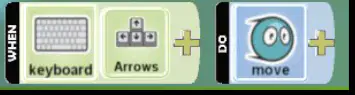
This line of code needs to be explained. What does it do?
It creates a new variable.
It makes the character move when the arrow keys are pressed
It deletes a character when it moves
It makes the character move forward when the arrow keys are pressed

This line of code is performing which operation?
Assigning a value to a variable
Moves the character anywhere on the screen when arrow keys are pressed
Moves the character forward when the arrow keys are pressed
Importing a module

This line of code is:
Automatic
Manual
Semi-automatic
None of the above
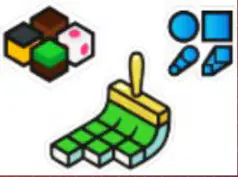
What does the Ground Brush tool do in Kodu?
Create Spikey or Hilly Ground
Paint, Add or Delete Ground
Add, Remove, or Tint Water
Make Ground Smooth or Level

Which tool is used to create hills or valleys in Kodu?
Water Tool
Flatten
Roughen
Up/Down

The Flatten tool in Kodu is used to _________?
Change the weather
Add Water to the World
Create New Characters
Make Ground Smooth or Level

Which tool allows you to create spikey or hilly ground in Kodu?
Water Tool
Roughen
Ground Brush
Up/Down

What can you do with the Water Tool in Kodu?
Paint the water
Add, Remove, or Tint Water
Flood your world
Change World Water Settings

Which tool is used to change the appearance of the world in Kodu?
Camera Tool
Object Tool
Change World Settings
Path Tool
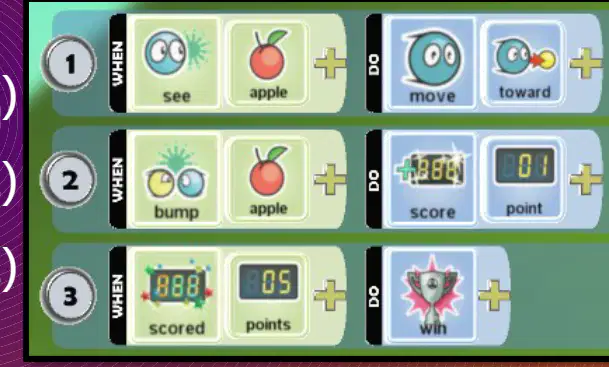
What does code number 1 do?
When the character sees an apple, it hides behind a tree.
When the character sees an apple, it jumps over the apple.
When the character sees an apple, it stops moving.
When the character sees an apple, it moves toward the apple.

What does code number 2 do?
When the character touches an apple, the score increases by 1 point.
When the character touches the ground, the game restarts.
When the character collects a coin, the timer resets.
When the character bumps into an apple, the score increases by 1 point.
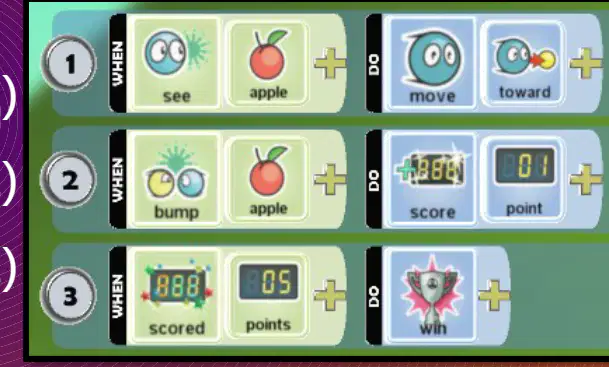
What does code number 3 do?
When the score reaches 5 points, the player wins & immediately starts again
It resets the score to zero
When the score reaches 5 points, the player wins
It displays a game over message
What 4 components does a computer game need?
Character, world, objects, rules/ reaction
Screen, keyboard, mouse, printer
Music, movies, books, magazines
CPU, RAM, hard disk, monitor

Look at the coding instruction shown in the image (keyboard + arrows → move forward quickly). What does this instruction do?
It makes the character move forward quickly when the keyboard arrow keys are pressed.
It makes the character jump when the spacebar is pressed.
It makes the character move backward slowly when the keyboard arrow keys are pressed.
It makes the character stop moving when any key is pressed.

Which navigation method uses 'When See...' to move toward a castle slowly?
Semi-Automatic
Manual navigation using arrow keys
Random movement algorithm
Automatic navigation
Select 2 benefits of coding using selection.
It makes collaboration simple and easy to manage
It allows for easier debugging and testing
It increases the risk of errors and mistakes
It improves code readability and maintainability

What does the term 'cloning' mean?
To make an exact copy of something
To destroy something completely
To change the color of something
To move something to a new place
What is a 'creatable' in the context of Kodu programming?
A setting that controls the speed of all characters in the game
A special command used to delete objects from the game world
A tool for changing the background music in a Kodu game
A type of object that can be programmed and spawned into the game world by other characters or events
In Kodu, what does it mean when an object is 'spawned'?
It means the object is deleted from the game world
It means the object is created and appears in the game world, often as a result of another character or event
It means the object changes its color
It means the object becomes invisible but remains in the game world
What are the 3 methods of selection you can use in Kodu?
Drag, drop & rotate
Copy, paste and delete
Basic selection, advanced selection and pages
Zoom, pan and select

