
 Worksheets
Spreadsheet PT
Total questions: 27
Worksheet time: 14mins
Which of the spreadsheet function counts the cells with content?
COUNT
SUMIF
COUNTIF
COUNTA
Which of these symbols will tell spreadsheet that you are writing a function?
>
<
=
->
Which chart type is most appropriate if you want to check the usage ratio of the different social media sites?
Scattered Chart
Line Chart
Pie Chart
Column Chart
Which is NOT a feature of spreadsheet program?
Automatic Calculations
Label Generation
Dynamic Updates
Data Analysis
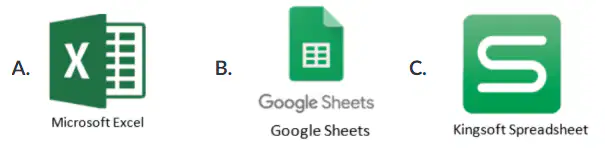
Which of the following Spreadsheet program(s) can be used offline (without internet connection)?
B and C
A and C
A and B
A only
Which of the chart type is appropriate if you want to compare the number of females vs. males per grade level?
Colum Chart
Pie Chart
Line Chart
Scatter Chart
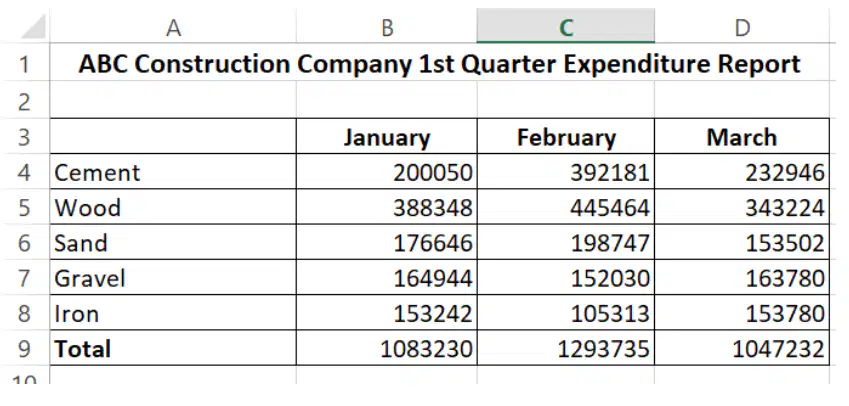
Refer to the Microsoft Excel table.
Which of the following formula is NOT correct in getting the total quarterly expenditure?
=TOTAL(B9:D9)
=B9+C9+d9
=SUM(B4:D8)
=SUM(B9:D9)
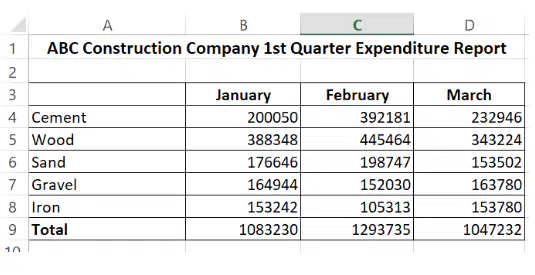
Refer to the Microsoft Excel table.
What is the result when you write the formula,
=IF(B9>C9,"Low Expenditure","High Expenditure")
No Output
High Expenditure
Low Expenditure
#VALUE!
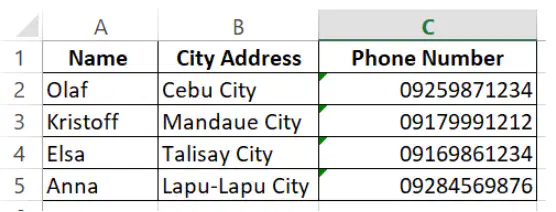
Refer to the Microsoft Excel table,
What would be the content/data at Cell address B2 if the following sorting steps are applied?
Sorting steps:
1. Highlight the entire table from cells A1 to C5
2. Click Home>Custom Sort>Sort by Name>Sort on Values>Order A to Z and ticked the box for My data has headers
City Address
Cebu City
Talisay City
Lapu-Lapu City

Refer to the Microsoft Excel table,
Which of the canned goods will have a Stock Status of "Running out of Stock" when this formula =IF(b2<25,"Running out of Stock", IF(B1<81, "In Stock", "Over Stock")) is applied to Stock Status for Sardines and then copy and drag the formula until Cherry?
Spanish Beefloaf and Cherry
Beef Loaf and Sardines
Beef Loaf and Evaporated Milk
Green Peas and Spanish Beefloaf
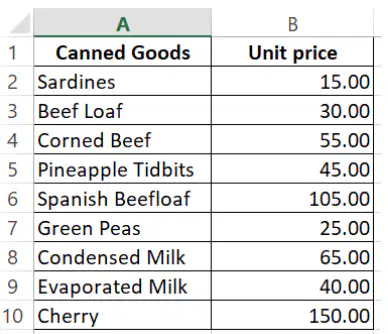
Refer to the Microsoft Excel table,
Which canned goods will its unit price have a red highlight, if the following conditional formatting steps are applied?
Conditional Formatting Steps:
1. Highlight the cells B2 to B10
2. Click Home>Conditional Formatting>New Rule>Format only cells that contain>Cell Value greater than 50>Format>Fill>Choose red color
Corned Beef, Spanish Beefloaf, Condensed Milk, and Sardines
Corned Beef, Spanish Beefloaf, Evaporated Milk, and Cherry
Corned Beef, Spanish Beefloaf, Condensed Milk, and Cherry
Corned Beef, Beef loaf, Condensed Milk, and Cherry
How do you call a spreadsheet feature that arranges data alphabetically or numerically in ascending or descending order?
Filtering
Sorting
Formatting
Editing
Which spreadsheet feature is used when you want to select which data will be shown or excluded?
Sorting
Selecting
Filtering
Formating
A spreadsheet is just like a book that contains many pages. How do we call the pages of a spreadsheet?
workbooks
wordsheets
worksheets
wordbooks
Spreadsheet is NOT the appropriate program to use, for which task as described below?
Preparing a budget
Tabulating Scores
Creating a graph
Writing an excuse letter
Which of the following spreadsheet feature that lets users create a cell with a variable value based on other cells?
Automatic Calculations
Visual Design
Generated Updates
Dynamic Updates

Refer to the Microsoft Excel table,
What would be the result for this formula, =COUNTA(A2:A10)?
9
10
8
0

Refer to the Microsoft Excel table,
What would be the appropriate formula if you want to determine the average unit price of the canned goods that has unit prices above 50?
=AVERAGEIF(B2:B10,">=50",B2:B10)
=AVERAGEIF(B2:B10,"<50",B2:B10)
=AVERAGEIF(B2:B10,">50",B2:B10)
=AVERAGEIF(B2:B10,"=50",B2:B10)

Refer to the Microsoft Excel table,
What would be the appropriate formula if you want to determine the average unit price of the canned goods which has unit prices below 50?
=AVERAGEIF(B2:B10,">50",B2:B10)
=AVERAGEIF(B2:B10,"<=50",B2:B10)
=AVERAGEIF(B2:B10,">=50",B2:B10)
=AVERAGEIF(B2:B10,"<50",B2:B10)

Refer to the Microsoft Excel table,
What would be the Stock Status of Sardines when this formula =IF(B2<25,"Running out of Stock", IF(B2<81,"In Stock", "Over Stock")) is applied?
Running out of Stock
Over Stock
In Stock
No Stock
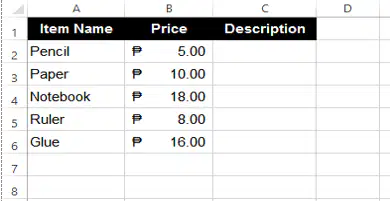
Refer to the given Microsoft Excel table,
Which function is used to find the total number of ITEM NAMES?
=COUNTIFS(A2:A6)
=COUNTIF(A2:A6)
=COUNT(A2:A6)
=COUNTA(A2:A6)

A better way to add numbers is to use the SUM function. But we can also add numbers by using different formula, it will also give the same result. Which of the following formula is NOT correct in finding the total revenue?
=SUM(B2:B3)
=TOTAL(B2:B3)
=B2+B3
=150+200

Refer to the Microsoft Excel data,
What is the result when you write the formula, =COUNTA(A3:A9)?
6
5
7
0

Refer to the Microsoft Excel table,
What is the result when you write the formula,
=IF(B9>C9,"Low Expenditure","High Expenditure")
Low Expenditure
High Expenditure
No output
#VALUE!
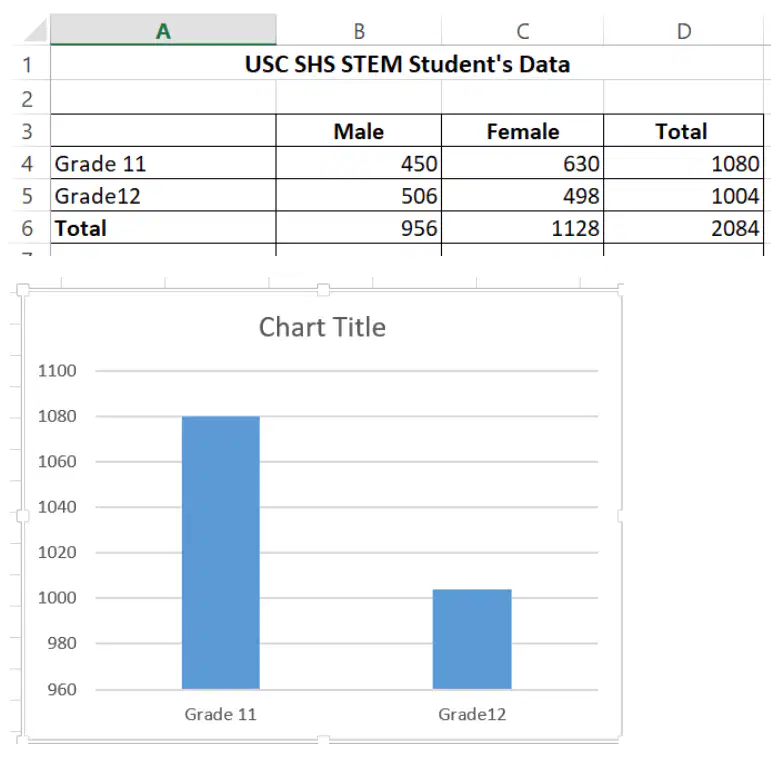
Refer to the Microsoft Excel table and the chart shown
Which of the following steps are correct in order to produce the chart?
Highlight the cells A4:A5 and cells D4:D5, then click insert, then choose Column type of chart
Highlight the cells A4:A5 and cells D4:D5, then click insert, then choose Bar type of chart
Highlight the cells A4:A6 and cells D4:D6, then click insert, then choose Column type of chart
Highlight the cells A4:A6 and cells D4:D6, then click insert, then choose Bar type of chart
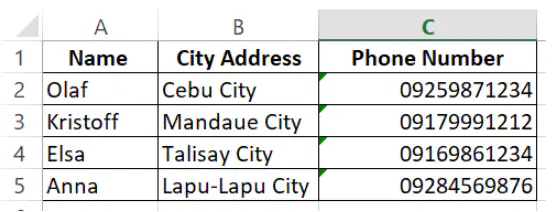
Refer to the Microsoft Excel table,
What would be the content/data at Cell address B2 if the following sorting steps are applied?
Sorting steps:
1. Highlight the entire table from cells A1 to C5
2. Click Home>Custom Sort>Sort by Column B>Sort on Values>Order A to Z without ticking the box for My data has headers
Cebu City
City Address
Talisay City
Mandaue City

Refer to the Microsoft Excel table,
Which canned goods will its unit price have a red highlight, if the following conditional formatting steps are applied?
Conditional Formatting Steps:
1. Highlight the cells B2 to B10
2. Click Home>Conditional Formatting>New Rule>Format only cells that contain>Cell Value between 30 to 50>Format>Fill>Choose red color
Spanish Beef Loaf, and Pineapple Tidbits
Beef Loaf, Evaporated Milk, and Pineapple Chunk
Beef Loaf, Evaporated Milk, and Pineapple Tidbits
Beef Loaf, Condensed Milk, and Pineapple Tidbits

