
 Worksheets
GODOT IDE Part 1
Total questions: 70
Worksheet time: 35mins
In the Godot project window, which button shows the list of projects?
Projects
Settings
Run
Help
In the Godot project window, which button allows you to download projects from the Asset Library?
Asset Library
Project Settings
Debugger
Scene
In the Godot project window, which button allows you to create a new project?
Create
Open
Delete
Export
In the Godot project window, which button allows you to change environment settings such as Language, Interface Theme, Display Scale, Network Mode, and Directory Naming Convention?
Settings
Play
Import
Help
What is the field where you name your project or game in GODOT called?
Project Name
Project Path
Game Engine
Resource Folder
What must be true about the folder where GODOT projects are created?
It must be an empty folder.
It must be named 'GodotProject'.
It must contain a README file.
It must be located on the desktop.
Which button do you click to change the path to the GODOTGames folder?
Browse
Open
Save
Delete
Which renderer should you use for both desktops and mobile devices in GODOT?
Mobile
Desktop
Web
Console
What should you set the Version Control Metadata to when starting a new GODOT project, according to the instructions?
None
Git
SVN
Mercurial
Should you leave the 'Edit Now' option checked when creating a new GODOT project?
(a)
What is the final step to create your GODOT project after setting all options?
Click Create
Click Cancel
Click Save As Template
Click Export
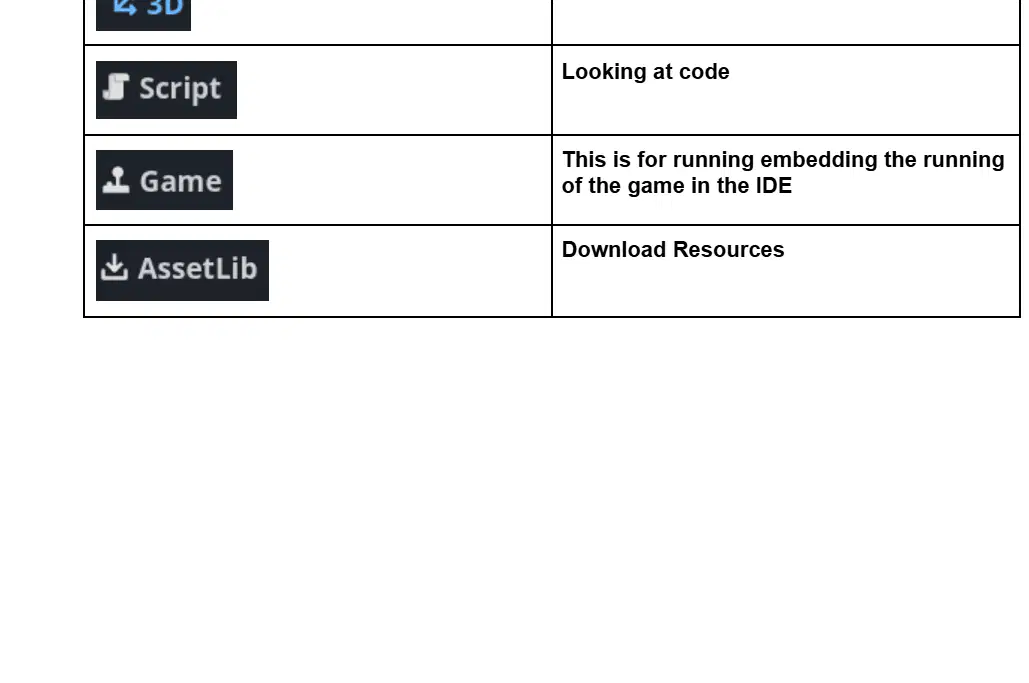
Match the following Top Tab Menu items with their correct functions:
Creating 2D Games
2D
Creating 3D Games
3D
Looking at code
Script
This is for embedding the running of the game in the IDE
Game
Download Resources
AssetLib
The '2D' tab in the Top Tab Menu is used for _________?
Creating 2D Games
Editing Audio Files
Writing Scripts
Managing 3D Models
The '3D' tab in the Top Tab Menu is used for _________
Creating 3D Games
Editing Audio Files
Writing Code Scripts
Managing User Accounts
The 'Script' tab in the Top Tab Menu is used for _________?
Looking at code
Changing the theme
Viewing notifications
Editing user profile
The 'Game' tab in the Top Tab Menu is used for _________
This is for embedding the running of the game in the IDE
This is for editing the source code of the game
This is for viewing the game documentation
This is for managing user profiles
The 'AssetLib' tab in the Top Tab Menu is used for _________
Download Resources
Editing Scripts
Running the Project
Debugging Code
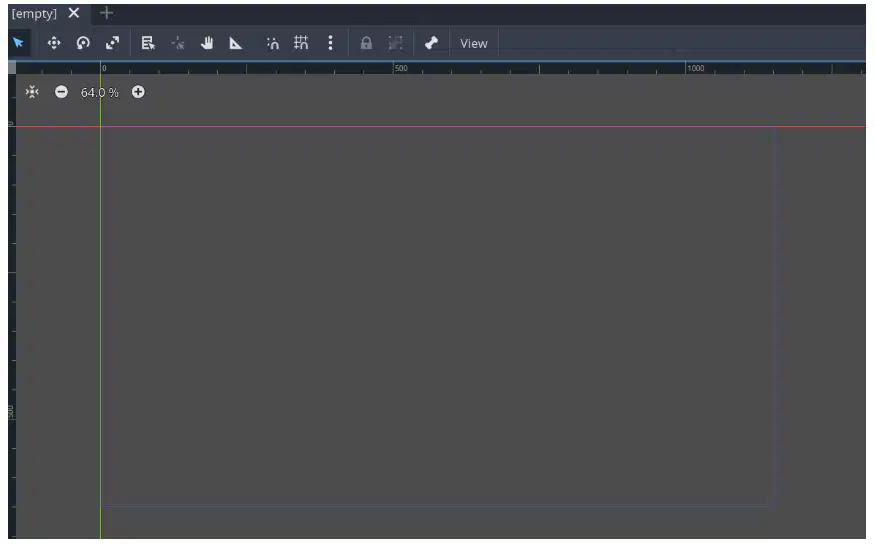
What is the area inside the blue rectangle in the 2D Game Window called?
Canvas
Viewport
Scene
Layer
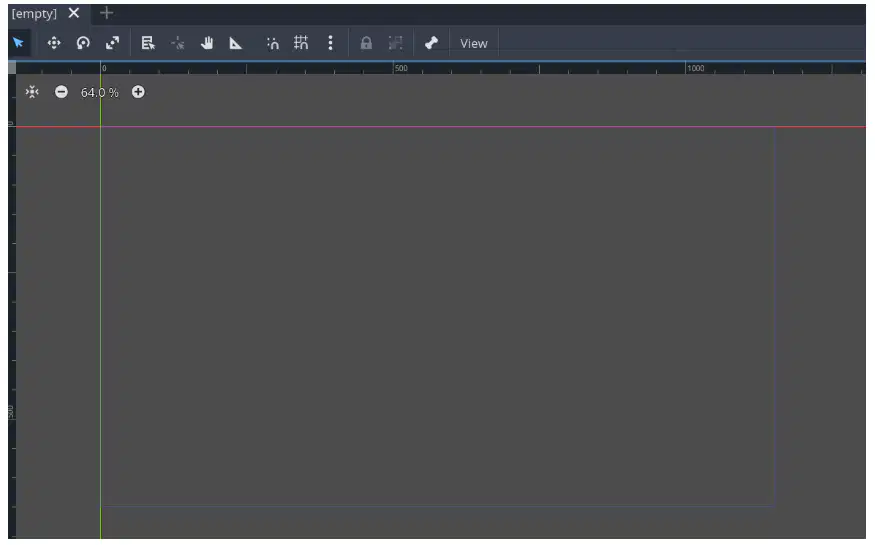
In GODOT, which direction does the X axis go?
From top to bottom
From right to left
From left to right
From bottom to top
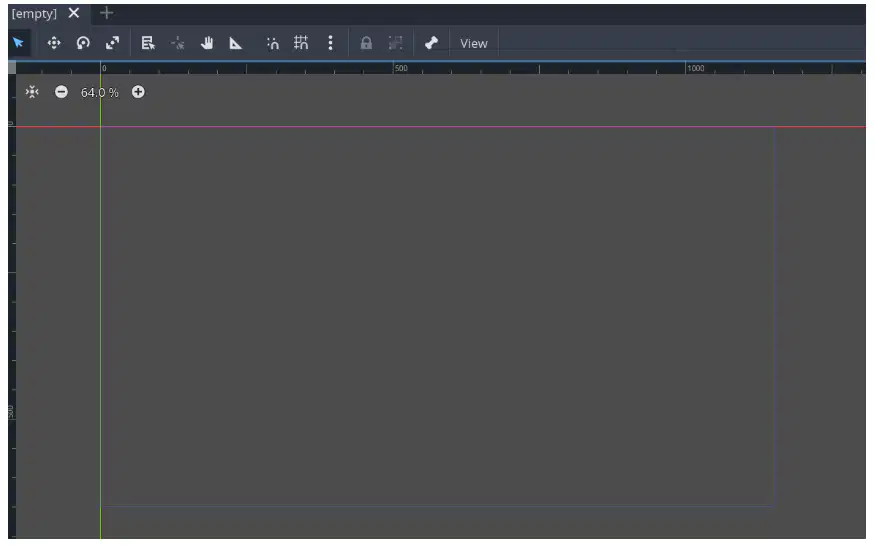
Fill in the blank: In GODOT, the Y axis goes from ______ to ______.
top to bottom
bottom to top
left to right
right to left
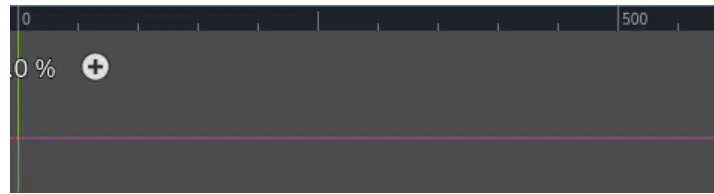
Where is the coordinate 0,0 located in the 2D Game Window?
Center
Bottom right corner
Top left corner
Bottom left corner
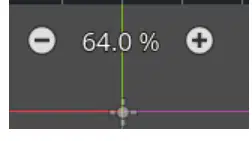
You can zoom in and out in the 2D Game Window using which of the following?
Arrow keys
+ or – keys or mouse wheel
Space bar
Enter key
What does the following icon represent in the Godot editor?
Pan
Select
Centers the node that is selected in the Scene Menu
Rotation Tool
What is the function of the following icon in the Godot editor? (Icon: Pan)
Pan
Select
Rotation Tool
Scale Tool
What does the following icon do in the Godot editor?
Select
Pan
Scale Tool
Moves node along X and Y axis
What is the function of the following icon in the Godot editor?
Rotation Tool
Moves node selected in the Scene Menu along the X and Y axis with the mouse
Pan
Scale Tool
What does the following icon represent in the Godot editor?
Scale Tool
Pan
Rotation Tool
Select
What is the function of the following icon in the Godot editor?
Scale Tool - x, y, x and y
Pan
Select
Rotation Tool

What is the Scene Menu in the Godot editor?
The Scene Menu contains all the visual and functional parts of our game.
The Scene Menu is used to write scripts for game logic.
The Scene Menu is where you adjust project settings.
The Scene Menu is a tool for importing assets.
What is the File System in the Godot editor?
The File System contains all the files and folders used in our game. 'res://' is an alias for our game path (C:\Users\austin\Desktop\GODOTGames).
The File System is a tool for editing scripts only in Godot.
The File System is used to manage network connections in Godot.
The File System is a built-in debugger for Godot projects.
What is the function of the Inspector tab in the Godot Editor?
Allows us to see and adjust all of the properties of whatever is selected in the Scene Menu.
It is used to write and edit scripts for game logic.
It displays a list of all nodes in the current scene.
It is used to preview the game in real time.
What is the function of the Node tab in the Godot Editor?
Node tab is used to set signals and other actions for nodes selected in the Scene Menu.
Node tab is used to edit the project settings.
Node tab is used to import assets into the project.
Node tab is used to write and edit scripts.
What is the function of the History tab in the Godot Editor?
Contains a running history of recents things you have done. Useful if you need to go back to a previous version of your game.
Displays a list of all available assets in your project.
Shows the current scene hierarchy and node structure.
Allows you to edit the properties of selected objects.
What does the 'Run Project' button do in the Top Right Menu?
Run Project
Delete Project
Save Project
Open Settings
What does the 'Pause Running' button do in the Top Right Menu?
Pause Running
Start New Session
Open Settings
Log Out
What does the 'Stop Running (F8)' button do in the Top Right Menu?
Stop Running (F8)
Save the current file
Open a new project
Run the code
What does the 'Remote Deploy' button do in the Top Right Menu?
Remote Deploy
Open Settings
Log Out
View Notifications
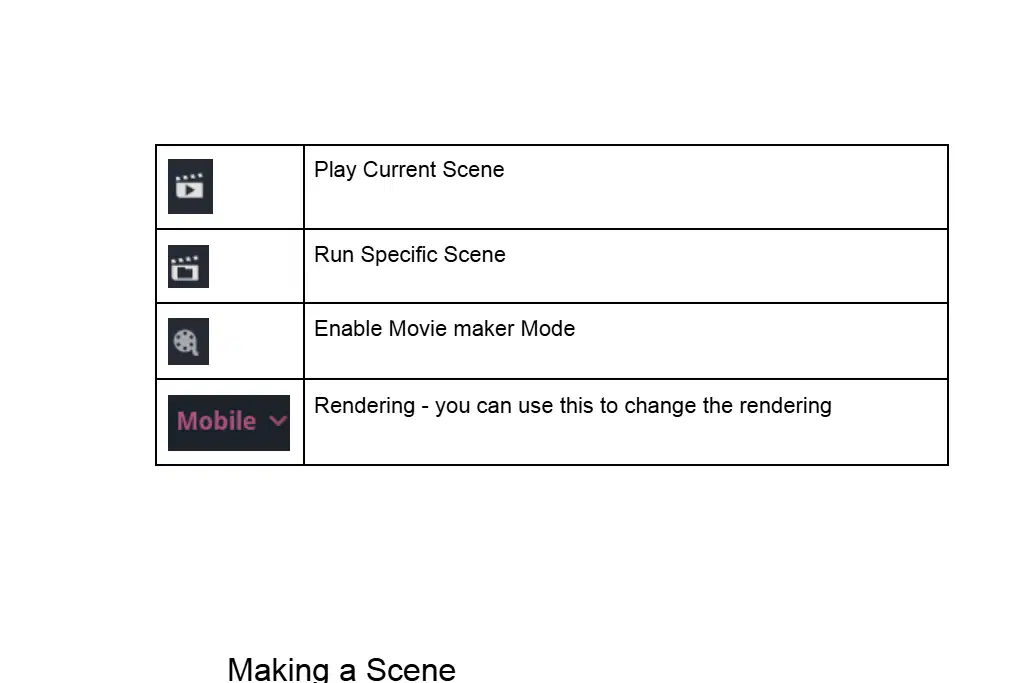
Match the icon to its function:
Play Current Scene
A
Run Specific Scene
B
Enable Movie maker Mode
C
Rendering - you can use this to change the rendering
D
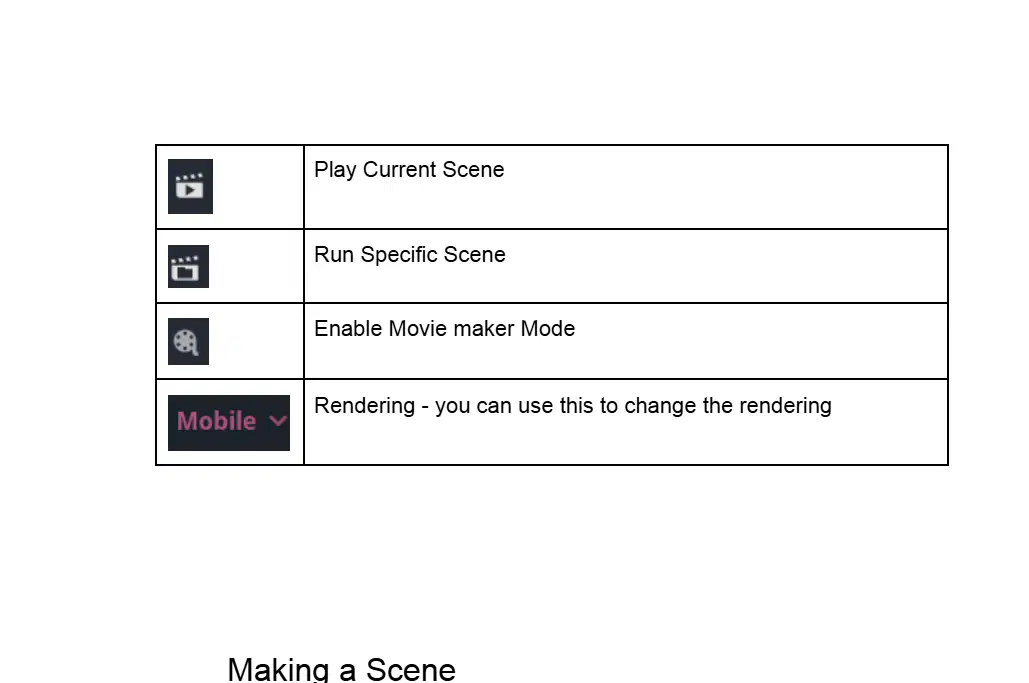
What is the function of the icon labeled 'Mobile'?
Rendering - you can use this to change the rendering
Saving - you can use this to save your work
Printing - you can use this to print the document
Undo - you can use this to undo your last action
According to the instructions, what should you rename Node2D to when making a scene?
Test
Main
Player
SceneRoot
Which menu option do you use to save a scene in Godot?
Top Menu -> Scene -> Save Scene
Top Menu -> File -> Export
Top Menu -> Edit -> Preferences
Top Menu -> Project -> Project Settings

In the Save Scene As window, what is the file name used in the example?
test.tscn
scene1.tscn
main_scene.tscn
level1.tscn
What is the folder hierarchy you should create to keep your projects organized, as mentioned in the instructions?
res://Scenes/Test
res://Assets/Images
res://Scripts/Levels
res://Textures/Audio
According to the instructions, what should you change the file name to at the bottom of the screen to follow Pascal Case naming convention?
Test.tscn
test.tscn
TEST.tscn
testFile.tscn
Which of the following is NOT a step to add the icon to the scene?
Click the Icon file from the FileSystem Menu and drag it to the viewport.
Notice the Icon is now available in the scene menu.
Delete the Icon from the FileSystem Menu.
Save because of the star!
Run the scene
The instructions recommend saving your work because of the star icon.
True
False

What are the three options available when no main scene has ever been defined?
Select, Cancel, Select Current
Save, Cancel, Delete
Open, Close, Select
Add, Remove, Select
Fill in the description of the control shown by this icon: (Pause icon)
Pause the game
Start the game
Stop the game
Restart the game
Fill in the description of the control shown by this icon: (Play icon)
Play or start the game
Pause the game
Stop the game
Rewind the game
Fill in the description of the control shown by this icon:
Input settings or input debugger
Volume control
Brightness adjustment
Network settings
Fill in the description of the control shown by this icon: (2D icon)
Switch to 2D view
Open settings menu
Zoom in
Toggle fullscreen mode

Fill in the description of the control shown by this icon: (3D icon)
Switch to 3D view
Open settings menu
Zoom in
Switch to 2D view

Fill in the description of the control shown by this icon: (Target icon)
Center or focus the view
Zoom out the view
Open settings menu
Switch to night mode
Main Category: Texture Sub Category: ________ What does it do? ________
Sub Category: (leave blank if not applicable), What does it do? 'Defines the image used for the sprite.'
Sub Category: Diffuse, What does it do? 'Controls the lighting of the sprite.'
Sub Category: Normal, What does it do? 'Adds 3D depth to the sprite.'
Sub Category: Specular, What does it do? 'Adjusts the shininess of the sprite.'
Inspector Sprite 2D List and fill in what the properties do. Main Category: Offset Sub Category: ________ What does it do? ________
Sub Category: (leave blank if not applicable), What does it do? 'Adjusts the position of the sprite relative to its origin.'
Sub Category: Center, What does it do? 'Changes the color of the sprite.'
Sub Category: Pivot, What does it do? 'Scales the sprite up or down.'
Sub Category: Anchor, What does it do? 'Rotates the sprite around its center.'
Fill in the Sub Category and What does it do? for the Main Category: Animation.
(Answers will depend on the curriculum or lesson content, not provided in the image.)
Sub Category: Drawing; What does it do? It allows you to create static images only.
Sub Category: Video Editing; What does it do? It is used for editing live-action footage only.
Sub Category: Sound Design; What does it do? It is used for creating background music only.
Fill in the Sub Category and What does it do? for the Main Category: Animation.
(Answers will depend on the curriculum or lesson content, not provided in the image.)
Sub Category: Drawing; What does it do? Allows you to create static images only.
Sub Category: Video Editing; What does it do? Edits live-action footage only.
Sub Category: Audio Mixing; What does it do? Mixes soundtracks for movies.
Fill in the Sub Category and What does it do? for the Main Category: Animation.
(Answers will depend on the curriculum or lesson content, not provided in the image.)
Sub Category: Drawing; It allows you to create static images only.
Sub Category: Video Editing; It is used to cut and merge video clips.
Sub Category: Sound Mixing; It is used to combine different audio tracks.
Fill in the Sub Category and What does it do? for the Main Category: Animation.
(Answers will depend on the curriculum or lesson content, not provided in the image.)
Sub Category: Drawing; It allows you to create static images only.
Sub Category: Video Editing; It is used to edit live-action videos only.
Sub Category: Audio Mixing; It is used to combine different sound tracks.
Fill in the Sub Category and What does it do? for the Main Category: Region.
(Answers will depend on the curriculum or lesson content, not provided in the image.)
Sub Category: Continent; It divides the world into large landmasses.
Sub Category: Country; It defines political boundaries within a region.
Sub Category: State; It organizes regions into smaller administrative units.
Fill in the Sub Category and What does it do? for the Main Category: Transform.
(Answers will depend on the curriculum or lesson content, not provided in the image.)
Sub Category: Addition. It combines two numbers to get their sum.
Sub Category: Subtraction. It finds the difference between two numbers.
Sub Category: Multiplication. It finds the product of two numbers.
Fill in the Sub Category and What does it do? for the Main Category: Transform.
(Answers will depend on the curriculum or lesson content, not provided in the image.)
Sub Category: Addition, What does it do? Adds numbers together.
Sub Category: Subtraction, What does it do? Subtracts numbers from each other.
Sub Category: Multiplication, What does it do? Multiplies numbers together.
Fill in the Sub Category and What does it do? for the Main Category: Transform.
(Answers will depend on the curriculum or lesson content, not provided in the image.)
Sub Category: Addition, What does it do? Adds numbers together.
Sub Category: Subtraction, What does it do? Subtracts numbers.
Sub Category: Multiplication, What does it do? Multiplies numbers.
Fill in the Sub Category and What does it do? for the Main Category: Transform.
(Answers will depend on the curriculum or lesson content, not provided in the image.)
Sub Category: Addition, What does it do? Adds numbers together.
Sub Category: Subtraction, What does it do? Subtracts numbers.
Sub Category: Division, What does it do? Divides numbers.
CanvasItem: Fill in the Sub Category and What does it do? for the Main Category: (Blank).
(Answers will depend on the curriculum or lesson content, not provided in the image.)
It is a tool for drawing only circles.
It is used exclusively for text formatting.
It is a feature that changes the background color automatically.
Main Category: Process Sub Category: ________ What does it do? ________
(Answers will depend on the specific subcategory and function of 'Process' in the context of the worksheet, which is not provided in the image.)
It is always related to financial transactions only.
It refers exclusively to hardware components.
It is a type of software used for entertainment purposes.
Main Category: Thread Group Sub Category: ________ What does it do? ________
(Answers will depend on the specific subcategory and function of 'Thread Group' in the context of the worksheet, which is not provided in the image.)
It manages database connections for the application.
It handles user authentication and authorization.
It is responsible for rendering the user interface.
Main Category: Physics Interpolation Sub Category: ________ What does it do? ________
(Answers will depend on the specific subcategory and function of 'Physics Interpolation' in the context of the worksheet, which is not provided in the image.)
It is used to calculate the mass of an object.
It is a method for measuring temperature changes.
It is a technique for determining the speed of light.
Main Category: Auto Translate Sub Category: ________ What does it do? ________
(Answers will depend on the specific subcategory and function of 'Auto Translate' in the context of the worksheet, which is not provided in the image.)
It translates images into code.
It automatically solves math problems.
It generates random text.
Main Category: Editor Description Sub Category: ________ What does it do? ________
(Answers will depend on the specific subcategory and function of 'Editor Description' in the context of the worksheet, which is not provided in the image.)
It is used to describe the main category of the worksheet.
It provides a summary of the worksheet's answers.
It lists the available options for each question.

