
 Worksheets
Google Forms Strategy and Design Quiz
Total questions: 25
Worksheet time: 13mins
Imagine you are creating a job application form for a bagel shop using Google Forms. How would you strategically use the form’s description and confirmation message to enhance the applicant’s experience and ensure they have all the necessary information?
Use the description to explain the job and the confirmation message to thank applicants and remind them of the review process.
Leave both the description and confirmation message blank to save time.
Use the description to list unrelated job openings and the confirmation message to ask for more applications.
Only use the confirmation message to provide instructions, ignoring the description.
You are tasked with making a Google Form visually appealing for a school event. What strategic steps would you take to customize the form’s theme, and why would these choices be important for your audience?
Change the fonts and colors, and add a header image related to the event to make the form engaging and relevant.
Use default settings and avoid adding any images or changing colors.
Add random images and use clashing colors to make the form stand out.
Only change the font size and ignore the theme and images.
When planning the structure of a job application form in Google Forms, what reasoning would you use to decide which questions should be required and which can be optional?
Make essential questions like name and contact information required, while leaving less critical questions optional to respect applicants’ time.
Make all questions optional to avoid pressuring applicants.
Make every question required, even if not all are relevant.
Only require questions that are easy to answer.
Suppose you need to update your Google Form after receiving feedback that some questions are unclear. What strategic approach would you take to improve the form based on this feedback?
Review and edit the unclear questions for clarity, possibly adding descriptions or examples, and remove any unnecessary questions.
Ignore the feedback and keep the form as it is.
Delete all questions and start over without considering the feedback.
Add more questions without changing the unclear ones.
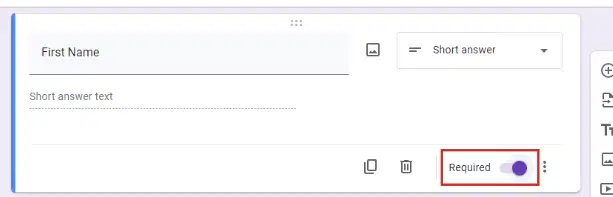
Imagine you are creating a form and want to ensure that respondents cannot submit the form without answering a specific question. Describe the steps you would take to achieve this, and explain how you would visually confirm that the requirement is set.
Click the Required option, which turns purple and adds a red asterisk after the question.
Add a new question and leave it blank.
Change the question type to multiple choice.
Duplicate the question and edit the text.
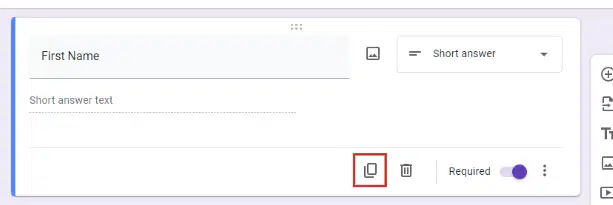
You are tasked with creating a form that asks for both first and last names using identical question formats. Explain how you would efficiently add the second question and what steps you would take to modify it appropriately.
Use the Duplicate icon to copy the question, then edit the field to say "Last Name."
Manually add a new question and type everything again.
Change the question type to checkboxes.
Delete the original question and start over.
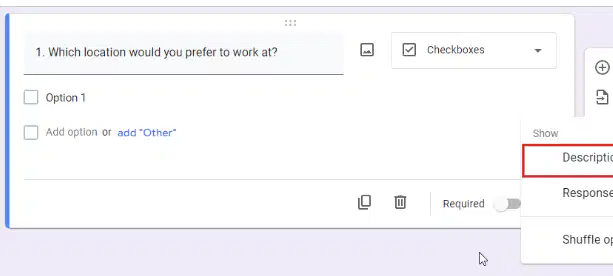
Suppose you want to help respondents better understand how to answer a question about preferred work locations in a form. What steps would you take to add helpful instructions, and where would you enter this information?
Click the More options icon, select Description, and enter the instructions in the Description field.
Change the question type to short answer.
Add a new question with the instructions as the question text.
Use the Duplicate icon to copy the question.
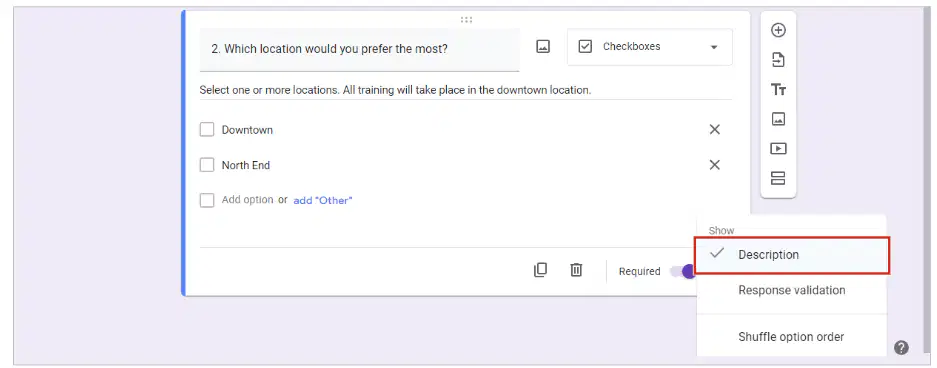
Suppose you are creating a form and want to ask respondents to choose between two locations, Downtown and North End. After duplicating the question, you want to remove the description from the duplicate. What steps should you follow to remove the description?
Click the More options icon and deselect Description.
Delete the entire question and create a new one.
Change the question type to Paragraph.
Click the Required toggle to turn off the description.
You are designing a form to collect information about job applicants’ experience. You want to add a question that allows respondents to rate their experience in food service on a scale. How should you set up the labels for a Linear scale question to capture both beginners and highly experienced individuals?
Use "This would be my first experience" for 1 and "I have over 5 years experience" for 5.
Use "Beginner" for 1 and "Expert" for 5.
Use "Low" for 1 and "High" for 5.
Use "No experience" for 1 and "Some experience" for 5.
Imagine you are customizing a form and want to ensure that a question about job position is answered by every respondent. What should you do to make this question mandatory?
Mark the question as required.
Add a description to the question.
Change the question type to Paragraph.
Duplicate the question.
You want to add a new question between two existing questions in your form. What is the correct process to do this?
Select the question above where you want to insert, then click the Add question icon.
Delete one of the existing questions and add a new one.
Change the order of the questions after adding a new one at the end.
Edit the description of the previous question.

If you want to change the overall appearance of your form, including fonts, colors, and images, which icon should you click?
Customize Theme icon
Add question icon
More options icon
Send icon
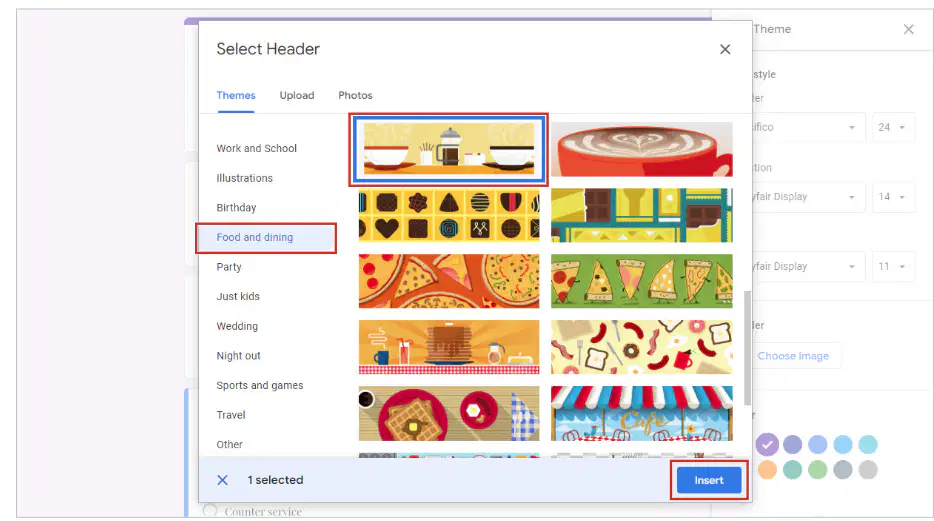
Imagine you are customizing a form for a school project. You want the header to stand out and match the theme of your form. Based on the steps shown, how would you strategically select and apply a header image that fits a "Food and dining" theme, and what would you do if the suggested image is not available?
Select the "Food and dining" section, choose the highlighted image, and click Insert. If the image is not available, select any image of your choice.
Only use the default header image provided and do not change it.
Select the "Birthday" section and choose any image, regardless of the theme.
Skip the header image step entirely if the suggested image is not available.
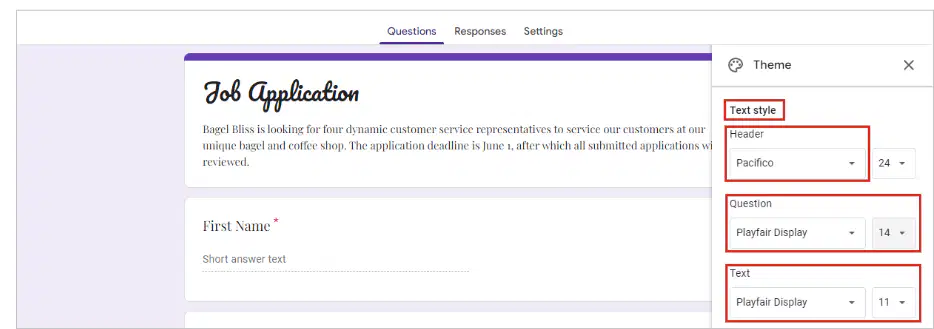
You are tasked with making a form visually appealing and easy to read. Using strategic thinking, explain how you would change the font styles for the Header, Question, and Text sections to create a clear hierarchy and improve readability, based on the instructions provided.
Set the Header font to Pacifico, the Question and Text fonts to Playfair Display, and adjust the Question font size to 14.
Use the same font and size for all sections to keep the form uniform.
Only change the Header font and leave the other sections unchanged.
Randomly select fonts and sizes for each section without considering readability.

Imagine you are customizing a form and want to ensure the colors match your selected header image. What strategic steps would you take to choose the primary and background colors, and why is this important for the form’s appearance?
Select random colors to make the form look unique, regardless of the header image.
Choose primary and background colors that complement the header image to create a visually appealing and cohesive form.
Use only black and white colors for simplicity.
Ignore the color section and keep the default settings.
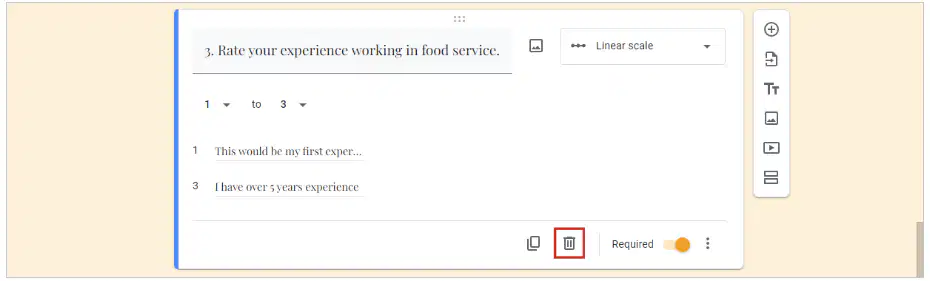
You notice that one of the questions in your form is no longer needed. Describe the reasoning and steps you would follow to remove this question effectively, ensuring the form remains organized.
Select the question and click the Delete icon to remove it from the form.
Ignore the question and leave it in the form.
Move the question to the end of the form.
Change the question text to something else.
After deleting or adding questions, your form’s questions are out of order. What strategic approach would you use to ensure the questions are logically sequenced, and why is this important?
Renumber the questions so they follow a logical order, making the form easier to follow and understand.
Leave the questions as they are, even if they are out of order.
Add more questions to fill the gaps.
Delete all questions and start over.
Why is it important to proofread your form for accuracy and format before sharing it, and what strategies would you use to ensure it is error-free?
Proofreading ensures the form is clear, accurate, and professional, reducing confusion for respondents; strategies include checking spelling, grammar, and question order.
Proofreading is not necessary if the form looks fine.
Only check the first and last questions for errors.
Ask someone else to fill out the form without reviewing it yourself.
Explain the reasoning behind previewing your form before finalizing it. What steps would you take to ensure the form appears as intended to respondents?
Previewing allows you to see the form as respondents will, helping you catch errors or formatting issues; you should exit preview mode after reviewing.
Skip previewing and share the form immediately.
Only preview if you have made major changes.
Preview only the first question.
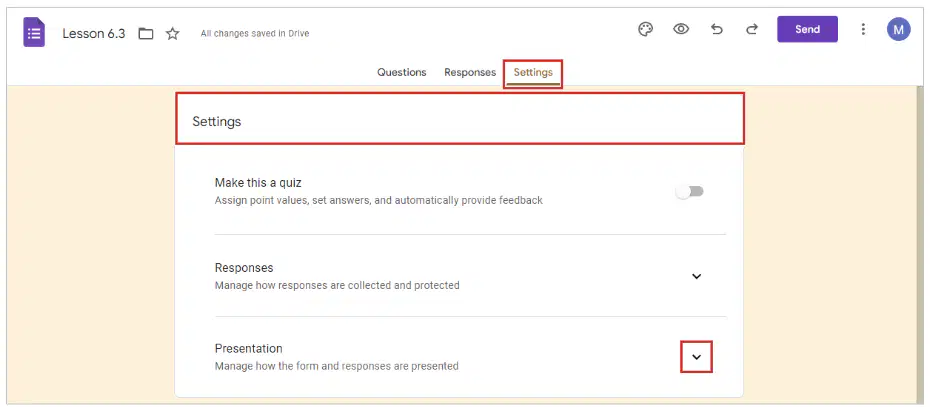
You want to add a confirmation message that respondents will see after submitting the form. Describe the strategic steps you would take to set this up and explain why a confirmation message is important.
Go to the Settings tab, select the Presentation drop-down menu, and enter your confirmation message to inform respondents their submission was successful.
Add the confirmation message in the first question of the form.
Send a separate email to each respondent.
Do not add a confirmation message.
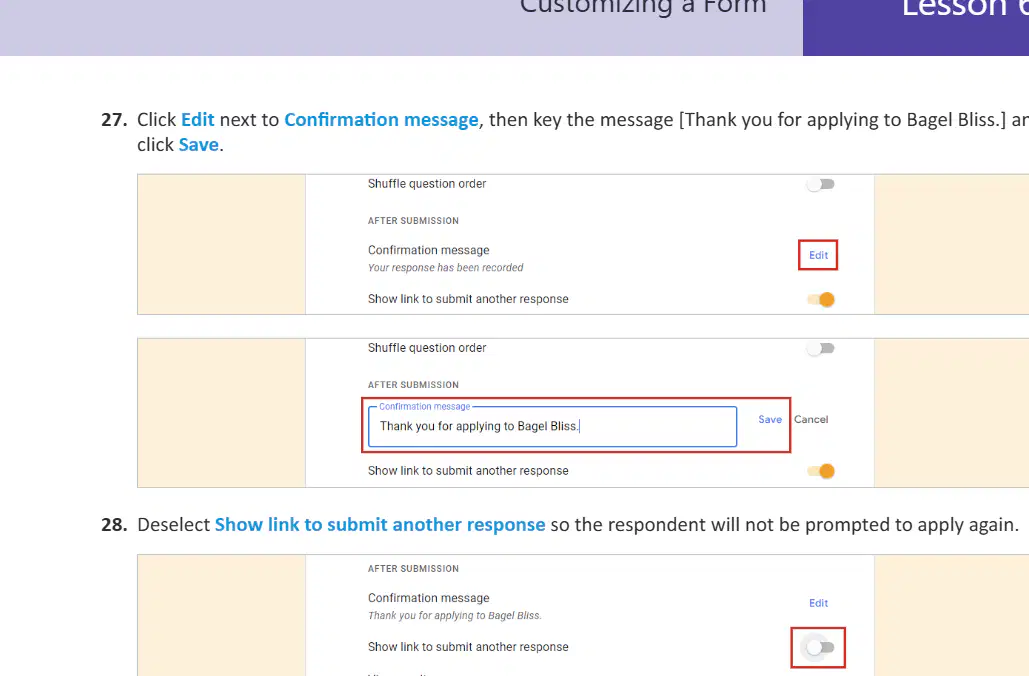
Imagine you are creating an online application form for a club. You want applicants to see a specific message after they submit their form, and you do not want them to be able to submit another response. Describe the steps you would take to achieve this, and explain why each step is important.
Edit the confirmation message, save it, and deselect the option to show the link to submit another response.
Only edit the confirmation message and save it.
Only deselect the option to show the link to submit another response.
Edit the confirmation message, but leave the link to submit another response enabled.
You are tasked with ensuring that respondents to your form do not accidentally submit multiple applications. Using reasoning, explain which setting you would adjust and justify your choice.
Deselect the "Show link to submit another response" option.
Change the confirmation message only.
Enable the shuffle question order option.
Add a password to the form.
Imagine you are customizing a job application form for a coffee shop. What is a strategic reason for including a question about the applicant's preferred work location, even if all training takes place at the downtown location?
To ensure applicants are assigned to a location where they are most likely to be satisfied and perform well.
To make the form longer and more complicated.
To confuse applicants about where they will be trained.
To avoid hiring anyone for the North End location.
Suppose you are designing a form for a job application. Why might you require applicants to describe any experience they have related to the position in 100 words or less?
To encourage applicants to be concise and focus on the most relevant information.
To make it harder for applicants to complete the form.
To limit the number of applicants.
To avoid reading long answers.
If you were tasked with improving the job application form shown, what strategic change could you make to better assess an applicant’s suitability for a customer service role?
Add a scenario-based question that asks how the applicant would handle a difficult customer.
Remove the question about preferred location.
Make all questions optional.
Only ask for the applicant’s name.

