Worksheets
Grade 7 - Maqueen Plus & Mind+ - Quiz
Total questions: 49
Worksheet time: 25mins

What is Robotics mainly about?
Drawing pictures
Designing and operating robots
Playing computer games
Cooking food

Which fields are combined in robotics?
Sports and Music
Engineering, Electronics, and Programming
History and Geography
Painting and Sculpture

What is Maqueen Plus mainly used for?
Playing movies
Teaching STEM concepts
Cleaning the classroom
Sending emails
Which of these is NOT a feature of Maqueen Plus?
Line-tracking sensors
Ultrasonic sensors
Light sensors
Solar panels
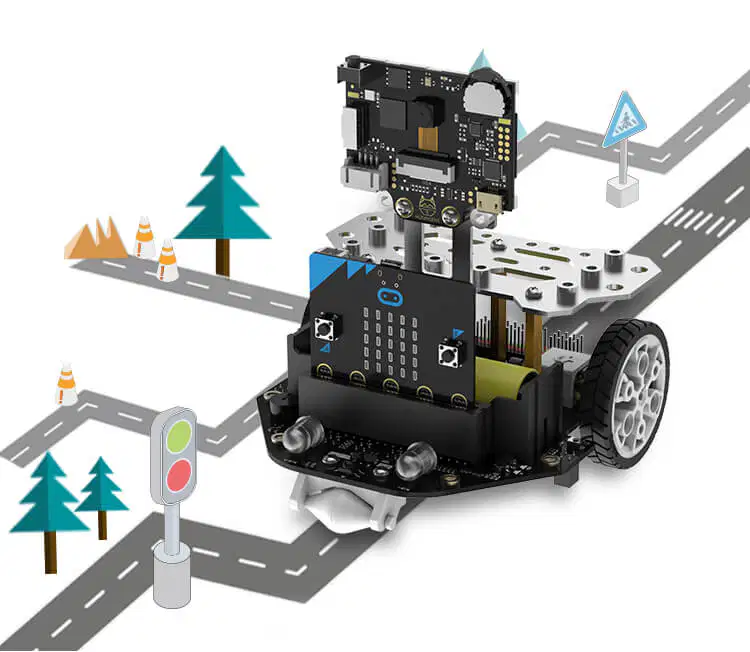
What do the motors in Maqueen Plus control?
LEDs
Wheels
Sensors
Batteries
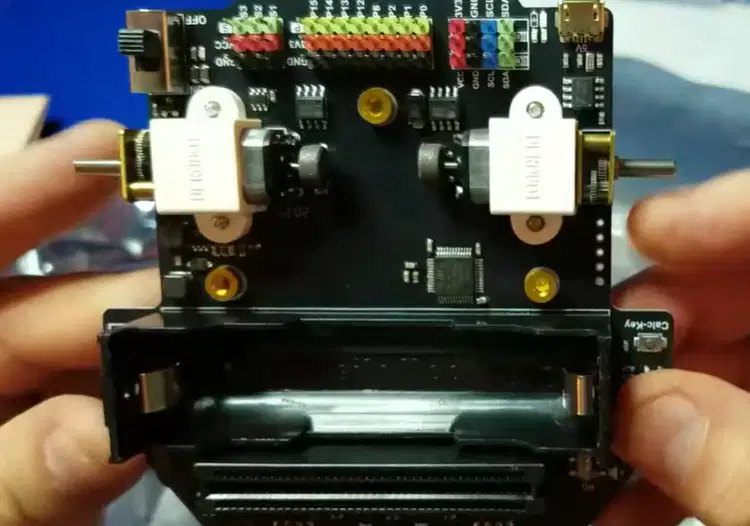
How many motors does Maqueen Plus have?
1
2
3
4

What movements can Maqueen Plus perform with its wheels?
Only forward
Only backward
Forward, backward, turning, spinning
Jumping

Which sensor helps Maqueen Plus detect obstacles?
Line sensor
Ultrasonic sensor
Light sensor
Temperature sensor

What do line sensors allow the robot to do?
Play sounds
Follow paths
Measure temperature
Fly
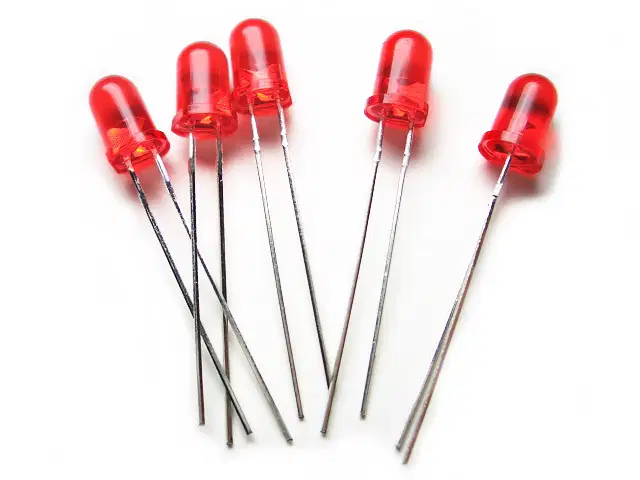
What is the role of LEDs on Maqueen Plus?
Cooking food
Providing visual feedback
Charging batteries
Cooling the robot

Which programming platform is used with Maqueen Plus?
Photoshop
Mind++
Scratch Jr. only
MS Word

Mind+ is best described as:
A text editor
A visual programming platform with drag-and-drop blocks
A music player
A calculator

Why is Mind+ useful for beginners?
It removes all robots from class
It simplifies coding with blocks
It requires complex coding
It doesn't work with robots

How does Mind+ connect with Maqueen Plus?
Through cooking recipes
Directly, to test programs in real time
By writing letters
By drawing pictures
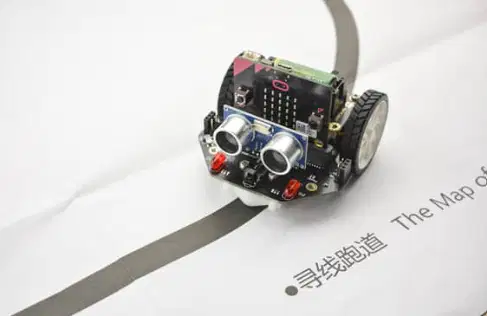
Which of these is a possible project with Maqueen Plus and Mind+?
Baking a cake
Line-following robot
Singing contest
Writing essays
What do obstacle-avoiding robots develop in students?
Painting skills
Logical thinking and problem-solving
Cooking skills
History knowledge
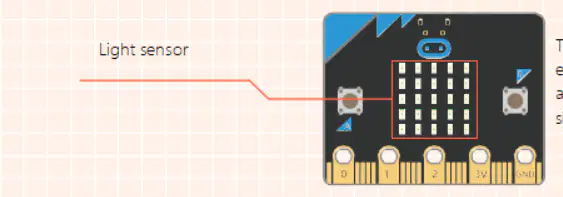
Which sensor helps Maqueen Plus respond to environmental light?
Ultrasonic sensor
Light sensor
Line sensor
Touch sensor
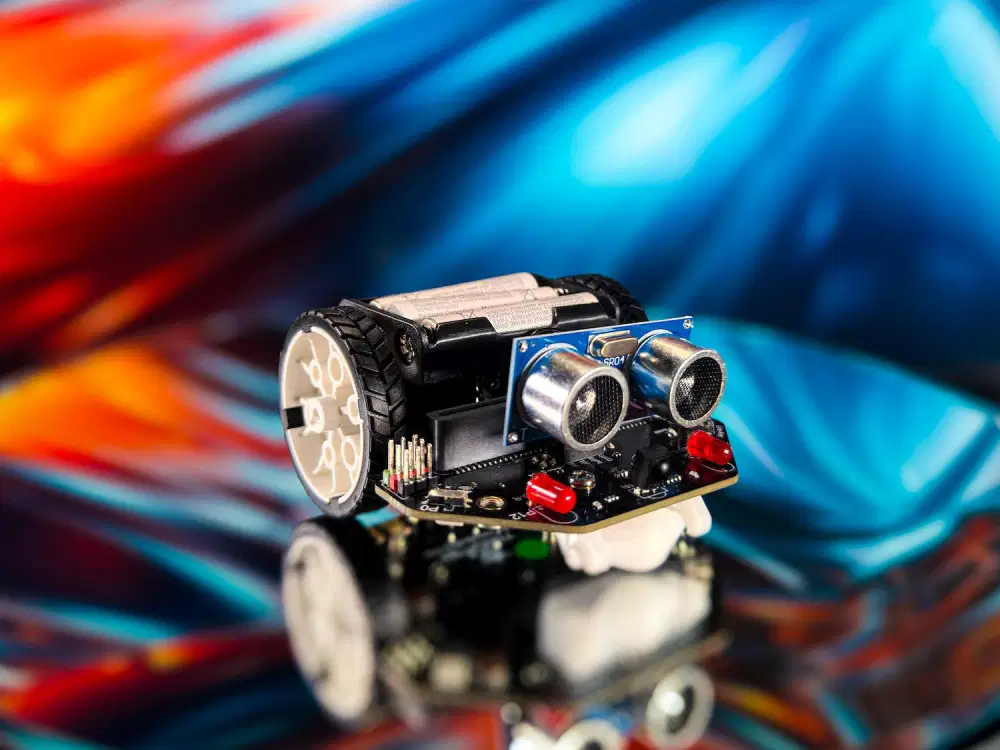
Which part is essential for navigation in Maqueen Plus?
Motors and wheels
The cover
The USB cable
The battery label
What do students gain by experimenting with Maqueen Plus?
Cooking lessons
Practical STEM skills
Music lessons
Geography skills
What is the main goal of using Maqueen Plus with Mind+?
To make students tired
To provide an engaging introduction to robotics and coding
To avoid using technology
To study history
Mind+, a programming software developed based on:
Scratch
Arduino
RedKit
Python
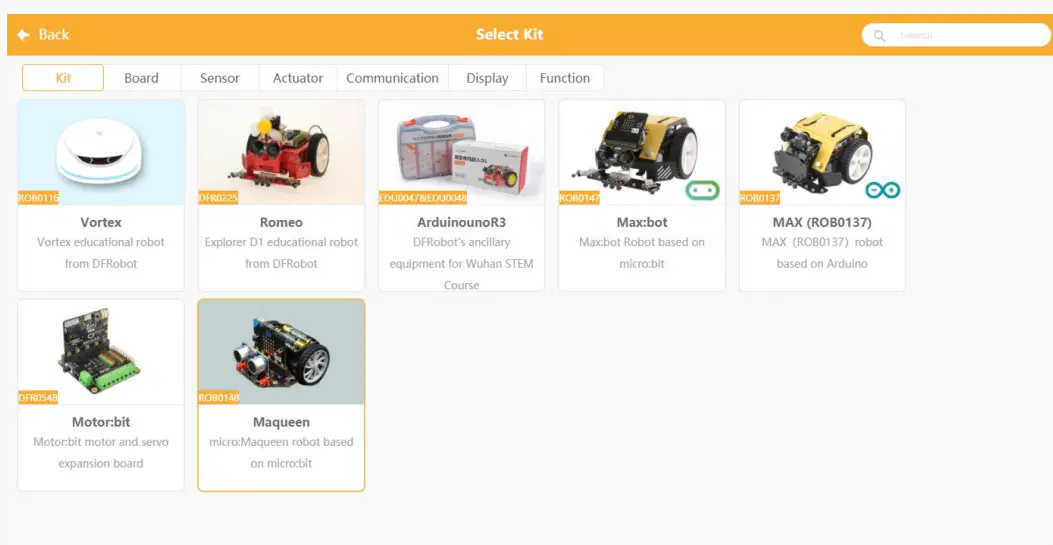
To choose Maqueen in kit as showen in figure we need to click:
Extensions
Opertation
Connection
Stage
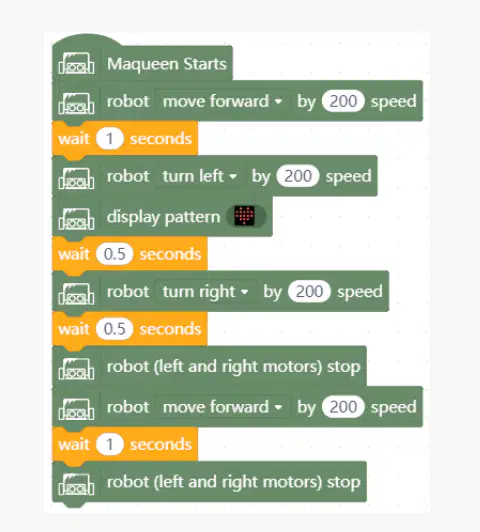
What does this code do?
1- move forward for 1s 2- turn left for 0.5s,
3- show smile
4- turn right for 0.5s,
5- keep going forward for 1s
1- move forward for 1s 2- turn left for 0.5s,
3- keep going forward for 1s
4- turn right for 0.5s,
5- show smile
1- move forward for 1s
2- turn left for 0.5s,
3- show smile
4- keep going forward for 1s
5-turn right for 0.5s,

What does the Maqueen robot do if this code is run?
Maqueen robot turn right
Maqueen robot spin in place
Maqueen robot turn right
Maqueen robot go backward
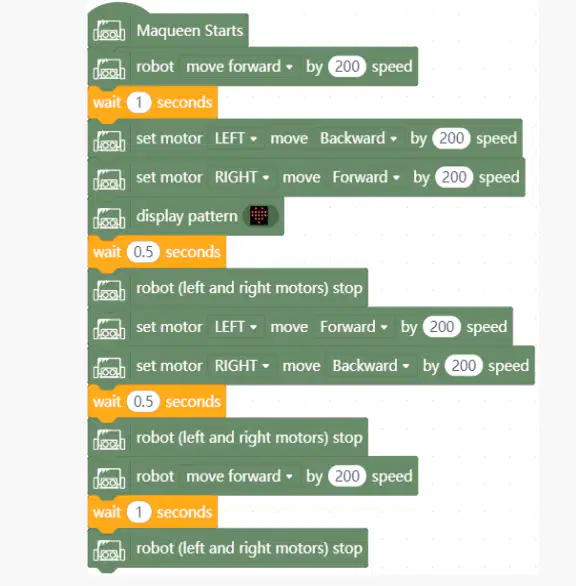
What is the summery of this block of code?
→Go forward
→ spin right
→ display pattern
→ spin left
→ go forward again → stop.
→Go forward
→ spin right
→ spin left
→ go forward again
→ display pattern
→ stop.
→Go forward
→ display pattern
→ spin right
→ spin left
→ go forward again → stop.
→Go forward
→ spin right
→ spin left
→ go forward again → stop
→ display pattern.
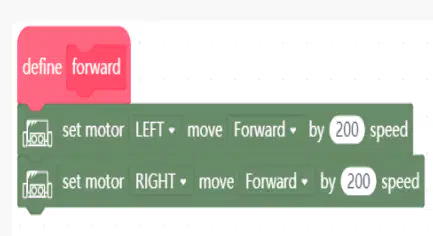
Left motor → Forward 200
Right motor → Forward 200
Move Straight Forward
Move Straight Backward
Turn Smoothly Right
Turn Smoothly Left
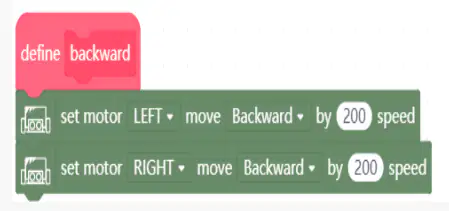
Left motor → Backward 200
Right motor → Backward 200
Move Straight Forward
Move Straight Backward
Turn Smoothly Right
Turn Smoothly Left
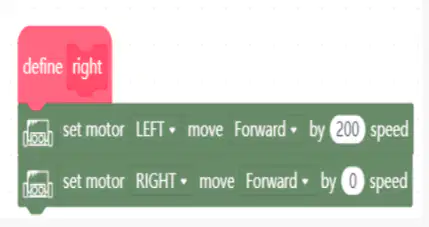
Left motor → Forward 200
Right motor → Forward 100
Move Straight Forward
Move Straight Backward
Turn Smoothly Right
Turn Smoothly Left
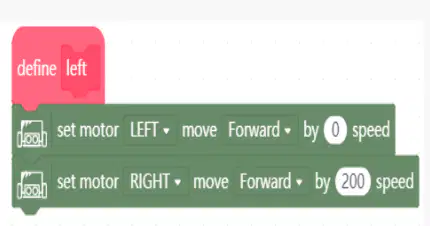
Left motor → Forward 100
Right motor → Forward 200
Move Straight Forward
Move Straight Backward
Turn Smoothly Right
Turn Smoothly Left
Left Backward + Right Forward
Spin Right (clockwise)
Spin Left (counterclockwise)
Left Forward + Right Backward
Spin Right (clockwise)
Spin Left (counterclockwise)
How many 4 RGBs in the bottom of Maqueen: .
1 RGBs
4 RGBs
3 RGBs
2 RGBs
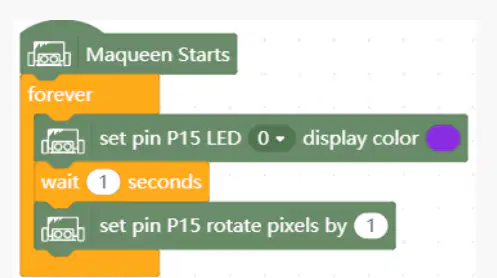
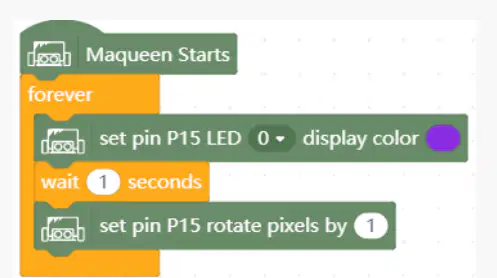
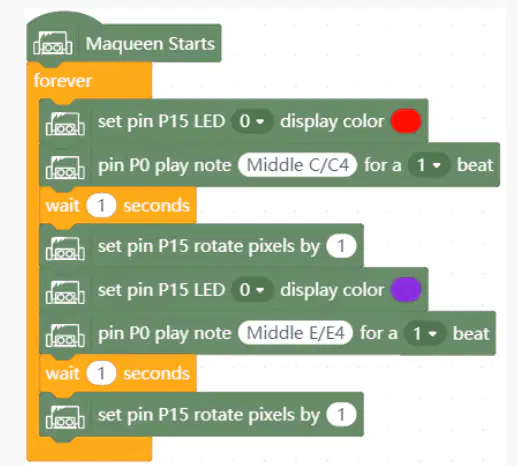
What will this block of code do?
The program will light up 4 RGBs one by one every second with blue color.
The program will light up 4 RGBs one by one every second with red color.
The program will light up 4 RGBs one by one every second with green color.
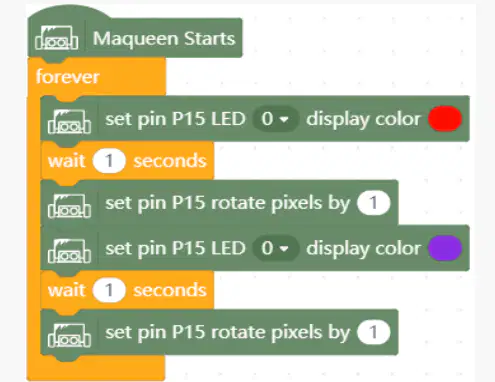
Maqueen Starts → The program begins running when the Maqueen is powered on.
Forever loop → The sequence inside repeats continuously.
Set pin P15 LED 0 display color red → Turns the first Neopixel LED on pin P15 to red.
Wait 1 second → Keeps it red for 1 second.
Set pin P15 rotate pixels by 1 → Rotates the LED colors along the strip by one position.
Set pin P15 LED 0 display color purple → Changes the first LED to purple.
Wait 1 second → Keeps it purple for 1 second.
Set pin P15 rotate pixels by 1 → Again rotates the LED colors by one position.
The onboard ultrasonic sensor in Maqueen is?
HC-SR04
HC-SR1000
HH-SR04
After the block trigger signal, the ultrasonic wave is emitted. When the ultrasonic wave reflected back for reach object, the module outputs an echo signal. Then we can determine the distance of the object by the time difference between the trigger signal and the echo signal. This is how:
Ultrasonic Sensors Work
Motors Work
Light Sensors Work
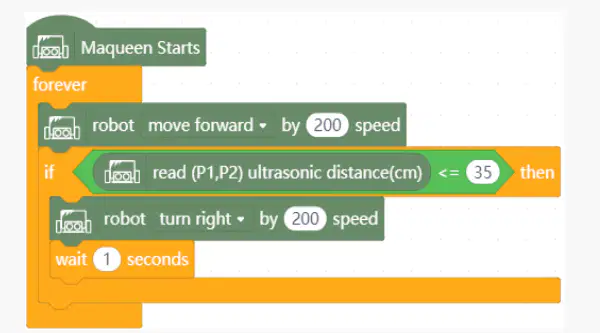
What does the block code do?
Maqueen turns right when detected an obstacle.
Maqueen turns left when detected an obstacle.
Maqueen go backward when detected an obstacle.
The dark night has given me a pair of black eyes, but I use them to find the light: this is said by:
a Chinese poetry wrote by Gu Cheng
a Chinese poetry wrote by Elon Musk
a Chinese poetry wrote by Donald Trump
a Chinese poetry wrote by Jackie Chan
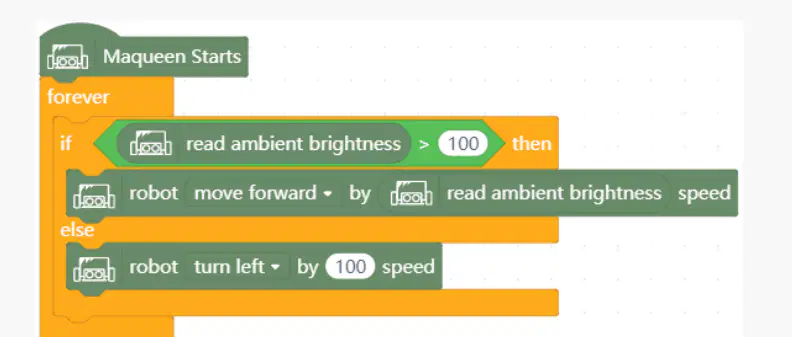
What does Maqueen do with this code?
In a bright area (light > 100) → The robot goes straight forward, faster when it’s brighter.
In a dark area (light ≤ 100) → The robot spins left in place at a constant speed.
In a bright area (light > 200) → The robot goes straight forward, faster when it’s brighter.
In a dark area (light ≤ 140) → The robot spins left in place at a constant speed.
In a bright area (light > 100) → The robot goes backward, faster when it’s brighter.
In a dark area (light ≤ 100) → The robot spins left in place at a constant speed.

What is the difference between these loops?
1 - infinite loop
2- finite loop
3- loop with conditions
1 - finite loop
2- infinite loop
3- loop with conditions
1 - infinite loop
2- loop with conditions
3-finite loop
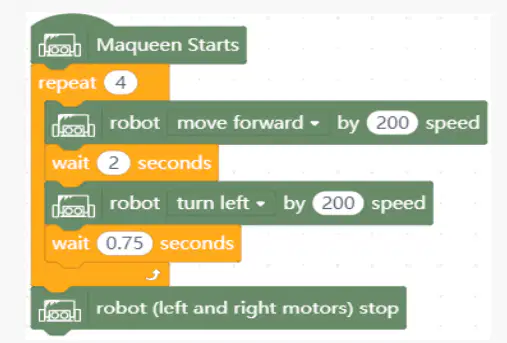
How many times does the robot moves left with this code?
1 time
3 times
4 times
200 times
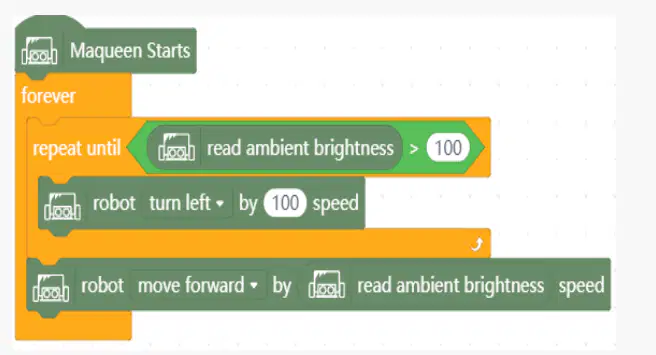
This continues in a loop turning left until:
it finds enough light
it sees an obstacle
it sees black line
What are sensors Line-L and Line-R?
line-tracking
light-tracking
object-tracking
The Maqueen should move "Move forward" if the line-tracking sensor reads (left, right):

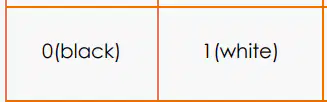


The Maqueen should move "Only right motor rotates, the car turns left" if the line-tracking sensor reads (left, right):
The Maqueen should move "Only the left motor rotates, the cat turns right." if the line-tracking sensor reads (left, right):
The Maqueen should move "Move backward" if the line-tracking sensor reads (left, right):
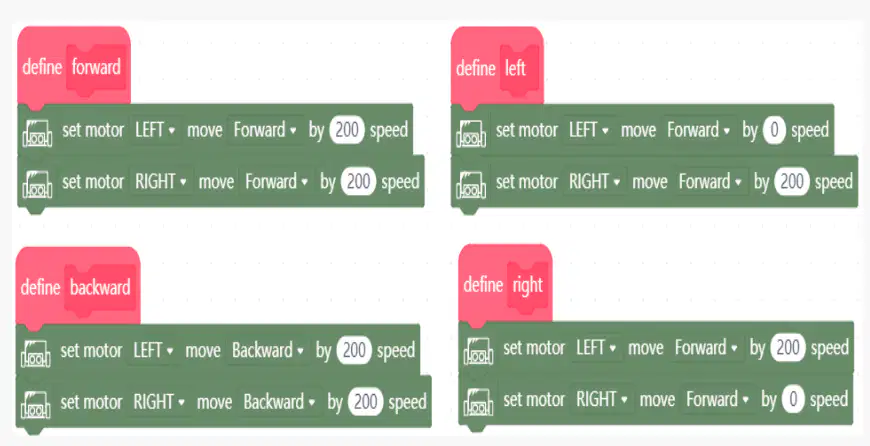
The block of code that starts with: define are:
functions
variables
lists
sprites
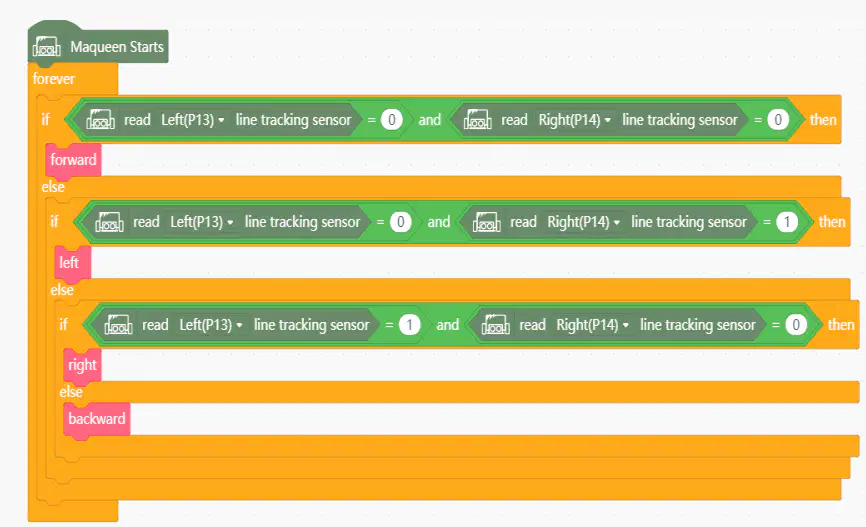
With the block "right" we call which function?