
 Worksheets
Quiz on Games and Colleges
Total questions: 30
Worksheet time: 15mins
What is the name of the game mentioned in Unit 3?
Hide and Seek Game
Tag Game
Puzzle Game
Racing Game
Which of the following is a skill students will practice?
differentiating between different event blocks
counting numbers
singing a song
planting a tree
If you want to program using two event blocks, what should you do?
Use two different event blocks in your program
Draw two event blocks on paper
Sing about event blocks
Ignore event blocks
Why is it important to differentiate between different event blocks when programming?
Because each event block does something different in a program
Because event blocks are all the same
Because event blocks are only for decoration
Because event blocks are used for drawing
If you want something to happen after 10 seconds, which block would you use?
Wait 10 seconds
Move 10 steps
Play sound pop
Change color effect by 25
Imagine you want a penguin to move and then play a sound. Which blocks would you use and in what order?
Move 10 steps, then play sound pop until done
Play sound pop until done, then move 10 steps
Wait 10 seconds, then change color effect by 25
Change color effect by 25, then wait 10 seconds

What does waving the flag at the start of a race mean?
It signals everyone to start the race.
It means the race is over.
It tells everyone to stop.
It is just for decoration.
Which blocks are used in Scratch to create triggers?
Events blocks
Motion blocks
Sound blocks
Costume blocks

What does the "when flag clicked" block do in Scratch?
It starts the program when the green flag is clicked.
It stops the program when the green flag is clicked.
It changes the color of the flag.
It makes the penguin jump.
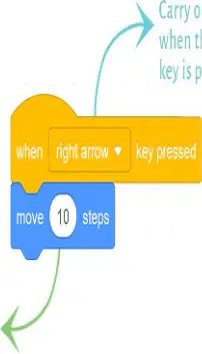
What does the "when right arrow key pressed" block do in Scratch?
It moves the sprite 10 steps forward.
It changes the sprite's color.
It makes the sprite jump.
It plays a sound.
Which block should you use to make something happen when you press the right arrow key?
when right arrow key pressed
move 10 steps
play sound
change color
What is the first step when using event blocks in Scratch?
Drag-and-drop the block to the Code area.
Click the green flag.
Type a message.
Save your project.
What can you use to control the action of a sprite in Scratch?
Keyboard or mouse
Television remote
Mobile phone
Calculator
If you want your sprite to move when the right arrow key is pressed, which key should you select in the Events block?
right arrow
space
up arrow
down arrow
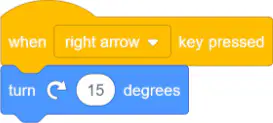
Which block do you use to make a sprite turn 15 degrees when the right arrow key is pressed?
When left arrow key pressed
When space key pressed
When right arrow key pressed
When up arrow key pressed
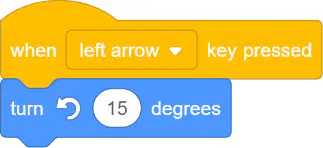
If you want the sprite to turn anti-clockwise when you press the left arrow key, which block should you use?
When right arrow key pressed
When left arrow key pressed
When down arrow key pressed
When space key pressed
What is the first step when programming two sprites using the Events blocks?
Add two sprites of your choice.
Click the green flag.
Delete all sprites.
Change the background.
Which block is used to make a sprite do something when a key is pressed?
when space key pressed
move 10 steps
say Hello!
wait 1 second
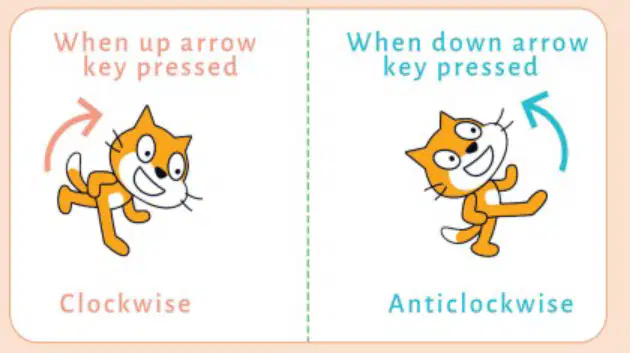
Imagine you are writing a script for a sprite. How would you make the sprite turn clockwise when a key is pressed?
Make the sprite jump when the up arrow key is pressed
Make the sprite turn clockwise when the up arrow key is pressed
Make the sprite turn anticlockwise when the down arrow key is pressed
Make the sprite disappear when the space bar is pressed
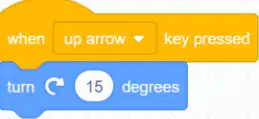
Why do you use the "turn 15 degrees" block in Scratch?
To make the sprite turn
To make the sprite jump
To make the sprite disappear
To make the sprite change color
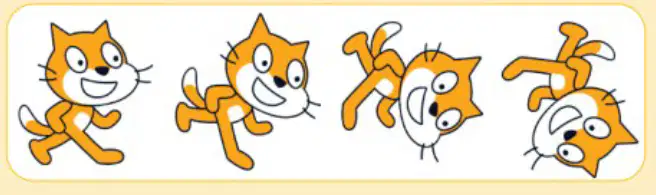
What does each image of the sprite show in the picture?
How the sprite moves when it is clicked
How the sprite changes color
How the sprite makes sounds
How the sprite disappears
Which block allows the gamer to interact with the sprite using the mouse button or touch interface?
The 'Turn' block
The 'when this sprite clicked' block
The 'Move' block
The 'Stop' block
Why is the 'Turn' block chosen in the challenge solution?
Because the sprite needs to jump
Because the output is moving clockwise
Because the sprite needs to disappear
Because the sprite needs to talk
Which of the following is a possible value for the turn right block in this challenge?
45
100
5
120
If you want the sprite to turn by a larger degree, which method can you use?
Try different multiples of 15 degrees
Click the sprite twice
Change the sprite's color
Make the sprite jump
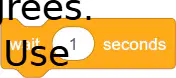
Which block should you use to make the sprite wait for 1 second?
Move block
Wait block
Turn block
Say block
If you want the sprite to turn in the opposite direction after turning clockwise, what should you do?
Turn clockwise again
Move forward
Turn anticlockwise
Wait for 2 seconds
How many steps does the sprite move forward in the challenge?
10 steps
20 steps
30 steps
40 steps
How long does the sprite wait in the challenge?
2 seconds
5 seconds
1 second
10 seconds
Imagine you want the sprite to move forward and then wait. Which two actions would you use from the challenge?
Move 30 steps forward and wait for 1 second
Turn clockwise 30 degrees and move 30 steps forward
Wait for 1 second and turn anticlockwise 30 degrees
Turn anticlockwise 30 degrees and move 30 steps forward

