
 Worksheets
scratch programming input & output
Total questions: 30
Worksheet time: 15mins
Which goal is part of this lesson?
Learning how to plan a program
Drawing a picture with crayons
Playing a sports game
Singing a song
In Scratch, what can operators help you do with inputs and outputs?
Change inputs into outputs
Make music sounds only
Move the mouse
Print paper pages
Which pair belongs together for this lesson?
Inputs and outputs
Forks and spoons
Cats and dogs
Rain and umbrellas
Which sentence best tells what a program is?
A set of commands that control the computer
A picture on the screen
A toy made of plastic blocks
A song the computer plays
In Scratch, what are the commands called that you fit together to make a program?
Files
Blocks
Games
Keys
What do you do with Scratch blocks to make a program?
Color them in
Fit them together
Hide them
Throw them away
Which blocks make the sprite move steps in Scratch?
Motion blocks
Looks blocks
Sound blocks
Event blocks
What color are the Motion blocks?
Blue
Purple
Green
Yellow
To see the Motion blocks, what should you click on?
Blue dots
Red dots
Green flag
Cat sprite
Which block type makes the sprite say “Hello!”?
Looks blocks
Motion blocks
Sound blocks
Control blocks
What color are the Looks blocks in Scratch?
Purple
Blue
Orange
Light green
If you want the sprite to make a sound like “Meow,” which blocks will you use?
Sound blocks
Looks blocks
Motion blocks
Variables blocks
You want the sprite to move and then make a sound when the green flag is clicked. Which sequence is best?
When flag clicked → move steps → play sound
Play sound → move steps → when flag clicked
Move steps only
Play sound only
Which statement is true about Motion, Looks, and Sound blocks?
Motion moves the sprite; Looks shows speech; Sound plays noises
Looks moves the sprite; Motion plays sounds; Sound shows text
Sound moves the sprite; Motion changes color; Looks plays music
All three are the same color
You want to make the sprite say “Hello!” and then move 10 steps. Which two block types should you combine?
Looks and Motion
Sound and Motion
Looks and Sound
Events and Variables
Which blocks in Scratch help start a script, like when you click the green flag?
Motion blocks
Event blocks
Sound blocks
Looks blocks
What color are the Event blocks in Scratch?
Yellow
Light blue
Purple
Green
What do Event blocks do in a Scratch program?
Make a sprite change costumes
Define when a script should run
Play music
Draw shapes
If there are no Event blocks, what happens to the script?
It runs faster
It cannot run
It changes color
It plays a sound
In Scratch, which blocks are used for input from the user, like answering a question?
Control blocks
Sensing blocks
Events blocks
Operators blocks

In Scratch, what do you type in the white space when the sprite asks, "What’s your name?"
Your name
A random number
The word Scratch
Nothing
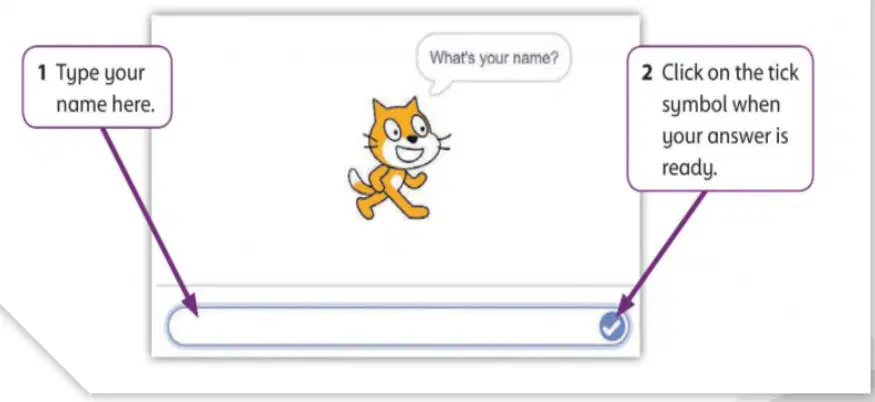
After typing your answer in the box, what should you click to send it to the program?
The red stop sign
The tick (check) symbol
The green flag
The cat sprite

You want the program to begin when you click the sprite. Which block should be placed at the top?
say Hello! for 2 seconds
ask What’s your name? and wait
when this sprite clicked
repeat 10
What does the sprite do first in the program before saying anything?
Asks your name
Says Hello!
Jumps around
Stops the program
Which block lets the sprite say the words you typed?
repeat
answer
move 10 steps
costume
You want the sprite to say your name instead of “Hello!”. Which step should you take?
Delete the ask block
Drag the light blue answer block into the say block
Change the sprite’s costume
Add more moves blocks
A sprite asks, "What’s your name?" You type "Mina". What should the sprite say if the answer block is used in the say block?
Hello!
What’s your name?
Mina
Goodbye
What should your program do first in the Activity task?
Say “Hello” and your name
Ask your name
Change the sprite
Save the file
Which Scratch feature lets the sprite use what you typed after a question?
Motion block
Answer block
Backdrop chooser
Sound block
You are making the Extra Challenge project. Which plan best matches the instructions?
Use any sprite and make it dance with music.
Choose a new sprite and backdrop, ask for your favorite computer game, then say “I like to play” and the game’s name.
Keep the same sprite and draw shapes only.
Make a story that never asks a question.

