
 Worksheets
EOU1 Illustrator Quiz - S1
Total questions: 36
Worksheet time: 19mins
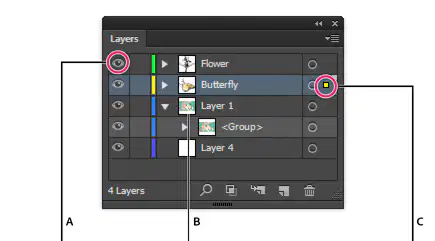
In the image below, What do the following letters represent?
"A" is the visibility of the layer and "C" shows the selected objects displayed
"A": object is hidden and "C" shows the selected objects displayed
"A" is the selection of the layer and "C" shows the locked layer
One mistake that doesn't get the pathfinder to work is:
Selecting 2 intersecting / overlapping objects
Selecting only 1 object
Selecting 2 intersecting objects of different colors
To undo a certain move I press:
Cmd T
Cmd Z
Cmd F
Shift Z
What file type is Adobe Illustrator based on?
Pixel
Jpeg
Vector
The Stroke panel helps
add colors and texture to objects
create dashed lines, round caps, and controls weight of strokes
align objects either horizontally or vertically
RGB stands for:
Red, Green, Black
Red, Gray, Blue
Red, Green, Blue
You can change the width and length of an artboard after you create it
Yes
No
it depends
It is possible to change the positions of panels for example the color panel.
True
False
it depends
When working with artwork, what is the best practice?
Give your files meaningful names
keep a back up copy of your file.
Save your file frequently
Save your files in their relevant folders
All of the above
To create a new file in Illustrator what do we choose?
File > New
File > Open
Edit
Window
In order to move a certain object on my workspace which tool do I choose?
Direct selection tool
Selection tool
Pen tool
I want to make a copy of my object
I use the shortcut Cmd + C, Cmd + V
I go to Edit > copy then Edit > Paste
I click on my object then hold down the Alt key then drag.
All of the above
None of the above
I want to scale up my illustration (make it bigger) I...
I go to one corner of the bounding box then click and drag
I hold down shift then I go to one corner of the bounding box then click and drag using the selection tool
I ask my teacher for help
What is the direct selection tool?
Allows the selection of individual shapes
Allows the selection of individual lines
Allows the selection of individual letters
Allows the selection of individual anchor points
One way to draw a triangle in Illustrator is to use the pen tool
True and I can also use shapes
True and this is the only way
False
What is the Appearance panel?
This Panel allows you to view and adjust the appearance attributes for an object, group, or layer.
This panel allows you to see where the object is located on your artboard.
This panel helps designers see how the design will look like when printed.
When I am using the pen tool, one thing can make my drawing easier:
Remove the fill color and add a stroke color
Keep the fill color and add a stroke color
Chose RGB for color mode
Put it back and grab a sandwich
Which of the following drawing tools is used to make anchor points for a segment:
convert anchor point tool
ellipse tool
pen tool
Which pathfinder option allows you to divide the object in the back by the object in the front.
intersect
minus front
unite
lets you create and name colors, gradients, or tints and quickly apply them to your document.
Color panel
Swatches panel
Color palette
When the layer panel is not in your workspace, you can get it from ...
Menu bar > View
Menu bar > Object
Menu bar > Window
I can move an object from one layer to another
True
False
Not relevant
Which tool allows you to divide an object in the back by an object in the front?
back to front
minus front
Join
Which tool selects anchor points or path segments within an object?
selection tool
direct selection tool
lasso tool
If you can't find the color panel on your Illustrator workspace where should you get it from?
Edit
View
Window
Which additional key is necessary to press when making a perfect circle with the ellipse tool?
tab
option
shift
Which one below is the standard Illustrator file format?
.ai
.ia
The points that form a vector are called
sail points
anchor points
target points
Which tool selects entire objects?
pen tool
selection tool
direct selection tool

What tool does this icon represent?
text or type
layer blend
tone
A designer wants to create a logo for a client. It should be easily re-sizable and readable to be used on promotions like a small business card or a large billboard sign. What program should she use?
Adobe Photoshop
MS Word
Adobe Illustrator
MS Publisher
Which of the following is considered the primary drawing tool in Adobe Illustrator?
shape tool
black arrow
pen tool
line tool
Can one create a shadow using Effect in Illustrator?
No
Yes
only if you install an extension first
Which of the following best describes the role of art direction in a layout?
Choosing only the color palette for the design
Ensuring that all visual elements work together to communicate the intended message and mood
Focusing primarily on typography choices
Selecting images without considering the overall composition
Which of the following is not a key design principle to consider when creating a poster?
Balance
Contrast
Readability
File size
What is the primary goal of effective typography in poster design?
To use as many fonts as possible to create variety
To ensure text is clear, legible, and supports the overall message
To make the text the most complex element on the poster
To use only decorative fonts for visual appeal

