
 Worksheets
Microsoft Word Basics Quiz
Total questions: 115
Worksheet time: 1hrs 9mins
Which tab do you click to open a document?
Home tab
File tab
Insert tab
After clicking the File tab, what should you click to open a document?
Save
Open
Close
Where can you find the folder of your document?
In the Open dialog box
On the desktop only
Inside the printer
What button do you click after selecting the document you want to open?
Create
Save
Open
Which command is used to save your document?
Save As
Exit
Where do you type the name of your document?
File name box
Toolbar
Status bar
What should you click after typing the document name?
Save
Open
Close
Which tab do you click to create a new document?
View
File
Insert
Under Available Templates, what should you choose to make a new blank page?
Old Document
Saved File
Blank Document
What button do you click after choosing Blank Document?
Create
Delete
Close
To print a document, which tab do you click?
File tab
Insert tab
Review tab
What command should you click after choosing File tab to print?
Save
Exit
What do you need to choose before printing?
Font
Printer name
Folder
What happens after clicking Print?
The document will open
The document will close
The document will be printed
Where do you find the Print command?
Home tab
File tab
Page Layout tab
What is another word for font face?
Typeface
Highlight
Shadow
What does font size do?
Changes color
Changes size
Changes shape
What is the default font size in Word?
10 pt.
12 pt.
20 pt.
What is the biggest font size you can set?
48 pt.
72 pt.
60 pt.
What does “Change Case” do?
Changes letter case
Changes font color
Changes font size
What tool changes the text color?
Text Effects
Font Color
Highlight Color
Which tool changes the highlight color behind the text?
Text Effects
Font Color
Text Highlighter Color
Which feature adds shadow or glow effects to text?
Text Effects
Font Size
Font Case
What does “Clear Formatting” do?
Erases the text
Removes all styles
Makes text bold
What happens when you click “Grow Font”?
Font becomes bigger
Font becomes smaller
Font changes color
What happens when you click “Shrink Font”?
Font becomes smaller
Font becomes bigger
Font becomes blue
Which tab lets you create, open, or save documents?
File Tab
Home Tab
Review Tab
Which tab lets you change fonts and styles?
Home Tab
View Tab
Mailing Tab
Which tab lets you add pictures or text boxes?
Insert Tab
Review Tab
Page Layout Tab
Which tab helps you change margins and paper layout?
Page Layout Tab
File Tab
Insert Tab
Which tab is used to make references or citations?
Review Tab
References Tab
Insert Tab
Which tab helps when you want to send letters?
Mailing Tab
Home Tab
View Tab
Which tab is used to check spelling and grammar?
Home Tab
Review Tab
File Tab
Which tab lets you see your document in different views?
Page Layout Tab
View Tab
References Tab
Which tab gives you quick buttons like Save and Undo?
Home Tab
Quick Access Tab
Review Tab
Where can you find the Text Box command?
Text group
Font group
Layout group
What appears when you click the Text Box command?
Drop-down menu
Picture
Printer window
What should you choose to make your own text box?
Blank Document
Draw Text Box
Open Text Box
What should you do to create the text box on the document?
Click and drag
Click Save
Click Print
Where do you type after making the text box?
Inside the box
On the title bar
On the toolbar
What tool lets you design or edit the text box?
Drawing Tools Format
Home Tab
File Tab
What kind of software is Microsoft Word?
Spreadsheet
Word Processing
Presentation
What is the main purpose of Microsoft Word?
To type and edit text
To draw pictures
To make slides
Which tab contains the Save command?
File
Home
Insert
What should you do before printing a document?
Save it
Delete it
Close it
Which key is used to delete letters?
Enter
Delete
Tab
Which command lets you create a new blank page?
New
Save As
Which command lets you rename your file?
Open
Save As
Which tool removes all font styles and colors?
Clear Formatting
Text Effects
Change Case
Which feature helps you make your text attractive with shadow and glow?
Text Effects
Font Size
Clear Formatting
Used to write a specific text that you can move around your document.
(a)
Changes the outline, shadow, reflection and glow effects of the text.
(a)
Changes the size of the text
(a)
is used to add more text effects to your document.
(a)
Leaves the plain text and clears all previous formatting to the text.
(a)
Changes the color of the highlight.
(a)
changes the letter case of the document.
(a)
is the typeface. It can be thick or thin, tailed or no tail, curly or straight, big or small.
(a)
changes the text color.
(a)
is composed of theme colors, theme fonts, and shape styles.
(a)
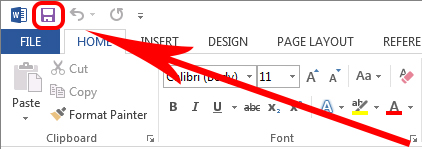


What is this button used for?
Creating a new document
Opening a document
Saving a document
Inserting a picture
Which tab would you need to click if you wanted to add a photograph to your document?
Home
Insert
Format
Page Layout
Which tab would you click to change the page to landscape?
Home
Format
View
Page Layout
What is the opposite of landscape?
Horizontal
Vertical
Portrait
Upright
Which of these buttons will let you change CAPITALS to lower case?


Saving your work regularly is not really needed these days.
True
False

Letter A on this Table image is referring to a...
Column
Table

Calibri, Times New Roman, Comic Sans are all examples of...
Header styles
Font sizes
Font Styles

The highlight color button is available on the ............. tab.
Home
Insert
File
None of these
............is the way of placing text between the margins of a page.
Alignment
Formatting
Editing
None of these

It is usually used to mark some important facts in the text.
Font color
Bold
Text highlighter
Shading
The Font and Text Effects commands are present in the ____ group.
Clipboard
Paragraph
Font
Insert
Formatting means
changing the shape
changing text
changing appearance of text
none
What icon is Right Alignment?


What is a good definition of software?
parts of a computer that are soft
Parts of a computer that you can't see
A set of rules that tell a computer what to do
games
Which is a Word file?


A folder is....
an object that contains data or information
a container that stores books and food
a container that stores files and folders
What is the keyboard shortcut for Copy?
CTRL+C
CTRL+A
CTRL+V
CTRL+P
. The keystrokes Ctrl + I is used to
A) Increase font size
B) Inserts a line break
C) Indicate the text should be bold
D) Applies italic format to selected text

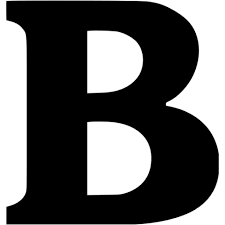
To apply bold style to font what icon should we click?

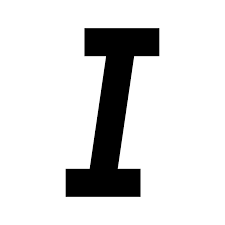
Pema wants to underline the sentence which icon should she click on ?
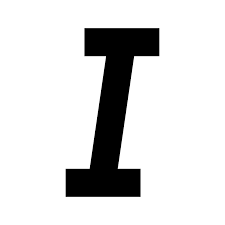


The above picture is an icon for
Change font type
Change font colour
Change font shape
Change font size
Font group can be found in _____ tab.
Font
Review
Home
Text
When you save a document for the first time, which tab displays in Backstage?
Save As
Save
New
Info
When we make changes to a document it is called as ______________________.
copying
pasting
Editing
Moving
Which key do you press to move the cursor to the next line which will mark the beginning of new paragraph?
Backspace
Enter
Alt
Ctrl


What does the box with the red arrow pointing at means?
Font Style
Text Color
Bold
Font Size
The Insert WordArt button is located on the ___ Ribbon.
Design
Home
Insert
Layout
The title bar displays which of the following?
A quick way to find where commands are located in the application
Commands to manage work in documents
The name of the active location in the the document
The name of the current, active file
Which of the following items do people most commonly use the Word application to create?
Create database objects to manage data between systems
Create documents to distribute such as letters, brochures, and social media posts
Create slides to present content such as a meeting agenda
Create spreadsheets to track items such as budgets, lists, and timesheets
A set of commands and command groups at the top of the document window that you can minimize or hide.
Button
Group
Ribbon
Tab
The blank space around the boundaries of the document content.
Border
Indentation
Margin
Spacing
Keyboard Shortcut for New Document
CTRL + C
CTRL + D
CTRL + ENTER
CTRL + N


What is the shortcut key to print a document?
Alt + P
Shift + P
Ctrl + P
Ctrl + D

