
Font size
 Worksheets
Understanding Skateboarding
Total questions: 91
Worksheet time: 46mins
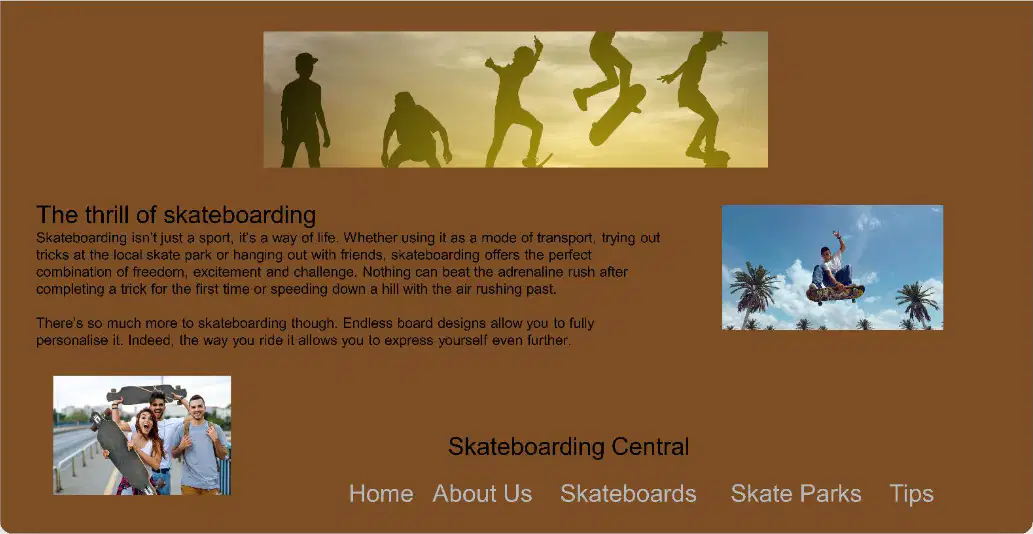
What is one issue with the web page design mentioned in the image?
The text contrasts well with the background.
The images are consistently sized and placed.
The navigation bar is poorly positioned and not intuitive for the user.
The title is already placed at the top of the page.

Why is the text on the web page difficult to read?
The text is too large.
The text doesn’t contrast well with the background.
The text is written in a different language.
The text is placed at the bottom of the page.
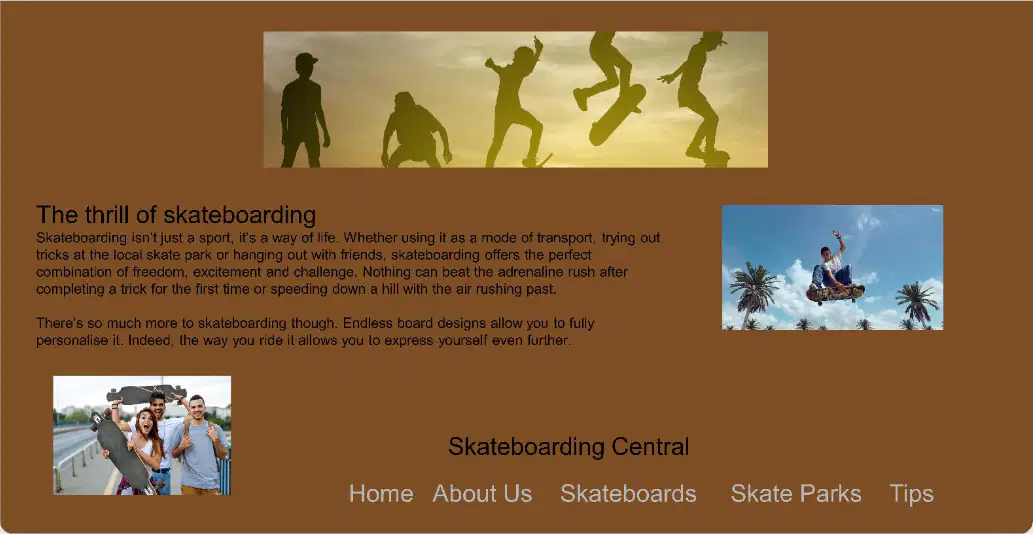
What would improve the placement of the title on the web page?
Placing the title at the bottom of the page.
Placing the title at the top of the page.
Removing the title entirely.
Changing the font of the title.
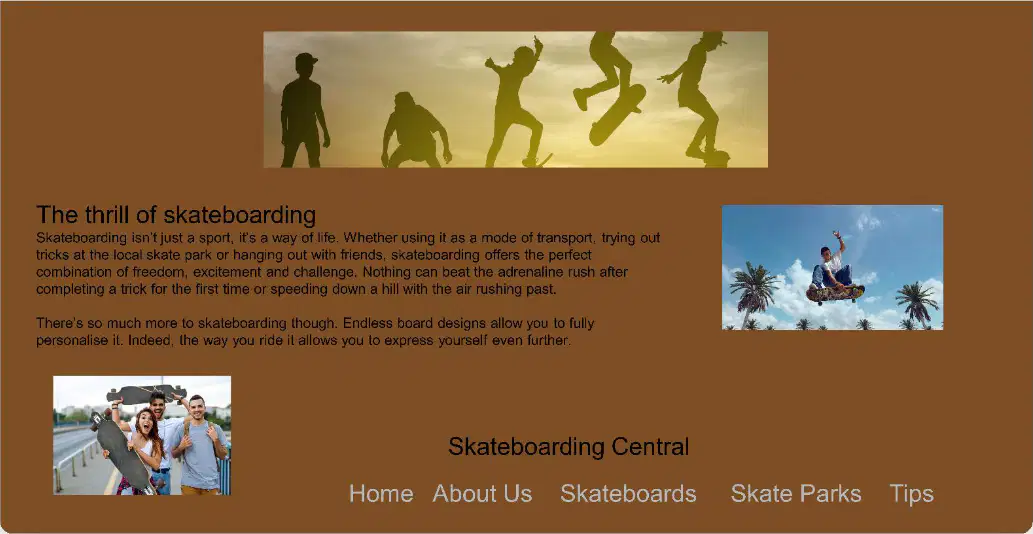
What is one issue with the images on the web page?
The images are consistently sized and placed.
The images are not consistently sized and placed.
The images are too colorful.
The images are missing captions.
What does the term "intuitive" mean?
Something that requires detailed instructions to understand or use
Something that feels natural or obvious and is easy to understand or use without instruction
Something that is complex and difficult to use
Something that aligns with user expectations but requires explanation
Which of the following is a characteristic of an intuitive design?
Requires detailed explanation
Feels unfamiliar and confusing
Enhances usability and efficiency
Contains hidden features
Which of the following is an example of an intuitive design?
A touchscreen that responds to swipes
A complex form with unclear instructions
Buttons that don’t indicate their purpose
A door with a handle on the push side
Which of the following is NOT an example of an intuitive design?
Drag-and-drop file upload
Icons that clearly represent their function
A door with a push plate on the side you’re meant to push
A complex form with unclear instructions
What is a key difference between an intuitive design and a non-intuitive design?
Intuitive designs require detailed instructions, while non-intuitive designs do not
Intuitive designs align with user expectations, while non-intuitive designs may have hidden features
Intuitive designs are complex, while non-intuitive designs are simple
Intuitive designs feel unfamiliar, while non-intuitive designs feel natural
What is the primary focus of User Experience (UX) Design?
To create visually appealing graphics for a website
To consider how users make use of a website and how it could be improved
To develop the backend functionality of a website
To focus solely on the content of a website
What is one of the key goals of UX design?
To make a website accessible for all users by considering ease of use and creating intuitive designs and processes
To focus on the aesthetic appeal of the website
To ensure the website has the most advanced coding techniques
To prioritize the developer's preferences over user needs
What is the role of a UX designer in website development?
To create marketing strategies for the website
To focus on the visual design of the website only
To be involved in research, planning, implementation, and testing of a website to help improve the user experience
To write content for the website
Which of the following is NOT a focus of UX design?
Accessibility for all users
Ease of use
Intuitive designs and processes
Advanced coding techniques
What does accessibility in web design aim to achieve?
Making websites visually appealing
Ensuring all users can access and use a website
Increasing website traffic
Optimizing websites for search engines
Which of the following is an example of an accessibility feature for users with disabilities?
High-resolution images
Alternative text descriptions for images
Faster loading times
Interactive animations
Why are accessible designs important for web pages?
They make web pages more accessible for all users
They improve website rankings on search engines
They reduce the cost of website development
They increase the number of advertisements on the website

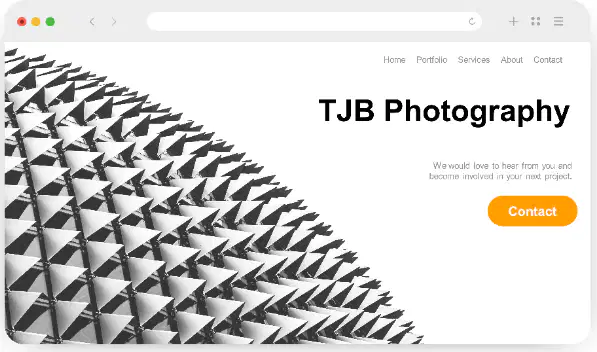
What accessibility issue might the webpage on the right have?
Lack of alternative text for images
Too many colors on the webpage
Excessive use of animations
Poor website loading speed

What is one of the accessibility issues mentioned in the learning material?
The text contrasts very well with the background, making it easy to read.
The lack of whitespace/negative space around the elements prevents them from standing out.
The use of black and grey text on a white background makes the visual less accessible.
The design uses too many colors, making it overwhelming.
How is the design improved according to the learning material?
By using black and grey text on a white background, the visual is much more accessible.
By adding more colors to the design to make it vibrant.
By removing whitespace to make the design compact.
By using text that blends into the background for a seamless look.
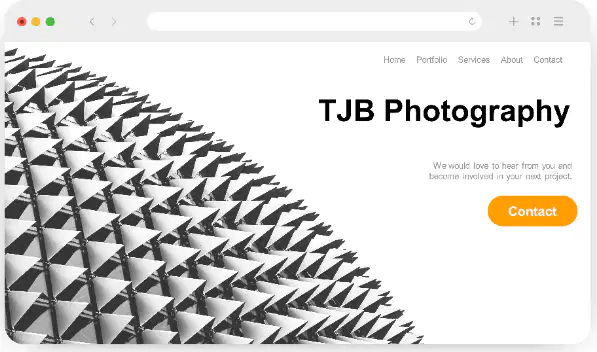
Why is whitespace important in design as per the learning material?
It makes the design look more colorful.
It allows all the elements to stand out.
It reduces the readability of the text.
It makes the design more compact and dense.
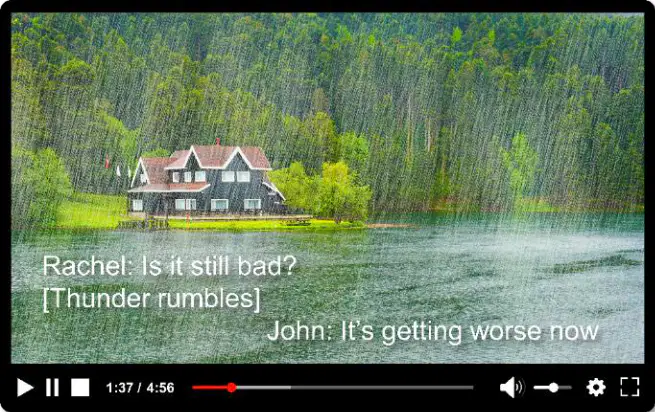
What is the primary purpose of subtitles in video dialogue?
To provide a text version of video dialogue for accessibility.
To enhance video quality.
To add background music to videos.
To replace audio in videos.
How do video transcripts improve accessibility?
They allow users to skim through content quickly and are easily read by screen readers.
They replace subtitles in videos.
They add sound effects to videos.
They remove the need for headphones.
What is one benefit of subtitles for users who cannot play sound?
They allow users to understand video content without disturbing others.
They improve video resolution.
They add captions to unrelated videos.
They remove the need for video transcripts.
What is the difference between subtitles and closed captions?
Subtitles only show dialogue, while closed captions include sound effects and other audio cues.
Subtitles include sound effects, while closed captions only show dialogue.
Subtitles are used for audio description, while closed captions are used for video quality.
Subtitles and closed captions are the same.

What is the primary difference between subtitles and closed captions?
Subtitles show dialogue, while closed captions include dialogue and sound effects.
Subtitles are used for translating dialogue, while closed captions are only for hearing-impaired viewers.
Subtitles describe sound effects, while closed captions only show dialogue.
Subtitles and closed captions are identical in function.
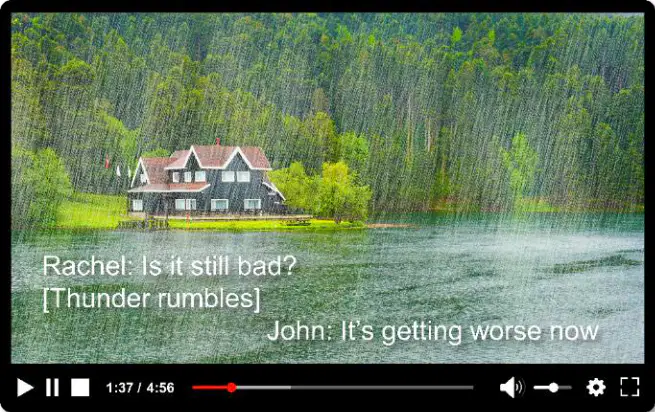
Which of the following is an example of a sound effect described in closed captions?
[Door creaks]
"Rachel: Is it still bad?"
"John: It's getting worse now."
[Cup shatters]
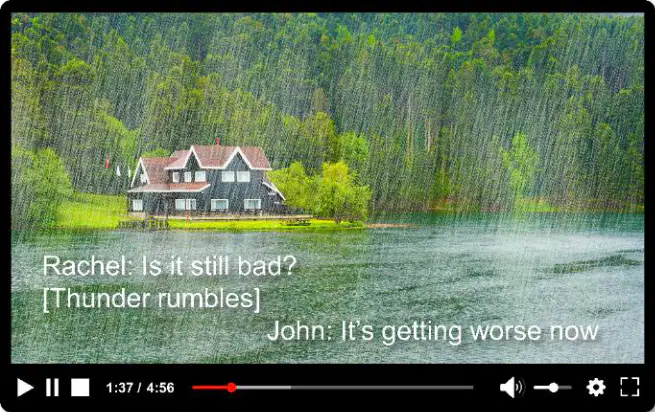
Why are closed captions more common in TV programs and films?
They add an additional dimension to the mood by including sound effects and music.
They are easier to create than subtitles.
They are only used for translating dialogue.
They are required by law for all TV programs.
Which of the following is NOT typically included in closed captions?
Dialogue being spoken.
Sound effects like [Cup shatters].
Music descriptions like [Pensive music].
Visual descriptions of scenery.
What is one reason why keyboard-only navigation is important for web accessibility?
It allows users to navigate without using a mouse.
It improves the visual design of the website.
It increases the speed of video playback.
It reduces the need for internet connectivity.

How can video players be made more accessible for users who have difficulty using a mouse?
By using keyboard shortcuts to control the player.
By increasing the video resolution.
By adding more mouse-based controls.
By removing playback controls entirely.
Which of the following is a benefit of using keys instead of a mouse for navigation?
It makes navigation accessible for users with physical disabilities.
It reduces the size of the video player.
It eliminates the need for audio controls.
It increases the number of videos that can be played simultaneously.

What is the main purpose of keyboard-only navigation in web design?
To make websites more accessible for users with difficulty using a mouse.
To improve the aesthetic appeal of the website.
To increase the loading speed of web pages.
To reduce the amount of text on the website.
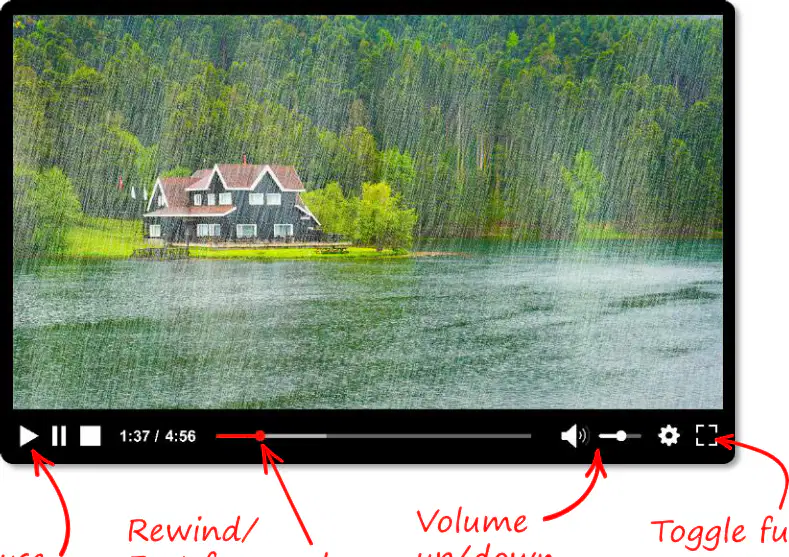
What is the primary way to control a web page video player using only a keyboard?
Using mouse gestures
Using keyboard shortcuts
Using voice commands
Using touch screen controls
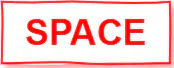
Which keyboard key is commonly used to toggle play/pause in a video player?
Enter
SPACE
Tab
Esc
What is the benefit of keyboard shortcuts for video players?
They make video players less accessible
They are only useful for advanced users
They make video players more accessible for people with disabilities and general users
They are only used for aesthetic purposes
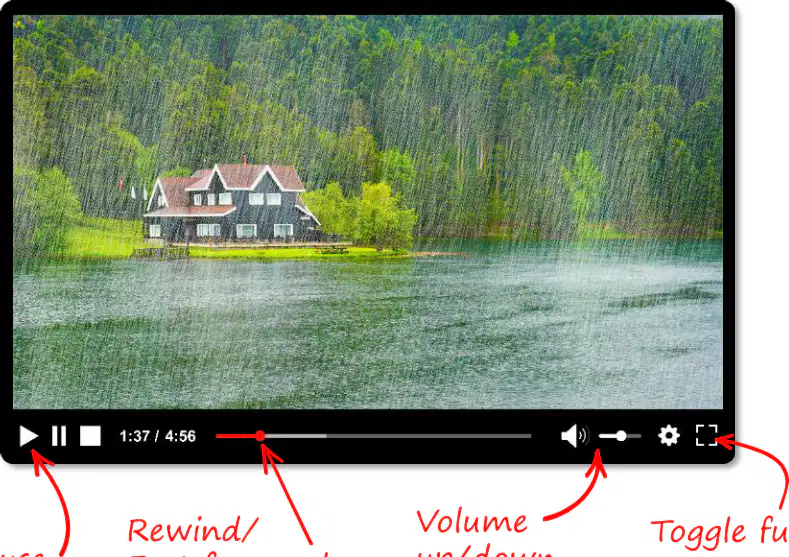
Which keyboard key is used to toggle fullscreen mode in a video player?
F
M
Esc
Tab
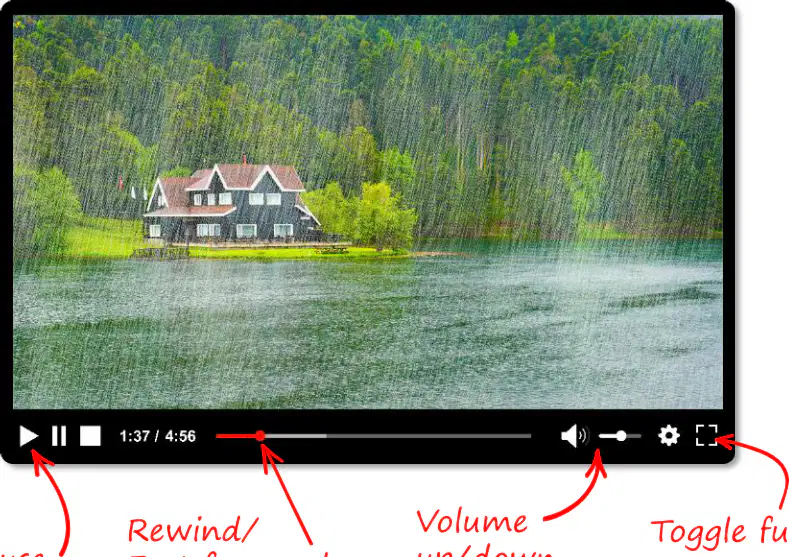
Which keys are used to rewind or fast forward a video in a web page video player?
Up and Down arrow keys
Left and Right arrow keys
Tab and Enter keys
Esc and SPACE keys
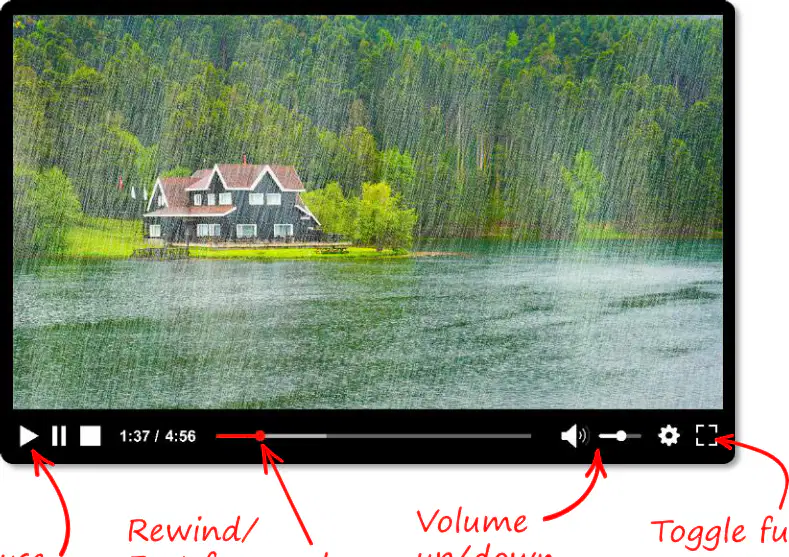
How can you increase or decrease the volume of a video player using a keyboard?
Using the left and right arrow keys
Using the up and down arrow keys
Using the SPACE key
Using the Esc key
What is the primary purpose of breadcrumbs in website development?
To display advertisements on a webpage
To show how a web page fits into the hierarchy or categories of a website
To enhance the visual design of a webpage
To replace the navigation bar entirely
What does each item of text in a breadcrumb trail represent?
A decorative element
A hyperlink to an appropriate section or category of the website
A random word
A pop-up menu
Where are breadcrumbs typically displayed on a website?
At the bottom of the webpage
Near the navigation bar
In the footer section
In the sidebar
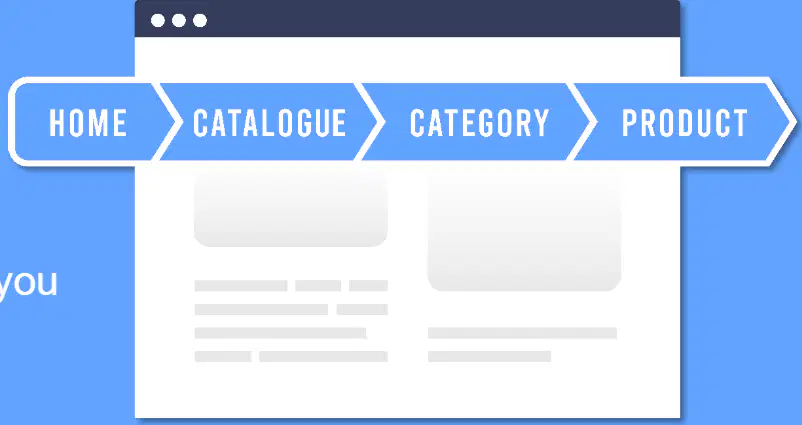
What is an example of a breadcrumb trail?
Home > Women > Shoes > Trainers
Home > Contact Us > About Us
Home > Blog > Comments > Likes
Home > Settings > Privacy > Terms
What is one way accessible websites allow users to customise text size?
By using a slider to adjust brightness
By using + and - buttons to increase or decrease text size
By changing the font style
By enabling voice commands
What is the default setting for subtitles and closed captioning on accessible websites?
Subtitles and closed captioning are always on
Subtitles and closed captioning are always off
Subtitles and closed captioning can be set to on or off
Subtitles and closed captioning are only available in dark mode

What is one common customisation feature available on websites?
Changing the website's language
Adjusting the website's layout
Setting for dark mode and light mode
Adding animations to the website

What is one advantage of using dark mode over light mode?
It reduces eye strain in low-light environments
It increases the brightness of the screen
It makes the text size larger
It disables subtitles and closed captioning

What does dark mode/light mode do to a web page?
Changes the text size on the page
Adjusts the color scheme of the page
Enables or disables animations
Changes the language of the page
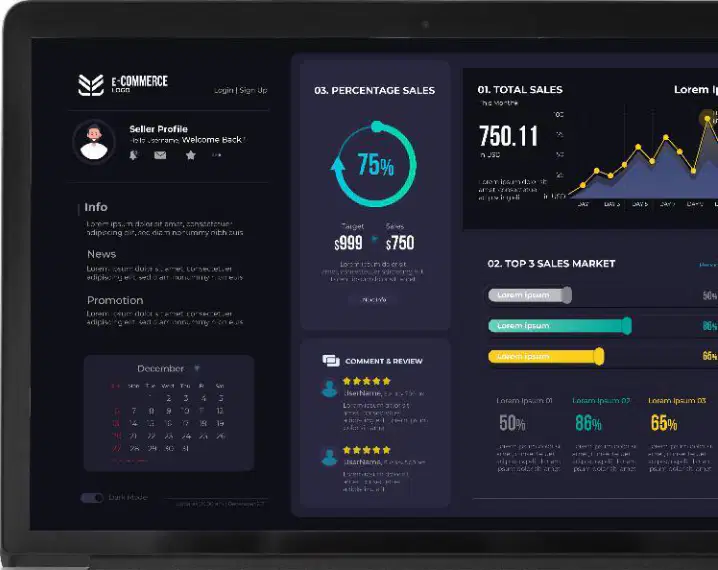
What happens to the background colors when switching from light mode to dark mode?
Background colors become white or light gray.
Background colors go to black or a very dark color.
Background colors become blue or green.
Background colors remain unchanged.
Why does text change to a light color in dark mode?
To match the background color.
To contrast with the background.
To make the text invisible.
To reduce eye strain.
Which of the following is an advantage of using dark mode?
Increased eye strain in low light rooms.
Easier focus on content for some users.
Reduced visibility of text.
Increased brightness of the screen.
What is one reason users might prefer dark mode?
It reduces eye strain in bright rooms.
It matches the style of light mode.
Some users prefer the style of dark mode.
It makes the screen brighter.

Which accessibility feature involves using colors for text, background, and other elements to avoid clashing and ensure readability?
Text contrast
Colour combinations
Dark mode
Text size +/-
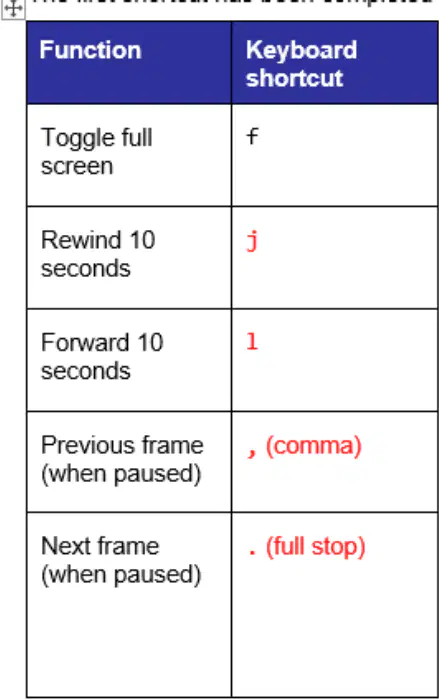
What is the function of the keyboard shortcut "f" in video playback?
Toggle subtitles/captions
Toggle full screen
Rewind 10 seconds
Mute/unmute

Which accessibility feature provides a text version of dialogue, usually displayed at the bottom of a video?
Subtitles
Closed captions
Video transcripts
Text size +/-
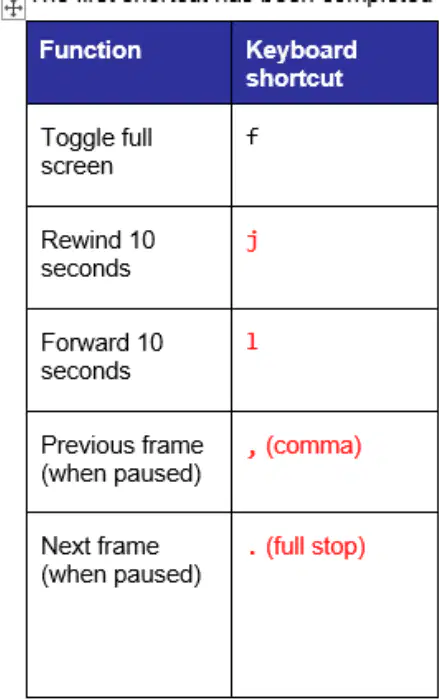
What does the keyboard shortcut "j" do during video playback?
Rewind 10 seconds
Forward 10 seconds
Slow down the video
Speed up the video

Which accessibility feature helps users understand their position in a website's hierarchy?
Breadcrumbs
Video transcripts
Keyboard-only navigation
Text contrast
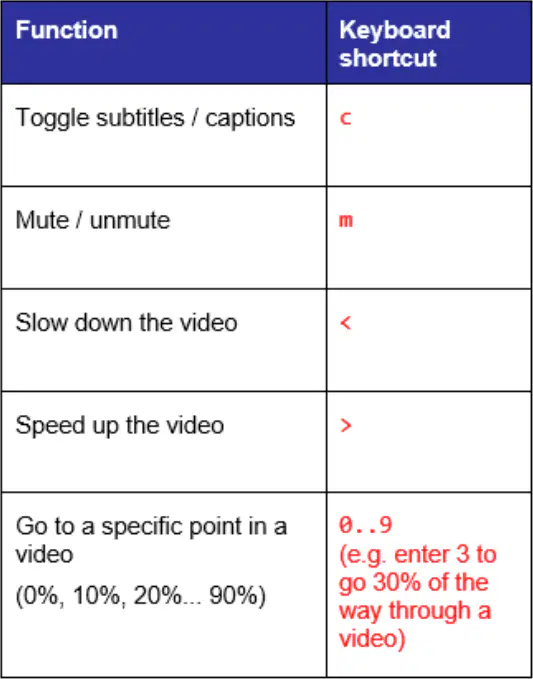
What is the function of the keyboard shortcut "m" in video playback?
Mute/unmute
Toggle subtitles/captions
Toggle full screen
Slow down the video

Which accessibility feature reduces light output by making backgrounds and graphics black or dark, with text in white or lighter colors?
Dark mode
Text contrast
Colour combinations
Text size +/-
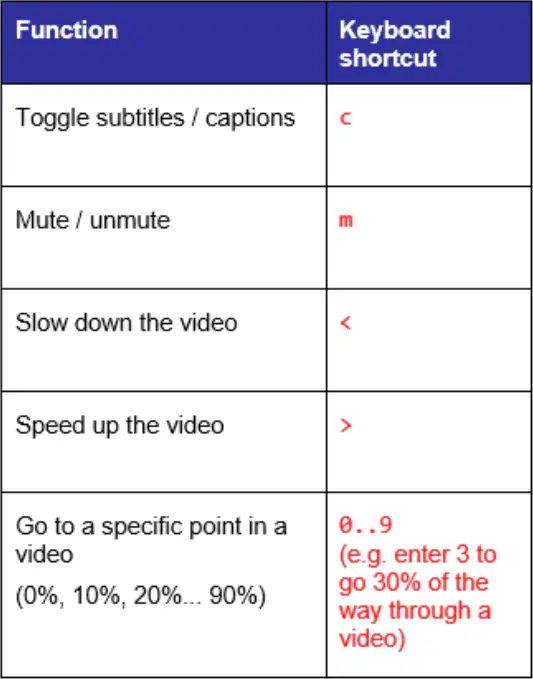
What does the keyboard shortcut "<" do during video playback?
Slow down the video
Speed up the video
Rewind 10 seconds
Forward 10 seconds

Which accessibility feature involves written text of all dialogue for a video?
Subtitles
Video transcripts
Closed captions
Text size +/-
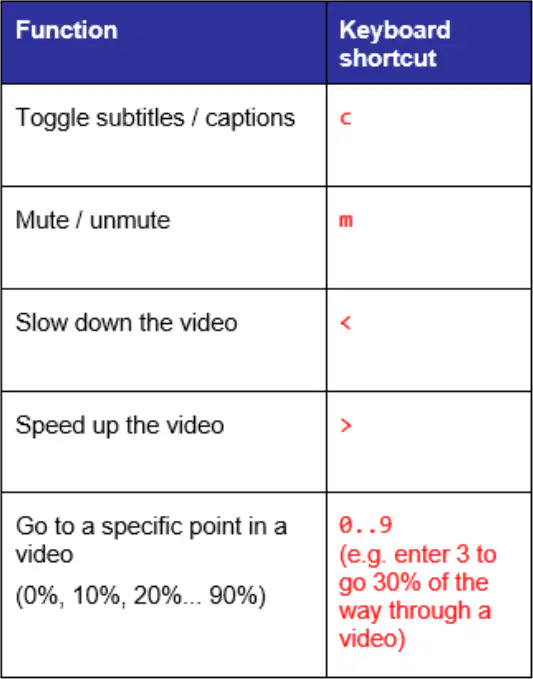
What does the keyboard shortcut ">" do during video playback?
Speed up the video
Slow down the video
Toggle subtitles/captions
Toggle full screen
What are user interface elements also known as?
Web components
User interface (UI) components
Design elements
Interaction tools
Which of the following is an example of a user interface element?
Buttons
Text boxes
Progress bars
All of the above
What is the primary purpose of user interface elements on a web page?
To display advertisements
To allow users to interact with the web page
To improve website loading speed
To enhance website security
Which of the following is NOT a user interface element?
Progress bar
Search bar
Big button
Web server

What is the term used to describe the parts of a web page that users interact with?
Backend components
User interface elements
Database elements
Network components

Which user interface element is typically used to display the progress of a task?
Search box
Progress bar
Radio buttons
Toggle buttons

Which user interface element is used to input text?
Text box
Radio buttons
Toggle buttons
Process bar
Which user interface element allows users to rate something, often on a scale of 1 to 5?
Rating bar
Checkboxes
Toggle buttons
Search box
What is the function of radio buttons in a user interface?
To allow multiple selections from a list
To allow users to select only one option from a group
To toggle between two states
To input text
Which user interface element is used to toggle between two states, such as on and off?
Toggle buttons
Checkboxes
Radio buttons
Process bar
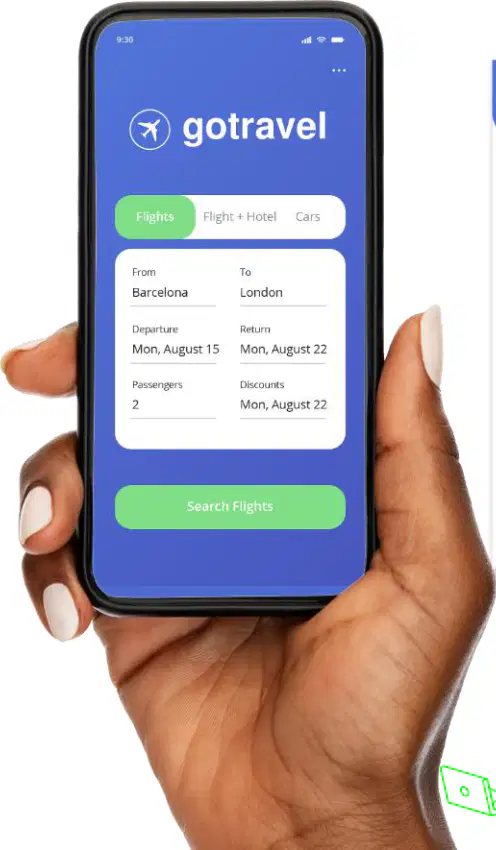
What is the importance of maintaining consistency in the design elements of web pages throughout a website?
It helps users interact with the website more easily.
It makes the website load faster.
It ensures the website is accessible offline.
It increases the number of pages on the website.
Why might users leave a website if the functionality is confusing?
They find it difficult to navigate the website.
They prefer websites with more advertisements.
They want websites with more colors and animations.
They are looking for websites with fewer pages.
Which of the following is a benefit of a trustworthy-looking website?
Users are more likely to trust and use the website.
Users will spend less time on the website.
Users will avoid interacting with the website.
Users will only use the website for entertainment purposes.
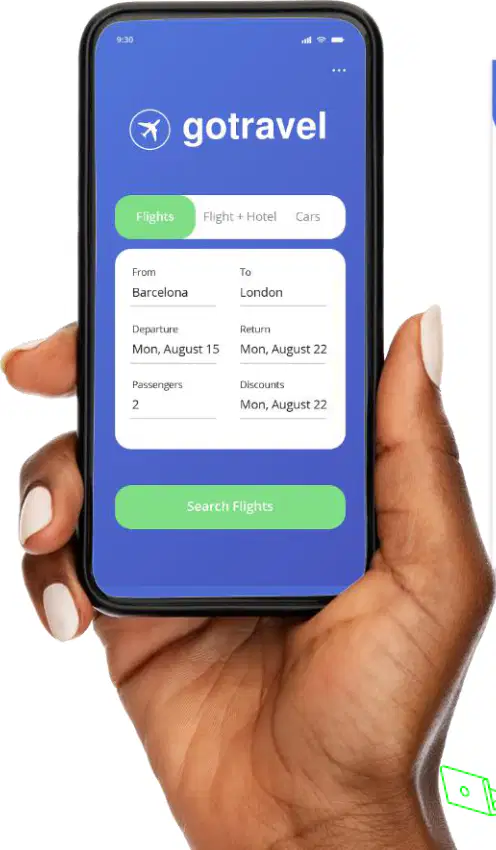
How can webpages be kept consistent?
By using the same design elements throughout the website.
By changing the design elements on every page.
By adding random animations to each page.
By using different fonts and colors on every page.
Which of the following is included in branding to maintain consistency in web pages?
Navigation bar placement
Logo, colour scheme, typography, writing style
Style of images and graphics
UI element placement
What does page layout refer to in maintaining consistency in web pages?
The style of images and illustrations
The placement of text, images, navigation bar, and other UI elements
The writing style and typography
The colour scheme of the website
Which aspect of consistency focuses on the style of images, graphics, and illustrations?
Branding
Page layout
Design
User interface elements
What is the purpose of maintaining consistency in user interface elements?
To ensure the placement of navigation bars is uniform
To keep the style of each UI element the same
To focus on typography and writing style
To design graphics and illustrations
Which of the following is a way to keep web pages consistent?
Using different fonts for each page
Maintaining a consistent color scheme
Randomly changing navigation menus
Using varying layouts for each page
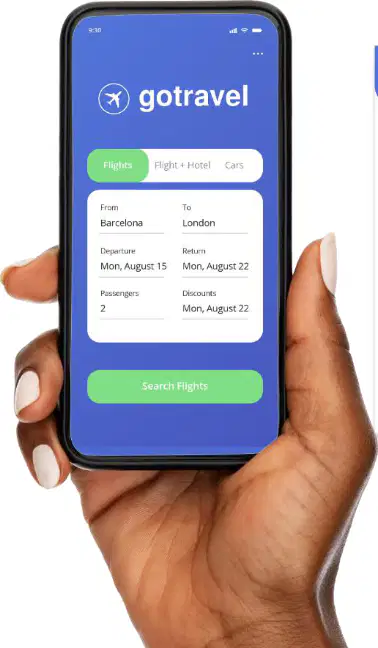
What is one principle of user experience in website development?
Consistency in design
Adding as many features as possible
Using complex navigation systems
Ignoring user feedback
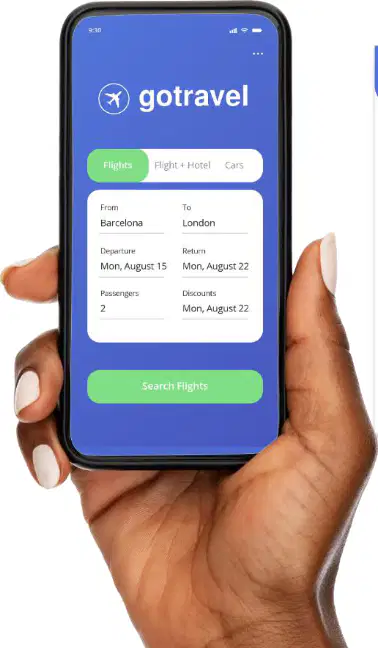
Which of the following is included in 'Branding' to keep web pages consistent?
Navigation bar placement
Typography and writing style
Style of images and illustrations
UI element functionality
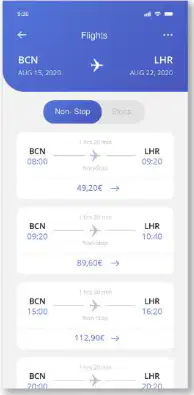
What does 'Page layout' refer to in maintaining web page consistency?
Placement of text, images, and navigation bar
Style of graphics and illustrations
Writing style and typography
Functionality of UI elements
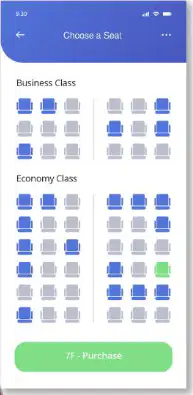
Which of the following is an example of 'Design' in web page consistency?
Logo and color scheme
Style of images, graphics, and illustrations
Navigation bar placement
Writing style

What is the purpose of maintaining consistent 'User interface elements' in web pages?
To ensure the style of each UI element is the same
To improve navigation bar placement
To enhance typography and writing style
To focus on the color scheme
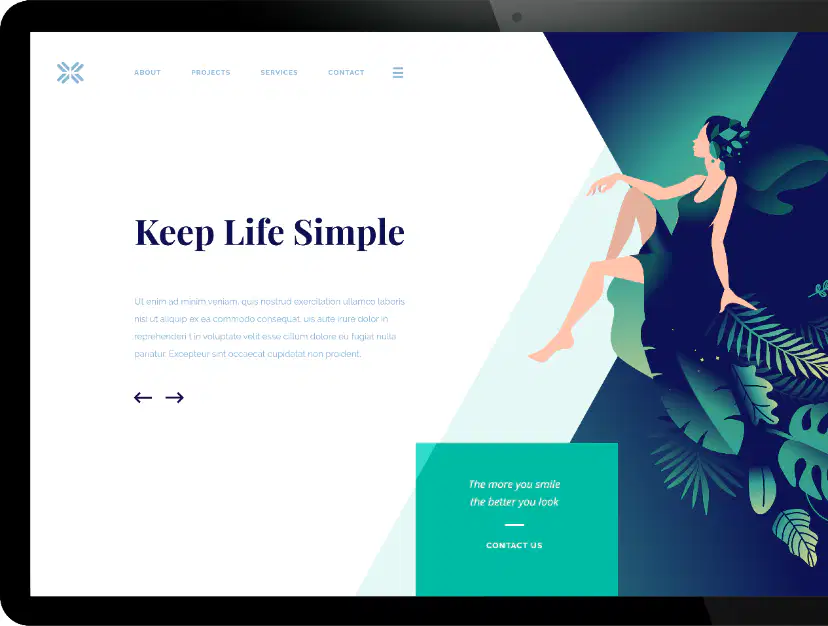
What are the characteristics of user-friendly websites?
Simple, engaging, responsive, intuitive
Complex, static, unresponsive, confusing
Simple, boring, unresponsive, intuitive
Complex, engaging, responsive, intuitive

Why is it important for a website to be user-friendly?
To attract more users and keep them staying for longer
To make the website harder to navigate
To reduce the number of visitors
To increase the complexity of the website
Which of the following is NOT a characteristic of a user-friendly website?
Simple
Confusing
Responsive
Intuitive

How can web pages be made more intuitive?
By ensuring the design is simple and easy to navigate
By adding unnecessary features and complexity
By making the website static and unresponsive
By using outdated design principles
Which of the following is a feature of an intuitive website that helps users quickly identify functions like search or shopping cart?
Clear navigation
Familiar icons
User feedback
Breadcrumbs
What is the purpose of breadcrumbs in an intuitive website?
To provide user feedback after form submission
To allow users to understand the site structure
To display familiar icons for quick identification
To create distinct call-to-action buttons

