
 Worksheets
Operating System fundamentals
Total questions: 57
Worksheet time: 29mins
What is an operating system (OS)? Fill in the blank: An operating system (OS) is software that controls the computer's _______ and _______ resources.
hardware; software
input; output
memory; storage
files; folders
Which of the following is NOT a function of an operating system?
Processor management
Memory management
Web browsing
Security
Fill in the blank: The operating system allows applications to interact with the _______ on a computer.
hardware
software
internet
printer
One function of an operating system is:
Managing hardware resources
Compiling source code
Designing web pages
Editing videos
Which function of the operating system is responsible for handling data coming in and out of the computer, as well as managing signals that require immediate attention?
Processor management
Inputs, outputs, and interrupts
Memory management
Security
Fill in the blank: _______ management is a function of the operating system that deals with the computer's RAM and storage.
Memory
Process
File
Device
What is an operating system?
The operating system is the most fundamental piece of system software that acts as a platform on which other software can run and handles operations common to different pieces of software running on the same system.
An operating system is a type of application software used for creating documents.
An operating system is a hardware component responsible for data storage.
An operating system is a programming language used to develop software.
Which of the following is NOT a function of an operating system?
Acts as a platform for other software
Handles operations common to different software
Directly controls the user
Allows software to read and write to storage devices
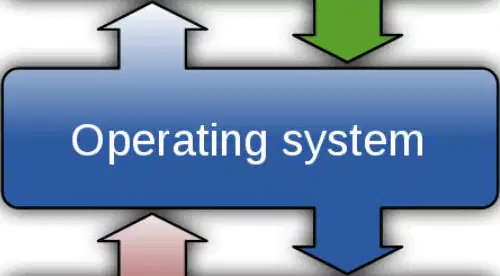
Refer to the diagram showing the relationship between User, Application, Operating System, and Hardware. Which layer directly interacts with the hardware?
Operating system
User
Application
Network layer
The operating system provides a user interface and supports security.
True
False
What is the role of the operating system when you open a program on a computer?
The operating system works behind the scenes to make sure that all the hardware is processing the right instructions at the right time by finding the appropriate data from the secondary storage, loading it into the main memory, and instructing the processor to execute the processes needed to open the program.
The operating system only displays the program icon on the desktop without managing any hardware resources.
The operating system directly runs the program from secondary storage without using main memory or the processor.
The operating system only manages network connections and does not interact with programs or hardware.
What is the function of a scheduler in an operating system?
A scheduler swaps tasks in and out of the processor so that it appears to the user that the computer is carrying out more than one task at the same time.
A scheduler manages the computer's memory allocation for each process.
A scheduler is responsible for handling all input and output operations.
A scheduler encrypts data to ensure secure communication between processes.
A computer with a single processor core can carry out more than one process at a time without the help of a scheduler.
True
False
What is multi-tasking in the context of operating systems?
Multi-tasking is when the operating system allows the computer to carry out more than one task at the same time, making it appear to the user that multiple processes are happening simultaneously.
Multi-tasking is when the operating system only allows one program to run at a time, stopping all others.
Multi-tasking is when the operating system prevents any background processes from running.
Multi-tasking is when the operating system only runs system processes and ignores user applications.
Modern computers often have multiple cores. What advantage does this provide in terms of multi-tasking?
Multiple cores make computers more efficient at multi-tasking, as each core can carry out one process at a time, allowing more tasks to be processed simultaneously.
Multiple cores reduce the need for memory in a computer, making multi-tasking possible.
Multiple cores increase the computer's screen resolution, which helps with multi-tasking.
Multiple cores allow computers to store more files, improving multi-tasking.
Memory manager: Fill in the blank. The memory manager keeps track of what portions of ______ have been allocated.
memory
CPU
disk
network
What does the memory manager map to each process?
CPU time
Memory
Storage
Network bandwidth
Memory manager: Fill in the blank. The memory manager determines how much ______ to allocate to each process.
memory
time
bandwidth
storage
The memory manager determines when a portion of memory should be available for a process.
True
False
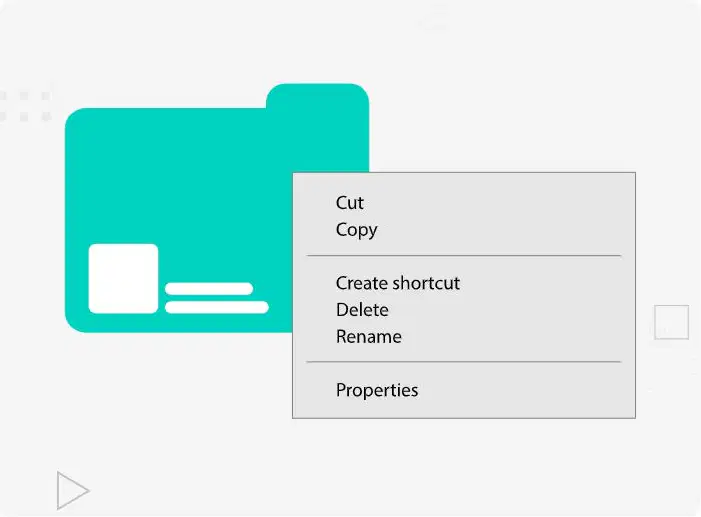
Which of the following is NOT a folder operation you can perform in an operating system?
Creating
Renaming
Moving
Printing
Deleting
Fill in the blank: Backing storage refers to any _______ storage device.
non-volatile memory
volatile memory
temporary
primary
The operating system keeps a directory of where files and programs are stored so that they can be accessed quickly when requested.
True
False
Select two folder operations that an operating system allows you to perform.
Creating and deleting folders
Printing and scanning folders
Sending and receiving emails
Editing and compiling code
Fill in the blank: Keeping a directory also speeds up storage and saves _______ resources.
computational
manual
visual
network
What is a key role of the operating system?
Managing memory only
Controlling and using input and output (I/O) devices
Running applications only
Displaying graphics
Fill in the blank: The OS manages I/O devices by recording which device requires ________ time so that the processor can communicate with the device without any conflicts.
processor
memory
cache
register
Which of the following is NOT a way the OS manages I/O devices?
A) It records which device requires processor time
B) It prioritises processes based on control signals
C) It ignores all I/O device requests
D) It communicates with devices without conflicts
What is an interrupt?
A signal sent to the processor to request immediate attention
A type of hardware device
A software application
A memory management technique
Fill in the blank: When the processor receives an interrupt, it ________ what it is doing and runs the process associated with the interrupt.
suspends
completes
ignores
accelerates
Which of the following is a reason the processor can be interrupted?
A hardware device has signalled that it has data to process
The computer is turned off
The monitor is displaying an image
The user is typing
An interrupt can occur if a hardware failure has occurred and needs to be addressed.
True
False
What is a device driver?
A program that controls the operation of a specific type of device that is part of a computer system
A type of hardware device
An application that runs on the operating system
A type of operating system
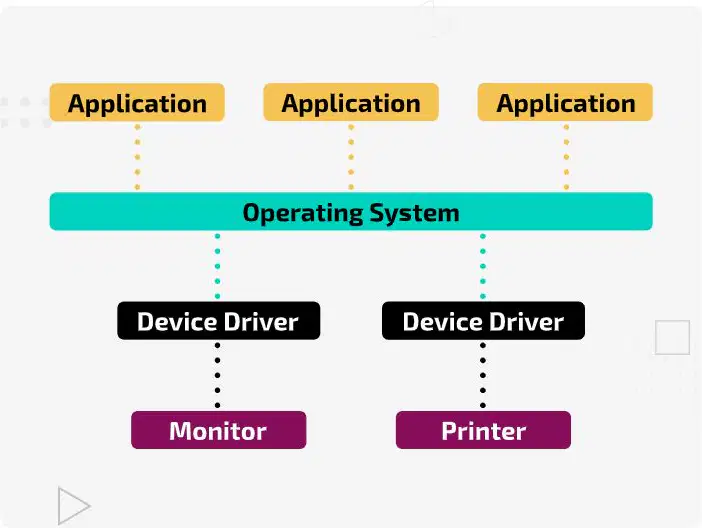
According to the diagram, which component allows the operating system to interact with hardware devices such as a monitor or printer?
Application
Device Driver
Operating System
User
Fill in the blank: Device drivers are installed into the operating system on demand, extending the ________ of the operating system.
functionality
size
color
speed
A generic device driver may be missing features that a specific device driver would provide.
True
False
What might happen if a gaming mouse is used without its specific device driver?
Some advanced features may not work properly.
The mouse will not move at all.
The computer will not turn on.
The mouse will overheat quickly.
Which of the following is NOT a way to install device drivers?
Built into the operating system
Downloaded from the internet
Installed from physical storage media
Sent via email attachment
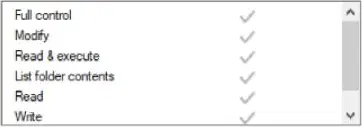
By default the permissions are set to allow the students full control over all the files in the folder. Which of the following permissions should be set to Allow so that students can only open the files but not make changes to them?
List folder contents
Full control
Read & execute
Modify
Read
Name a type of utility software that helps protect a computer from unauthorized access over a network.
Firewall
Disk Defragmenter
Word Processor
Media Player
Name a type of utility software that helps detect and remove malicious software from a computer.
Anti-malware
Disk Defragmenter
File Compression
Backup Utility
Name a type of utility software that helps ensure the operating system and applications are up to date with the latest security patches.
Checks for software updates
Disk defragmenter
File compression tool
Media player
Which file permission allows you to make changes to a file?
Modify
Read
Execute
Delete
Which file permission allows you to run a program or script?
Read & execute
Write only
Read only
Delete only
Which file permission allows you to see the contents of a folder?
List folder contents
Read-only
Full control
Write
Which file permission allows you to view the contents of a file?
Read
Write
Execute
Delete
Which file permission allows you to add or change the contents of a file?
Write
Read
Execute
Delete
To allow the user to interact with the computer, an operating system provides a user interface (UI). What does CLI stand for?
Command Line Interface
Computer Language Interpreter
Control Logic Integration
Centralized Link Interface
To allow the user to interact with the computer, an operating system provides a user interface (UI). How does a user interact with a Command Line Interface (CLI)?
By clicking icons
By typing in specific commands
By touching the screen
By using voice commands
To allow the user to interact with the computer, an operating system provides a user interface (UI). What is the main benefit of a CLI?
It requires a high amount of storage
It requires a low amount of secondary storage and RAM
It has many graphics
It is only for beginners
What is the name of the prompt where the user enters text in a CLI?
Command prompt
Input box
Dialog window
Text editor
To allow the user to interact with the computer, an operating system provides a user interface (UI). True or False: A CLI has no graphics or icons that you would commonly find on devices such as a smartphone or tablet computer.
True
False
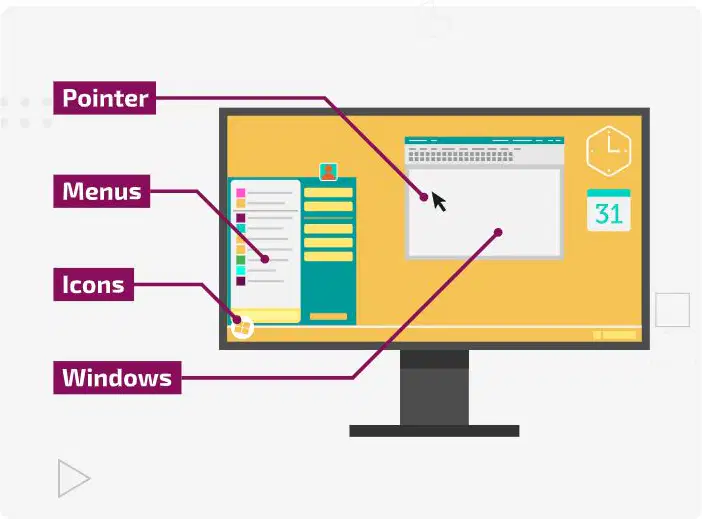
Which of the following is a component of a graphical user interface (GUI)?
Windows
Commands
Scripts
Terminals
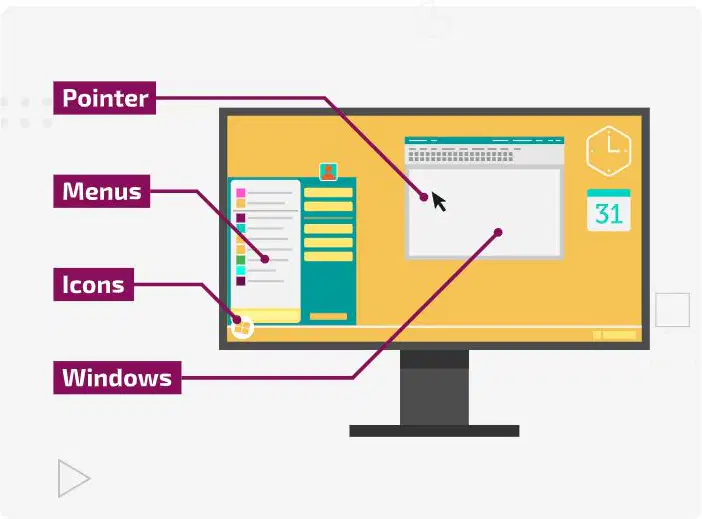
Which of the following is NOT a component of a graphical user interface (GUI)?
A) Icons
B) Menus
C) Pointers
D) Terminals
Fill in the blank: A GUI is considered to be a ________ interface as they are designed to be visual and intuitive to use.
user-friendly
command-line
text-based
hardware
What is a natural language interface?
A natural language interface involves the user giving instructions for the computer to perform using language you would normally use when speaking to another human being. It can be text-based or use audio commands.
A natural language interface is a type of hardware device used to connect computers to the internet.
A natural language interface is a programming language used to write operating systems.
A natural language interface is a graphical tool for designing websites.
In a natural language interface, you need to learn specific commands to interact with the computer.
True
False
Select the user interface, or interfaces, you would use if designing an in-car satellite navigation system and explain why.
Touchscreen and voice interface for ease of use and safety.
Only keyboard interface for precise input.
Only gesture-based interface for modern design.
Text-based interface for simplicity.

