
 Worksheets
Learning Objectives
Total questions: 91
Worksheet time: 46mins
Which statement best describes an Instruction Set Architecture (ISA) for a computer?
It is the physical wiring of the computer’s hardware.
It is the agreed-upon interface between software and the hardware that executes it.
It is a program used to browse the internet.
It is only the memory where data is stored.
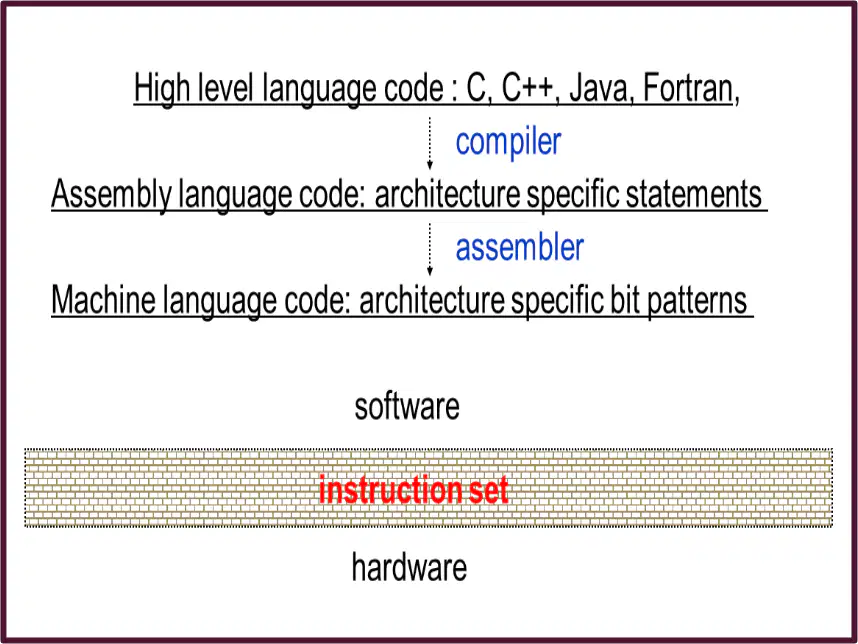
What is the role of a compiler in the path from high-level language code to machine language code?
It converts machine language into hardware signals.
It translates high-level language code like C or Java into assembly language statements.
It assembles bit patterns directly into hardware.
It stores data in registers for later use.
Which statement best describes computer organization based on the passage: it addresses control signals and memory types and includes all physical aspects of a computer system.
It focuses on the ideas of how a computer should be designed without mentioning hardware.
It deals with physical components, control signals, and memory types of computer systems.
It is only about the software that programmers write.
It describes how users interact with applications and websites.
According to the text, computer organization deals with components that interact to perform instructions. Which item is one of those components?
Circuit design in the hardware
A story in a history textbook
A painting on a museum wall
A lunch menu at school
What hardware details are said to be transparent to the programmer but still part of computer organization?
Control signal and peripheral
User passwords and usernames
Laptop stickers and decorations
Internet web pages and emails
Which list shows examples that belong under computer organization as given in the passage?
Fonts, colors, and screen savers
Circuit design, control signals, and memory types
Class schedules, report cards, and lockers
Songs, poems, and drawings
According to the passage, what does understanding computer organization help optimize?
Performance-based products
Classroom seating charts
Historical timelines
Art museum tours
Which level in the computer hierarchy is called the User level and is where applications like word processors and games run?
Level 6
Level 5
Level 4
Level 2
What does the High-Level Language level include according to the hierarchy description?
Languages such as C++, Java, FORTRAN, and Pascal
Circuits and gates
Microcode or hardwired control
Executable programs only
Which tool changes a high-level language into a form the machine can understand?
Compiler or interpreter
Keyboard
Printer
Router
After compilation, high-level language code is translated first into assembly language and then into what?
Machine code
User applications
Operating system
Digital logic diagrams
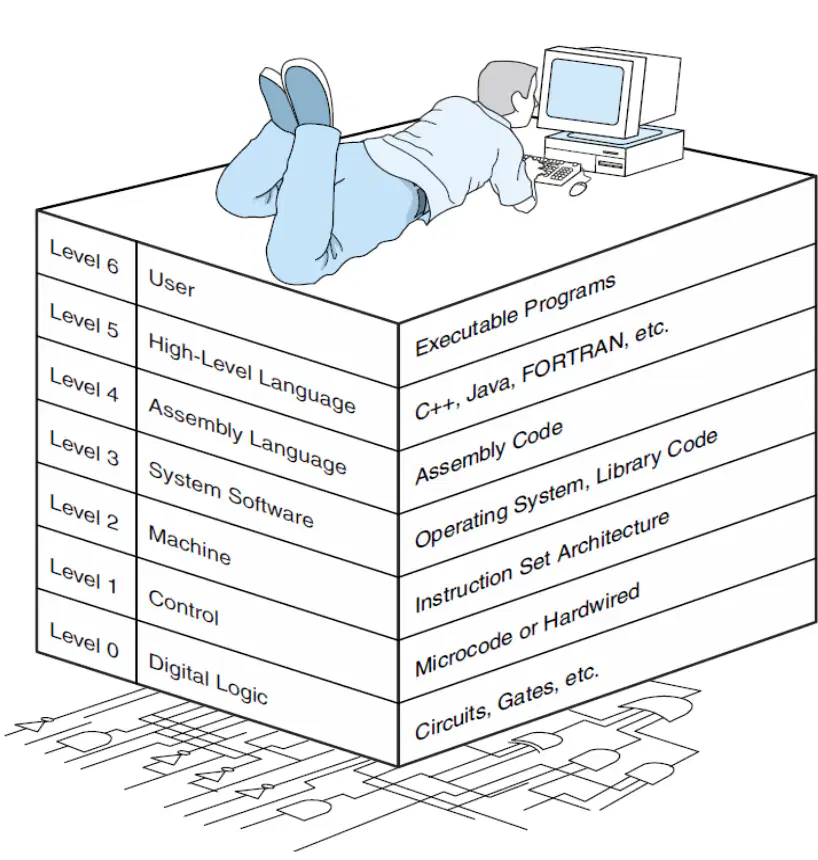
Which level lists “Instruction Set Architecture” in the diagram of the computer hierarchy?
Level 2 (Machine)
Level 6 (User)
Level 4 (Assembly Language)
Level 0 (Digital Logic)
What is the main role of the Instruction Set Architecture (ISA) in computer design as stated in this section?
It serves as the interface between software and hardware
It prints documents
It stores user files permanently
It draws pictures on the screen
Which statement best describes compiled languages at Level 5?
They are translated to assembly language and then assembled into machine code
They run directly on hardware without translation
They are only used by the operating system
They are the same as user applications
Which level reduces the semantic gap by translating one instruction to exactly one machine instruction?
Level 4: Assembly Language
Level 6: User
Level 0: Digital Logic
Level 3: System Software
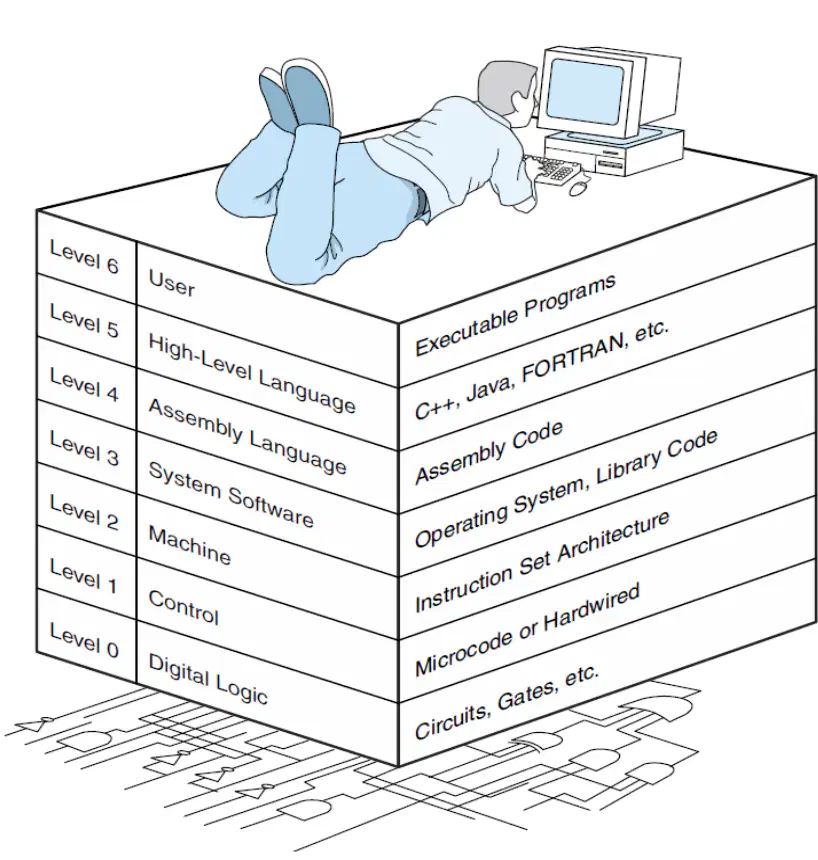
According to the diagram, what is associated with Level 0 (Digital Logic)?
Circuits and gates
Executable programs
Assembly code
Operating system
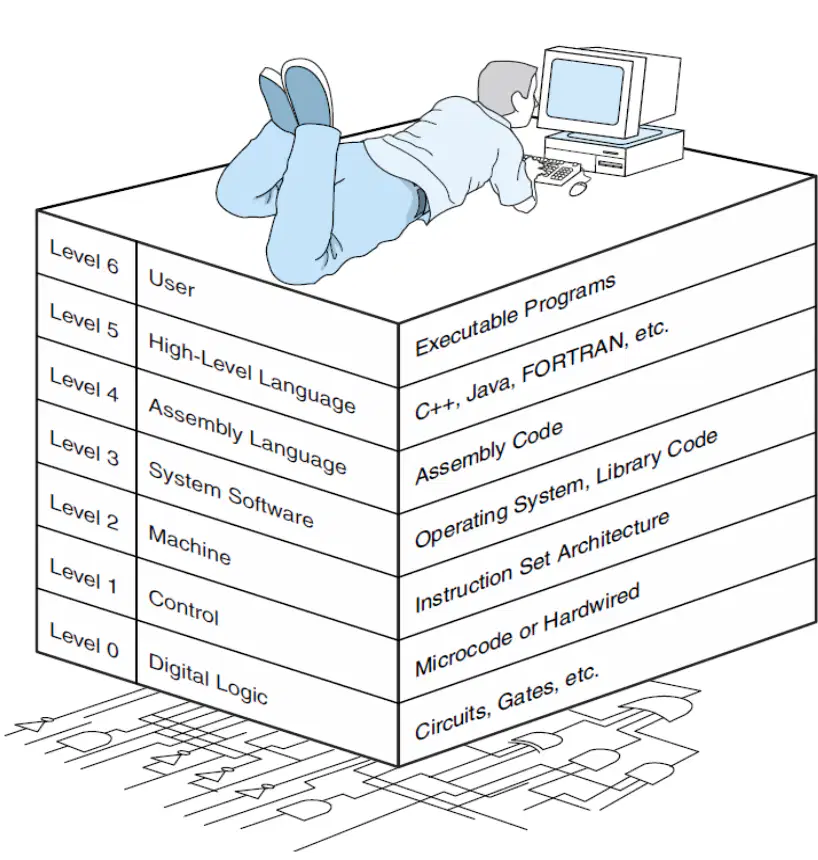
Which level is linked with the operating system and library code?
Level 3: System Software
Level 6: User
Level 2: Machine
Level 4: Assembly Language
What languages are examples of the High-Level Language level?
C++, Java, FORTRAN, Pascal
Binary digits only
Assembly mnemonics only
Microcode instructions
What does an assembler do after assembly language is created from a high-level program?
Turns assembly language into machine language
Saves a document as a picture
Connects the computer to the internet
Changes hardware circuits
Which level is nearly invisible to regular users according to the description?
The lower levels below the User level
The User level itself
Only the High-Level Language level
Only the System Software level
What does machine language consist of, as noted in the assembly level explanation?
0s and 1s
Words and sentences
Pictures and sounds
Buttons and sliders
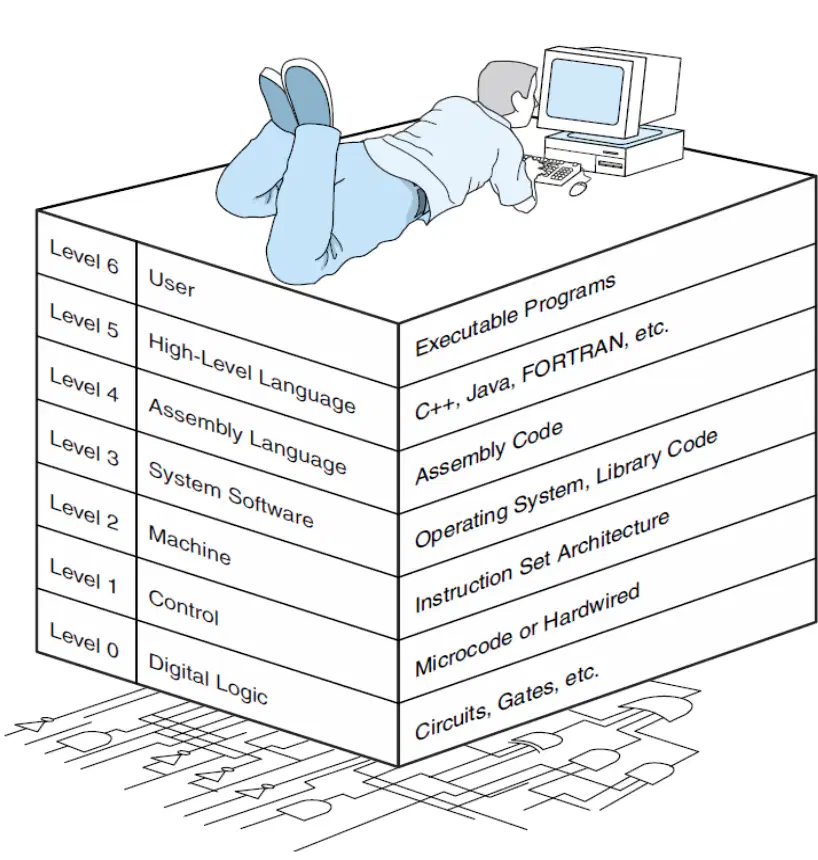
Which level is directly above the Machine level in the hierarchy?
System Software (Level 3)
Digital Logic (Level 0)
Control (Level 1)
User (Level 6)
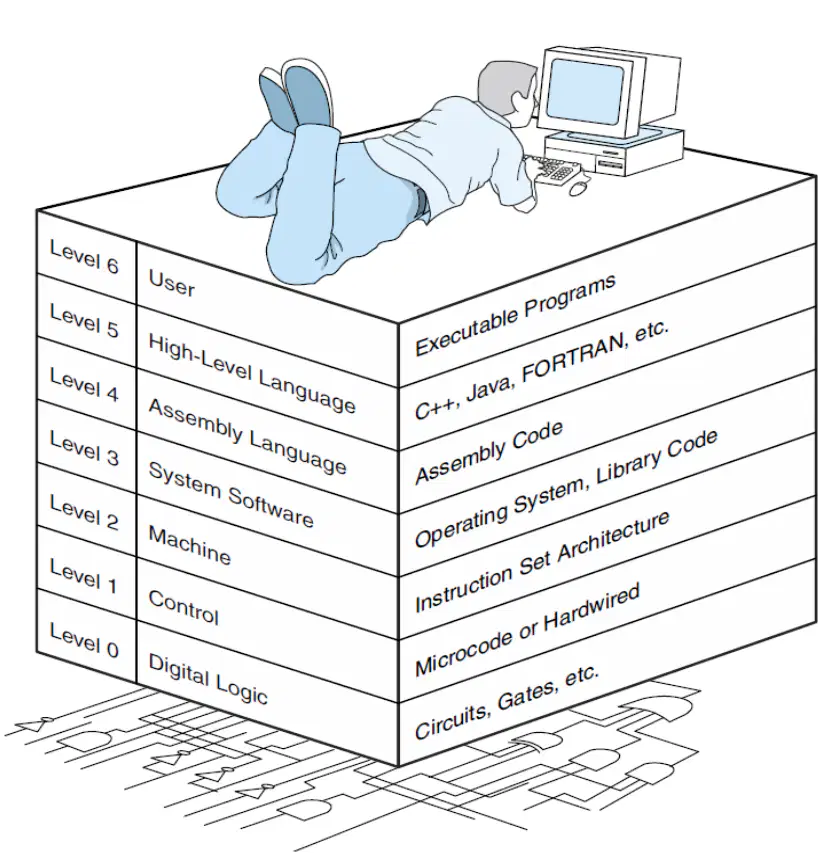
In the hierarchy diagram, what is listed next to Level 1 (Control)?
Microcode or hardwired
Executable programs
Instruction Set Architecture
High-Level Language names
What must a programmer know at the High-Level Language level?
Data types and available instructions for those types
Exact wiring of circuits
Only how to play games
How to draw icons
What is the one-to-one translation described at the Assembly Language level?
Each assembly instruction becomes exactly one machine instruction
Many assembly instructions become one machine instruction
An assembly program becomes an operating system
Assembly language turns into user applications
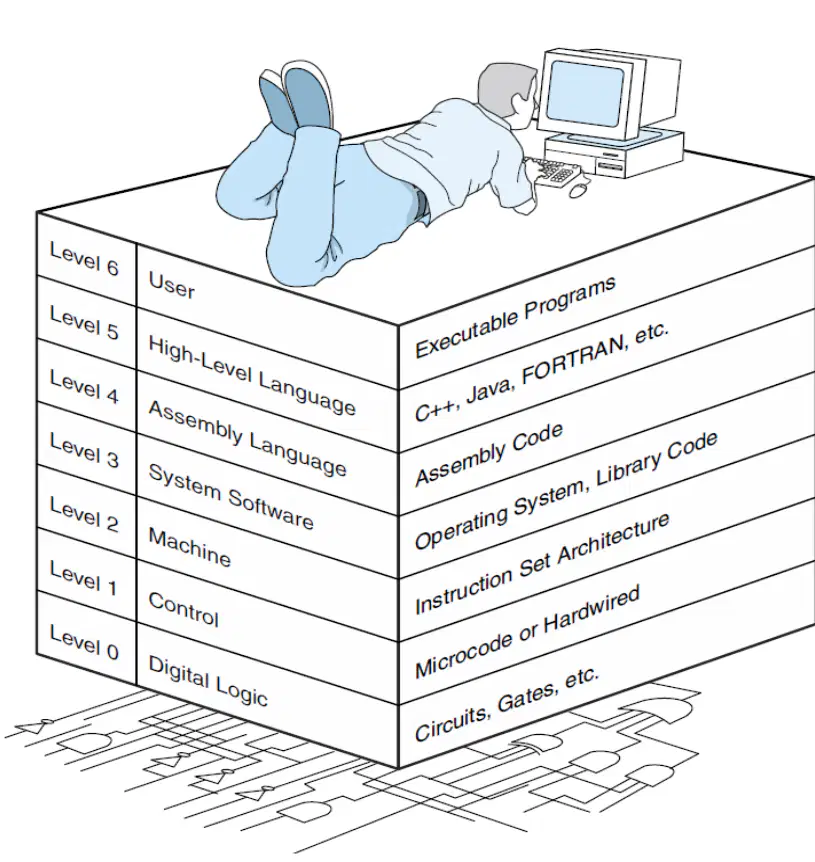
According to the computer level hierarchy, which level handles operating system instructions and tasks like multiprogramming and protecting memory?
Level 6: User
Level 5: High-Level Language
Level 3: System Software
Level 1: Control
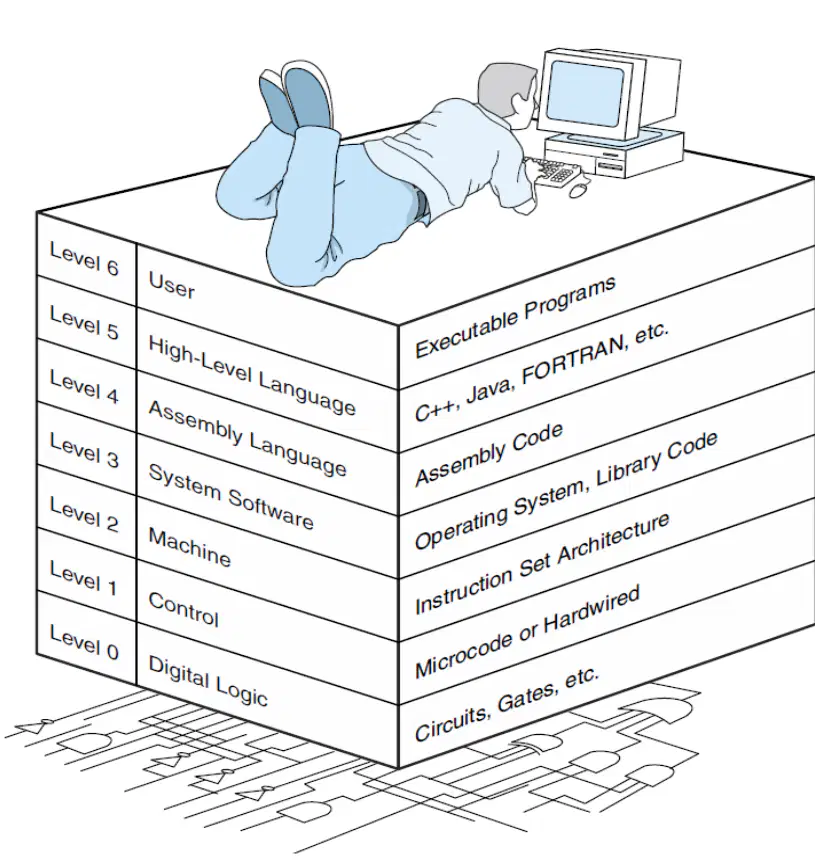
Which description best matches Level 0: Digital Logic in the hierarchy shown?
Circuits and gates that form the hardware basics
Executable programs used directly by the user
Assembly code written close to machine language
Instruction set architecture visible to machine level
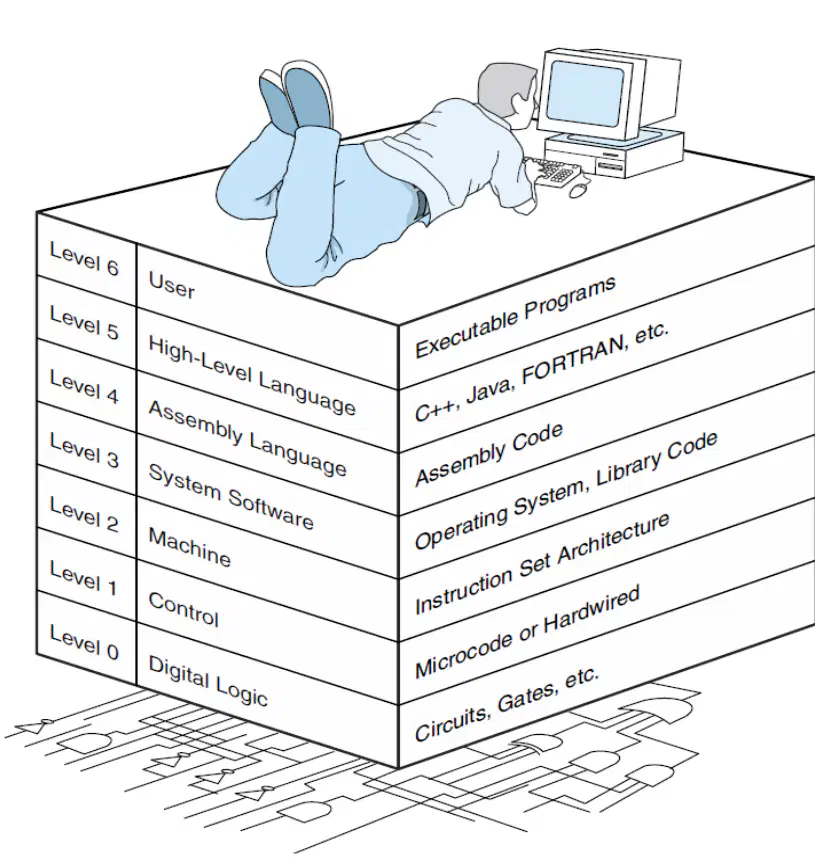
What is listed as an example under Level 5: High-Level Language in the diagram?
Operating System, Library Code
C++, Java, FORTRAN, etc.
Assembly Code
Microcode or Hardwired
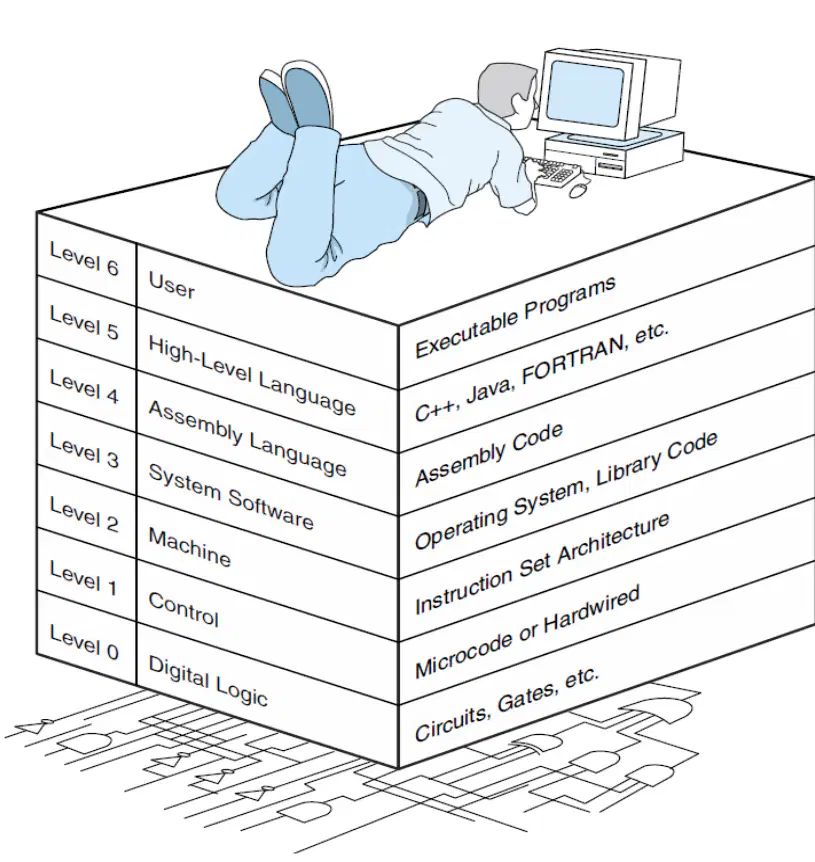
The text says some instructions translated from assembly language to machine language are passed through a certain level unmodified. Which level is this?
Level 4: Assembly Language
Level 2: Machine
Level 3: System Software
Level 6: User
Look at the diagram of a computer case interior. Which part stores long-term files like photos and games even when the computer is turned off?
System fan
CPU (processor)
Hard drive
RAM (memory)
In the labeled diagram, which component’s main job is to keep air moving to cool the computer’s parts?
System fan
Power supply
Motherboard
I/O ports
Which part provides electrical power to all the other components in the computer?
RAM
Power supply
Motherboard
Hard drive
According to the diagram, which component is the main circuit board that holds the CPU, RAM, and ports?
Motherboard
Hard drive
System fan
I/O ports
Which component is described in the diagram as the computer’s “brain” that performs calculations and runs instructions?
RAM
CPU
Power supply
System fan
What does RAM mainly do in the computer system shown in the diagram?
Stores programs permanently
Holds data and programs while the computer is working
Connects a monitor and keyboard to the computer
Cools the computer by moving air
In the diagram, where would you plug in a keyboard and mouse?
System fan
I/O ports
Power supply
RAM slots
Which pair correctly matches a component to its basic role shown in the diagram?
Hard drive — cools the computer
Power supply — stores files when off
System fan — moves air to remove heat
CPU — provides places to plug in cables
Which level is closest to the person using the computer and includes apps like word processors and games?
User Level
System Software Level
Assembly Language Level
High-Level Language Level
What is the main job of system software at the top levels of a computer?
To manage hardware and run other software
To design new computers from scratch
To store only long-term data
To translate pictures into numbers
Which tool translates a whole program written in a high-level language into machine code before it runs?
Compiler
Interpreter
Assembler
Text editor
Which statement best describes an interpreter?
It runs each high-level instruction one by one without making a full program first.
It turns assembly language into machine code.
It stores data for long-term use.
It controls the computer’s resources like a traffic manager.
At which level are programs written using human-friendly commands like print, if, and while?
High-Level Language Level
Assembly Language Level
System Software Level
User Level
Which level uses short, hardware-specific instructions (like MOV and ADD) that are closer to machine code?
Assembly Language Level
User Level
High-Level Language Level
System Software Level
Which statement correctly shows how the levels interact?
User apps use high-level languages, which are translated by compilers or interpreters, and the system software helps manage everything.
System software creates user apps automatically without any code.
Assembly language directly talks to people without translation.
High-level languages run only on peripherals and not on the computer.
Which choice lists two examples of software that help convert languages for the computer to understand?
Compiler and Interpreter
Text editor and printer driver
Main memory and CPU
Mouse and keyboard
Which CPU part performs the computer’s data processing function?
Registers
Control Unit
Arithmetic and Logic Unit (ALU)
System Bus
In a simple single-processor computer, what do registers provide?
External storage devices
Storage internal to the CPU
Network connections
Input and output control

What is the role of the CPU interconnection in the CPU structure diagram?
It displays images on the monitor
It provides communication among the control unit, ALU, and registers
It supplies power to the computer
It stores long-term files
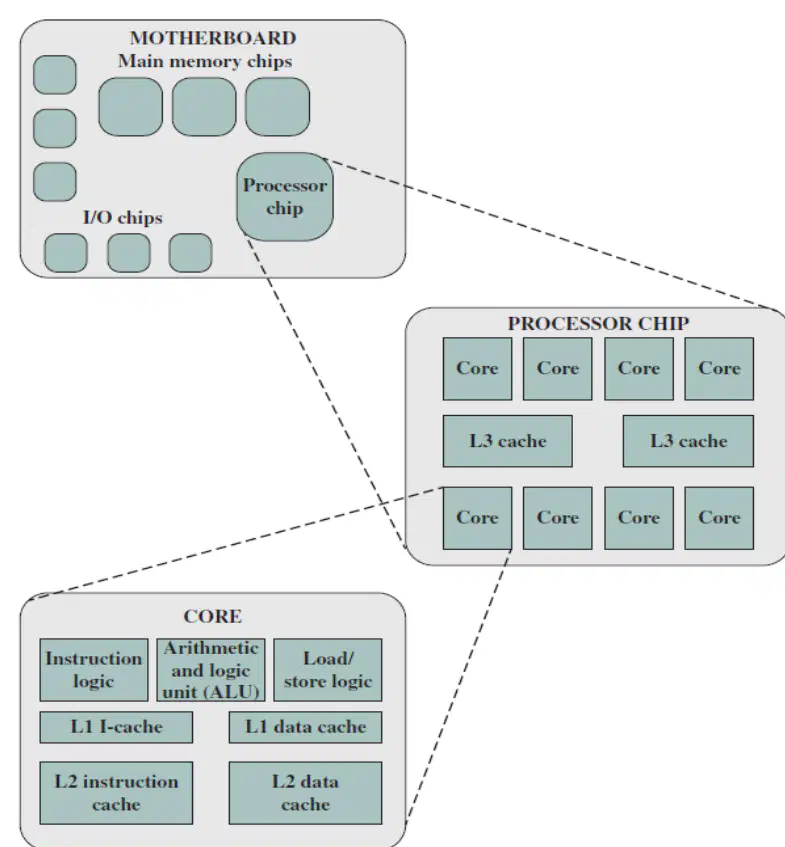
Contemporary computers generally have processors with multiple processing units on a single chip. What are these units called?
L1 cache blocks
Cores
Motherboards
I/O chips
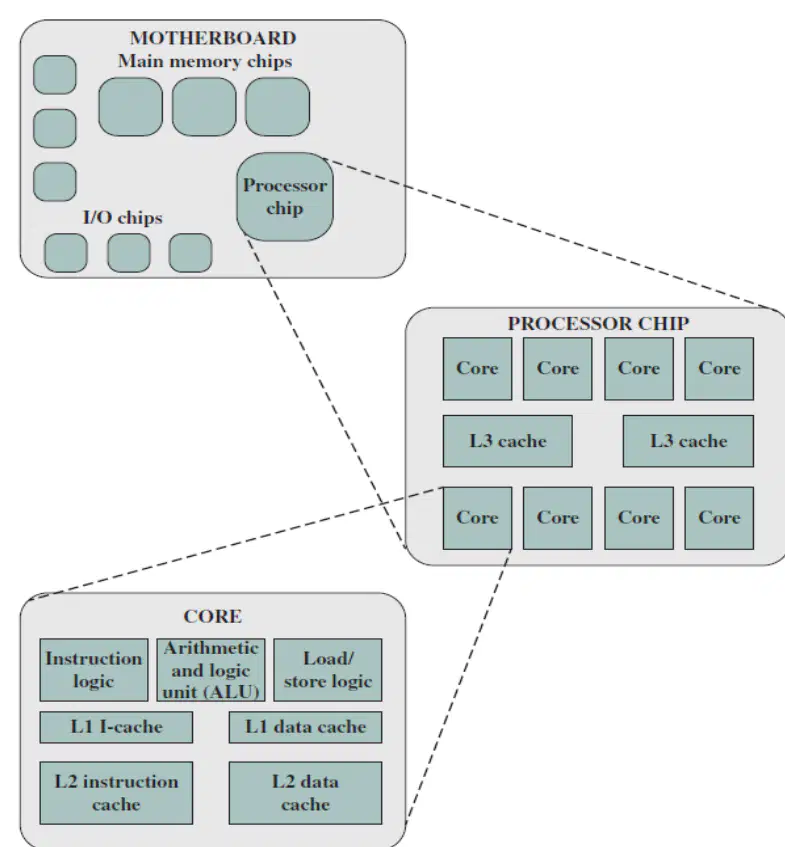
Which list correctly describes what a single core may include?
Instruction logic, ALU, registers, and caches
Monitor, keyboard, mouse, and speakers
Networking card, hard drive, and power supply
Operating system, applications, and files
What does the central processing unit (CPU) do according to the multicore computer structure notes?
Fetches and executes instructions
Only stores files for long-term use
Controls the printer hardware
Sends internet signals to the router
Look at the diagram of a simple computer system showing CPU, Main Memory, I/O, and a System Bus. Which component is responsible for performing calculations and controlling the computer’s operations?
Main Memory
CPU
I/O devices
System Bus
In the diagram of the computer system, what is the main purpose of Main Memory?
Stores data and programs the CPU uses
Connects components together like a highway
Sends input and output to the outside world
Physically houses the computer
Based on the diagram, which part acts as the communication pathway linking the CPU, Main Memory, and I/O?
CPU
System Bus
Main Memory
Hard drive
In a hierarchical system, what does "structure" mean?
How individual components operate on their own
How components relate and are arranged within the system
How fast the system completes tasks
How the system changes over time
Which statement best defines "function" in a hierarchical system?
The overall purpose of the entire system
The operation or role of individual components
The history of how the system was created
The number of subsystems connected
What is an example of interrelated subsystems in a hierarchical system?
Separate parts that never affect each other
Components that operate independently with no shared tasks
Smaller systems within a larger system that work together
Random pieces grouped without any purpose
Which core function of a computer changes raw input into useful information like sums, sorted lists, or decisions?
Data storage
Data movement
Data processing
Control
What is the main job of the control unit in a computer system?
To permanently save photos and documents
To direct how data is processed, stored, and moved
To draw pictures on the screen only
To connect the computer to the internet
When you click "Save" and your work is kept for later, which core function is happening?
Data movement
Data storage
Control
Data processing
Which action is an example of data movement in a computer?
Sorting a list of names inside a program
Sending a message from the keyboard to the CPU
Keeping a file on the hard drive
Following instructions to start a program
Look at the diagram of a simple single-processor computer. Which part is the brain that performs calculations and makes decisions?
Main Memory
Central Processing Unit (CPU)
Input/Output (I/O)
System Interconnection
In the simple computer diagram, which component stores programs and data while the computer is running?
Central Processing Unit (CPU)
Main Memory
Input/Output (I/O)
Registers
Which part of the CPU does arithmetic like addition and compares values?
Control Unit
Arithmetic and Logic Unit (ALU)
Main Memory
Input/Output
Inside the CPU, what is the job of the Control Unit?
Store long-term files
Move signals between the computer and a printer
Direct the steps of the CPU and manage instruction execution
Do math problems only
Which item inside the CPU holds small pieces of data very quickly for use by the ALU and Control Unit?
Registers
Main Memory
Input/Output devices
System Interconnection
In the top-level diagram, what connects the CPU, Main Memory, and I/O so they can share signals and data?
Cache chip
System Interconnection (bus)
Arithmetic and Logic Unit
Control Unit
Which component lets the computer talk to devices like a keyboard and screen?
Arithmetic and Logic Unit
Main Memory
Input/Output (I/O)
Registers
Choose the correct match between a part and its main role in the simple computer diagram.
CPU—stores programs permanently
Main Memory—performs arithmetic and logic
ALU—controls the flow of instructions
System Interconnection—carries data and control signals among components
Look at the diagram showing a processor chip on a motherboard. Which term means a single processing unit inside a multicore processor that can run its own tasks?
Motherboard
Cache
Core
Port
Which part holds several cores together on one piece of hardware and plugs into the motherboard?
Processor chip
Cache memory block
External hard drive
Power supply
In the diagram, a small, fast memory is shown close to the cores. What is this memory called?
Main memory
Cache memory
Video memory
Virtual memory
Which statement best describes a multicore processor?
A single core placed on many motherboards
Several cores built into one processor chip
A motherboard with extra ports
A processor that only uses external memory
What connects the processor chip to the rest of the computer’s parts, as shown in the diagram?
Motherboard
Mouse
Monitor
Speaker
Which item is most likely to make programs run faster by storing recent data close to the cores?
Motherboard slots
Cache memory
USB ports
Cooling fan
If a processor has four cores, which idea from the diagram explains why it can do more at once?
Each core can work on a different task
The motherboard changes colors
The cache deletes files automatically
The ports add more screens
Which choice correctly matches the term to its role in the diagram?
Core—holds the whole computer
Processor chip—contains several cores
Motherboard—tiny memory inside the chip
Cache—large board that parts plug into
Look at the slide titled “A Brief History of Computers – Integrated Circuit.” Which statement best explains why computers became widely used during the integrated circuit era?
The invention of vacuum tubes made computers larger and slower.
Integrated circuits allowed many transistors on a single chip, making computers faster and cheaper.
Mechanical gears replaced electronic parts, improving reliability.
Magnetic tape storage eliminated the need for processors.

According to the slide, what material was first used to make microchips before silicon became common?
Copper
Germanium
Plastic
Carbon
According to the computer generations table, which early device is associated with the very first stage of computing history?
Mechanical Calculating Machine
Vacuum Tube
Transistor
Integrated Circuit
In the table of computer generations, which technology defines the First Generation of computers?
Transistor
Integrated Circuit
Vacuum Tube
Mechanical keyboard
Which technology in the computer generations table came after vacuum tubes and made computers smaller and more reliable?
Mechanical gears
Transistor
Punch cards
Integrated Circuit
The computer generations table lists Integrated Circuit technology as part of which later stage of computing?
Early mechanical stage
First Generation
Second Generation
Third Generation
Match each generation label to its key technology as summarized in the computer generations table.
First Generation — Vacuum Tube
Second Generation — Transistor
Third Generation — Integrated Circuit
Pre-computer era — Mechanical Calculating Machine
Based on the computer generations summary, which sequence correctly shows the progression of key technologies over time?
Integrated Circuit → Transistor → Vacuum Tube → Mechanical Calculating Machine
Mechanical Calculating Machine → Vacuum Tube → Transistor → Integrated Circuit
Vacuum Tube → Integrated Circuit → Transistor → Mechanical Calculating Machine
Transistor → Mechanical Calculating Machine → Integrated Circuit → Vacuum Tube
Which ancient tool is an early form of computing used for counting and simple calculations?
Abacus
Vacuum tube
Transistor
IAS Computer
What numbering system did early mechanical calculating machines commonly use for their computations?
Binary numbering system
Decimal numbering system
Hexadecimal numbering system
Roman numerals system
Vacuum tubes were important in early electronic computers. Which statement correctly describes a vacuum tube?
A solid-state device made from silicon
A glass device that controls electrical signals and generates more heat
A mechanical wheel used for counting beads
A stored-program design for memory and instructions
The stored-program concept means that both instructions and data are kept together inside the computer. Which early machine is often linked with this idea in the instructional material?
Abacus
IAS Computer
Mechanical calculator
Transistor radio
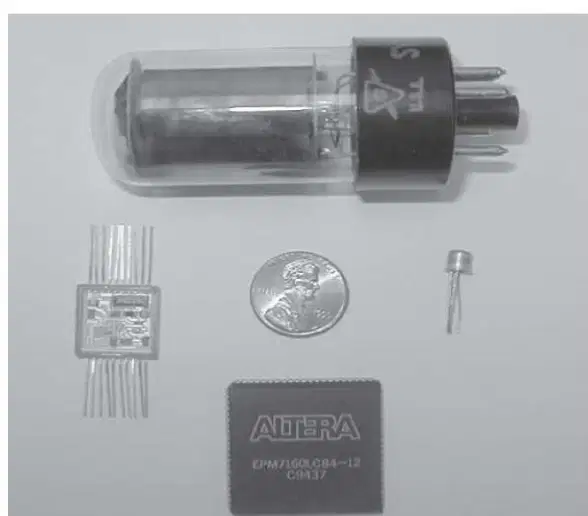
According to the comparison image of computer components, which item is the smallest solid-state device made from silicon that replaced vacuum tubes in many uses?
Vacuum tube
Transistor
Integrated circuit package
Chip with 3200 2-input NAND gates
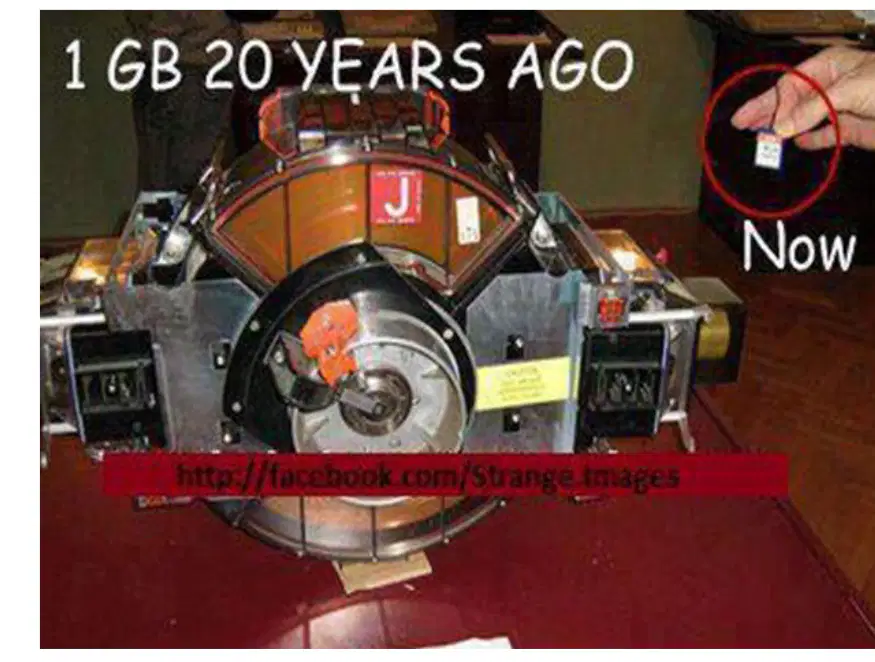
Look at the memory image showing '1 GB 20 years ago' versus 'Now.' What main idea does this picture illustrate?
Memory used to be smaller and slower than today
Memory has become much larger and physically bigger over time
Memory capacity can now be stored in much smaller physical devices
Vacuum tubes are still used to store modern memory

