
Font size
 Worksheets
Quiz on Karno Nano
Total questions: 98
Worksheet time: 49mins
What is the name of the person introduced in the document?
Karno Nano
Karno Nino
Karno Nono
Karno Nanu
What is the position held by Karno Nano as mentioned in the document?
Pengembang Teknologi Pembelajaran (PTP)
Pengembang Teknologi Pendidikan (PTP)
Pengembang Teknologi Pariwisata (PTP)
Pengembang Teknologi Bisnis (PTP)
Which institution is Karno Nano associated with?
BBPPMPV Bisnis dan Pariwisata
BBPPMPV Teknologi dan Pendidikan
BBPPMPV Bisnis dan Teknologi
BBPPMPV Pariwisata dan Pendidikan
What does "Eksplorasi IFP" primarily focus on according to the image?
Exploring digital tools and features
Learning about wireless screen sharing
Understanding the scope and purpose of IFP
All of the above
Which section in "Eksplorasi IFP" deals with the introduction of tools?
Tujuan
Pengenalan Alat
Eksplorasi Fitur
Pemeliharaan
What is the focus of section 08 in "Eksplorasi IFP"?
Implementasi
Berbagi Layar Nirkabel
Eksplorasi Papan Tulis Digital
Pemeliharaan
Which section in "Eksplorasi IFP" is related to maintenance?
Tujuan
Pemeliharaan
Implementasi
Ruang Lingkup
What is the primary goal of "Tujuan Eksplorasi" as mentioned in the learning material?
To provide a comprehensive understanding of IFP features and functions.
To teach students about the history of digital learning tools.
To develop skills in using traditional teaching methods.
To discourage the use of digital tools in education.
Which of the following is an objective of "Tujuan Eksplorasi" related to teachers?
To encourage teachers to develop creative and collaborative digital learning models.
To limit teachers' use of digital tools in classrooms.
To focus solely on theoretical teaching methods.
To replace all traditional teaching methods with digital ones.
What does "Tujuan Eksplorasi" aim to show regarding IFP usage?
Various contextual practices of using IFP in teaching and learning activities.
The disadvantages of using IFP in education.
How to avoid using IFP in classrooms.
The history of IFP development.
What is one of the features of 'Ruang Lingkup' mentioned in the image?
Digital Interactive Whiteboard
Traditional Chalkboard
Paper-based Learning Materials
Printed Textbooks
Which feature of 'Ruang Lingkup' supports collaborative learning?
Collaborative Learning
Multimedia Presentation
Teacher/Student Device Connectivity
Access to Online Materials and LMS
What does 'Access to online materials and Learning Management Systems' refer to in the context of 'Ruang Lingkup'?
Access to online materials and Learning Management Systems
Offline textbook access
Printed study guides
Traditional classroom resources
What is the purpose of 'Simulation of using IFP in Learning Activities' in 'Ruang Lingkup'?
Simulation of using Interactive Flat Panels in learning activities
Simulation of traditional teaching methods
Simulation of paper-based learning activities
Simulation of chalkboard usage in classrooms

Which feature of 'Ruang Lingkup' involves multimedia presentations?
Multimedia Presentation
Collaborative Learning
Teacher/Student Device Connectivity
Simulation of using IFP in Learning Activities
What is one of the main purposes of introducing the Hisense 75" IFP?
To understand the main features of the Hisense 75" IFP
To learn advanced programming techniques
To explore the history of digital devices
To study the manufacturing process of electronic devices

What does the introduction of the Hisense 75" IFP aim to demonstrate in classrooms?
The potential of IFP in digital learning
The importance of traditional teaching methods
The role of textbooks in education
The history of interactive displays
Which skill is emphasized in the basic operation of the Hisense 75" IFP?
Basic device operation
Advanced coding techniques
Graphic design skills
Hardware assembly
What does the Interactive Flat Panel (IFP) replace in terms of functionality?
Conventional whiteboards and projectors
Tablets and smartphones
Desktop computers and monitors
Printers and scanners
What is one of the main features of the Interactive Flat Panel (IFP)?
Allows users to write, draw, and interact directly with content on the screen
Functions as a traditional projector
Operates only as a large smartphone
Requires external devices to display content
How is the Interactive Flat Panel (IFP) similar to a tablet or smartphone?
It allows direct interaction with content displayed on the screen
It is portable and handheld
It requires a stylus to operate
It functions only as a communication device
What is one key advantage of IFP (Interactive Flat Panel) over a projector in terms of image quality?
IFP provides sharp, 4K images that remain clear in bright rooms.
IFP requires additional tools for interactivity.
IFP needs a dark room for clear images.
IFP has longer startup time compared to projectors.
Which aspect of IFP makes it more interactive compared to a projector?
IFP has a touchscreen feature.
IFP requires additional cables for interactivity.
IFP needs calibration for interactivity.
IFP uses external tools for interactivity.
What is the main difference between IFP and projectors in terms of lighting requirements?
IFP does not depend on room lighting, while projectors need a dark room.
IFP requires a dark room, while projectors work in bright rooms.
Both IFP and projectors need a dark room for optimal performance.
Both IFP and projectors work well in bright rooms.
What is one advantage of IFP in terms of maintenance compared to projectors?
IFP requires minimal maintenance and no lamp replacement.
IFP requires routine maintenance and lamp replacement.
IFP needs calibration for maintenance.
IFP requires additional cables for maintenance.
What feature does IFP have that projectors generally lack?
Operating System (OS) with application installation capability.
Requires additional screen for display.
Needs calibration for startup.
Uses multiple cables for connectivity.
Which aspect of IFP makes its display more organized compared to projectors?
IFP has an integrated and neat display.
IFP requires additional cables for display.
IFP needs external screens for display.
IFP uses calibration for display organization.
What is the difference in startup time between IFP and projectors?
IFP starts quickly, while projectors take longer and require calibration.
IFP takes longer to start compared to projectors.
Both IFP and projectors have similar startup times.
Projectors start quickly, while IFP requires calibration.
What is the screen size of the Hisense 75WM61FE?
65 inches
75 inches
55 inches
85 inches
Which operating system does the Hisense 75WM61FE use?
Android 12
Windows 10
Android 13
Linux
What is the storage capacity of the Hisense 75WM61FE?
128GB
512GB
256GB
64GB
How many HDMI ports does the Hisense 75WM61FE have?
2
4
3
5
What type of touchscreen technology is used in the Hisense 75WM61FE?
Capacitive
Resistive
InGlass
Infrared
Which wireless connectivity options are available in the Hisense 75WM61FE?
Bluetooth 4.0 and WiFi 4
Bluetooth 5.1 and WiFi 5G
Bluetooth 3.0 and WiFi 6
Bluetooth 5.2 and WiFi 5G
What is the RAM capacity of the Hisense 75WM61FE?
8GB
16GB
32GB
4GB
What additional features does the Hisense 75WM61FE offer?
Wireless sharing, whiteboard, 4K camera
Wireless sharing, projector, 3D camera
Whiteboard, 8K camera, LAN
Wireless sharing, 3D camera, Bluetooth 4.0
What is the power consumption of the device without OPS (maximum)?
350W
240W
100W
50W
What is the standby power consumption of the device?
< 0.5W
15W
20W
50W
What is the range of power requirements for the device?
AC 100 V – 240 V, 50/60 Hz
AC 50 V – 100 V, 60 Hz
AC 240 V – 350 V, 50 Hz
AC 10 V – 100 V, 60 Hz
What is the specification of the built-in speaker in the device?
2x15W + 20W
2x10W + 15W
2x20W + 15W
2x10W + 20W
What is the main feature of the 4K Ultra HD Panel mentioned in the document?
It ensures perfect color and rich detail in various conditions.
It supports wireless transmission for better connectivity.
It integrates with Google Classroom for efficient management.
It provides a safer and enhanced experience with Android 13.
Which feature of the IFP helps in adjusting screen brightness automatically and is energy-efficient?
Smart Whiteboard
Smart Power
Dolby Atmos
Wireless Transmission
What does the Smart Whiteboard feature support?
Writing with a pen, erasing with a hand, and moving objects.
Connecting to Google Classroom and managing tasks.
Providing a surround sound experience.
Adjusting screen brightness automatically.
Which feature ensures privacy with a physical cover and indicator light?
Dolby Atmos
Integrated 4K Camera
Wireless Transmission
Smart Power
What does Wireless Transmission provide for better connectivity?
Dual WiFi for fast, stable, and superior screen-sharing experience.
Integration with Google Classroom and Chrome.
Enhanced audio experience with Dolby Atmos.
Automatic brightness adjustment for energy efficiency.
Which feature helps teachers manage classes and tasks efficiently?
Google Integration
Smart Whiteboard
Dolby Atmos
Wireless Transmission
What operating system is mentioned in the Safer and Enhanced Experience feature?
Android 10
Android 11
Android 12
Android 13
What does Dolby Atmos provide according to the document?
Enhanced screen brightness and energy efficiency.
Clear sound, high detail, and realistic surround sound for entertainment.
Integration with Google Classroom and Chrome.
Privacy with a physical cover and indicator light.
Which of the following items is included in the package contents of the Interactive Flat Panel?
User Manual
HDMI Cable (male to male)
Stand Bracket x 1
All of the above
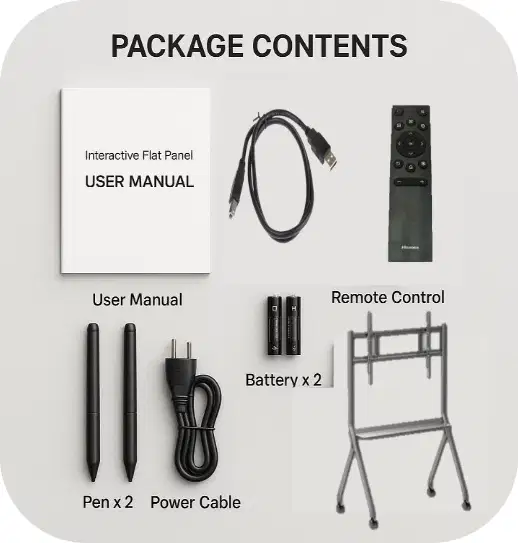
What type of cable is included in the package contents for connecting USB devices?
USB A to USB C
USB A to USB B
HDMI Cable
Ethernet Cable
How many pens are included in the package contents of the Interactive Flat Panel?
1
2
3
4
Which item in the package contents is used to power the Interactive Flat Panel?
USB A to B
Power Cable
HDMI Cable
Stand Bracket
What is the purpose of the Stand Bracket included in the package contents?
To connect USB devices
To hold the Interactive Flat Panel
To provide power to the device
To control the device remotely
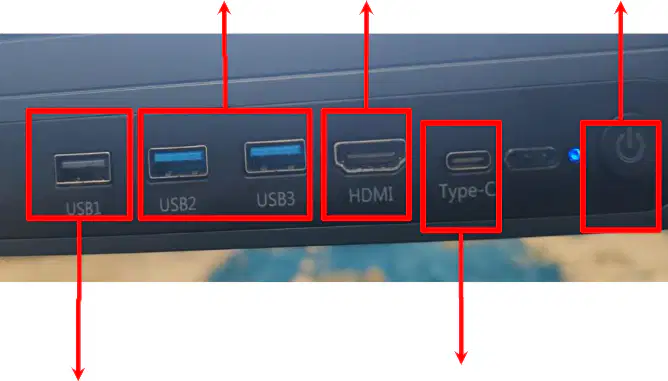
What is the primary use of the USB1 (Type-A) port?
To transfer data at USB 3.0 speed.
To connect mouse, keyboard, or regular flash drives.
To display video from a laptop to a panel.
To charge devices that support USB Type-C.
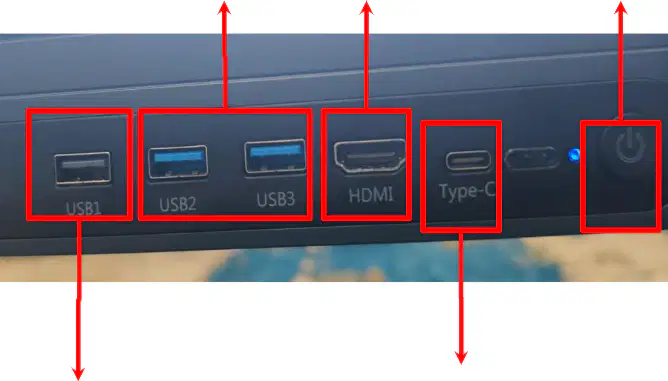
Which port is suitable for faster data transfer and external SSDs?
USB1 (Type-A).
HDMI.
USB2 (Type-A, blue).
Power Button.
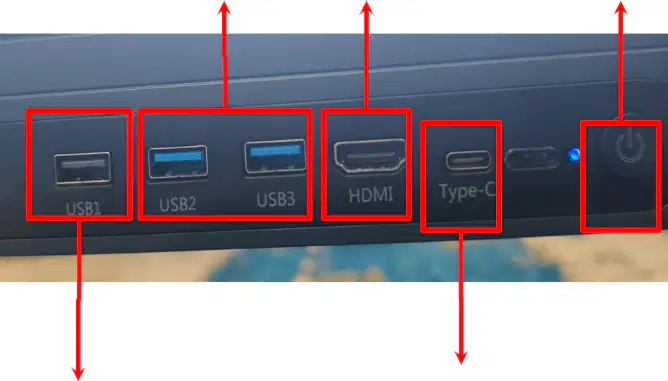
What is the function of the HDMI port on the IFP device?
To connect external SSDs.
To display the screen from a laptop or other device to the panel.
To charge devices.
To turn the device on or off.
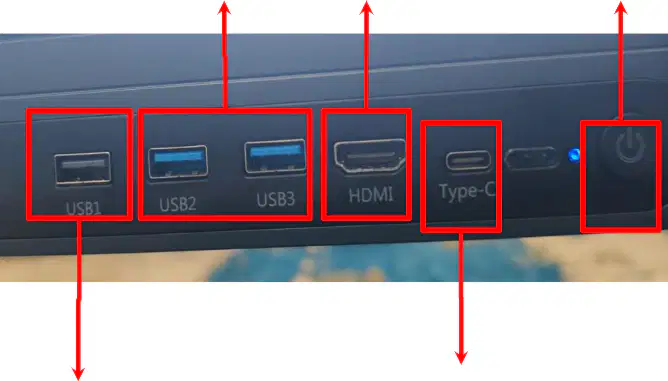
Which port can be used for video input, data transfer, and charging supported devices?
USB1 (Type-A).
Type-C.
HDMI.
USB3 (Type-A, blue).
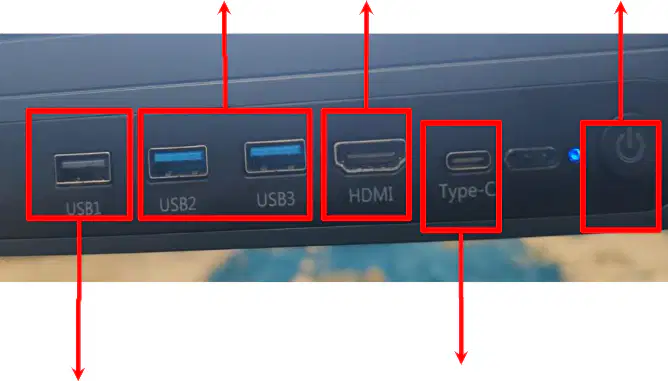
What is the function of the power button on the IFP device?
To transfer data.
To display video from a laptop.
To turn the device on or off.
To charge devices.
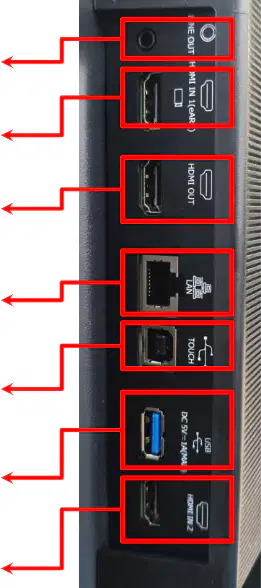
What is the function of the LINE OUT port on the IFP?
To connect the touchscreen panel to a computer
To send audio signals to external speakers or headphones
To connect to the internet via Ethernet cable
To send video signals to another display device
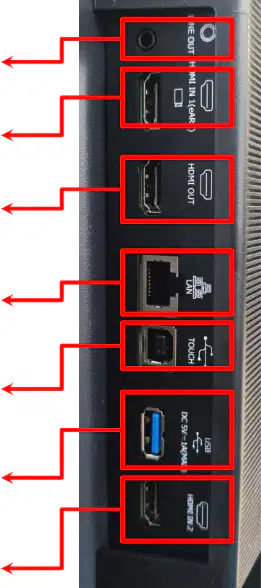
Which port is used to receive audio/video signals from external devices like laptops or PCs?
HDMI OUT
HDMI IN (eARC)
USB (Type-A)
LAN
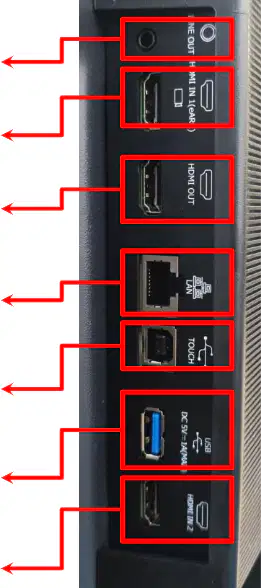
What is the purpose of the LAN port on the IFP?
To connect to the internet via Ethernet cable
To send audio signals to external speakers
To connect a USB flash drive
To send video signals to another display device
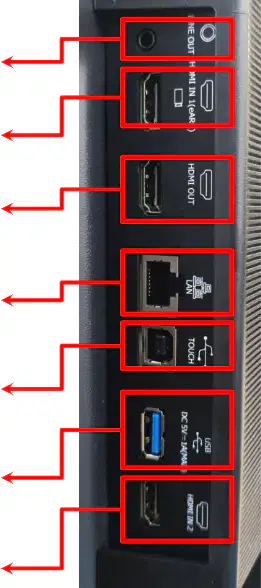
Which port is used to connect a touchscreen panel to a computer for touchscreen functionality?
TOUCH (USB-B)
HDMI OUT
USB (Type-A)
HDMI IN 2
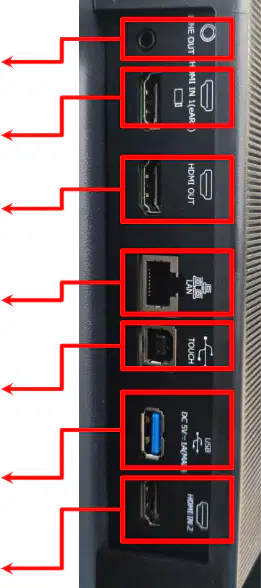
What is the function of the USB (Type-A) port on the IFP?
To connect to the internet via Ethernet cable
To send audio signals to external speakers
To connect a USB flash drive or other USB devices
To send video signals to another display device
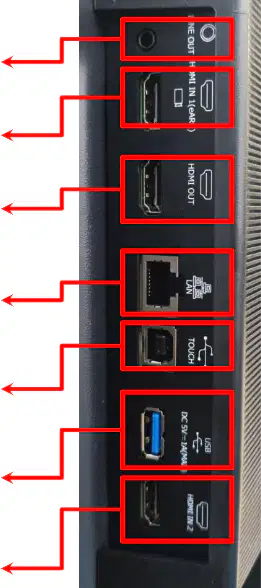
What is the purpose of the HDMI OUT port on the IFP?
To send audio signals to external speakers
To send signals to another display device like a projector or second monitor
To connect to the internet via Ethernet cable
To connect a USB flash drive
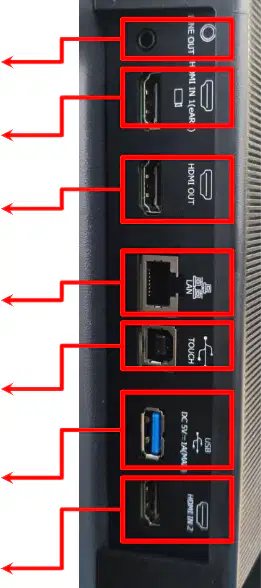
What is the function of the HDMI IN 2 port on the IFP?
To connect a USB flash drive
To send audio signals to external speakers
To provide an additional HDMI input from external devices
To connect to the internet via Ethernet cable
What is the function of the "Tombol Power" button on the remote control?
To increase the volume
To turn the device on or off
To mute the sound
To navigate to the home screen
Which button on the remote control is used to navigate to the home screen?
Beranda
OK
Freeze
Pengaturan
Which button is used to increase the volume on the remote control?
Kurangi Suara
Tambah Suara
Arah Kanan
Back
Which button is used to navigate upwards on the remote control?
Arah Atas
Arah Bawah
Arah Kiri
Arah Kanan
What is the function of the "Pengaturan" button on the remote control?
To access settings
To mute the sound
To navigate to the home screen
To increase the volume
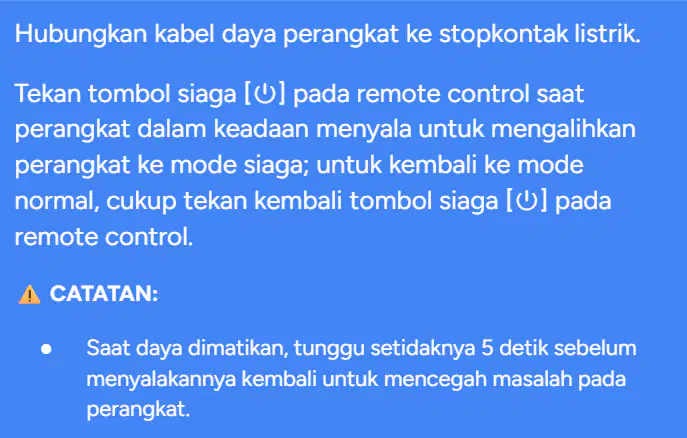
What is the first step to power on the device?
Press the standby button on the remote control.
Connect the power cable to the electrical socket.
Wait for 5 seconds before pressing the power button.
Switch the device to standby mode.
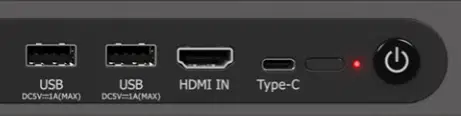
What should you do to switch the device to standby mode?
Disconnect the power cable.
Press the standby button on the remote control while the device is on.
Wait for 5 seconds before pressing the standby button.
Press the HDMI IN button on the device.
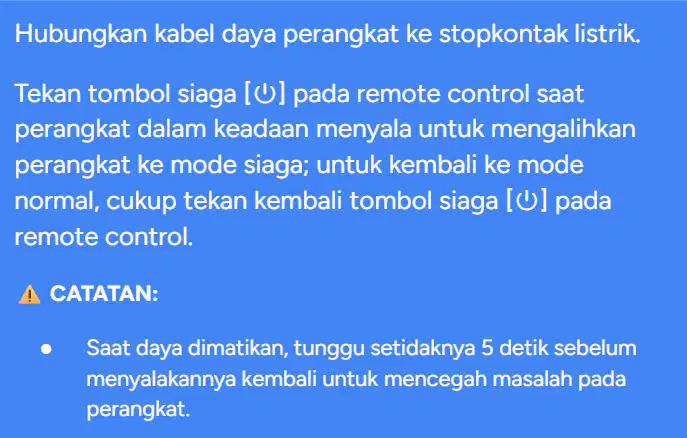
What is the recommended waiting time before turning the device back on after powering it off?
2 seconds
5 seconds
10 seconds
15 seconds
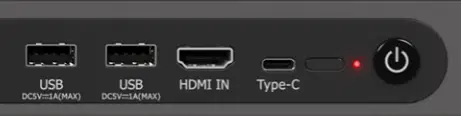
How can you return the device to normal mode from standby mode?
Disconnect and reconnect the power cable.
Press the standby button on the remote control again.
Wait for 5 seconds and press the HDMI IN button.
Use the Type-C port to reset the device.
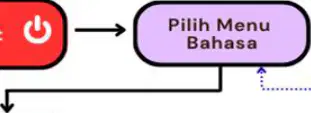
What is the first step in the "Pengaturan Awal IFP" process?
Configure Wi-Fi/Internet settings
Select the language menu
Turn on the IFP device
Set up Google Assistant
What should you do after reading the legal information during the setup process?
Click "Next Step"
Configure Wi-Fi settings
Transfer data from Google Account
Skip the Google Assistant setup
If you do not want to transfer data from your Google Account, what option should you select?
Accept
Don't copy
Skip
Next
What is the final step in the "Pengaturan Awal IFP" process?
Configure Google Pay
Turn on the sidebar
Set up a PIN
Select the vision settings menu
What should you do if you do not want to set up a PIN for the IFP device?
Select "Next"
Skip the PIN setup
Click "Accept"
Configure Wi-Fi settings
What is the function of the "Settings menu/Pengaturan" in the sidebar?
To access gadget features
To open the device settings menu
To adjust volume and brightness
To perform shortcut operations
Which feature in the sidebar allows users to perform actions like annotation, screenshot, touch lock, and source selection?
Gadget
Shortcut Operation
Volume and Luminance
Settings menu
What is the purpose of the "Volume dan Luminance" section in the sidebar?
To open the device settings menu
To access gadget features
To adjust volume and brightness
To perform shortcut operations
What is the function of the "Back (Kembali)" button in the Five-Finger Menu?
To return to the previous screen or application
To open the homepage of the IFP
To adjust the volume
To take a screenshot
Which button in the Five-Finger Menu allows you to access the homepage of the IFP?
Signal Source
Homepage
Settings
Scissors (Screenshot)
What is the purpose of the "Signal Source" button in the Five-Finger Menu?
To adjust the volume
To select the input source to be used
To open the settings menu
To activate the annotation feature
Which button in the Five-Finger Menu is used to activate the annotation feature?
Volume Down & Up
Scissors (Screenshot)
Anotasi
Grid / App Switcher
What does the "Grid / App Switcher" button in the Five-Finger Menu do?
Displays all installed applications or the application menu list
Takes a screenshot of the screen
Opens the settings menu
Returns to the previous screen
Which button in the Five-Finger Menu is used to take a screenshot?
Scissors (Screenshot)
Volume Down & Up
Signal Source
Settings
What is the function of the "Settings" button in the Five-Finger Menu?
To open the settings menu of the IFP
To adjust the volume
To activate the annotation feature
To return to the homepage
Which button in the Five-Finger Menu is used to adjust the volume?
Volume Down & Up
Signal Source
Homepage
Grid / App Switcher
What does the gesture "Geser ke bawah" (Swipe down) do on the screen?
Opens notifications and quick settings
Navigates between pages or widgets
Opens the app drawer
Closes all applications
Which gesture is used to open the app drawer?
Geser ke bawah (Swipe down)
Geser ke atas (Swipe up)
Geser ke kanan/kiri (Swipe right/left)
Geser ke samping (Swipe sideways)
What is the function of "Geser ke kanan/kiri" (Swipe right/left)?
Opens notifications and quick settings
Navigates between pages, applications, or widgets
Opens the app drawer
Refreshes the screen
What can you do using the "Panel Notifikasi" (Notification Panel)?
View and manage messages, updates, and notifications
Open the app drawer
Navigate between pages or widgets
Close all applications
What is the first step to record a screen discussion using the Screen Recording feature?
Activate the Screen Recording feature from the beginning.
Save the discussion summary.
Choose the storage format.
Determine the storage location.
Which file formats can be chosen for saving the recorded screen discussion?
PNG, JPEG, PDF.
MP4, AVI, MKV.
DOC, TXT, XLS.
HTML, CSS, JS.
Where can the recorded screen discussion be stored?
Internal Storage, USB Flashdisk, Cloud, Export.
Internal Storage, External Hard Drive, Cloud, Export.
USB Flashdisk, SD Card, Cloud, Export.
Internal Storage, USB Flashdisk, SD Card, Export.
What is the purpose of the "Save" button in the screen recording process?
To save the discussion summary after recording.
To start the screen recording.
To delete the recorded file.
To pause the screen recording.

