
 Worksheets
animate your sprite
Total questions: 30
Worksheet time: 15mins
In Scratch, which number type should you use in the Move steps block to make a sprite go forward?
A positive number of steps
A negative number of steps
Zero steps only
Think of a number line. If the sprite is at 0 and you click a script that moves it 5 steps, then click a script that moves it −3 steps, where will the sprite end up?
At step 2
At step 8
At step −3
Back at 0
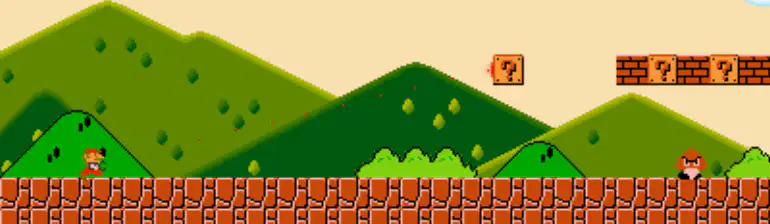
Look at the picture of a game world with a small character and blocks. What does "moving in all directions" mean for a sprite?
The sprite can only go left
The sprite can go up, down, left, and right
The sprite can stand still forever only
The sprite can only jump but not walk
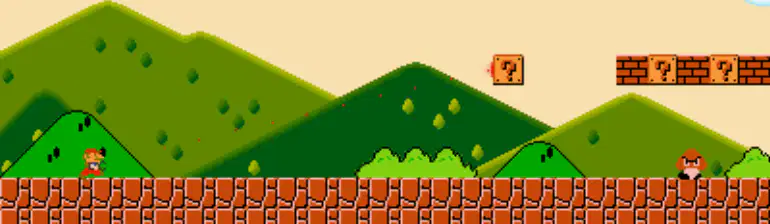
In a game, a sprite is the character or object you control. Which choice best describes a sprite?
A sheet of paper
A controllable character or object on the screen
A sound effect
A timer that counts points
Moving down usually means the sprite goes toward which part of the screen?
Top edge
Bottom edge
Middle only
Clouds area
Game mechanics are the rules that make the game work. Which is a game mechanic about movement?
How loud the music is
How the sprite can go up, down, left, or right
What color the hills are
How many clouds are drawn
A sprite can move in all directions to avoid obstacles. Which is an obstacle in the scene?
A cloud that gives points
A floating question block and bricks
The score text only
The sky color
If you want the sprite to avoid a small enemy, which plan is best?
Walk straight into it
Move right and jump over it
Stop moving at all times
Move down into the ground
If the sprite is blocked on the right by a wall, what other direction could it try first?
Right again into the wall
Left to find another path
Down into the ground
Pause and wait forever
Which choice shows using evidence from what you see on the screen to decide your move?
Ignoring blocks and enemies
Seeing a block above and choosing to jump up
Turning off the display
Closing your eyes while playing
Look at the orange keyboard block shown. What does choosing the option labeled “any” do?
It runs an action only when the space bar is pressed.
It runs an action when any key on the keyboard is pressed.
It stops the action if a wrong key is pressed.
When a challenge asks you to use what you learned, what does that mean?
Apply the concept in a new task
Forget the concept and start again
Copy your friend’s work
Close the program immediately
If you want a sprite to move forward, which action is correct?
Use a move block or command
Put the sprite under the table
Draw a circle on paper
Play a loud sound
If your sprite moves too fast, what is a smart action?
Change the steps to slow it down
Hit the keyboard hard
Turn up the volume
Ignore it and submit
If a sprite must not hit the edge, what can you plan?
A path that turns before the edge
Throw the mouse
Make the screen blank
Forget about edges
Look at the picture showing a sprite moving up, down, left, and right. Which action happens when the sprite moves upward?
The sprite goes to the top.
The sprite goes to the bottom.
The sprite moves to the left side.
The sprite moves to the right side.
What does pressing the Space key do in the sample script that changes y by -10?
Moves the sprite down 10 steps
Moves the sprite up 10 steps
Stops the sprite
Changes costume
What does changing y by 10 do to the sprite’s position?
Moves it up
Moves it down
Moves it left
Moves it right
What does changing y by -10 do to the sprite’s position?
Moves it down
Moves it up
Moves it left
Moves it right
What does changing x by -10 do to the sprite’s position?
Moves it left
Moves it right
Moves it up
Moves it down
If you want the sprite to go up, which value should you use for change y?
+10
-10
+100
0
Which option shows a correct pair: key and movement direction?
m → right
space → up
b → left
z → down
Which change makes the sprite move opposite to right?
change x by -10
change y by 10
change y by -10
change x by 0
Which icon near the stage is used to stop the program?
Green flag
Red stop button
Yellow triangle
Blue circle
The path has many small steps instead of one long line. What does this suggest about the code?
It moves in tiny repeats
It teleports once
It only changes color
It plays a sound but does not move
Which concept is being checked when we compare the picture to what the code should do?
Guesswork
Solution verification
Random drawing
Password entry
If you want the sprite to go right, which key should you press?
D
A
W
S
What does change y by -35 mean for the sprite’s movement?
It moves down 35 steps
It moves up 35 steps
It moves left 35 steps
It moves right 35 steps
Which key combination is correct for moving down?
S key with change y by -35
W key with change y by 15
A key with change x by -50
D key with change x by 20
Which option correctly matches each key to direction?
W = up, S = down, A = left, D = right
W = down, S = up, A = right, D = left
W = left, S = right, A = up, D = down
W = right, S = left, A = down, D = up

