
 Worksheets
Random movement
Total questions: 30
Worksheet time: 15mins
Which block action helps put a sprite at a new spot on the screen?
Make loud sound
Move to new position
Change costume color
Start recording audio
You want the cat sprite to surprise you by going different ways each time. What should you add?
Random movement code
Always move right
Stay in one place
Repeat the same path
Your sprite should disappear when a ghost appears and then come back later. What is a good plan?
Use hide then show blocks
Move to top left corner
Play meow sound twice
Change background picture
Which block moves the sprite to a random spot on the stage?
Turn fifteen degrees
Move ten steps
Go to mouse pointer
Go to random position
Where can you find the ‘go to random position’ block?
Sound category
Events category
Motion category
Looks category
What starts the code when the green flag is clicked?
Turn fifteen degrees
When clicked block
Forever loop
Wait one second
Which block repeats the action again and again?
When clicked event
Go to random position
Forever loop
Wait one second
What does the Wait block do in the project?
Changes the sprite costume
Starts the green flag
Moves to mouse pointer
Pauses for a short time
Put these steps in order: start flag, repeat, move randomly. Which choice shows the best sequence?
When clicked, Go to random position, Forever
Go to random position, Forever, When clicked
When clicked, Forever, Go to random position
Forever, When clicked, Go to random position
If you want the sprite to wait between jumps, which blocks should be together?
Forever with Wait
Variables with Operators
Looks with Events
Sound with Motion
You drag ‘go to random position’ under the Forever loop. What will the sprite do?
Keep jumping to new spots
Turn once then stop
Play a sound once
Change color and stop
Your sprite moves too fast. What simple change can slow it down?
Increase Wait time
Delete Motion block
Click red stop sign
Change to Looks block

Look at the penguin picture. When a sprite is hidden, what happens to it on the screen?
It makes a loud sound
It moves to the left
It grows very large
It disappears from view
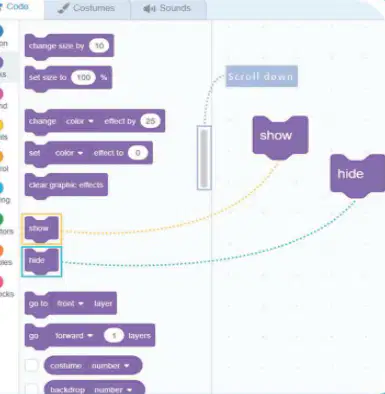
Which Scratch category has the hide and show blocks?
Events category menu
Motion category menu
Looks category menu
Sound category menu
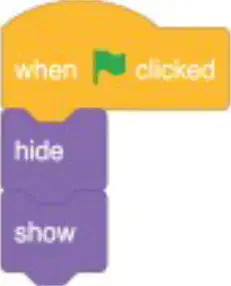
What does the hide block make a sprite do?
Move across screen
Disappear from view
Change to loud sound
Start the program
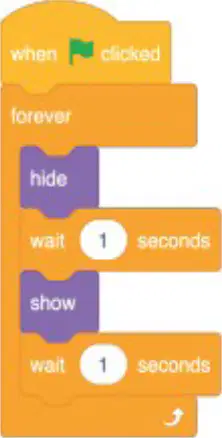
You want the sprite to keep appearing and disappearing. Which block should you use?
Repeat once block
Forever loop block
Stop all block
Go to x y block
Where do you click to start the blocks running?
Purple looks tab
Green flag icon
Blue share button
Red stop sign

To wait between hide and show, which block should be added?
Wait seconds block
Say hello block
Go to front block
Switch costume block
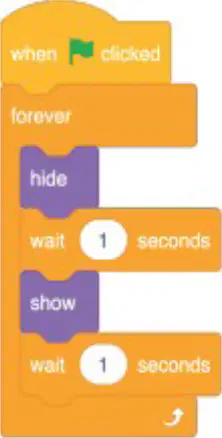
Plan the steps: Put the blocks in the right order to make the sprite hide, wait, show, wait in a loop started by the flag. Which choice lists the correct order?
Hide, show, wait, wait, forever
Wait, hide, show, wait, forever
Hide, wait, show, wait, forever
Show, wait, hide, wait, forever
Which block makes the sprite go to a new random spot?
When green flag clicked
Wait five seconds
Repeat fifteen times
Go to random position

A script uses a repeat block set to 15. What will happen?
The actions run fifteen times
The sprite waits fifteen seconds
The green flag flashes fifteen times
The sprite changes costume fifteen times
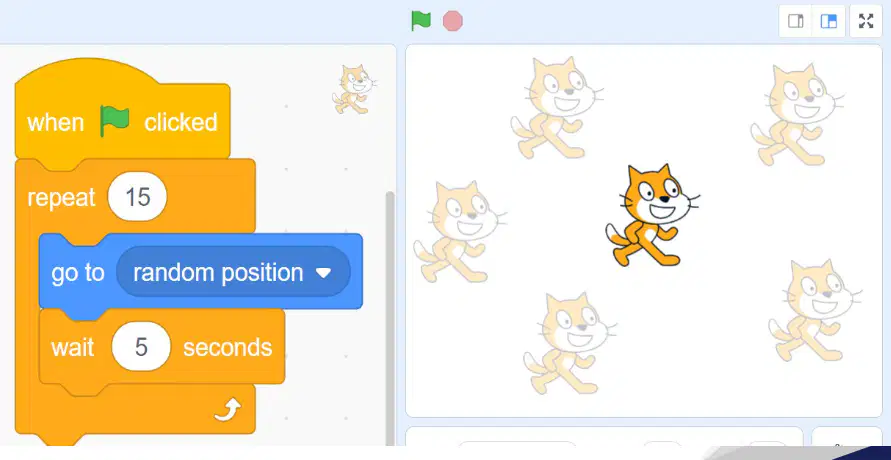
Why add a wait 5 seconds block after moving?
To stop random positions
To make the sprite larger
To start the program
To pause before next move
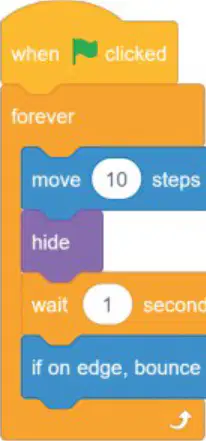
Look at the blocks: move 10 steps, hide, wait 1 second, if on edge, bounce. What block is missing to make the sprite appear again?
repeat block after wait
show block after wait
start block at the top
move block before wait
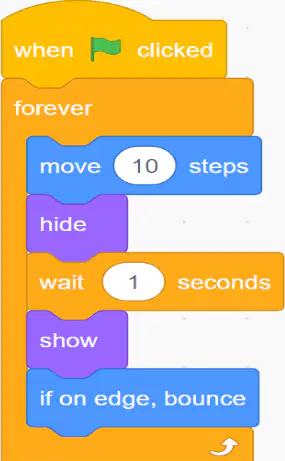
Ben wants the sprite to move left and right without disappearing forever. Which order works best?
hide, wait, show, move
move, hide, show, wait
show, wait, move, hide
move, hide, wait, show
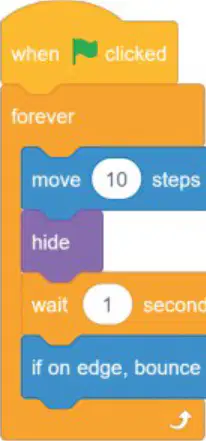
If the sprite reaches the screen edge while moving, which block keeps it on screen?
hide then show block
wait 1 second block
move 10 steps block
if on edge, bounce block
Which block makes the sprite keep turning without stopping?
Forever loop block
Start block only
Move steps block
Say hello block
You set the turn block to 10 degrees inside a forever loop. What happens if you change it to 30 degrees?
It moves forward
It stops turning
It turns faster
It turns slower
To recreate a script that turns a sprite continuously, which two blocks should work together?
Move and Start
Say and Turn
Hide and Show
Forever and Turn
Which block should you click first to start your script in Scratch?
when green flag clicked
move ten steps
wait two seconds
show sprite now

You want the sprite to keep moving and bounce at the screen edge. Which pair of blocks works best?
hide sprite + turn degrees
set rotation style + wait seconds
show sprite + wait seconds
move steps + if on edge, bounce

