
 Worksheets
Grade 12 PWY B Christmas Theory Exam 2025
Total questions: 40
Worksheet time: 22mins

Identify the icon shown.
Polyline
Construction Line
Line
Spline

Identify the icon shown.
Polyline
Polygon
Line
Spline

Identify the icon shown.
Circle
Polygon
Arc
Rectangle

Identify the icon shown.
Circle
Polygon
Arc
Rectangle

Name the draw toolbar command icon shown below. ( Do not type command after the name)
(a)

Name the draw toolbar command icon shown below. (Do not type command after name)
(a)

Identify the draw toolbar command. It is a/ an:
Circle
Donut
Polygon
Polyline
ESC key on the keyboard allows the user to :
Repeat command
Undo the command
Cancel command
None of the above
The last command can be repeated by pressing _________ or _________ on the keyboard.
esc, enter
spacebar, enter
u, spacebar
None of the above
The user can UNDO the last command by using:
(Check all boxes that are correct)
Right click and selecting Undo
Spacebar and enter
Undo shortcut key in quick access toolbar
U and enter key
Esc key and enter
There are only two methods available to select objects in the drawing window. True or False
Ture
False
Which object snap allows users to snap angles to degree increments?
Perpendicular
Polar tracking
Tangent
Node
Which tool contains settings for the drawing file, such as coordinates, units, displaying grid, and toggling snap mode?
Menu bar
Application Menu
Status Bar
Quick Access Toolbar
If I’m making a drawing in feet or inches, what length type do I select?
Architectural
Engineering
Decimal
Scientific
Fractional
If you want to create a circle using a diameter of 8 units, which method should you use?
center-radius
center-diameter
two-point
three-point
Which of the following is NOT a valid object snap mode?
Endpoint
Object
Midpoint
Nearest point
What does the "FILLET" command do?
Adds a rounded on corner between two line
Create a sharp corner
Deleted line
Extend line from original
Allow draftsman to access commonly used commands that are in the application menu quickly ___________.
Application Menu
Quick Access Toolbar
Infocenter
Tooltips.
Quickly access information about AutoCAD commands on the web. ____________________
Application Menu
Quick Access Toolbar
Infocenter
Tooltips.
Displays the drawings. ____________________
Tooltips
Command line
Drawing Window
Navigation Bar
Access various methods of moving around in the drawing window. ____________________
Tooltips
Command line
Drawing Window
Navigation Bar
Allows drafter to toggle between settings while drawing.____________________
Tooltips
Command line
Status Bar
Crosshair & Prompt
Provides access to AutoCAD files, settings and documents .____________________
Application Menu
Ribbon
Status Bar
Crosshair & Prompt
A text window used to input commands.____________________
Application Menu
Ribbon
Status Bar
Command line
Contains AutoCAD tools in a series of TABS and PANELS.____________________
Application Menu
Ribbon
Status Bar
Command line
Shows the cursor current position and information of command.____________________
Application Menu
Ribbon
Crosshairs & prompt
Command line
Displays command name, a description and image sometimes when hoover over a command.____________________
Application Menu
Ribbon
Crosshairs & prompt
Tooltips
When the draftsman drag mouse right to left and the window is green. It's using a _____________ selection.
Polywindow
Cross window
Blackout
Picking
Window
To set the drawing units the draftsman should select _________, then _________ then _______ to change settings. Select all the correct answers.
Drawing Utilities
Quick Access Toolbar
Application Menu
Drawing Setup

Identify the object snap in the image above.
Parallel
Mid-point
Perpendicular
End-point

Identify the object snap in the image above.
Parallel
Tangent
Perpendicular
End-point

Identify the object snap in the image above.
Parallel
Tangent
Perpendicular
Nearest
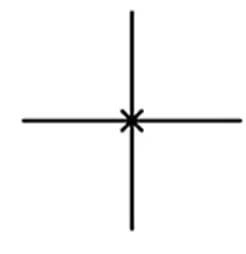
Identify the object snap used on the figure shown above.
Intersection
Tangent
Perpendicular
Nearest
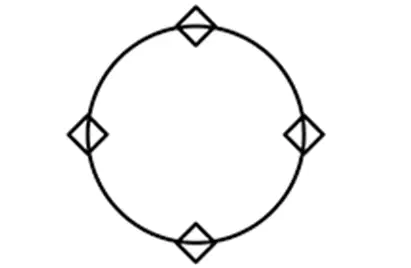
Identify the object snap used on the circle shown above.
Center
Quadrant
Mid-point
Nearest
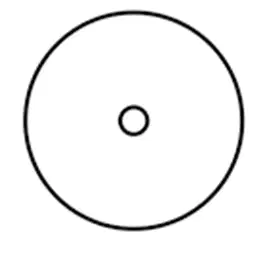
Identify the object snap used on the circle shown above.
Center
Quadrant
Mid-point
Nearest
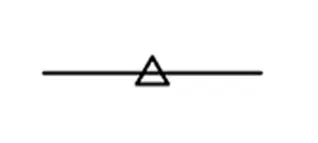
Identify the object snap used on the line shown above.
Center
Quadrant
Mid-point
Nearest
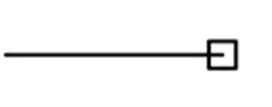
Identify the object snap used on the line shown above.
Center
Quadrant
Mid-point
End-point
The Ortho mode located on the status bar when turn on keeps lines horizontally and vertically straight.
True
False
When opening AutoCAD for the first time, you must select ____ __ before drawing.
(a)
Drawing Units allow users to set
Decimal
Architectural
Engineering
All of the above

