
 Worksheets
9 Weeks Test – Block Coding
Total questions: 56
Worksheet time: 40mins
What is the purpose of using loops in block-based programming?
To store information that can change
To repeat a set of instructions
To check whether a condition is true or false
Which block would you use to check if a condition is true or false?
Forever loop
If...then
Repeat
What is the purpose of a variable?
Repeat a set of instructions
Store information that can change
Make an object move
Which block will make a sprite move forward 10 steps?
Move 10 steps
Wait
Repeat forever
What does the “Forever” block do?
Pause execution for a certain period of time
Repeat a set of instructions indefinitely
Move a sprite
Which block allows the program to respond when the sprite is clicked?
Repeat
When sprite clicked
Move 10 steps
What is debugging?
Create a sprite
Fix errors in a program
Repeat instructions
What does a conditional statement do?
Move an object
Store information
Perform an action only when the condition is true
How can you make a sprite perform multiple actions at the same time?
Use multiple scripts
Use variables
Use conditional statements
What is the purpose of the “Wait” block?
Repeat the instructions
Pause execution for a certain period of time
Store information
The difference between the “Repeat” loop and the “Forever” loop is:
The “Repeat” loop runs a certain number of times, while the “Forever” loop runs endlessly.
The “Repeat” loop runs endlessly, while the “Forever” loop runs a certain number of times.
Both the “Repeat” and “Forever” loops run endlessly.
Both the “Repeat” and “Forever” loops run a certain number of times.
12. The use of variables in block programming is important because:
They allow you to store and reuse values in your program.
They make the program run slower.
They are required for every code block.
They make the code harder to understand.
The benefit of using the “If…then” statement is:
They allow conditional decision-making in the program.
They increase the speed of computer hardware.
They are used to store large amounts of data.
They help the program run without any errors.
Which of the following steps are involved in debugging a program that does not work as expected?
Identify and fix errors in the source code
Ignore the problem and hope it resolves itself
Delete the entire program and start over
Add more errors to see what happens
Organizing code blocks logically is important because:
it makes your code easier to read and maintain.
it makes your code run faster than any other code.
it allows you to use more colors in code blocks.
it prevents your computer from crashing.
Task 1: Use the Repeat block set to 4, with the Move 10 steps and Turn 90 degrees blocks inside. What will this do in a program?
It makes the character move in a square path.
It makes the character move in a straight line.
It makes the character turn in place without moving.
It makes the character move in a circular path.
The purpose of using the If block to check if the sprite touches the edge and then placing the color change block inside is to:
Make the sprite change color when it touches the edge
Move the sprite to a new position
Stop the sprite's movement
Play a sound when the sprite touches the edge
Task 3: Use the block 'When the character is clicked', inside the 'If...then' block to check the answer. If correct, display 'Correct'; if not, display 'Try again'. What does this task do in a program?
It checks the answer when the character is clicked and gives feedback if it is correct or not.
It moves the character to a new position when clicked.
It changes the color of the character when clicked.
It plays a sound when the character is clicked.
Match the following criteria with their descriptions:
Understanding of Concepts
Correctly identifies all block types, loops, conditionals, and variables
Problem-Solving
Logic is clear, efficient, and accurate
Application of Blocks
Correct blocks used for all programming tasks
Debugging & Explanation
Clear explanation of debugging and reasoning
Organization & Clarity
Program described clearly; easy to follow
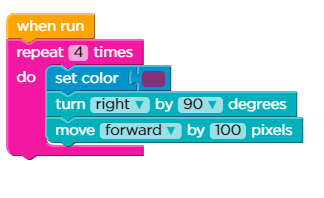
What shape does this code create?
Rectangle
Triangle
Square
Circle
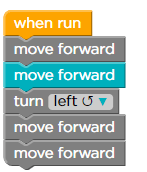
What does this code do?
Move forward, turn, move forward
Move forward twice, turn left, then move forward two more times
Move forward four times and turn left
Move and turn

Solve this puzzle


Which of the code below will complete this puzzle?


Oliver and Abigail are helping their robot friend follow a path! Look at the code blocks above. Can you guess what the robot will do when Oliver presses 'Run'?
Move forward, turn, move forward
Move forward twice, turn left, then move forward two more times
Move forward four times and turn left
Move and turn
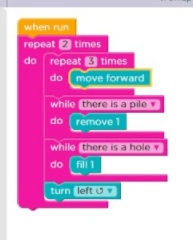
Nora, Elijah, and Luna are working on a programming project. They notice that their robot keeps repeating the same action, just like in the image above. What is it called when you do the same thing over and over again?
Looping
Bugging
Programming
What is block coding?
A form of traditional dance
A programming language that uses visual blocks to represent code.
A method of data encoding
A type of building material used in construction
What is debugging in block-based programming and why is it important?
Debugging is only important in text-based programming
Debugging is a waste of time in block-based programming
Debugging is not important in block-based programming
Debugging is important in block-based programming because it helps ensure the program runs smoothly and as intended.
What is the purpose of using blocks in block-based programming?
To confuse programmers
To organize and structure the source code
To make the source code more chaotic
To slow down the programming process
What is the purpose of using blocks in block-based programming?
To confuse programmers
To organize and structure the source code
To make the source code more chaotic
To slow down the programming process

Which code will get Angry Bird jumping ON the pig?


Which code will get Angry Bird jumping ON the pig?
The REPEAT does what's in the gap "however many times". In this case, 3!

An error in a program that causes the program to not run as expected is called what?
Algorithm
Program
Error
Source code

Which code will get Angry Bird jumping ON the pig?
The REPEAT does what's in the gap "however many times". In this case, 3!


Which code will get Angry Bird jumping ON the pig?
The REPEAT does what's in the gap "however many times". In this case, 3!


What is block coding?
A form of traditional dance
A programming language that uses visual blocks to represent code.
A method of data encoding
A type of building material used in construction
Explain the concept of a function in block-based programming.
Functions in block-based programming are only used for debugging purposes.
Functions in block-based programming are used to break code into smaller parts for better organization.
Functions in block-based programming are reusable blocks of code that perform a specific task.
Functions in block-based programming are decorative elements used to enhance aesthetics.
What is debugging in block-based programming and why is it important?
Debugging is only important in text-based programming
Debugging is a waste of time in block-based programming
Debugging is not important in block-based programming
Debugging is important in block-based programming because it helps ensure the program runs smoothly and as intended.
What is the purpose of using blocks in block-based programming?
To confuse programmers
To organize and structure the source code
To make the source code more chaotic
To slow down the programming process
How can you create a custom function in block-based programming?
By writing the function name in the code editor
By using voice commands to create a function
By dragging and dropping function blocks from the code palette and customizing it with specific code blocks.
By shaking the device to create a function
Which code will get Angry Bird jumping ON the pig?
Which code will get Angry Bird jumping ON the pig?
The REPEAT does what's in the gap "however many times". In this case, 3!
An error in a program that causes the program to not run as expected is called what?
Algorithm
Program
Error
Source code
Which code will get Angry Bird jumping ON the pig?
The REPEAT does what's in the gap "however many times". In this case, 3!
What is defined as a set of instructions to solve a problem?
Algorithm
Problem
Data
Program
What is the action or process of writing computer programs called?
Programming
Data
Algorithm
Program
A set of instructions that performs a specific task when executed by a computer is called what?
Program
Data
Algorithm
Problem
Which relational operator is this: >
Less than
Greater than
Equal to
Not equal to
Which relational operator is this: <
Less than
Greater than
Equal to
Not equal to
What is this relational operator: <=
Less than or equal to
Greater than or equal to
Equal to
Not equal to
What is this relational operator: >=
Less than or equal to
Greater than or equal to
Equal to
Not equal to
Programming can be used to...
Instruct computers what to do
Create games, websites, and applications
Program robots
All of the above

Working with your code to find out why it does not work is called
iteration
Boolean logic
pseudocode
debugging
List some industries that can use block programming
What is the definition of an algorithm and what is its relationship with block coding?

