wayground logo

Free Printable Worksheets

Font size

S
M
L
XL
Worksheets

Year 7 mid year revision

Total questions: 91

Worksheet time: 46mins

Name
Class
Date
1.
Which one is an input device?
a)
printer
b)
mouse
c)
monitor
d)
speakers
2.
Which one is an output device?
a)
monitor
b)
speaker
c)
printer
d)
all of them
3.
Which one is NOT an output device?
a)
printer
b)
earphones
c)
keyboard
d)
speakers
4.
Which one is NOT an input device?
a)
scanner
b)
monitor
c)
mouse
d)
microphone
5.
What type of information gets lost if it isn't saved?
a)
CD ROM
b)
storage memory
c)
RAM
d)
flash drive
6.
The main circuit board, especially of a personal computer
a)
monitor
b)
motherboard
c)
RAM
d)
hardware
7.
A display screen used to provide visual output from a computer
a)
Mouse
b)
Keyboard
c)
 Monitor
d)
Speakers
8.
A hand-operated device that allows control of the cursor on a computer screen.
a)
Mouse
b)
Keyboard
c)
Printer
d)
Hardware
9.
what does CPU stand for??
a)
Central Processing unit
b)
Control Processing unit
10.
what is the CPU usually called?
a)
the brain of the computer
b)
the heart of the computer
11.
what is the main part of the computer where instructions are processed?
a)
RAM
b)
ROM
c)
CPU
12.
The main board in the computer, also called the system board.
a)
Motherboard
b)
Daughterboard
c)
Board
d)
Plank
13.
What is this component called?
a)
Spinning Disk Drive
b)
Optical Disk Drive
c)
Hard Disk Drive
d)
Floppy Disk Drive
14.
What does the motherboard do?
a)
Processes instructions
b)
Keeps the computer safe
c)
Connects everything together
d)
Generates electricity
15.
Identify this computer part.
a)
CPU
b)
hard disk drive
c)
RAM module
d)
motherboard
16.
What does RAM stand for?
a)
Read All Memory
b)
Random Always Memory
c)
Read Access Memory
d)
Random Access Memory
17.
An example of computer hardware is...
a)
Web Browser
b)
Keyboard
c)
App
d)
Operating System
18.
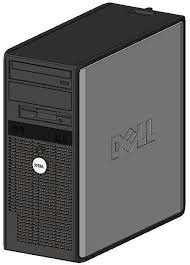
The part of a desktop PC that holds the computer components.
a)
Tower
b)
PC
c)
Monitor
d)
Hardware
19.
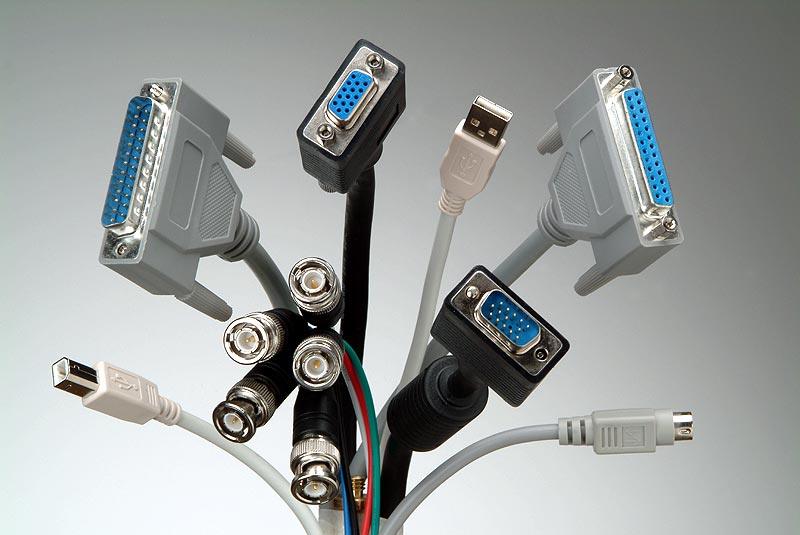
A place to connect something to a computer.
a)
Port
b)
Keyboard
c)
Monitor
d)
Hard Drive
20.
Is a smart phone considered a computer?
a)
true
b)
false
21.

Which type of input device allows you to enter letters, numbers and characters?

a)

Mouse

b)

Keyboard

c)

Microphone

d)

Scanner

22.

Which type of input device allows you to enter sound into a computer system?

a)

Mouse

b)

Keyboard

c)

Microphone

d)

Scanner

23.

Which type of input device allows you to move a cursor and select items?

a)

Mouse

b)

Keyboard

c)

Microphone

d)

Scanner

24.

Which type of input device allows you to make a copy of an image or text on a piece of paper?

a)

Mouse

b)

Keyboard

c)

Microphone

d)

Scanner

25.

Which type of output device allows us to see our data to be displayed instantly as images or text?

a)

Printer

b)

Monitor

c)

Speakers

d)

Actuator

26.

Which type of output device allows us to see our data to be put onto paper?

a)

Printer

b)

Monitor

c)

Speakers

d)

Actuator

27.

Which type of output device allows a motor to be moved?

a)

Printer

b)

Monitor

c)

Speakers

d)

Actuator

28.

Which type of output device allows sound to be heard?

a)

Printer

b)

Monitor

c)

Speakers

d)

Actuator

29.

Which of these is both an input and output device?

a)

Speakers

b)

Keyboard

c)

Touchscreen

d)

Scanner

30.

Which of these devices would be used by a till worker in a shop?

a)

Barcode Scanner

b)

Graphics Tablet

c)

Webcam

d)

3D Printer

31.

Which of these is an input device?

a)

Headphones

b)

Motherboard

c)

Hard drive

d)

Microphone

32.

Which of these is an input device?

a)

SD Card

b)

Graphics Tablet

c)

LEDs

d)

Processor

33.

Which of these is an output device?

a)

SD Card

b)

Graphics Tablet

c)

LEDs

d)

Processor

34.

Which of these is an output device?

a)

Headphones

b)

Motherboard

c)

Hard drive

d)

Microphone

35.
In the red box what does the A with the red line under it mean?
a)
Bold
b)
Slant
c)
Font Style
d)
Font Color
36.
In the red box was does the black B mean? 
a)
Underline
b)
Font Style
c)
Bold 
d)
Text Size
37.

What does the little A with the down arrow in the red box mean?

a)

Text Bigger

b)

Text Smaller

c)

Underline

d)

Color

38.

What does the bigger A with an upwards arrow mean in the red box?

a)

Bigger Text

b)

Smaller Text

c)

Font Style

d)

Underline

39.
In the red box what does the U with a line under it means?
a)
Bold 
b)
Italics 
c)
Underline
d)
Font Color 
40.
Which tab is clip art under? 
a)
Page Layout
b)
Insert 
c)
View
d)
Review
41.
Which icon do you click on to get to Microsoft Word?  
a)
Orange
b)
Green 
c)
Blue
42.
On your mouse which button gives you options? Left or Right?
Like Copying, Pasting
a)
Left 
b)
Right
43.
Which tab can you find shapes under? 
a)
Home
b)
View
c)
Insert
d)
Page Layout 
44.
Which button on your mouse let's you select/click things? Left or Right
a)
Right
b)
Left
45.
What does the i mean? 
a)
Bold
b)
Underline
c)
Text Color
d)
Slant/ Italics  
46.
What does the box with the red arrow pointing at means? 
a)
Text Style
b)
Text Color
c)
Bold
d)
Size
47.
What does the tool in the red box means? 
a)
Highlighting 
b)
Text Size 
c)
Underline 
d)
Bold
48.
a)
Save
b)
Undo
c)
Redo
d)
Underline
49.
a)
Left align
b)
Font size
c)
Font name
d)
Save
50.
a)
Center align
b)
Font name
c)
Increase font
d)
Underline
51.

What is the name of this option?

a)

Typeface

b)

Line-spacing

c)

Footer

d)

Heading

e)

Text box

52.

What is the name of this option?

a)

Typeface

b)

Line-spacing

c)

Footer

d)

Heading

e)

Text box

53.

What is the name of this option?

a)

Typeface

b)

Line-spacing

c)

Footer

d)

Heading

e)

Text box

54.
a)
Save
b)
Undo
c)
Redo
d)
Underline
55.
Microsoft Word and Google Docs are examples of what?
a)
Word processors
b)
Spreadsheets
c)
Presentations
d)
Databases
56.
Google Docs or Microsoft Word allows to you to:
a)
create, edit, share and store forms for user input.
b)
create, edit, share and store webpages and sites
c)
create, edit, share and store spreadsheet documents
d)
create, edit, share and store word-processing documents.
57.
Which of the following commands appears in the Insert menu or tab?
a)
Table
b)
Undo/Redo
c)
Bold
d)
Line Spacing
58.
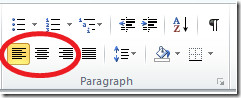
Left, Center, Right,and Justify are options for which tool located on the toolbar or ribbon?
a)
Zoom
b)
Line Spacing
c)
Bulleted Lists
d)
Text Alignment
59.
In Microsoft Word, what do you use to show a spreadsheet of data?
a)
Table
b)
menu
c)
toolbar
d)
copy
60.
In Microsoft Word, what is a "menu"?
a)
a spreadsheet
b)
a list of options available to a user
c)
row of buttons on a display screen with a variety of functions
61.
"Ctrl + c" is a shortcut that means to...
a)
copy
b)
paste
c)
cut
62.
"Ctrl + x" is a shortcut that means to... 
a)
paste
b)
copy
c)
cut
63.
"Ctrl + v" is a shortcut that means to...
a)
cut
b)
copy
c)
paste
64.

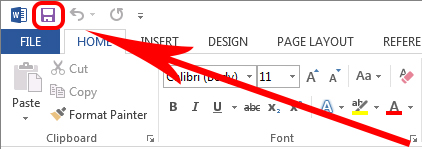
What is this button used for?

a)

Creating a new document

b)

Opening a document

c)

Saving a document

d)

Inserting a picture

65.

Which tab would you need to click if you wanted to add a photograph to your document?

a)

Home

b)

Insert

c)

Format

d)

Page Layout

66.

Which tab would you click to change the page to landscape?

a)

Home

b)

Format

c)

View

d)

Page Layout

67.

What is the opposite of landscape?

a)

Horizontal

b)

Vertical

c)

Portrait

d)

Upright

68.

Which of these buttons will let you change CAPITALS to lower case?

a)
b)
c)
d)
69.

Saving your work regularly is not really needed these days.

a)

True

b)

False

70.

Letter A on this Table image is referring to a...

a)

Column

b)

Table

71.

Calibri, Times New Roman, Comic Sans are all examples of...

a)

Header styles

b)

Font sizes

c)

Font Styles

72.
Columns run horizontally in tables, and rows run from left to right.
a)
True
b)
False
73.
Q12. Which tab to you click to save ?
a)
Home
b)
Insert
c)
File
d)
View
74.

What is the name of the software we are using to do DeskTop Publishing?

a)

Exel

b)

Word

c)

PowerPoint

d)

Publisher

75.

When is DTP software good to use?

a)

When you need to perform calculations

b)

When you need to type letters

c)

When you need to combine text and images

d)

When you need to store lots of data

76.

What do you need to create in order to add text to your page?

a)

A text box

b)

A writing frame

c)

A word shell

77.

You want to add a picture to your document. What menu option on the ribbon should you select?

a)

Page Design

b)

Insert

c)

File

d)

Home

78.

What does this button do?

a)

Adds a text box

b)

Adds a title

c)

Adds WordArt

79.

What does this button do?

a)

Underlines text

b)

Changes font style

c)

Changes font colour

80.

The dotted lines around the edge of shapes and text boxes will not appear when your document is printed.

a)

True

b)

False

81.

What does this button do?

a)

Centre-aligns text

b)

Right-aligns text

c)

Draws a table

d)

Changes line spacing

82.

When might you use this button?

a)

When you want to add a text box

b)

When you want to add an image

c)

When you want to draw an arrow

d)

When you want to draw a table

83.

What does this button do?

a)

Fills a shape with a colour

b)

Changes font colour

c)

Changes the colour of a border

84.

What does this button do?

a)

Changes the appearance of a shape outline

b)

Underlines text

c)

Changes the fill colour of a shape

85.

What does this button do?

a)

Sends items backwards / to the back

b)

Brings items forwards / to the front

c)

Draws a Post-it shape

d)

Adds a drop shadow to a shape

86.

What does this button do?

a)

Sends items backwards / to the back

b)

Brings items forwards / to the front

c)

Draws a Post-it shape

d)

Adds a drop shadow to a shape

87.

To move a text box you need to click...

a)

In the middle of it

b)

Just outside it

c)

On its border

88.

If we stretch an image too big and it becomes blurry we say that it is...

a)

Pixelated

b)

Pixelised

c)

Rastorised

89.

If you make an image taller or wider (but not both) it can become...

a)

Distorted

b)

Disrupted

c)

Disturbed

90.

You can make an object more or less see-through by changing its transparency. Where can this setting be found?

a)

Shape Fill >> More Fill Colours

b)

Shape Fill >> Tints

c)

Shape Effects >> Glow

d)

Shape Effects >> Shadow

91.

What does this button do?

a)

It spell checks your work

b)

It performs a word count

c)

It turns on CAPS-LOCK