
 Worksheets
Year 9 End of Unit Assessment on Spreadsheet
Total questions: 43
Worksheet time: 2hrs 32mins

You're creating a budget. Write the formula to calculate the total expenses by adding cells B2 (Rent), B3 (Utilities), and B4 (Groceries).

A teacher wants to calculate Garry's net points by subtracting his penalty points from his points. Write the formula to do this calculation

Mike needs to multiply the Quantity of milk by the price per unit to calculate the total milk revenue for his shop. Write the formula.

You have 10 student test scores. Write the function to calculate their average score.

The table shows the daily temperature readings for Wickford for a particular week. Write a function that shows the coldest temperature (the lowest temperature).

In a driving theory test, if the score is 44 or more, the taker has passed; otherwise, the taker must retake the test. Write an IF function to show if Morgan has passed or needs to retake the test
In a class list of 30 students (A1:A30), some haven't submitted assignments. Which function counts how many submissions are missing (cells with blank data)?
Analyzing weekly sales data to find the worst-performing week. Which function is most useful?
MAX
AVERAGE
MIN
COUNT
Your IF statement =IF(P4>50,Pass,Fail) shows an error. Rerwrite the function and correct the errors
The passing score for a test is 50. For a score in G2, the teacher wanted: “Pass” if 50 or more, “Fail” if otherwise. The teacher typed:
=IF(G2>=50,Pass,Fail)
Excel gave a #NAME? error. Rewrite the IF function correctly.
A salesman wanted to calculate the total sales for the first quarter by adding cells B2 (Jan), B3 (Feb), and B4 (Mar) using Excel. He wrote this in the expected cell:
B2+B3+B4 =
But nothing happened. Rewrite the correct formula for him.
In a survey, if cell D3 contains “Yes” it should return 1, and if “No” return 0. Someone typed:
=IF(D3=Yes,1,0)
Excel returned an error. Write the corrected IF function.
To find the highest sales value in cells A1:A12, this was entered:
=BIGGEST(A1:A12)
Excel returned #NAME?. Write the correct function.

To make the title "UK Theory Driving Test" darker and thicker, which tool in Excel should the user click to do this?.
A teacher needs to count how many students in the cell ranges F1:F20 have not completed their homework (any blank entry). Which count function counts the blank entries in the range?

Write an XLOOKUP function to return the price of Cosmic Adventure.
Hint: Structure of xlookup
=XLOOKUP( What to Find, Where to Look, What to Return )

What is the title of chat shown here?

Which fruit has the highest quantity sold?
Give one reason why you will use excel formulas or functions to perform your calculations rather than working out the calculations manually.
State one use of a Spreadsheet application
A formula =A1+A2+A3 works correctly. Which function could replace this formula?
=TOTAL(A1:A3)
=ADD(A1:A3)
=SUM(A1:A3)
=COUNT(A1:A3)
A student wants to calculate the total cost by adding values in cells B2 and B3. Which formula is correct?
B2+B3
=ADD(B2,B3)
SUM=B2,B3
=B2+B3
A student wants the title of a spreadsheet to stand out clearly at the top. Which formatting option would be most appropriate?
Change the cell colour
Increase column widthIncrease column width
Make the text bold and larger
Add a formulaAdd a formula
Why must formulas in Excel always start with an equals sign (=)?
To format numbers
To show text clearly
To tell Excel a calculation is being performed
To protect the cell
Which of the following is NOT a basic Excel function?
SUM
GRAPH
MAX
MIN
A student uses =SUM(B2:B6). What will Excel do?
Find the average
Count the numbers
Find the biggest number
Add all values from B2 to B6
What will =AVERAGE(A1:A5) return?
The middle value
The largest value
The mean of the values
The total of the values
Why should charts have a clear title?
To improve file size
To protect data
To add colour
To explain what the data shows
Before creating a chart, what must a student do first?
Protect the sheet
Format the worksheet
Select the dataset
Add formulas
Why are charts useful in spreadsheets?
They replace calculations
They make data slower to read
They help users visualize and understand data quickly
They stop errors
Test Scores Spreadsheet
A teacher has entered students’ test scores into an Excel spreadsheet. The teacher wants the data to be clear, accurate, and easy to understand.
You are asked to improve the spreadsheet using formatting, formulas, and functions.
Describe how you would use Excel to improve the spreadsheet.
You should refer to:
Formatting to make the data clear
At least two formulas or functions used to analyse the scores
Explain how your choices help the teacher understand the results.
You should write at least two paragraphs, not less than 100 words
A student forgets to label the axes on a graph. What is the main problem?
The chart will not display
The data will be deleted
The chart may be confusing to read
The formula will change
Which chart would best show the relationship between height and weight of students?
Line graph
Pie chart
Bar chart
Scatter plot
A student wants to show how a school budget is divided into sections. Which chart is most suitable?
Line graph
Scatter plot
Pie chart
Bar chart

The Insurance rate is stored in a single cell and used for all rows.
Write the formula to calculate Insurance for Alex, making sure the Insurance rate does not change when copied down.
Insurance = Base cost * Insurance Rate

Write a formula to calculate the Revenue (£) for the Space Quest film. Ensure that there will be no errors when the formula is copied down
Note: Revenue= Tickets Sold * Ticket Price

Columns can be sorted in A to Z or Z to A for text values. For numbers, columns can be sorted as Largest to Smallest or Smallest to Largest.
From the dataset, identify the column (Product, Category, Unit Price, Stock, Last Delivery ) that has been sorted and state the order in which it has been sorted.
When a formula =B2*C2 is copied from row 2 to row 3, what happens to the cell references?
They remain the same
They change to =B3*C3
They become $B$2 * $C$2
They cause an error
Which conditional formatting rule would highlight scores below a pass mark of 70?
Greater Than
Between
Less Than
Top 10%
What happens to data that does not meet a filter condition?
It is deleted
It is moved to another sheet
It is hidden
It is permanently removed
How do you write cell D1 as an absolute reference in a formula?

Write the Excel function to calculate the total sales for the week.
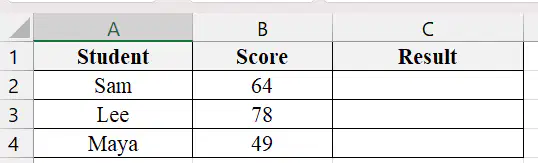
Write an IF function that displays "Pass" if Sam's score is 50 or above, and "Fail" if it is below 50.

