
 Worksheets
Fundamentals of Computing Final Exam
Total questions: 52
Worksheet time: 26mins
Name
Class
Date
1.
What was the name of the program we used to do our coding modules in?
a)
CodeBurst.org
b)
MicroBurst.org
c)
CodeHS.com
d)
MicroCode.com
2.
Which of the following devices connects all of the physical components of a computer together?
a)
Motherboard
b)
Central Processing Unit
c)
Hard drive
d)
Input/output devices
3.
What is the function of a router?
a)
A router connects multiple networks and directs communication between devices.
b)
A router encodes information into binary.
c)
A router connects one computer to another to send information.
d)
A router protects your computer from viruses.
4.
Which of the following statements are true about the Internet?
I - The Internet connects devices and networks all over the world
II - The Internet helps people collaborate to solve problems
III - The Internet helps people communicate
IV - There are no negative consequences of the Internet, it is purely positive
a)
I only
b)
I & II only
c)
I, II & III only
d)
All of the above
5.
What does URL stand for?
a)
Underlying Request Layout
b)
Underlying Response Layout
c)
Uniform Resource Locator
d)
Usable Render List
6.
Which of the following industries utilize computer science?
I. Agriculture
II. Government
III. Music
IV. Healthcare
V. Art
VI. Film
a)
I and IV
b)
I, III, IV, and V
c)
I, II, IV, V, and VI
d)
I-VI, (all)
7.
What is the domain of this URL: www.example.com/home.html
a)
www
b)
home.html
c)
www.example.com
d)
HTML
8.
Which of the following best explains what happens when a new device is connected to the Internet?
a)
A device driver is assigned to the device.
b)
An Internet Protocol (IP) address is assigned to the device.
c)
A packet number is assigned to the device.
d)
A Web site is assigned to the device.
9.
A person’s digital footprint consists of the following:
I. Comments you leave
II. Pictures you post
III. Topics you search
IV. Apps you use
V. Music you download
VI. Emails you send
a)
I only
b)
I & II only
c)
I-IV only
d)
All of the Above
10.
What does GUI stand for?
a)
Gallery Usage Identification
b)
Gradual User Images
c)
Graphical User Interface
d)
Graphic Unity Icons
11.
Which of the following are examples of encoding information?
a)
Representing fast food meals as numbers on the menu. For example a number 1 represents a hamburger.
b)
Assigning a numeric value to every area of a region, for example zip codes in the United States
c)
Assigning a number to every character of the alphabet so we can represent sentences as series of simple digits.
d)
All the above
12.
Which number system is used to store information digitally in a computer?
a)
Binary (base 2)
b)
Decimal (base 10)
c)
Hexadecimal (base 16)
13.
All of the colors you see on a computer screen are the result of a mixture of the same three colors. What are those colors?
a)
red, yellow, blue
b)
green, orange, purple
c)
red, green, blue
d)
red, green, yellow
14.

If black is 0 and white is 1, which of the following binary codes creates the smiley face pixel image below?
a)
Option 1
b)
Option 2
c)
Option 3
d)
Option 4
15.
Why do we use while loops in JavaScript?
a)
To repeat some code while a condition is true
b)
To help make functions
c)
In combination with IF statements
d)
In combinations with "IF/ELSE" statements
16.
Why do we use "IF" statements in JavaScript?
a)
To do something when things are conflicted
b)
To do something only if a condition is true
c)
To do something no matter what
17.

In Javascript, what is printed to the screen if the user enters ‘5’ when the following program is run?
a)
5
b)
25
c)
30
d)
50
18.
A store has 20 apples in its inventory. How can you store this information in a JavaScript variable?
a)
Option 1
b)
Option 2
c)
Option 3
d)
Option 4
19.
Which of the following are examples of browsers: I - Chrome; II - Firefox; III - Safari; IV - Windows 7; V - Google
a)
I, II, and III only
b)
V only
c)
I, II, III, and V only
d)
All I thorugh V
20.
Which of the following is true regarding indenting code?
a)
Indentation helps show the structure of the program.
b)
Correct indentation is necessary for a program to run.
c)
Indentation is how programmers teach computers new commands.
d)
Indentation makes it easier to repeat commands.
21.
What is data?
I. Computer readable information
II. Information collected about the physical world
III. Programs that process images
IV. Graphs and charts
a)
III & IV
b)
I & II
c)
I , II & IV
d)
I, II, III & IV
22.
Which of the following statements are true about using visualizations to display a dataset?
I. Visualizations are visually appealing, but don’t help the viewer understand relationships that exist in the data
II. Visualizations like graphs, charts, or visualizations with pictures are useful for conveying information, while tables just filled with text are not useful.
III. Patterns that exist in the data can be found more easily by using a visualization
a)
I & II
b)
III
c)
I, II & III
23.
Which of the following statements is true about data visualizations?
a)
Visualizing data has only been possible since computers have become widespread.
b)
Visualizations take many forms, from tables to charts to images.
c)
There is always one exact visualization that should be used to show a particular aspect of a dataset.
24.
A pet store is in the process of purchasing a domain name for their business.
Which of the following domain names would be acceptable for their business?
A. petstorepetstorepetstore.com
B. fish.com
C. petsareus.com
D. thepetstore.com
a)
A & B
b)
B & C
c)
C & D
d)
A & C
e)
A, B, C & D
25.
Which of the following accurately describes the binary, decimal, and hexadecimal number systems?
a)
Binary is a base 2 system, decimal is a base 8 system, and hexadecimal is a base 12 system.
b)
Binary is a base 2 system, decimal is a base 10 system, and hexadecimal is a base 16 system.
c)
Binary is a base 4 system, decimal is a base 10 system, and hexadecimal is a base 32 system
d)
Binary is a base 2 system, decimal is a base 10 system, and hexadecimal is a base 12 system.
26.
What does HTML stand for?
a)
Hidden Text Meta Language
b)
Hyper Text Markup Language
c)
Hidden Theme Markdown Level
d)
Hyper Text Markdown Language
27.
Which of the following is the proper format for an HTML tag?
a)
>h1/h1<
b)
Content Affected by Tag
c)
d)
Content Affected by Tag
28.
The title of your HTML document goes in the ____ of the page?
a)
Head
b)
Body
29.
The heading tags (H1, H2, H3... etc) go in the ____ of the HTML page?
a)
b)
c)
d)
30.
Which of the heading is the smallest?
a)
b)
c)
d)
31.
This tag is puts a line across the page & is used to create a thematic break or separation between different sections of content on a web page.
a)
b)
c)
d)
32.
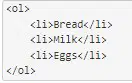
What is the result of the following HTML code?
a)
Option 1
b)
Option 2
c)
Option 3
d)
Option 4
33.
This tag puts items in a bulleted list
a)
b)
c)
d)
34.
Which of the following tags puts the content on to the next line?
a)
b)
c)
d)
35.
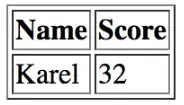
Which of the following HTML code snippets will generate the following table?
a)
Option 1
b)
Option 2
c)
Option 3
d)
Option 4
36.
Which of the following tags defines a table row?
a)
d) 37. When do you use the src= attribute? a) when inserting a hyperlink b) when inserting a break c) when inserting an image d) when inserting a citation 38. Which of the following lines of HTML code will insert an image into a webpage? a) b) c)  d) 39. When turning an image into a hyperlink... you use the following formula
a) The website address of where you got the image b) What you want the hyperlink to display on the screen c) The website address of where you want to go after the image is clicked 40. href= is used when inserting hyperlinks into HTML pages a) True b) False 41. what is the tag used for? a) inserting an image b) to abbreviate c) inserting a hyperlink d) this is not a tag 42. Why do we use CSS? a) HTML wasn’t intended to be able to style web pages, CSS allows us to add style b) Separate the content of a web page from the design of a web page c) Easily modify the look and feel of a web site even at a large scale d) All of the above 43. Which of the following code snippets will select all a)  Option 1 b)  Option 2 c)  Option 3 d)  Option 4 44. What is the function of the Cascade in CSS? a) The Cascade is a set of guidelines to make your site look beautiful. b) The Cascade helps you write styling for your websites quickly by providing easy templates to use. c) The Cascade determines which CSS rules will be applied when multiple rules for an item are contradictory. d) The Cascade will make sure there are no typos in your CSS rules. 45. According the the CSS Cascade...Rank the following in highest priority to least priority in CSS rules
Class, Tag, ID a) Tag, ID, Class b) Class, Tag, ID c) ID, Class, Tag d) ID, Tag, Class 46. You can create styles in CSS that are not possible than in HTML a) True b) False 47. What does CSS stand for? a) Colorful Style Sheets b) Cascading Style Sheets c) Creative Style Sheets d) Computer Style Sheets 48. Which is a Karel command? a) (move); b) Move; c) move(); d) move;() 49. What is used to make Karel do something new? a) Programs b) Options c) Methods d) Functions 50. You need to write a program where Karel will take a ball if there is a ball present, otherwise Karel should put down a ball. Which control structure do you need to use? a) IF statement b) IF/ELSE statement c) Function d) Loop 51. You need to write a program that has Karel move if the front is clear, but if it isn't clear, Karel will do nothing. Which control structure do you need to use? a) IF statement b) IF/ELSE statement c) Function d) Loop 52. 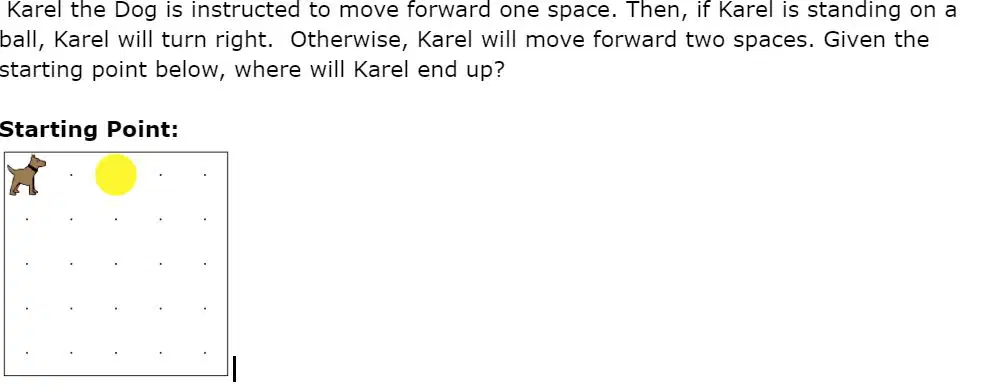 a)  Option 1 b)  Option 2 c)  Option 3 d)  Option 4 100 % Similar Resources on Wayground 49 questions Botany Unit 1  Worksheet • 11th Grade 49 questions Adj + prep Worksheet • 9th Grade 47 questions Middle Ages and Renaissance review Worksheet • 9th Grade - University 50 questions FINAL EXAM REVIEW PART 2 Worksheet • 9th - 12th Grade 50 questions Practice Final 2025 Worksheet • 11th Grade 47 questions English 9 1st Semester Exam Review Worksheet • 9th Grade 50 questions MCC Info 1001 Information Literacy Assessment - Final Worksheet • 9th - 12th Grade 49 questions Ks KS aj Worksheet • 9th - 12th Grade |
|---|